Iot: Error when trying to set speed of L298N H-Bridge (question how to)
I am trying to do a "HelloWord" asp.net core application. I would like to control motor speed through web page.
But I don't know how to properly set motor speed. My code is:
        public async Task SetSpeed(int motor, double speed)
        {
            var sett = new DCMotorSettings()
            {
                Pin0 = 23,
                Pin1 = 24,
                PwmController = new PwmController(new SoftPwm()),
                PwmChip = 25,
                //PwmChannel = 1, // use for hardware PWM
                PwmFrequency = 50, // optional, defaults to 50
            };
            using (var m = DCMotor.Create(sett))
            {
                m.Speed = speed / 100;
                Console.WriteLine($"Set speed of motor 1 to {m.Speed}.");
                await Task.Delay(3000);
            }
        }
With pin 23, 24 and 25 I get error:
Set speed of motor 1 to 0.6.
dotnet :
+ CategoryInfo : NotSpecified: (:String) [], RemoteException
+ FullyQualifiedErrorId : NativeCommandErrorUnhandled Exception:
System.InvalidOperationException: Can not write to a pin that is not open.
at System.Device.Gpio.GpioController.Write(Int32 pinNumber, PinValue value)
at System.Device.Pwm.Drivers.SoftPwm.RunSoftPWM()
at System.Threading.ThreadHelper.ThreadStart_Context(Object state)
at System.Threading.ExecutionContext.RunInternal(ExecutionContext executionContext, ContextCallback callback,
Object state)
--- End of stack trace from previous location where exception was thrown ---
at System.Threading.ExecutionContext.RunInternal(ExecutionContext executionContext, ContextCallback callback,
Object state)
at System.Threading.ThreadHelper.ThreadStart()
I also try to set pin 33, 35, 37, but I get
System.Exception: Element not found.
Pin ' is not available. It is reserved by the system or in use for another function.
at Windows.Devices.Gpio.GpioController.OpenPin(Int32 pinNumber, GpioSharingMode sharingMode)
at System.Device.Gpio.Drivers.Windows10Driver.OpenPin(Int32 pinNumber)
at System.Device.Gpio.GpioController.OpenPin(Int32 pinNumber)
at System.Device.Pwm.Drivers.SoftPwm.OpenChannel(Int32 pinNumber, Int32 pwmChannel)
at System.Device.Pwm.PwmController.OpenChannel(Int32 pwmChip, Int32 pwmChannel)
at Iot.Device.DCMotor.DCMotor3Pin..ctor(PwmController pwmController, Double pwmFrequency, Int32 pwmChip, Int32 pwmChannel, Int32 pin0, Int32 pin1, GpioController controller)
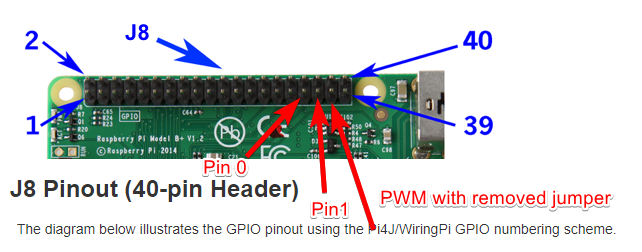
I get pin numbers from here.
What did I do wrong.
I connected pins to my raspberry pi 3B+ like this:

Do I need to set anywhere which board (Rasberry PI) I am using.
 MaklaCof
All 8 comments
@krwq do you mind taking a look here? From what I can tell, @MaklaCof is just following your sample from here:
so I would'nt expect the errors that he is seeing.
I get pin numbers from here.
I believe you are using Physical/Board pin numbering, and I believe that this binding is using Logical numbering. In order to get the right logical pin numbers, you can go to https://pinout.xyz/ and check the number that is becide BCM in order to get the right number. for example, for physical pin 23, it looks like the actual pin number is 11:

 joperezr
on 7 Jun 2019
joperezr
on 7 Jun 2019
@MaklaCof the issue looks like what @joperezr mentioned, if you still find any issues please make a picture or create Fritzing diagram of how you connected your motor, if there are still any issues after validating I will take a look if we somehow didn't regress this scenario.
 krwq
on 7 Jun 2019
krwq
on 7 Jun 2019
Ok, fine thank you.
I am not sure how wrongly connected pin triggers exception, but sound logic to me that I first try to connect correctly all the pins. I will update the thread in few hours when I get from work.
MaklaCof
on 7 Jun 2019
@joperezr as part of this issue it might be worth checking what's our behavior when you try to open/write to the bogus pin
krwq
on 7 Jun 2019
Ok here are findings:
- First I correctly connect pins, and code/motor start working.
- Then I set error handling link
Strange is that with my old code I get random error when API function end. (I think when dispose is called).
Sometimes I could call my API 10 times, sometimes 2 times ... Even stranger is, that application completely crash. I had to restart it. But not if throw exception in API. - After that I change my code to save Motor in static variable:
    public class MotorsController : Controller
    {
        private static Dictionary<int, DCMotor> _motors = new Dictionary<int, DCMotor>();

        [HttpPut("SetSpeed/{motor}/{speed}")]
        public void SetSpeed(int motor, double speed, bool revert)
        {
            if (speed == 0)
            {
                this.RemoveMotor(motor);
                return;
            }
            var m = this.GetMotor(motor);
            m.Speed = speed / 100 * (revert ? -1 : 1);
            Console.WriteLine($"Set speed of motor 1 to {m.Speed}.");
        }

        private DCMotor GetMotor(int motorIndex)
        {
            var sett = new DCMotorSettings()
            {
                Pin0 = 13,
                Pin1 = 19,
                PwmController = new PwmController(new SoftPwm()),
                PwmChip = 26,
                PwmFrequency = 50
            };

            if (!_motors.TryGetValue(motorIndex, out var motor))
            {
                motor = DCMotor.Create(sett);
                _motors.Add(motorIndex, motor);
            }
            return motor;
        }

        private void RemoveMotor(int motorIndex)
        {
            if (_motors.TryGetValue(motorIndex, out var motor))
            {
                motor.Dispose();
                _motors.Remove(motorIndex);
            }
        }
    }
Every time I call dispose, I get exception and my application completely crash. Witch again is really strange. Maybe something to look for @joperezr (Because throwing an error in application doesn't crash application.)
- Then I try to set speed to 0, before calling dispose. Exception happen random (after 2 tries, 5 tries ...)
- Then I set speed to 0, wait 1 second, call dispose and now it seems it works.
        private async Task RemoveMotor(int motorIndex)
        {
            if (_motors.TryGetValue(motorIndex, out var motor))
            {
                motor.Speed = 0;
                await Task.Delay(1000);
                motor.Dispose();
                _motors.Remove(motorIndex);
            }
        }
Not sure @krwq if calling dispose should set motor speed to 0, and wait a few moments to avoid exceptions. I will leave that to you.
Now I just have one question @krwq that probably it is not related to the code. Even if I set speed to 0.01, motor (Lego) runs approximately at half speed. If I further decrease speed, motor rotation is not slower but it stop for short moment and run again and stop for a short moment and run again ....
Is this problem with PwmFrequency or L298N H-Bridge itself? I get a lot better rotation (continuous rotation) if I drop voltage. Is this normal? I don't known anything about PWM, but it seems that this works a lot worse comparing to voltage change.
MaklaCof
on 9 Jun 2019
Every time I call dispose, I get exception and my application completely crash
How does it crash? Are you getting any exception message? (can you copy the whole output related to exception?)
Especially randomness sounds like something running in a different thread - I'd expect this to be rather deterministic unless the code related to GPIO has an issue (hence the message would be useful).
Also another thing, I do not know specific of ASP.NET but:
1.
        private static Dictionary<int, DCMotor> _motors = new Dictionary<int, DCMotor>();

        [HttpPut("SetSpeed/{motor}/{speed}")]
        public void SetSpeed(int motor, double speed, bool revert)
        // ...
with combination of static dictionary might cause threading issues. You might want to lock any usage of _motors
2.
            if (speed == 0)
            {
                this.RemoveMotor(motor);
                return;
            }
RemoveMotor disposes the motor, IMO this piece of code should be removed and RemoveMotor called only by Dispose method of your controller
Even if I set speed to 0.01, motor (Lego) runs approximately at half speed
When I think about it now I think the name I've used might be a bit misleading.
Speed is actually relative voltage (or more accurately PWM fill but considering motor has inertia they are close to each other) fed onto the engine (0 is none, 1 is maximum).
Considering static friction and other physical properties this is not even close to speed but on the other hand I do not have idea for better term to use.
Also other thing to double check if the LEGO engines are using the same connectors as regular DC motors (I do not know any details about it), they might be using SPI which could have cause the output to behave completely randomly if not damage some controller in there.
Possibly there might also be a bug somewhere in the code of SoftSpi or in DcMotor itself - I'd have to measure the output with oscilloscope to know for sure (or perhaps capacitor connected to ground and output1 and output2 respectively and measuring a voltage might work as well)
In order to get something which is translatable to speed you'd need to feed inputs to the motor class into the PID controller and find the right properties (currently we do not have PID in iot repo but it is something which we might want to consider).
krwq
on 10 Jun 2019
About number 1.
This is true, but not happening right now, since I am the only one triggering operations on dictionary.
About number 2.
This is not true. Controller is disposed immediately when API function is executed. In my case, that means that exception is triggered and motor stops.
Error is:
Disposing motor 1.
C:\Program Files\dotnet\dotnet :
+ CategoryInfo : NotSpecified: (:String) [], RemoteException
+ FullyQualifiedErrorId : NativeCommandErrorUnhandled Exception:
System.InvalidOperationException: Can not write to a pin that is not open.
at System.Device.Gpio.GpioController.Write(Int32 pinNumber, PinValue value)
at System.Device.Pwm.Drivers.SoftPwm.RunSoftPWM()
at System.Threading.ThreadHelper.ThreadStart_Context(Object state)
at System.Threading.ExecutionContext.RunInternal(ExecutionContext executionContext, ContextCallback callback,
Object state)
--- End of stack trace from previous location where exception was thrown ---
at System.Threading.ExecutionContext.RunInternal(ExecutionContext executionContext, ContextCallback callback,
Object state)
at System.Threading.ThreadHelper.ThreadStart()
This lego motor are more or less standard (image from here).
Wire hacking
I also using the same connector when plugged to 6V power adapter.
We can forget about speed, I agree there is no better naming. I didn't mean that speed would actually mean speed, but I do though, that setting speed to 0.5 would mean approximately half of full speed.
For now I am happy with hot it works. I know I need to set motor speed to 0 and wait a few moments before Motor object is disposed. And it works. I was hoping to get smoother rotating with low speed, but it will be ok.
Thanks.
MaklaCof
on 10 Jun 2019
@MaklaCof I think I encountered this issue when testing fix for #641. I included the patch in the PR.
The issue only happens when using software PWM which uses the same controller for PWM and motor direction - would be useful if you could test out if that fiix work for you (note: DCMotorSettings are gone now, abstraction should be simpler to use: just DCMotor.Create and pass 1, 2 or 3 pins).
Note that PR is fixing issue with 1/2 pin mode - I believe 3 pin mode was already fixed when I added Thread.Join in software PWM implementation (can't quickly point to the commit due to recent file renames)
krwq
on 31 Jul 2019
Related issues
 Tragetaschen
·
5Comments
Tragetaschen
·
5Comments
 DanielSSilva
·
5Comments
DanielSSilva
·
5Comments
 Ellerbach
·
6Comments
Ellerbach
·
6Comments
 jesperandersson89
·
5Comments
krwq
·
6Comments
jesperandersson89
·
5Comments
krwq
·
6Comments