Ios: [ONLYOFFICE] Creating Documents in NC iOS results in Error 500
Hello
I'm reaching out to you guys, because ONLYOFFICE support can't help me out with this issue
We driving a Nextcloud instance with a ONLYOFFICE backend and a license for 500 connections.
Everything is working wonderful, except the Document creation over the iOS app
We hope that someone can lead us in the right direction to solve this issue.
Expected behaviour
Able to create ONLYOFFICE Documents via the nextcloud iOS App [ONLYOFFICE]
Actual behaviour
Creating a document results in Error500
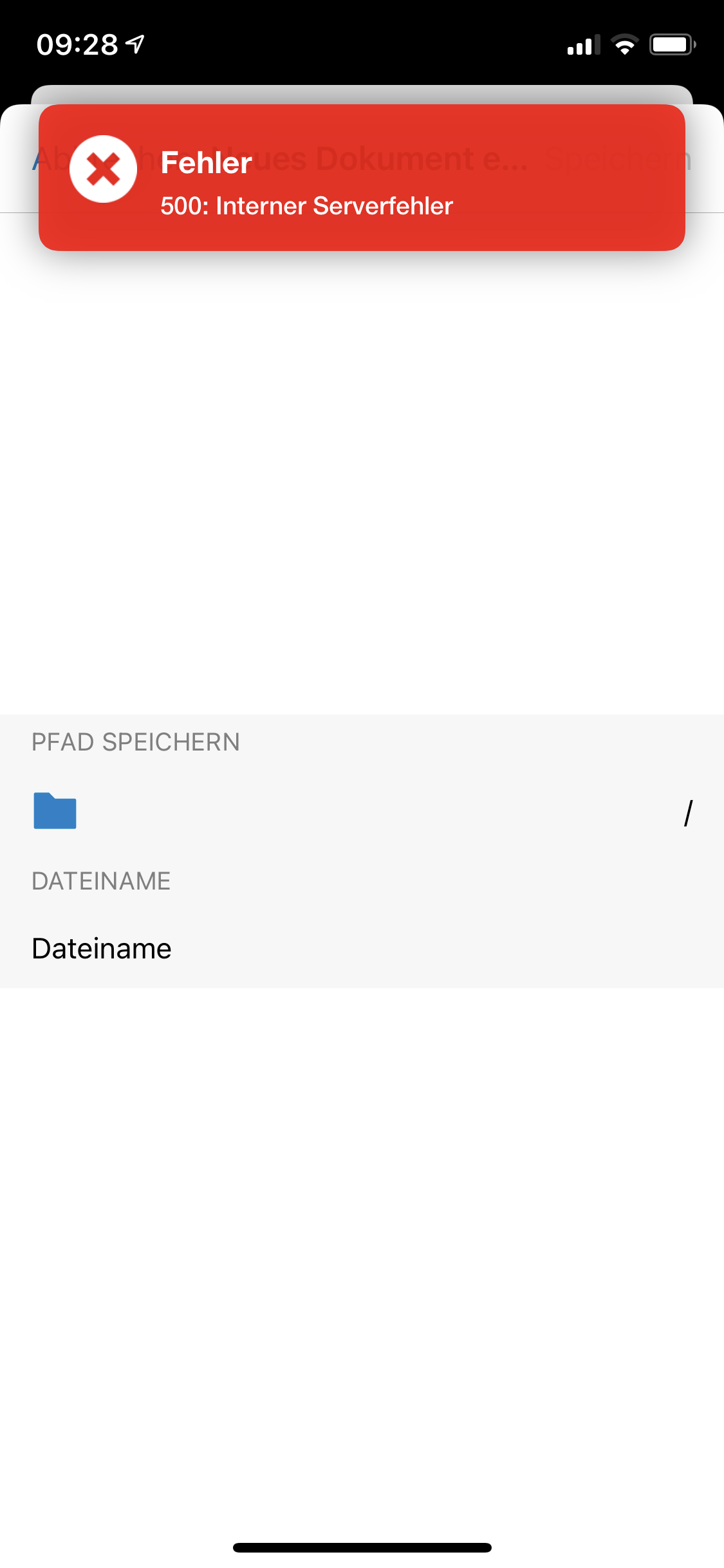
The Nextcloud Log shows following entry after trying to create a Document via iOS APP
10.0.59.101 - - [04/Nov/2020:12:40:41 +0000] "GET /ocs/v2.php/apps/files/api/v1/directEditing/templates/text/textdocumenttemplate?format=json HTTP/1.1" 500 851 "-" "Mozilla/5.0 (iPad) Nextcloud-iOS/3.0.11"
10.0.59.101 - - [04/Nov/2020:12:40:39 +0000] "GET /index.php/apps/logreader/poll?lastReqId=qUgA0tEc9tiIHDaBuT1f HTTP/1.1" 200 3447 "-" "Mozilla/5.0 (Macintosh; Intel Mac OS X 10_15_7) AppleWebKit/605.1.15 (KHTML, like Gecko) Version/14.0 Safari/605.1.15"
The GET request ends on the text app.
iOS version
14.1
App version
3.0.11.1
Server configuration
Nextcloud 18.0.10
ONLYOFFICE documentserver enterprise 6.0.1
Web server:
Apache
Database:
mysql
PHP version:
php-7.2
Nextcloud version: (see Nextcloud admin page)
18.0.10
 freumichCH
All 14 comments
Hi @freumichCH 500 connection ? do you have a contract for the Support with us ?
 marinofaggiana
on 5 Nov 2020
marinofaggiana
on 5 Nov 2020
Hello @marinofaggiana
Thank you very much for your quick respond.
We have a license for OnlyOffice with 500 Connections to get the full functionality of document server.
Unfortunately ONLYOFFICE does not see a Problem with the document server it self and asked us to race a ticket on the NC iOS project.
Support told us, that the request is ending on the text app of NC, instead of ending in the ONLYOFFICE document editing service
[04/Nov/2020:12:40:41 +0000] "GET /ocs/v2.php/apps/files/api/v1/directEditing/templates/text/textdocumenttemplate?format=json HTTP/1.1" 500 851 "-" "Mozilla/5.0 (iPad) Nextcloud-iOS/3.0.11"
Do your have any idea why NC iOS is doing a GET on the wrong backend?
freumichCH
on 5 Nov 2020
Got a example from ONLYOFFICE how the request should look like:
2020-11-05 13:14:32 Network request started: POST https://NEXTCLOUD/ocs/v2.php/apps/files/api/v1/directEditing/open?path=/newfile.docx&editorId=onlyoffice&format=json
2020-11-05 13:14:33 Network response request: https://NEXTCLOUD/ocs/v2.php/apps/files/api/v1/directEditing/open?path=/newfile.docx&editorId=onlyoffice&format=json, result: success
Maybe that helps to understand what is wrong
freumichCH
on 5 Nov 2020
Hello @marinofaggiana
Thank you very much for your quick respond.
We have a license for OnlyOffice with 500 Connections to get the full functionality of document server.Unfortunately ONLYOFFICE does not see a Problem with the document server it self and asked us to race a ticket on the NC iOS project.
Support told us, that the request is ending on the text app of NC, instead of ending in the ONLYOFFICE document editing service
[04/Nov/2020:12:40:41 +0000] "GET /ocs/v2.php/apps/files/api/v1/directEditing/templates/text/textdocumenttemplate?format=json HTTP/1.1" 500 851 "-" "Mozilla/5.0 (iPad) Nextcloud-iOS/3.0.11"Do your have any idea why NC iOS is doing a GET on the wrong backend?
Hi,
I'm afraid that while we can give ONLYOFFICE support with Nextcloud, onlyoffice doesn't work with us to support their customers. We can fix this, though - please, contact our sales team and we can help you get the most out of the combination of Nextcloud and onlyoffice.
It is probably easiest to use the form on https://nextcloud.com/enterprise/buy/ - we'd be happy to get you going!
 jospoortvliet
on 5 Nov 2020
jospoortvliet
on 5 Nov 2020
Hello @jospoortvliet
Thanks for your respond.
Just to make sure that i understand it correct.
Nextcloud is offering via there AppStore the ONYLOFFICE conector App who is marked as a Featured App from nextcloud. As a plus, ONLYOFFICE is offering a 30 day trial of a document server instance. The 2nd Option is installing the Community Document Server App on Nextcloud.
Installing the nextcloud iOS App rounds this Setup up.
So when i undersnatd you right, the whole setup is not working out of the box with the full range of features (creation of documents) and i need a nextcloud subscription to get this working proper?
When i remember right, nextcloud anounced a year or more ago that the nextloud app gets a ONLYOFFICE integrated. That does not include creating Documents? But editing is no problem?
I hope you can understand that this is a kind of disapointing?
freumichCH
on 5 Nov 2020
So when i undersnatd you right, the whole setup is not working out of the box with the full range of features (creation of documents) and i need a nextcloud subscription to get this working proper?
When i remember right, nextcloud anounced a year or more ago that the nextloud app gets a ONLYOFFICE integrated. That does not include creating Documents? But editing is no problem?
I hope you can understand that this is a kind of disapointing?
Yeah, I get that, and it certainly should work. So we'll register it as a bug and will work on it when we have time. That is the 'support' home users get - when we have time. But if you rely on it with a company, I can imagine "when we have time" isn't really what you were looking for. And for that, a OO license but a community version of Nextcloud is not helpful. We support ONLYOFFICE only with Nextcloud Enterprise. Does that make sense?
jospoortvliet
on 5 Nov 2020
Partly...
But i know what you want to say.
I would welcome it when the case can be tagged with bug or something. Just that its correctly classifyed like you told in your last post.
freumichCH
on 5 Nov 2020
Hi, we had the same issue, starting with iOS App version 3, pulling out hair... there is simple solution, we discovered by accident. Make sure you have the official Text App installed and activated. Then you can create documents from the iOS App again. The error stating request to „text template“ and entries in nextcloud log „no matching editor found“ was leading us to the cause and the solution. For whatever reason „create new sheet/document/presentation“ dialog is sending request for editing or creating text file, and if the Text App is disabled ist throws error back to client. This is not caused by OO or NC itself.
 dietze
on 6 Nov 2020
dietze
on 6 Nov 2020
Hello @dietze
You are a Rockstar! 🤩🎉🤓
Thank you for sharing this with us!
The funny thing is, that ONLYOFFICE-Support adviced me to deactivate the Text app. 🤔
I will forward this to the OO-Support just to let them know.
I wish you a wonderfull weekend!
freumichCH
on 6 Nov 2020
Glad to help.
dietze
on 6 Nov 2020
Current NC iOS Release via TestFlight (3.0.13.1) does solve the issue.
Here the compare: https://github.com/nextcloud/ios/compare/3013
@marinofaggiana Thank you for investigating on this
freumichCH
on 12 Nov 2020
I can confirm that indeed it’s now possible creating new office files even without Text App disabled. But the logs still show No Matching Editor Found exception when Text disabled. Can you confirm?
dietze
on 17 Nov 2020
@dietze I can confirm that. Following message will be thrown when creating a new Document with Nextcloud iOS 3.0.13
"GET /ocs/v2.php/apps/files/api/v1/directEditing/templates/text/textdocumenttemplate?format=json HTTP/1.1" 500 851 "-" "Mozilla/5.0 (iPad) Nextcloud-iOS/3.0.13"
But the error Message has disappeared.
freumichCH
on 18 Nov 2020
Yes. [normal]
marinofaggiana
on 18 Nov 2020
Related issues
 MarkusKepert
·
4Comments
MarkusKepert
·
4Comments
 khlschrnk
·
5Comments
khlschrnk
·
5Comments
 koarlmichael
·
3Comments
koarlmichael
·
3Comments
 immortal79
·
4Comments
immortal79
·
4Comments
 oxivanisher
·
4Comments
oxivanisher
·
4Comments