Login Succeeds but Main View isn't loaded. User is forced to close the app, once reopened the transition to Main view is completed correctly.
The issue occurs on several different nextcloud providers I've had the chance to test with
Expected behaviour
After verifying credentials, the Main view should be loaded.
Actual behaviour
WebLogin, infinite spin after clicking Grant Access
ClassicLogin Spinner stops, pressing spinner again gives an error
Steps to reproduce
Install application
Select Classic or WebLogin
Enter correct server, user password credentials
Click Login
iOS version
13.3.1 iPhone
10.3.4 iPad
App version
2.25.8
Operating system:
Debian 10
Web server:
Apache
Database:
MariaDB
PHP version:
7.3
Nextcloud version: (see Nextcloud admin page)
Nextcloud 16.0.7.1
 Delta-38
All 12 comments
Same here:
I've deleted the App and installed 2.25.8 on two devices with iOS 13.3.1.
I've tried to connect to two NC instances
Instance 1: NC 17.0.3, LDAP/AD
Instance 2: NC 17.0.3, Nexcloud-users only
In all cases (both devices, both NC instances) creating an account in the app failed, both with the NC/AD password and a generated password entered via QR Code.
iOS App reports a "forbidden"
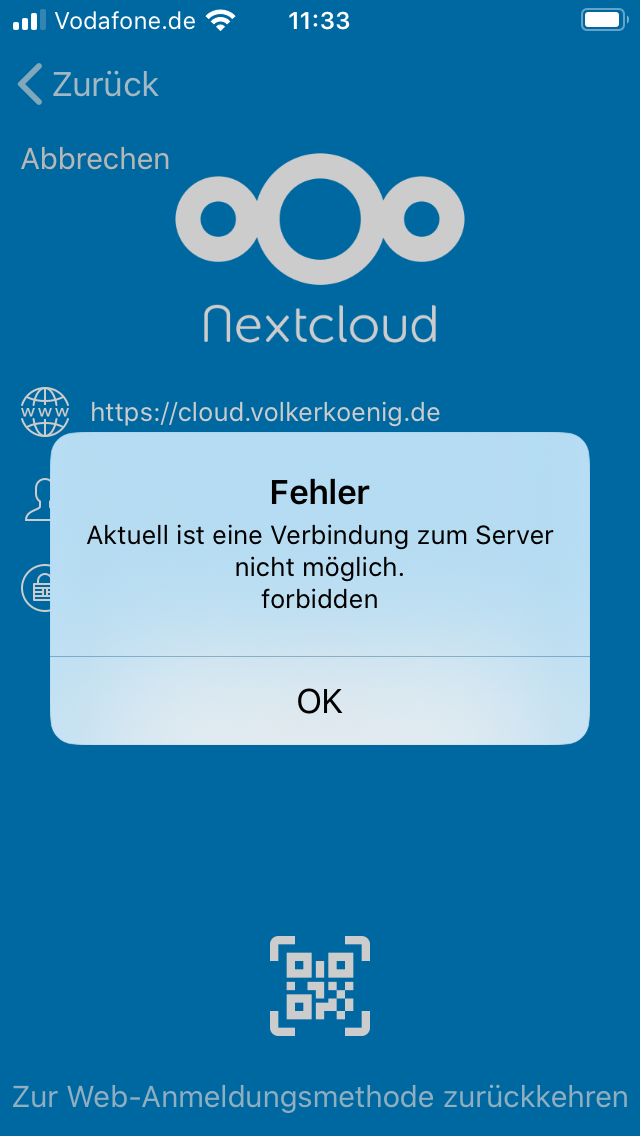
I've collected log records of the non-AD-instance. On the AD-instance it's the same but with more sensitive data:
193.27.X.X - - [14/Feb/2020:11:26:51 +0100] "GET /status.php HTTP/1.1" 200 4854 "-" "Mozilla/5.0 (iOS) Nextcloud-iOS/2.25.8"
193.27.X.X - - [14/Feb/2020:11:26:51 +0100] "GET /ocs/v2.php/cloud/user?format=json HTTP/1.1" 200 5008 "-" "Mozilla/5.0 (iOS) Nextcloud-iOS/2.25.8"
193.27.X.X - - [14/Feb/2020:11:26:51 +0100] "PROPFIND /remote.php/webdav HTTP/1.1" 207 2611 "-" "Mozilla/5.0 (iOS) Nextcloud-iOS/2.25.8"
193.27.X.X - - [14/Feb/2020:11:26:52 +0100] "GET /ocs/v1.php/cloud/capabilities?format=json HTTP/1.1" 200 3691 "-" "Mozilla/5.0 (iOS) Nextcloud-iOS/2.25.8"
193.27.X.X - - [14/Feb/2020:11:26:52 +0100] "REPORT /remote.php/dav/files/myuserid HTTP/1.1" 207 1446 "-" "Mozilla/5.0 (iOS) Nextcloud-iOS/2.25.8"
193.27.X.X - - [14/Feb/2020:11:26:52 +0100] "GET /index.php/avatar/vk/128 HTTP/1.1" 200 11353 "-" "Mozilla/5.0 (iOS) Nextcloud-iOS/2.25.8"
193.27.X.X - - [14/Feb/2020:11:26:52 +0100] "SEARCH /remote.php/dav HTTP/1.1" 207 3690 "-" "Mozilla/5.0 (iOS) Nextcloud-iOS/2.25.8"
193.27.X.X - - [14/Feb/2020:11:26:52 +0100] "PROPFIND /remote.php/webdav HTTP/1.1" 207 28614 "-" "Mozilla/5.0 (iOS) Nextcloud-iOS/2.25.8"
193.27.X.X - - [14/Feb/2020:11:26:52 +0100] "GET /ocs/v2.php/apps/notifications/api/v2/notifications?format=json HTTP/1.1" 200 8081 "-" "Mozilla/5.0 (iOS) Nextcloud-iOS/2.25.8"
193.27.X.X - - [14/Feb/2020:11:26:52 +0100] "GET /ocs/v2.php/apps/files_sharing/api/v1/shares HTTP/1.1" 200 26746 "-" "Mozilla/5.0 (iOS) Nextcloud-iOS/2.25.8"
193.27.X.X - - [14/Feb/2020:11:27:01 +0100] "GET /ocs/v2.php/core/getapppassword HTTP/1.1" 403 4101 "-" "Mozilla/5.0 (iOS) Nextcloud-iOS/2.25.8"`
Update: Same problem with NC staging instance with AD and NC 18.0.1
Another update: The error lets you stop at entering the credentials. If you cancel the app (double click home button and swipe the app out) and restart it, the account actually is open and you can use it.
Once you have done this, you can add additional accounts w/o the error.
The error only occurred when the app was freshly installed, migrating from a working 2.25.7 worked, too.
 Volker-K
on 17 Feb 2020
Volker-K
on 17 Feb 2020
Persists in app version 2.25.9
Volker-K
on 19 Feb 2020
Some extra information for Marino, login does complete successfully code wise (despite forbidden errors and such, and I can see from logs that my preferences and server information get fetched correctly, the account gets saved correctly and CCMain gets called to load the main view, but it's either an issue with the login controller not popping correctly or the navigation not being carried on successfully in ccmain.
I am running it against NC16, but I also tried a few public servers and always get the same result, I am a little surprised this got so little attention so far.
Delta-38
on 22 Feb 2020
Same problem here with Nextcloud 18.0.1 (and the previous stable 17.x).
When I try to login with Nextcloud account and password, 403. Same for QR code and same for manually created application password.
I removed the app on the iphone and reinstalled again and worked fine.
 xkill
on 25 Feb 2020
xkill
on 25 Feb 2020
Hi, I will do some tests to understand.
Thanks
 marinofaggiana
on 26 Feb 2020
marinofaggiana
on 26 Feb 2020
TestFlight 2.26.0 <<
[when available]
marinofaggiana
on 26 Feb 2020
TestFlight 2.26.0 <<
[when available]
I apologize for the delay in getting back to you, I can confirm that with 2.26.0 on Testflight classic login completes successfully.
Delta-38
on 2 Mar 2020
When will it be available outside TestFlight? AppStore still shows me 2.25.9.
Volker-K
on 9 Mar 2020
Will 2.26.0 be available at AppStore at all?
Volker-K
on 6 Apr 2020
Is #1188 related ?
Any news on this ?
All my ios users are affected by this issue...
 Ornanovitch
on 14 May 2020
Ornanovitch
on 14 May 2020
When will 2.26.0 be released?
 LiorNevo
on 19 Jun 2020
LiorNevo
on 19 Jun 2020
...meanwhile:
2.25.9 works with new browser-based login flow.
QR-Code authentification (what I'd prefer with most end users) ends with a filled form with server name, user id and the generated password. Login ends with an error, that can be ignored if you know how to get out of this trap.
How to excape it? After getting the error, just open task manager (double click the home button), close the app and when you start it again everything is fine.
Volker-K
on 24 Jun 2020
Related issues
 k-matti
·
4Comments
k-matti
·
4Comments
 notmgsk
·
4Comments
notmgsk
·
4Comments
 rakekniven
·
4Comments
rakekniven
·
4Comments
 MorrisJobke
·
4Comments
MorrisJobke
·
4Comments
 zigulle
·
3Comments
zigulle
·
3Comments
Most helpful comment
[when available]