Ios: Retry failed uploads in background (Pictures & Videos)
In https://github.com/nextcloud/ios/issues/215#issuecomment-312690578 we had a discussion about uploading pictures and videos in the background. Right now it doesn't and you have to open the app manually to retry every 10 seconds in foreground.
This should stay as is, but it would be good if we retried failed uploads in the background as well. For example let's say you were on holiday, you took loads of pictures and videos that were uploaded sporadically due to bad WIFI or cellular, battery died (or whatever). When you come home you expect all the pictures and videos are uploaded to Nextcloud, but they are not. Several pictures are missing, heck! What would solve this? Automatic Retry of Failed Uploads.
TL;DR
- I know that uploading stuff in the background is resource intensive especially videos. That's why there should be a switch;
Retry Failed Uploads in the Background. - Retry every 6 hours or so because of above if activated.
- Check pending uploads after battery died, or the app crashed. Keep unsuccessful uploads meta in cache maybe?
- Retry every time there is a significant change in location (that's how it's currently working with Apple)
- ownCloud does this in the background, why can't we?
- Maybe introduce a list with all the failed uploads so that you can manually retry as well? Or even better, use the current
Transfersview.
@nextcloud/ios What do you think?
 enoch85
All 39 comments
I would love to see this as well. Since I do not open the app regularly on the iPhone, retrying in the background seems like the way to go.
 roedie
on 18 Jul 2017
roedie
on 18 Jul 2017
@marinofaggiana Could we have this in 2.17.5?
enoch85
on 20 Jul 2017
Next week, little improvements and several bit fix
 marinofaggiana
on 20 Jul 2017
marinofaggiana
on 20 Jul 2017
retry available, 2.17.5
marinofaggiana
on 23 Jul 2017
@enoch85 Still open? v2.17.5 is out. Please verify.
 rakekniven
on 23 Jul 2017
rakekniven
on 23 Jul 2017
@rakekniven Nope, still not fixed. Went out on a trip just to test. Now not even photos are uploaded and videos get uploaded wiht 0 byte.

Current settings are:
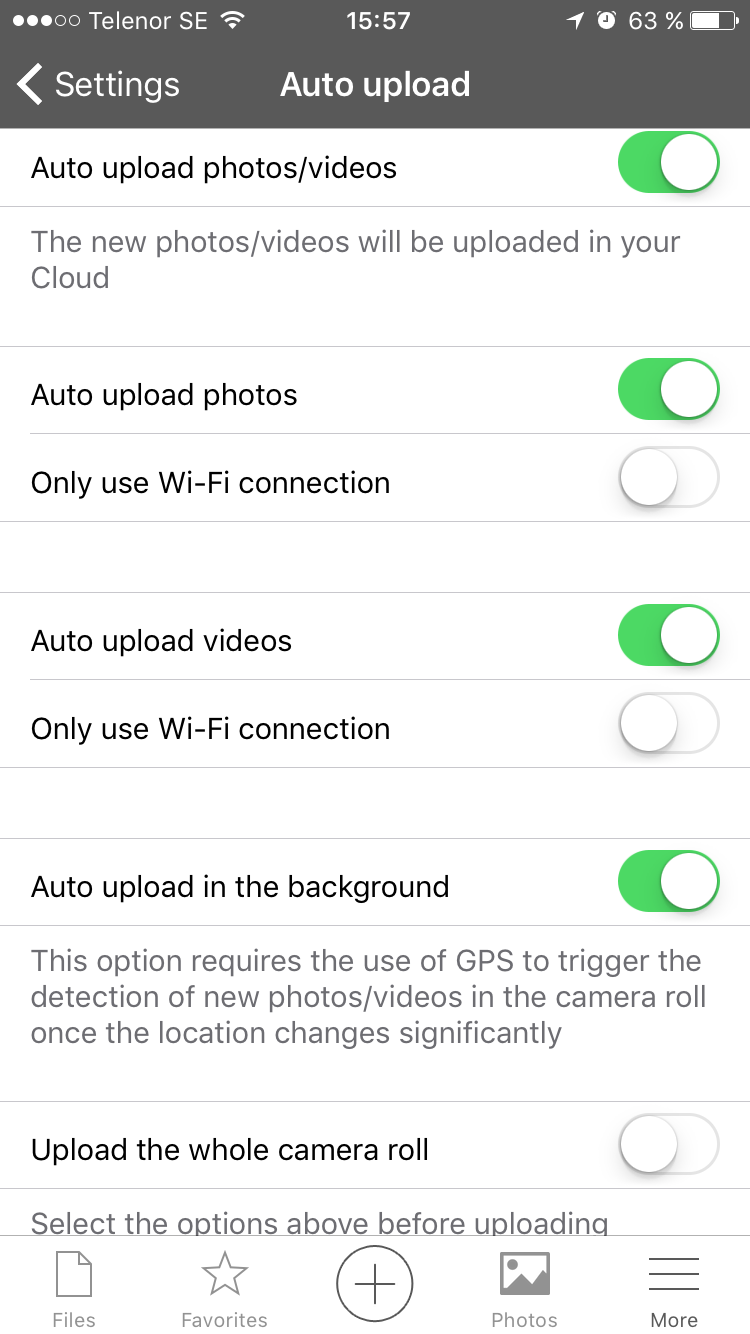
Plus Using subfolders
Activity feed:
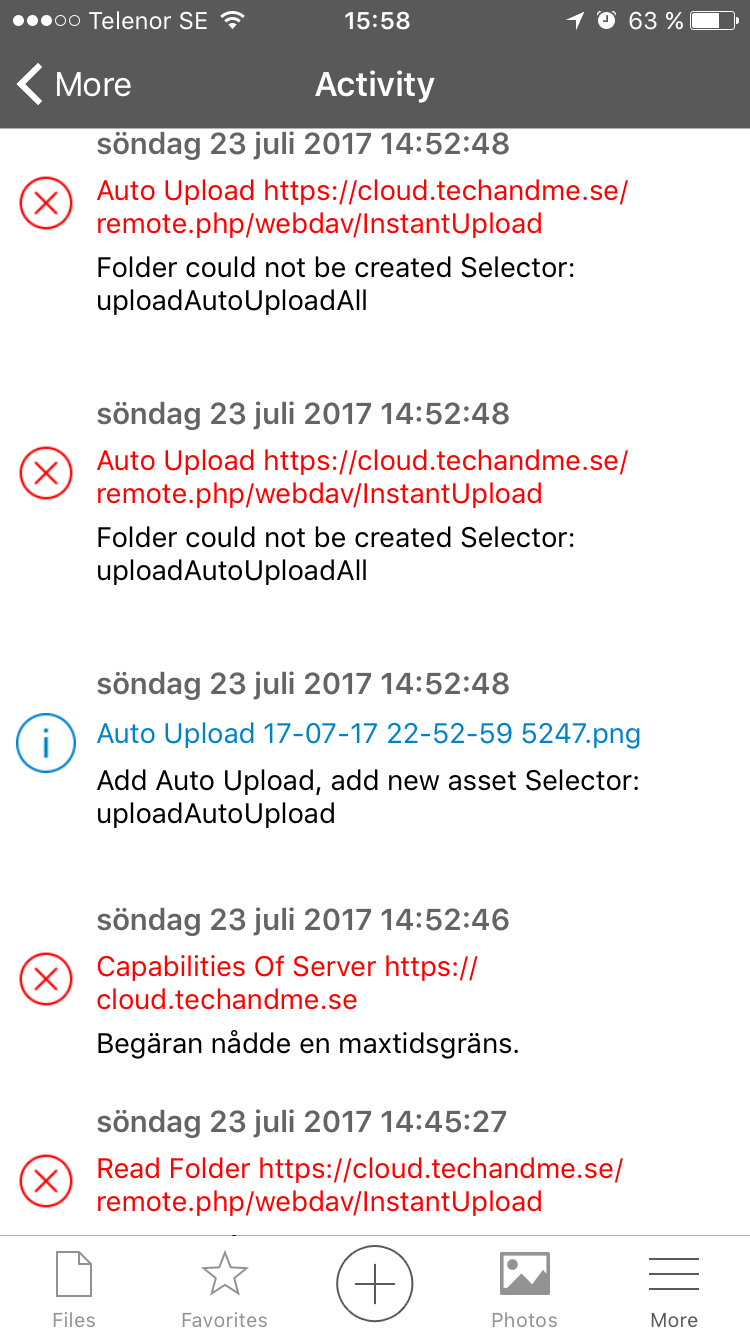
Nådde en maxtidsgräns = Reached max timeout limit
If I open the app in fourground it works and videos get uploaded as they should, but that's not the desired function here.
enoch85
on 23 Jul 2017
mmmm mumble mumble .... very strange .... 0 length 19 hours ago ?? ... please can I see activity ?
marinofaggiana
on 23 Jul 2017
0 length
That was yesterday, and the videos were not uploaded at all in background but today they got uploaded in the foreground with 0 byte.
enoch85
on 23 Jul 2017
I am not sure of this issue @enoch85 :-) When u have time make a new with 2.17.5 (not from previous version)
marinofaggiana
on 23 Jul 2017
As I said:
Nope, still not fixed. Went out on a trip just to test. Now not even photos are uploaded and videos get uploaded with 0 byte.
I went on a trip, took 2 videos and 3 photos. Went home and none of them were uploaded. Not even when reaching WIFI so this is broken. Don't mind the 0 byte stuff, fact is that videos are not uploaded, and as you can see I got new errors with 2.17.5 that weren't there yesterday.
enoch85
on 23 Jul 2017
@marinofaggiana If you send me your email address I can create an account for you on my server so that you can test yourself. Thanks!
enoch85
on 23 Jul 2017
Thanks but the issue is not the server ... (I think) the errors says : server unreachable ... but where are 3 photo and 2 video errors ?
marinofaggiana
on 23 Jul 2017
and why error autouploadall ??
marinofaggiana
on 23 Jul 2017
and why error autouploadall ??
I don't know, you're the dev :)
You could take a look at ownCloud iOS code and see how they do to get inspired.
enoch85
on 23 Jul 2017
What does the option Upload whole camera roll do? Does it make any difference?
enoch85
on 23 Jul 2017
hahaha the calls of API are the same ... ;) autouploadall is a error for select Auto Upload all Photo switch ON but your phone was offline (server unreachable) ... I don't view errors for your 3 photo and 2 videos
marinofaggiana
on 23 Jul 2017
ohhh YES !! this option upload ALL camera roll
marinofaggiana
on 23 Jul 2017
I don't view errors for your 3 photo and 2 videos
I can't fit them in the screen. And now I deleted the log to get a fresh one.
But this issue is about retrying failed uploads. so if they failed, they should be retried which they don't. Not even when I come home to my wifi.
ohhh YES !! this option upload ALL camera roll
What do you mean? I asked what the function was, but you didn't answer?
enoch85
on 23 Jul 2017
yes I have answer, this function upload all camera roll not only the last detect
marinofaggiana
on 23 Jul 2017
yes I have answer, this function upload all camera roll not only the last detect
So what's the difference in a Auto Upload situation?
Upload whole camera roll: ON:
- It uploads all photos manually everytime I open the app in foreground?
- It Auto Uploads all photos on camera roll twice (one time when photo is taken, another time when I open the app in foreground)?
Upload whole camera roll: OFF:
- Auto Upload doesn't work since it doens't upload all the photos and videos on the camera roll.
Please be precise, I don't understand when you write "ohhh YES !! this option upload ALL camera roll"
Thank you.
enoch85
on 23 Jul 2017
Hello all, sitting on my veranda and following your conversation.
Are there any testcases I can do?
Use the app daily and background upload is mystic for me. My habit is to open nextcloud app to have photos uploaded.
Enjoy sunday! Whatever you are doin' :-)
rakekniven
on 23 Jul 2017
@rakekniven in Italy now 34 Celsius ... 50% humidity ... 🙊
marinofaggiana
on 23 Jul 2017
Wow, get away from your keyboard. Put your feet in cool water and get a drink. 🍹
rakekniven
on 23 Jul 2017
@rakekniven
My habit is to open nextcloud app to have photos uploaded.
https://github.com/nextcloud/ios/issues/215#issuecomment-307195988
So, what you could do is to:
- Close the app completely, double tap home button and remove it from background apps as well.
- Take some photos and videos
- Move around so that the GPS get triggered.
- See if the photos and videos are uploaded (without opening the app, check on the server directly)
The point here is to upload photos without even opening the app, and retry in the background automatically if it failed the first time.
@marinofaggiana You still din't answer my question: https://github.com/nextcloud/ios/issues/306#issuecomment-317258238
enoch85
on 23 Jul 2017
@marinofaggiana
hahaha the calls of API are the same ... ;)
Yeah, but then it's strange that it works on ownCloud but not here...
enoch85
on 23 Jul 2017
@enoch85 Will be on holiday in a few days and my GPS will trigger app. That's for sure 😆
Will follow your testcase and understood basic function.
rakekniven
on 23 Jul 2017
boys I close this, reopen if exists news
marinofaggiana
on 23 Jul 2017
Please more detail, from several users.
marinofaggiana
on 23 Jul 2017
Ping @roedie as well for more user input.
enoch85
on 23 Jul 2017
@rakekniven Did you have any chance to test this yet?
enoch85
on 29 Jul 2017
I've tested this week, but it seems to upload everything.
roedie
on 29 Jul 2017
@roedie You are only on WIFI right? And what about Videos?
enoch85
on 29 Jul 2017
@enoch85 I'm only on WiFi indeed. Videos upload just as well.
roedie
on 29 Jul 2017
OK, have you ever had a failed upload? Can you try to make an upload fail, e.g. go from wifi to cellular while a upload is happening or something like that?
enoch85
on 29 Jul 2017
Also, do you have the "upload all files on camera roll" option enabled?
enoch85
on 29 Jul 2017
I'll have a try at creating a failed upload.
I do not have the "upload all files on camera roll" option enabled since it will re-upload everything I already have.
roedie
on 29 Jul 2017
Thanks @roedie!
enoch85
on 3 Aug 2017
I changed to Android instead so I can't test. But I still think that everything in my first post should be implemented.
What's the status here?
enoch85
on 16 Jan 2018
Stale --> closing
enoch85
on 13 Nov 2018
Related issues
 koarlmichael
·
3Comments
koarlmichael
·
3Comments
 oxivanisher
·
4Comments
oxivanisher
·
4Comments
 MarkusKepert
·
4Comments
MarkusKepert
·
4Comments
 MorrisJobke
·
4Comments
MorrisJobke
·
4Comments
 MarcusE1W
·
5Comments
MarcusE1W
·
5Comments
Most helpful comment
Wow, get away from your keyboard. Put your feet in cool water and get a drink. 🍹