Hi,
It seems like background uploading is not working. I have enabled the following:
- Upload camera photos/videos
- Upload camera photos
- Only use WiiFi connection
- Upload camera videos
- Only use Wi-Fi connection
- Upload images in the background
I understand the app gets triggered by GPS events since there is no other way. But even when I travel around a lot, photo's do not get scheduled for upload. They only upload once I open the Nextcloud IOS app.
Is there something I am missing or is this a bug?
Regards,
Sander
 roedie
All 79 comments
Hi @roedie this is a loooooong question for Nextcloud iOS but ownCloud iOS, DropBox, Drive, OneDrive as well ... and It's too technical .. I have worked several time with the component NSURLSession ... and now (after more try) I think that the best strategy is as DropBox (intercept the new images with GPS) but send this only in Foreground to continue in background ... start in Backgound mode the upload is toooooo slow and iOS block often the queue with a swelling queue with (crash) ... But this is "correct" Apple say : use background mode ONLY for some BIG file and not for so many small files.
 marinofaggiana
on 4 May 2017
marinofaggiana
on 4 May 2017
P.S. I have users that send 2000 files on queue ... this is madness and often the device crash for problem with queue, database etc. BTW in background mode iOS works very bad. sorry
marinofaggiana
on 4 May 2017
So, just so I understand it correctly.
- The upload will never start automatically in the background?
- You need to start it in the foreground and it will continue in the background?
roedie
on 4 May 2017
Yes, thanks for your question, I write here my consideration after 3 year of job with low level NSURLSession Apple and background :
Documentation Apple :
Background Transfer Considerations
The NSURLSession class supports background transfers while your app is suspended. Background transfers are provided only by sessions created using a background session configuration object (as returned by a call to backgroundSessionConfiguration:).With background sessions, because the actual transfer is performed by a separate process and because restarting your app’s process is relatively expensive, a few features are unavailable, resulting in the following limitations:
The session must provide a delegate for event delivery. (For uploads and downloads, the delegates behave the same as for in-process transfers.)
Only HTTP and HTTPS protocols are supported (no custom protocols).
Redirects are always followed.
Only upload tasks from a file are supported (uploading from data objects or a stream will fail after the program exits).
If the background transfer is initiated while the app is in the background, the configuration object’s discretionary property is treated as being true.
Discretionary :
When transferring large amounts of data, you are encouraged to set the value of this property to YES. Doing so lets the system schedule those transfers at times that are more optimal for the device. For example, the system might delay transferring large files until the device is plugged in and connected to the network via Wi-Fi. The default value of this property is NO.
The session object applies the value of this property only to transfers that your app starts while it is in the foreground. For transfers started while your app is in the background, the system always starts transfers at its discretion—in other words, the system assumes this property is YES and ignores any value you specified.
Test 2016 :
If the upload start in background mode the process are very very slow or blocked, from my test 100 Images from my test iPhone 5 iOS 9 - WiFi mode, after 1 week the session was not yet completed ... This is unacceptable per the "normal" user.
For programmers see :
https://developer.apple.com/reference/foundation/nsurlsessionconfiguration/1411552-discretionary
Nextcloud is opensource project, see :
https://github.com/nextcloud/ios/blob/master/iOSClient/Networking/CCNetworking.m
https://github.com/nextcloud/ios/blob/master/iOSClient/PhotosCameraUpload/CCPhotosCameraUpload.m
marinofaggiana
on 5 May 2017
I have this problem across several 3 iphones and 2 self-hosted servers. All apps and servers are up to date. Android uploads work.
 wobblywob
on 19 May 2017
wobblywob
on 19 May 2017
I have this problem across several 3 iphones and 2 self-hosted servers. All apps and servers are up to date. Android uploads work.
Read the post please ... iOS is not Android
marinofaggiana
on 22 May 2017
I have been testing a while with the Owncloud app and syncing there works as expected.
Yes it is slowish, and you do not want to sync 100's of files with it, but it works.
With the Owncloud app, if I take 5 pictures somewhere, move around a bit, then all 5 images are uploaded. If I do the same with the Nextcloud app, no images are uploaded ever. I can drive all around the Netherlands and wait for days, but they are not uploaded...
So, if this is not a bug but a technical limitation on IOS (which would be a bit weird since Owncloud does work) then the feature should be removed from the app.
roedie
on 23 May 2017
On background mode load only the image in our sandbox but send on Nextcloud only when this is activated (for now), soon i want try a bit modify ... are you in list on TestFlight ?
marinofaggiana
on 23 May 2017
No, not yet. But I do not mind testing this stuff.
roedie
on 23 May 2017
I am also willing to test this. I have noticed that there are always some pictures in the queue waiting for me to open the app until they are uploaded. If anything there can be improved, I can testflight that stuff.
 derkostka
on 24 May 2017
derkostka
on 24 May 2017
@marinofaggiana Please use [email protected] to invite me.
roedie
on 26 May 2017
+1 I've got the same issue wouldn't mind testing the beta via TestFlight
 nbittmann
on 7 Jun 2017
nbittmann
on 7 Jun 2017
@marinofaggiana
but send this only in Foreground to continue in background
This is not how it's done on the ownCloud iOS app. My wife uses both apps and I activated background uploads on both apps. I closed both apps (no foreground) and gave here the phone back. A few days later I opened the apps again and checked if files had been uploaded and the result was:
- Nextcloud iOS had not upload the photos, but started uploading them when I opened the app.
- ownCloud iOS did upload the the photos and I could see history if when they had been uploaded. In fact, it also uploaded videos in the background.
I mentioned this to you when you started to develop this app, and as you can see there are more people that agree with me. You point to Apple documentation and so on, but in fact ownCloud does it, why isn't that the fact for this app?
I don't mean to sound ungrateful because you are doing a great job, but for me this is the last piece that must work before I will use this app 100% and stop using the ownCloud iOS app. This app is much better design wise, but for me it's not only about design.
Essentially, for people who don't use the Nextcloud app to browse files (my wife is a great example - she uses the regular Gallery on the phone) it's kind of annoying to have to open the app everytime you want to upload photos or videos, especially for non technical persons that "just want it to work". This should work totally in the background IMHO.
 enoch85
on 8 Jun 2017
enoch85
on 8 Jun 2017
@enoch85 try with new version in TestFlight 2.17.4
marinofaggiana
on 9 Jun 2017
@marinofaggiana Can I have an invite as well? [email protected]
roedie
on 9 Jun 2017
@marinofaggiana Thanks, but I think someone like @roedie would be better suited for the Test program. I have my hand's full with the VM. :)
enoch85
on 9 Jun 2017
@roedie Did you test it yet? If not, please let me know when you do if it works as expected. Details would be nice to know as well. Thanks! :)
enoch85
on 9 Jun 2017
@enoch85 and @marinofaggiana , I just did the first test and it worked. Took some pictures, went out shopping to trigger the GPS stuff, came back, waited about an hour and the pictures were uploaded without opening the app. Did not look at how much time it took, but the previous version never got this far, so it's 100% better ;-)
I even only allow it to upload using WiFi, so, first test is thumbs up.
roedie
on 10 Jun 2017
@roedie Great news! Did you force close the app so that it wasn't even running in the background, or did you just switch to the home screen with the app still active in background?
Also please try with, and without WIFI only.
Would also be great if you could test videos.
Thanks!
enoch85
on 10 Jun 2017
Remember (Discretionary function iOS Background task) :
The best is :
iPhone with power supply + Wi-fi
With :
Low Battery without power supply the Upload in background is blocked or very very very slow.
Cheers
marinofaggiana
on 11 Jun 2017
iPhone with power supply + Wi-fi
If you take pictures at home and your home is the only place you have Wifi, then the pictures will not get uploaded at all as you will always try to upload them in the same location. Just sayin.
enoch85
on 11 Jun 2017
No, is not correct, this is the best condition but not the only ... make test ;-)
Surely the most important aspect is the level of charge.
marinofaggiana
on 11 Jun 2017
Image uploading seems fine. Video uploading does not work at all. Not even manually. This is tested with version 2.17.4(9)
roedie
on 11 Jun 2017
@roedie Thanks!
@marinofaggiana When will video uploads in the background be introduced?
enoch85
on 11 Jun 2017
@roedie yes I have found a bug (Auto Upload), but manually ?
marinofaggiana
on 11 Jun 2017
If I open the app it doesn't work as well. That's what I meant. Problem is, the app is trying so hard to upload the movie it becomes totally unresponsive to anything else. Even after deleting the movie the app wont behave correctly anymore. It keeps trying to upload the movie.
roedie
on 12 Jun 2017
Tested with version 2.17.4(10) and everything seems to be working fine.
The app was completely closed, took some pictures and shot a movie (30MB), drove home, waited an hour and everything was uploaded.
This is with WiFi uploads enabled only. Will test without WiFi tomorrow, but think that will work just right.
roedie
on 13 Jun 2017
Checked with uploads over the cellular network today.
Took some pictures and a small video, drove to work and when I looked in nextcloud they were there. So this works fine as well.
Did not test this with big videos or lots of files, I might try that on the way back.
roedie
on 14 Jun 2017
Great news @roedie!
@marinofaggiana When is 2.17.4 expected to be released?
enoch85
on 14 Jun 2017
Also, when uploading on cellular and you get out of connection area, will it automatically retry again? cc @marinofaggiana
enoch85
on 14 Jun 2017
@marinofaggiana When is 2.17.4 expected to be released?
soon
marinofaggiana
on 14 Jun 2017
Tested with version 2.17.4(10) and everything seems to be working fine.
Setting milestone.
enoch85
on 28 Jun 2017
@marinofaggiana
soon
18 days ago is not "soon" ;) When is the new release?
enoch85
on 2 Jul 2017
@enoch85 when all issue are closed
marinofaggiana
on 2 Jul 2017
@marinofaggiana Do you have a ETA?
enoch85
on 2 Jul 2017
Hmmm, it seems movie uploading broke again somewhere. Let me test again tomorrow.
roedie
on 2 Jul 2017
Not possible, video and images has the same algorithm ... see the code ;-)
marinofaggiana
on 2 Jul 2017
So, I checked today.
Took 2 pictures and a small movie this morning, drove to work (60KM) and now at the end of the day 2 pictures are uploaded and the movie is not.
Even funnier, the movie is not even uploaded when I open the app.
So I see the impossible happening.
I will try again when I drive home in a couple of hours.
roedie
on 3 Jul 2017
? have you select load Video on Auto Upload ? make a small video and open app for try
marinofaggiana
on 3 Jul 2017
Yes I do have it enabled.
I just shot a smal movie, opened the app and it uploads it right away, but the movie from this morning is not selected for upload.
roedie
on 3 Jul 2017
error on activity ?
marinofaggiana
on 3 Jul 2017
No, it is not listed in activity at all
roedie
on 3 Jul 2017
For test a small advice :
- take a fotos / videos with camera
- put your iPhone in Flight mode
- after 2, 3 min remove Flight mode, this method (usually) trigger the event change position for detect new photos and or videos
- if the iPhone is 100% battery with external power the first photo/video start in background
marinofaggiana
on 3 Jul 2017
@marinofaggiana To make this bullet proof I think that the app should automatically retry failed uploads.
enoch85
on 3 Jul 2017
the app now retry the failed upload every 10 sec. (in foreground)
marinofaggiana
on 3 Jul 2017
@marinofaggiana Could you add so that it retries every 6 hour in the background?
enoch85
on 3 Jul 2017
No in background do not exist a timer, the apps are freeze
marinofaggiana
on 3 Jul 2017
Hmm, videos are uploaded in the background with the ownCloud app. Maybe you could "ping" it every 6 hours or something to wake it up?
enoch85
on 3 Jul 2017
The upload in background mode use the Significant Change Location Capabilies trigger ... this is not a true background .. iOS don't run in background, the apps are freeze. Do not exists ping or timer
marinofaggiana
on 3 Jul 2017
OK, so when then Significant Change Location Capabilies is triggered, could we retry failed uploads then?
Let's say the app tries to upload, but it doesn't work. Then when it notice a Significant Change Location the next time, it will try again.
enoch85
on 3 Jul 2017
If exists an error I don't want retry this in automatic, for example Video 100 MB but do not exist free space on cloud, so the next trigger event re-upload 1000 MB too ... and error .. this is not acceptable ... it's dangerous for the user.
marinofaggiana
on 3 Jul 2017
Well, you can let the user choose if he/she wants this behavior and set it to "off" per default. Just as you do with pictures. I would want it, and many users with me.
Do you agree @roedie ?
enoch85
on 3 Jul 2017
Since I use WiFi only, I wouldn't mind if it tries to re-upload every once in a while without opening the app.
roedie
on 4 Jul 2017
Should work on cellular network as well. This is how it looks like in the ownCloud app:
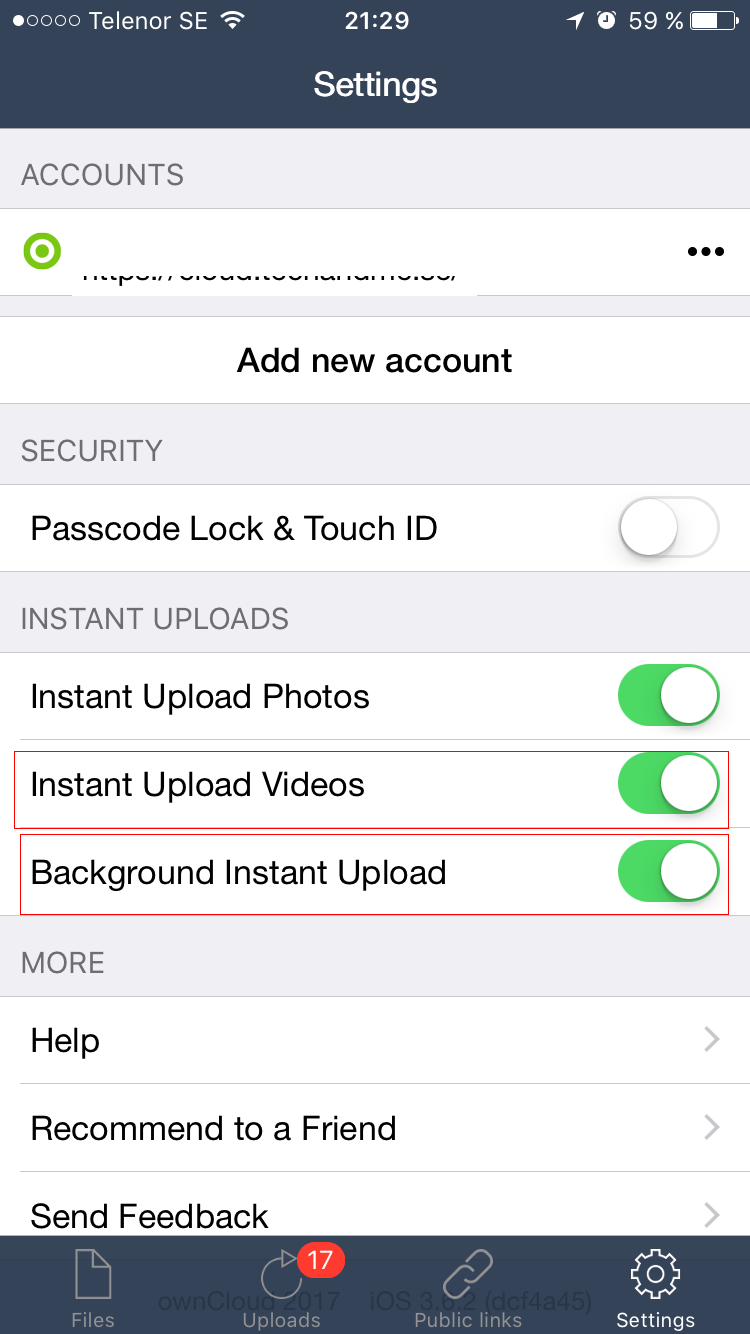
In other words, you can choose. The same thing should be possible in the Nextcloud app imho.
enoch85
on 4 Jul 2017
Done or still open?
Asking while maintaining release.
 rakekniven
on 14 Jul 2017
rakekniven
on 14 Jul 2017
@rakekniven I will test if it works as expected. I sure hope it does. Then I could migrate to Nextcloud instead of using the ownCloud app. :tada:
enoch85
on 15 Jul 2017
Forgot to mention, but yes it all works for me (tm)
So, this one can be closed.
roedie
on 18 Jul 2017
@roedie Videos too?
enoch85
on 18 Jul 2017
@enoch85 I had one video somehow not uploading. I think that has to do with the fact that I only allow nextcloud to upload when on WiFi. What I think happened is that the video got scheduled for upload, I was home on WiFi but I left home before the upload could finish.
So, except for the rescheduling for which you opened #306 everything seems to work AFAICT.
roedie
on 18 Jul 2017
Tips : Not Video or Image uploaded and not in queue with error (transfer view) ?
See activity with switch "Detailed Activity feed" ON ...
marinofaggiana
on 18 Jul 2017
This is still not working on my iPhone 8. The app does not at all look like the version shown in previous screenshots. The current version is nextcloud for iOS 2.18.2.00001. I can not find any kind of instant upload options.
 mist0706
on 7 Dec 2017
mist0706
on 7 Dec 2017
+1 not working for me on 2.20.0.00001 and server 12.0.5
 aaronogan
on 15 Feb 2018
aaronogan
on 15 Feb 2018
ping @marinofaggiana
enoch85
on 15 Feb 2018
I have better information now, please let me know if you'd prefer me to open a new ticket instead.
There was a server issue (mysql upgrade that necessitated a restart) that occurred in the middle of uploading all my photos. There were 8 photos in particular that must have had a problem uploading around the time the server-side issue occurred. After the server problem was resolved, all other photos uploaded successfully. Now on the Transfers screen, those 8 photos persist with no indication of the upload problem and seem to be pending upload.
aaronogan
on 15 Feb 2018
I am having this issue as well. Ios app need to be opened all the time.
And uploading photos is fine in the foreground but with big video it is not working at all
My version is 2.22.5.10
 ghost
on 26 Nov 2018
ghost
on 26 Nov 2018
Can confirm with @htph that background uploading doesn't appear to be working. I do get notification bubbles on the icon for the number of images/videos awaiting upload, but it won't upload until I actually open the app.
Nextcloud for iOS 2.22.5.10
Nextcloud Server 14.0.4
 patdavid
on 11 Dec 2018
patdavid
on 11 Dec 2018
I have the opposite: I disabled auto upload a few weeks ago, but it still automatically uploads new photos!
 doomi
on 25 Feb 2019
doomi
on 25 Feb 2019
I have the opposite: I disabled auto upload a few weeks ago, but it still automatically uploads new photos!
@doomi
Please open a new ticket for that.
enoch85
on 25 Feb 2019
Still not uploading in the background with the latest iOS client. I have to open the app for it to start syncing. 6000+ picture and movies has taken me (on and off) over a week to upload 👎
There are occasional errors of files locked by webdav too 😞...I'm not yet sure if the files are failing to upload, or it re-attempts to sync them later. At this point it's working slowly....I'm at 450 files left - I think I'll finish tonight 💃
I don't have any issues with Dropbox...which is the software I am trying to replace. Given that it works with some method (potentially others) - does Nextcloud anticipate fixing this? Ty
 gr33k
on 15 Jan 2020
gr33k
on 15 Jan 2020
I am having this issue as well. Ios app need to be opened all the time.
And uploading photos is fine in the foreground but with big video it is not working at all
My version is 2.22.5.10
@10hat
If you are using nginx - try adding this client_max_body_size 0; - I found that large file syncs will fail without this setting...
gr33k
on 15 Jan 2020
Same issue here. The photos are only uploaded when I open the app. I had this with 5 pics and with over 5K pics.
Nextcloud server: 18.0.6
iOS: 13.4.1
Nextcloud for iOS: 2.25.9.2
 EliranHayun
on 18 Jun 2020
EliranHayun
on 18 Jun 2020
We have the same problem beeing on latest version of iOS and Nextcloud for iOS and Server
 frankbackes
on 9 Jul 2020
frankbackes
on 9 Jul 2020
I can confirm this issue: When the display turns off, the upload stops on iOS.
 enes-oerdek
on 19 Jul 2020
enes-oerdek
on 19 Jul 2020
Same here,
Server on 19.0.1
iOS app 3.01
iOS 14.0
 wouterDeneyer
on 28 Jul 2020
wouterDeneyer
on 28 Jul 2020
Same issue here
 UtechtDustin
on 29 Jul 2020
UtechtDustin
on 29 Jul 2020
@marinofaggiana Didn't Apple introduce BGProcessingTask with iOS13+ for time consuming background tasks like uploading? Can this be utilized somehow?
 oli-ver
on 2 Aug 2020
oli-ver
on 2 Aug 2020
What is needed to have someone assigned to this so it can be worked on?
iOS: 13.6
Nextcloud: 18.0.4
iOS app: 3.0.2.16
 SeminolesFan78
on 5 Aug 2020
SeminolesFan78
on 5 Aug 2020
@immortal79
UtechtDustin
on 5 Aug 2020
I noticed this issue with other apps like Qfile from QNAP. Could Apple prevent these type of apps from fully using the GPS?
 nacoleon
on 9 Nov 2020
nacoleon
on 9 Nov 2020
Related issues
 MorrisJobke
·
4Comments
marinofaggiana
·
5Comments
MorrisJobke
·
4Comments
marinofaggiana
·
5Comments
 Alphakilo
·
3Comments
Alphakilo
·
3Comments
 helmut72
·
4Comments
helmut72
·
4Comments
 khlschrnk
·
5Comments
khlschrnk
·
5Comments
Most helpful comment
@marinofaggiana Didn't Apple introduce BGProcessingTask with iOS13+ for time consuming background tasks like uploading? Can this be utilized somehow?