Ios: Allow HTTP Basic Authentication
Currently using iOS app version 1.03
I have HA running behind a webserver (Apache) using HTTPS & authentication (via BasicAuthentication with username/password). I do not use the Password option from HA.
This way I have one set of credentials for all services I have at home including HA (web, ftp, etc); one way to set permissions and add/remove users, etc.
With the app it is currently not possible to specify a username/password for HTTP-based authentication.
Please add an option to specify
 mjj4791
All 27 comments
can you use the https://foo:[email protected]/ format?
 cmsimike
on 24 Apr 2017
cmsimike
on 24 Apr 2017
Possibly! I might just add this later this week.
 robbiet480
on 24 Apr 2017
robbiet480
on 24 Apr 2017
Not sure, but the specified username/password must be sent to the web server as a HTTP Authorization header; if that is the case by specifying the username & password as part of the URL, then that is what I intended
Just a small note:
the current entry field for the URL seems to assumes it will be used to specify a URL and thus limits the characters I can enter to those valid for an URL (several special characters I now have in my password, I cannot enter in this field).
This limit comes on top of the fact that, by specifying username/password as part of the URL (with : and @) also makes it impossible to use the colon and @-character as special characters in the password.....
mjj4791
on 24 Apr 2017
@mjj4791 https://serverfault.com/questions/371907/can-you-pass-user-pass-for-http-basic-authentication-in-url-parameters
generally speaking, that format url encodes the username password as the HTTP Auth header
cmsimike
on 24 Apr 2017
ok; I found that info as well.
I did try to put this in into the URL field in the iOS app, but it does not
yet seem to sent the authentication header..... (or at leaset, I am not
seeing a username in the webserver logs)
Can you confirm this requires a code change in the iOS app to work?
or should it already work (and I am configuring the wrong
username/password)?
M
On Mon, Apr 24, 2017 at 11:15 PM, Mike Megally notifications@github.com
wrote:
@mjj4791 https://github.com/mjj4791 https://serverfault.com/
questions/371907/can-you-pass-user-pass-for-http-basic-
authentication-in-url-parameters
generally speaking, that format url encodes the username password as the
HTTP Auth header—
You are receiving this because you were mentioned.
Reply to this email directly, view it on GitHub
https://github.com/home-assistant/home-assistant-iOS/issues/26#issuecomment-296824575,
or mute the thread
https://github.com/notifications/unsubscribe-auth/AXfjx0scGuZwgItVxlso4rtiZs4duPpvks5rzREIgaJpZM4NFibt
.
mjj4791
on 25 Apr 2017
I can confirm it doesn’t work with username / password in the url.
Please enable support for this or #27 as otherwise the app is pretty much useless if one has their hass configured and secured to be accessed over the internet.
 Shirk
on 25 Apr 2017
Shirk
on 25 Apr 2017
@Shirk I wouldn't say this app is useless without those features - far from it. Between a very long password in hass as well as IP blocking for bad auth attempts, I think it is fine. That is where I'm at right now and I feel secure, especially since any bad auth attempts show up in the UI.
cmsimike
on 26 Apr 2017
@cmsimike that depends on your definition of feeling secure. HTTP-auth is a standard feature of the protocol as would be the client auth from #27 and both work out of the box in the iOS frameworks if setup & enabled.
I’d rather use these then rely on hass’s own mechanisms. (And to be fair, I also have the API password enabled in addition to HTTP-auth / client certs)
Shirk
on 26 Apr 2017
Any solution to support basic authentication? Thanks
 diogopms
on 21 Jan 2018
diogopms
on 21 Jan 2018
I’d rather use these then rely on hass’s own mechanisms.
Yeah just ran into this, Id much rather have basic auth via Nginx. I feel it makes alot of sense to entrust the security to a really battle tested web server rather than something that focuses on home automation and just so happens to have its own authentication layer.
 gsdevme
on 24 Feb 2018
gsdevme
on 24 Feb 2018
Same here, would much prefer relying on my web server as a reverse proxy with basic auth required before any ability to run application code.
 pgauret
on 14 Mar 2018
pgauret
on 14 Mar 2018
Recently got into the whole HA ecosystem and I loved every minute of it.
I too like to use basic auth around any web services proxied exposed to the internet.
This would be really awesome to have!
 ghost
on 28 Jun 2018
ghost
on 28 Jun 2018
I'm considering closing this issue since 0.74 added support for a real authentication system. Can people respond to this comment using the thumbs up and down emojis to vote on whether it's worth still implementing this?
robbiet480
on 2 Aug 2018
For me it’s still not ideal, the fact is I don’t trust HA to be secure, it’s a hobbyist project and mistakes happen.
I trust nginx which is used by millions.
Sent from my iPhone
On 2 Aug 2018, at 22:28, Robbie Trencheny notifications@github.com wrote:
I'm considering closing this issue since 0.74 added support for a real authentication system. Can people respond to this comment using the thumbs up and down emojis to vote on whether it's worth still implementing this?
—
You are receiving this because you commented.
Reply to this email directly, view it on GitHub, or mute the thread.
gsdevme
on 3 Aug 2018
@gsdevme Thanks for your feedback, noted.
robbiet480
on 3 Aug 2018
In addition a HTTP Basic Authentication protects HA from being found in IoT search engines like shodan (which is really bad if an exploit for HA was found). They are not able to fingerprint without credentials as the webserver returns 401 without any information (except that it is a nginx webserver). It is an additional layer of security that you have to deactivate if you want to use the iOS app.
 earlyhost
on 3 Aug 2018
earlyhost
on 3 Aug 2018
I would stil like this feature implemented....
I did not yet look into detail in the Hass authentication solution, but I really like my current setup where ALL authentication is handled by my WebServer, and as such I am able to maintain one single source of authentication across all applications (and this currently is not OAuth... ) and I am not dependent on an implementation in Hass(and all other applications....)
M
Op 3 aug. 2018 om 07:07 heeft Peter Frühwirt notifications@github.com het volgende geschreven:
In addition a HTTP Basic Authentication protects HA from being found in IoT search engines like shodan (which is really bad if an exploit for HA was found). They are not able to fingerprint without credentials as the webserver returns 401 without any information (except that it is a nginx webserver). It is an additional layer of security that you have to deactivate if you want to use the iOS app.
—
You are receiving this because you were mentioned.
Reply to this email directly, view it on GitHub, or mute the thread.
mjj4791
on 3 Aug 2018
The hivemind has spoken!
robbiet480
on 4 Aug 2018
Never say I didn't do anything for y'all 😸
robbiet480
on 4 Aug 2018
Awesome!! 🎉🎉🎉
Sent from my iPhone
On 4 Aug 2018, at 04:30, Robbie Trencheny notifications@github.com wrote:
Never say I didn't do anything for y'all 😸
—
You are receiving this because you were mentioned.
Reply to this email directly, view it on GitHub, or mute the thread.
gsdevme
on 4 Aug 2018
Awesome feature! But im having issues getting it to work. 1.5.0 (17).
Using Caddy with LetsEncrypt.
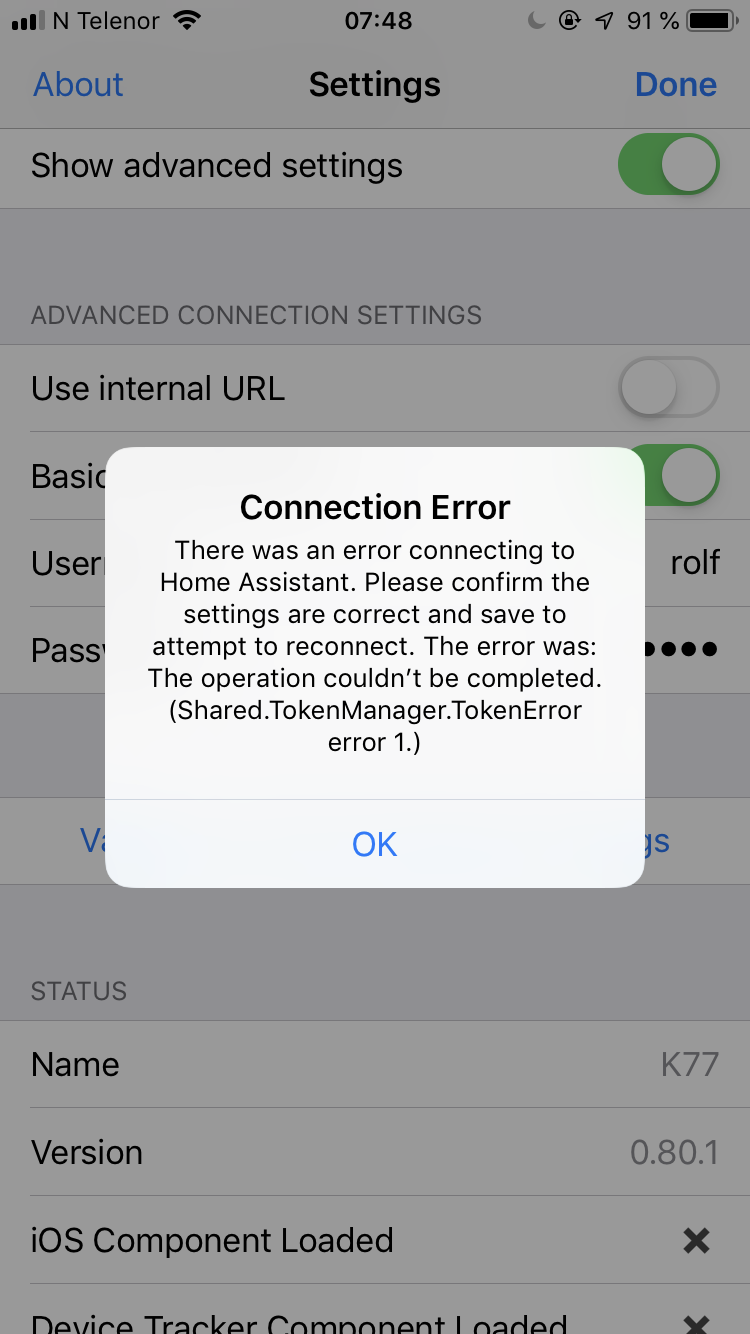
 roflmao
on 17 Oct 2018
roflmao
on 17 Oct 2018
Same error on my side. Having the latest IOS version (I'm on the beta testflight).
I also +1 on the fact basic auth is necessary
 BaQs
on 1 Nov 2018
BaQs
on 1 Nov 2018
Same issue for me ... activating basic auth (big thanks for including this, btw!) leads to the error shown above. Build 1.5.0 (34) Testflight Beta.
Anything I can provide from somewhere? Logs or anything?
 henningweiler
on 27 Jan 2019
henningweiler
on 27 Jan 2019
I ran a packet capture and the Authorization header isn't being sent with the POST to the /auth/token endpoint. Sometimes the validation button doesn't even cause a web request to be sent before displaying that error.
 rcarz
on 24 Feb 2019
rcarz
on 24 Feb 2019
@rcarz et al, I've added HTTP Basic Auth support for the token calls as of the 2.0 beta. Feel free to reach out to me on Discord to get in the beta.
robbiet480
on 25 Feb 2019
ok; I found that info as well. I did try to put this in into the URL field in the iOS app, but it does not yet seem to sent the authentication header..... (or at leaset, I am not seeing a username in the webserver logs) Can you confirm this requires a code change in the iOS app to work? or should it already work (and I am configuring the wrong username/password)? M
…
On Mon, Apr 24, 2017 at 11:15 PM, Mike Megally @.*> wrote: @mjj4791 https://github.com/mjj4791 https://serverfault.com/ questions/371907/can-you-pass-user-pass-for-http-basic- authentication-in-url-parameters generally speaking, that format url encodes the username password as the HTTP Auth header — You are receiving this because you were mentioned. Reply to this email directly, view it on GitHub <#26 (comment)>, or mute the thread https://github.com/notifications/unsubscribe-auth/AXfjx0scGuZwgItVxlso4rtiZs4duPpvks5rzREIgaJpZM4NFibt .
Just curious, in the end, how to do you include your username and password in your URL for successful HTTP basic authentication?
Thanks.
 jerrychong25
on 6 May 2019
jerrychong25
on 6 May 2019
Has this now been removed in v2.0? I can't seem to find out how to configure HTTP AUTH
gsdevme
on 18 Jan 2020
Related issues
 wolverinevn
·
3Comments
wolverinevn
·
3Comments
 vmcosco
·
8Comments
vmcosco
·
8Comments
 Nicxe
·
8Comments
Nicxe
·
8Comments
 adec
·
5Comments
adec
·
5Comments
 rifelpet
·
4Comments
rifelpet
·
4Comments
Most helpful comment
I'm considering closing this issue since 0.74 added support for a real authentication system. Can people respond to this comment using the thumbs up and down emojis to vote on whether it's worth still implementing this?