Ionide-vscode-fsharp: Syntax highlighting of module prefix changes depending on the file content
Describe the bug
See how the highlighting of the Base. changes when I change the file content. It should always use the same color (here the "green" color).
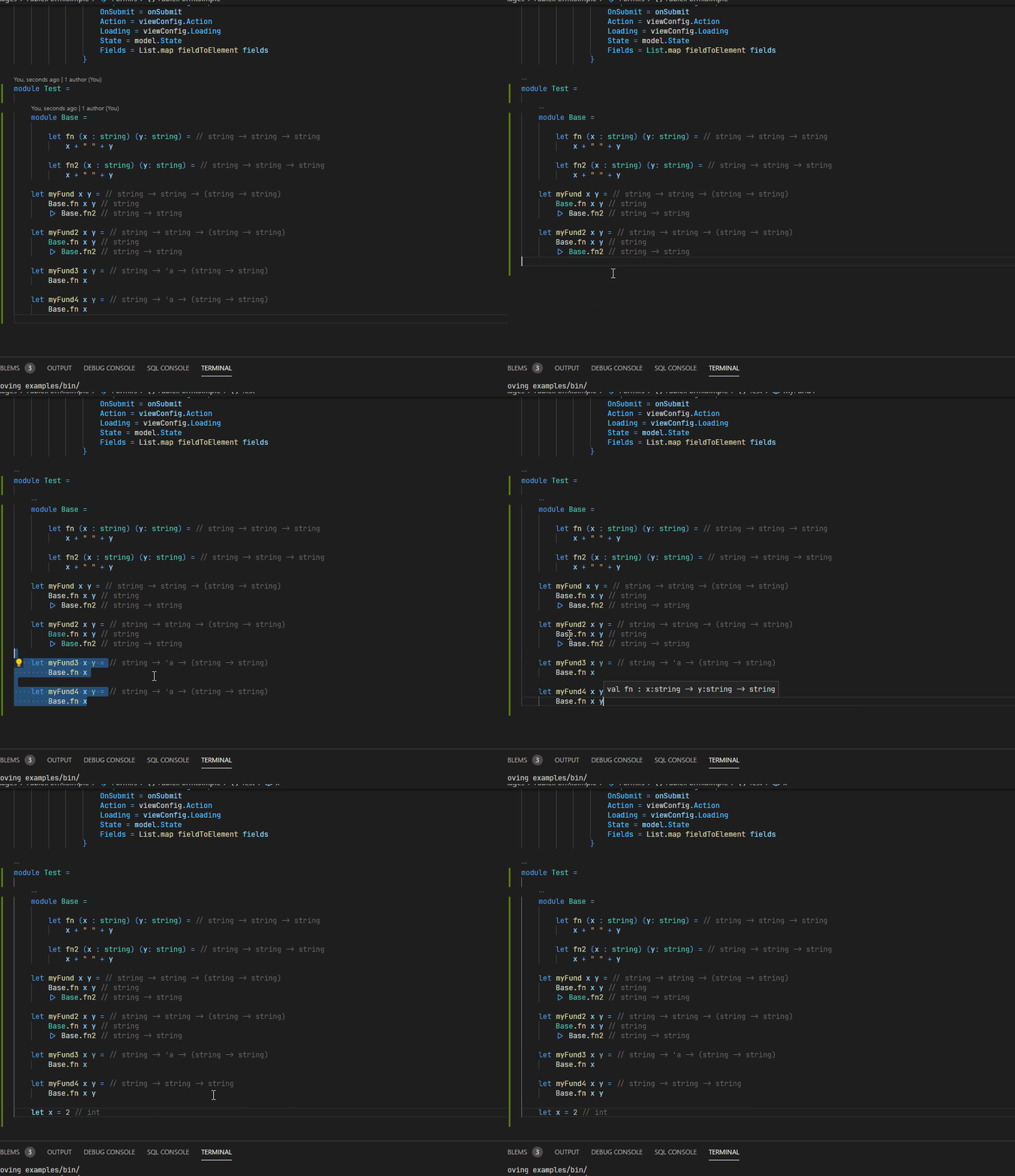
Code for reproduction
module Test =

    module Base =

        let fn (x : string) (y: string) =
            x + " " + y

        let fn2 (x : string) (y: string) =
            x + " " + y

    let myFund x y =
        Base.fn x y
        |> Base.fn2

    let myFund2 x y =
        Base.fn x y
        |> Base.fn2

    let myFund3 x y =
        Base.fn x

    let myFund4 x y =
        Base.fn x y
Machine info
- OS: Windows
- .NET SDK version: 5.0.202
- Ionide version: 5.5.3
 MangelMaxime
All 13 comments
Hey @MangelMaxime :wave:,
Thanks for backing our project. If possible, We will handle your
issue with priority support. To make sure we don't forget how special
you are, we added a backer label to your issue.
Thanks again for backing us :tada:!
![open-collective-bot[bot] picture](https://avatars.githubusercontent.com/in/23739?v=4&s=40) open-collective-bot[bot]
on 28 Apr 2021
open-collective-bot[bot]
on 28 Apr 2021
One thing that would help here is to use the Inspect Tokens and Scopes command from the palette and record the semantic token classes (as well as the textmate grammar classes) applied to the code in the different locations.

I have a suspicion that some of the textmate grammars are clobbering some of the semantic highlight tokens/ranges based on personal experience that I haven't turned into an issue.
 baronfel
on 28 Apr 2021
baronfel
on 28 Apr 2021
I thought that by default VSCode used the textmate grammar, and if semantic highlight tokens is active and gives a result for the token/range it take over the textmate grammar.
I don't really like what I see from the extraction of the scope informations... When running a diff against the HTML extraction I made I get not difference...
https://www.diffchecker.com/qmdekBDU
Information extracted when Base is colored in green:
| language | fsharp |
| standard token type | Other |
| foreground | #4EC9B0 |
| background | #1E1E1E |
| contrast ratio | 8.18 |
| semantic token type | namespace |
| foreground | entity.name.namespace |
|
|
| { "foreground": "#4EC9B0" } | |
| textmate token | ········Base.fn·x·y (19) |
| textmate scopes | source.fsharp.fsl |
Information extracted when Base is colored in white:
| language | fsharp |
| standard token type | Other |
| foreground | #4EC9B0 |
| background | #1E1E1E |
| contrast ratio | 8.18 |
| semantic token type | namespace |
| foreground | entity.name.namespace |
|
|
| { "foreground": "#4EC9B0" } | |
| textmate token | ·Base.fn2 (9) |
| textmate scopes | source.fsharp.fsl |
MangelMaxime
on 28 Apr 2021
I've thought the same about the precedence involved, but given that the semantic tokens scopes are the same for both use cases I've not been able to come to another reason why the display would be different :-/ I've always seen the same thing: the semantic token scopes in these situations were correct as far as I could tell, yet still there was a visual difference.
baronfel
on 28 Apr 2021
Unless the inspect token debug feature doesn't provides us will all the information for me it seems to lead to a bug in VSCode perhaps?
I mean if they are the same textmate grammar token and semantic token type it should gives the same results.
Do you know where all the storage.type.* stuff are coming from? I don't remember seeing them in the Ionide grammar when working on it.
MangelMaxime
on 28 Apr 2021
I don't know what that long list of storage.type entries are, but I have them as well. I guess they might be potentially-applicable textmate scopes?
baronfel
on 28 Apr 2021
I had the idea to disable the syntax semantic feature of VSCode to check what the grammar looks like by default.
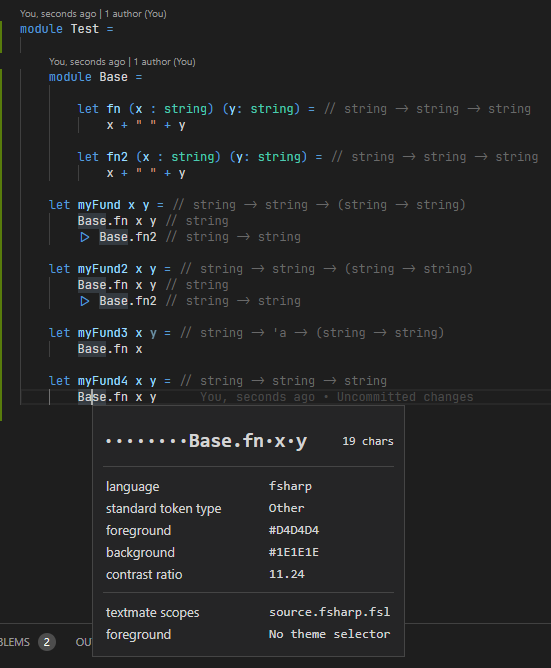
We can see that the grammar never colored any text in "green" even the module Base and namespace Base are not colored. So I think we can assume that the problem is with the syntax semantic.
And the long list of items is also coming from it.
The good news for me, is that I seem to avoid a journey into regex world 🤣
MangelMaxime
on 28 Apr 2021
The long list of storage.type thing seems to comes from the theme definition:
Perhaps, we see it because Ionide say I want a token of type namespace
I suppose the first line foreground | entity.name.namespace is the semantic scope chosen.
So if the scope is correct, it would leads to a rendering issue perhaps? I am not sure if we can open an issue on the VSCode repo with these informations.
Do we have an easy way to check the return of FSAC to check that FSAC gives to the correct semantic token and we understand the debug tooltip correctly?
MangelMaxime
on 28 Apr 2021
Good finds! For the semantic tokens there are a few layers involved, all of which are in FSAC, not ionide.
- Is the range reported correctly in the underlying FCS
GetSemanticRangecall? Usage - Is the correct data still retained after we do our custom logic in FSAC to split out multi-line and nested ranges into a flat list of un-nested semantic tokens?
- Assuming the source data is still good, is it still correct when it comes out of the LSP-required semantic highlight range encoding algorithm? Or is there a bug in this algorithm?
- Can a test case be added to detect the error you're seeing?
This is what I'd be working through to root-cause this issue.
baronfel
on 28 Apr 2021
Here's a more minimal example (at least on my system) that triggers the invalid coloration of the module name:
module Base =
    let fn (x : string) (y: string) =
        x + " " + y

let myFund x y =
    Base.fn x y
I figured out the root cause and will send an FSAC PR with tests shortly.
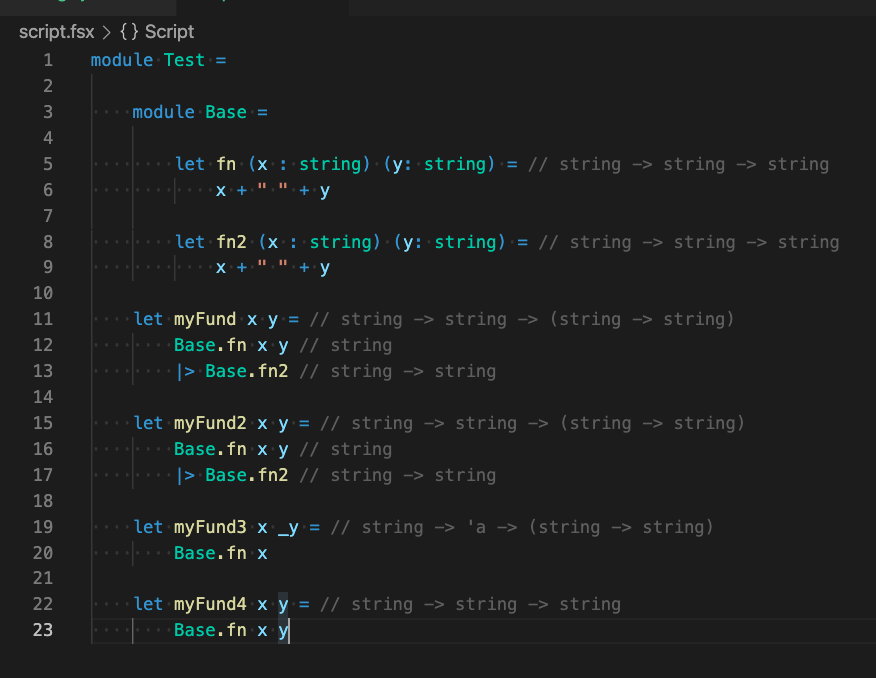
The bug was in step 2 listed in my comment above. FCS understands semantic classification spans that can be nested, and so does the LSP spec, but VSCode specifically does not so instead we have logic in FSAC to split out any tokens that are nested into a set of sub-tokens that ensure a non-overlapping set of ranges for the tokens. This could result in tokens with zero length, when the start or end of the 'parent' token was the same as the matching start or end of the 'child' token. Simply filtering these cases out ensures that coloration remains consistent as we expect.
baronfel
on 30 Apr 2021
Awesome <3
So much color it looks beautiful 😍 ahah
MangelMaxime
on 30 Apr 2021
Released in 5.5.4 this afternoon.
baronfel
on 30 Apr 2021
Related issues
 lilred
·
6Comments
lilred
·
6Comments
 isaacabraham
·
5Comments
isaacabraham
·
5Comments
 draganjovanovic1
·
3Comments
isaacabraham
·
5Comments
draganjovanovic1
·
3Comments
isaacabraham
·
5Comments
 alfonsogarciacaro
·
5Comments
alfonsogarciacaro
·
5Comments