Ionide-vscode-fsharp: FSX files full of errors since 4.1.0
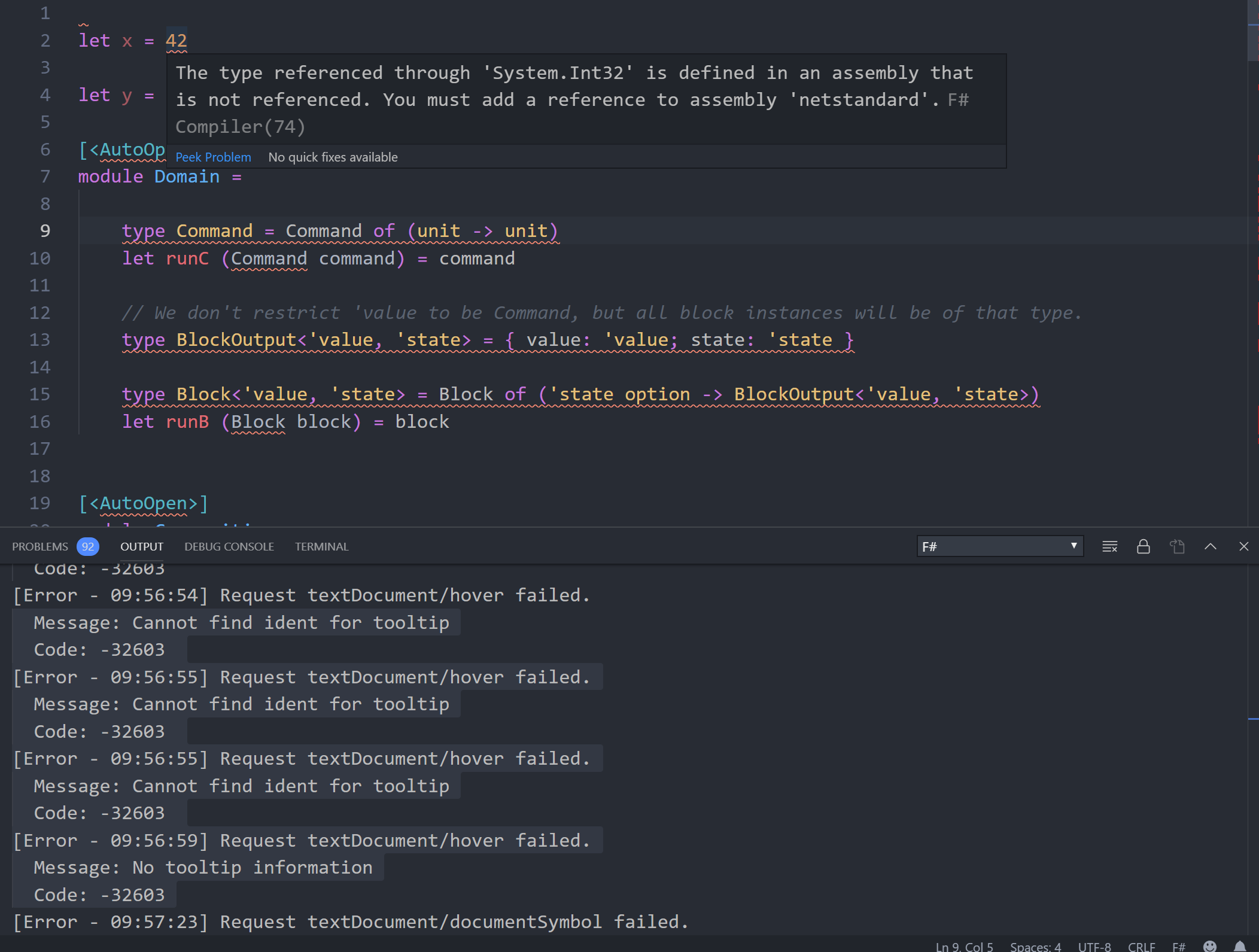
Since I updated to 4.1.0, I get a lot of error messages in fsx files.
- It seems that even basic types like string and int cause an error message, as you can see in the attached screenshot.
- When I move back to 4.0.6, it's ok again - no error messages.
- There are a lot more "Code: -32603" error messages in the log (also on the screenshot) - may be related to #1182.
Bug may be related to #1215, but since the described behavior definitely came with 4.1.0 (some hours ago), it's propably another issue.
 ronaldschlenker
All 13 comments
Hey @ronaldschlenker :wave:,
Thank you for opening an issue. We will get back to you as
soon as we can. Also, check out our OpenCollective and consider
backing us.
https://opencollective.com/ionide
PS.: We offer
backersupport for all backers. Don't forget to addbackerlabel when you start backing us :smile:
![open-collective-bot[bot] picture](https://avatars.githubusercontent.com/in/23739?v=4&s=40) open-collective-bot[bot]
on 19 Sep 2019
open-collective-bot[bot]
on 19 Sep 2019
Yep I am seeing this as well. Not only fsx files though, regular fs files as well.
 dlidstrom
on 20 Sep 2019
dlidstrom
on 20 Sep 2019
Can either of you see if you might be hitting https://github.com/fsharp/FsAutoComplete/issues/457? Essentially I'm wondering if you have mixed file soearator slashes in your project files. If you have the verbose logging on, you can verify this by seeing if the Files property of the 'fsharp/notifyWorkspace' even is an empty array.
 baronfel
on 20 Sep 2019
baronfel
on 20 Sep 2019
I have a small project file, just this:
<Project Sdk="Microsoft.NET.Sdk">
  <PropertyGroup>
    <OutputType>Exe</OutputType>
    <TargetFramework>net472</TargetFramework>
  </PropertyGroup>
  <ItemGroup>
    <Compile Include="Srtp.fs" />
    <Compile Include="Program.fs" />
  </ItemGroup>
  <Import Project="..\fsc.props" />
  <Import Project="..\.paket\Paket.Restore.targets" />
</Project>
In general, I start my .fsx files with:
#if !FAKE
#r "Facades/netstandard"
#r "netstandard"
It required 1-2 years ago. I am not sure if it still the case or no.
 MangelMaxime
on 20 Sep 2019
MangelMaxime
on 20 Sep 2019
git clean -xdf and good old medicine 'Reload window' sorted this for me which seems strange.
 ollipekka
on 21 Sep 2019
ollipekka
on 21 Sep 2019
I've temporarily fixed this by reverting FSAC to netframework instead of netcore in settings.
 isaacabraham
on 21 Sep 2019
isaacabraham
on 21 Sep 2019
Should be fixed in 4.2.0
 Krzysztof-Cieslak
on 8 Oct 2019
Krzysztof-Cieslak
on 8 Oct 2019
I still have the problem with 4.2.0, but @isaacabraham's workaround works for me
 lfr
on 10 Oct 2019
lfr
on 10 Oct 2019
I can also still reproduce this with 4.2.0 changing FSAC to net does indeed work
 almostSouji
on 13 Oct 2019
almostSouji
on 13 Oct 2019
I still have this problem with 4.9.0 on MacOS Catalina, switched to net too.
 davidspiess
on 18 Apr 2020
davidspiess
on 18 Apr 2020
FWIW I had that pb with some preview versions, uninstalling them with uninstall tools fixed it
```
$ dotnet --info
..
Host (useful for support):
Version: 5.0.0-preview.4.20251.6
Commit: 47ec733ba7
after uninstall

 ```
$ dotnet --info
.NET Core SDK (reflecting any global.json):
 Version:   3.1.300
 Commit:    b2475c1295

Runtime Environment:
 OS Name:     Mac OS X
 OS Version:  10.13
 OS Platform: Darwin
 RID:         osx.10.13-x64
 Base Path:   /usr/local/share/dotnet/sdk/3.1.300/

Host (useful for support):
  Version: 3.1.4
  Commit:  0c2e69caa6
 nrolland
on 1 Jun 2020
nrolland
on 1 Jun 2020
I'm using the .NET 5 SDK and had the same issue. Reverting back to the .NET backend fixes it.
 ErikSchierboom
on 3 Dec 2020
ErikSchierboom
on 3 Dec 2020
Related issues
isaacabraham
·
5Comments
 draganjovanovic1
·
3Comments
draganjovanovic1
·
3Comments
 sivabudh
·
3Comments
sivabudh
·
3Comments
 vasily-kirichenko
·
6Comments
vasily-kirichenko
·
6Comments
 yuhr
·
3Comments
yuhr
·
3Comments
Most helpful comment
I've temporarily fixed this by reverting FSAC to netframework instead of netcore in settings.