Ionide-vscode-fsharp: Intellisense and CodeLens have been gone after v3.29 update [LINUX/UBUNTU]
After the update, firstly fsi.exe was missing so I configured it manually in settings.json.
But intellisense-underlining syntax errors- and code lens not working.
Auto-complete works fine though.
UPDATE DEBUG INFO:
[16:21:02 INFO ] .Net runtime specified
[16:21:02 INFO ] finding FSAC for
runtime: NET
mono: mono
dotnet: null
OS Distro:
NAME="Ubuntu"
VERSION="18.04.1 LTS (Bionic Beaver)"
ID=ubuntu
ID_LIKE=debian
PRETTY_NAME="Ubuntu 18.04.1 LTS"
VERSION_ID="18.04"
VERSION_CODENAME=bionic
UBUNTU_CODENAME=bionic
VSCode :
Version: 1.28.2
Commit: 7f3ce96ff4729c91352ae6def877e59c561f4850
Date: 2018-10-17T00:20:56.183Z
Electron: 2.0.9
Chrome: 61.0.3163.100
Node.js: 8.9.3
V8: 6.1.534.41
Architecture: x64
Ionide Settings :
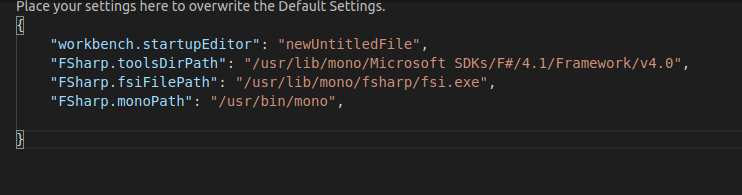
 memoricab
All 19 comments
Hum synthax highligh should still works. Can you please try uninstall and re-install ionide extension ?
 MangelMaxime
on 21 Oct 2018
MangelMaxime
on 21 Oct 2018
I have already tried many times to uninstall completely and install mono packages, vscode and also extension. But not solved the issue.
memoricab
on 21 Oct 2018
I have the same issue
 Teddmab
on 21 Oct 2018
Teddmab
on 21 Oct 2018
Not a solution but in order to use those features I set-up ionide extension v3.27.0.
Now CodeLens and intellisense work fine.
memoricab
on 21 Oct 2018
I have the same issue.
 Paludan
on 25 Oct 2018
Paludan
on 25 Oct 2018
Same here - following appears in the log upon startup:
[11:38:57 ERROR] RES (008) <- {workspaceLoad} ERROR in 945 ms: {stack: Error: Request failed with status code 500
    at createError (/Users/me/.vscode/extensions/ionide.ionide-fsharp-3.29.0/fsharp.js:13103:15)
    at settle (/Users/me/.vscode/extensions/ionide.ionide-fsharp-3.29.0/fsharp.js:17033:12)
    at IncomingMessage.handleStreamEnd (/Users/me/.vscode/extensions/ionide.ionide-fsharp-3.29.0/fsharp.js:27857:11)
    at emitNone (events.js:111:20)
    at IncomingMessage.emit (events.js:208:7)
    at endReadableNT (_stream_readable.js:1056:12)
    at _combinedTickCallback (internal/process/next_tick.js:138:11)
    at process._tickCallback (internal/process/next_tick.js:180:9), message: Request failed with status code 500, config: [object Object], request: [object Object], response: [object Object]} Data=undefined
 Rhywun
on 28 Oct 2018
Rhywun
on 28 Oct 2018
Has there been any progress on this?
 lsmullenbrock
on 2 Nov 2018
lsmullenbrock
on 2 Nov 2018
This problem cuts across platforms: I have the same issue in Windows 10
 Bob-McCrory
on 2 Nov 2018
Bob-McCrory
on 2 Nov 2018
This problem cuts across platforms: I have the same issue in Windows 10
God damn I still had it working on my Arch machine, but now it stopped working there too >_>
Paludan
on 2 Nov 2018
Also seeing this same issue on Solus Linux
 benfjohnson
on 3 Nov 2018
benfjohnson
on 3 Nov 2018
Not working for me either in Windows 10. TBH, I don't know if this is actually the same problem but CodeLens and Intellisense is not working for me.
I create a simple file: hello.fs
let hello = "hello"
I have
Ionide-Fsharp: 3.29.0
VSCode:1.28.2
VS Community 2017:15.8.9
VS Build tools 2017:15.8.9
Dotnet Core CLI:2.1.403
I tried to downgrade ionide to 3.27.0 and 3.25.4 but it didn't help.
console.ts:136 [Extension Host] [IONIDE-FSAC] Cannot execute recordStubGenerator, File 'c:\Users\danie\projects\SuaveRestApi\hello.fs' not parsed
t.log @ console.ts:136
t._logExtensionHostMessage @ extensionHost.ts:438
(anonymous) @ extensionHost.ts:246
emitTwo @ events.js:126
emit @ events.js:214
emit @ internal/child_process.js:772
_combinedTickCallback @ internal/process/next_tick.js:141
_tickCallback @ internal/process/next_tick.js:180
console.ts:136 [Extension Host] [IONIDE-FSAC] Cannot execute signature, File 'c:\Users\danie\projects\SuaveRestApi\hello.fs' not parsed
t.log @ console.ts:136
t._logExtensionHostMessage @ extensionHost.ts:438
(anonymous) @ extensionHost.ts:246
emitTwo @ events.js:126
emit @ events.js:214
emit @ internal/child_process.js:772
_combinedTickCallback @ internal/process/next_tick.js:141
_tickCallback @ internal/process/next_tick.js:180
console.ts:136 [Extension Host] [IONIDE-FSAC] Cannot execute tooltip, File 'c:\Users\danie\projects\SuaveRestApi\hello.fs' not parsed
t.log @ console.ts:136
t._logExtensionHostMessage @ extensionHost.ts:438
(anonymous) @ extensionHost.ts:246
emitTwo @ events.js:126
emit @ events.js:214
emit @ internal/child_process.js:772
_combinedTickCallback @ internal/process/next_tick.js:141
_tickCallback @ internal/process/next_tick.js:180
console.ts:136 [Extension Host] [IONIDE-FSAC] Cannot execute symboluse, File 'c:\Users\danie\projects\SuaveRestApi\hello.fs' not parsed
t.log @ console.ts:136
t._logExtensionHostMessage @ extensionHost.ts:438
(anonymous) @ extensionHost.ts:246
emitTwo @ events.js:126
emit @ events.js:214
emit @ internal/child_process.js:772
_combinedTickCallback @ internal/process/next_tick.js:141
_tickCallback @ internal/process/next_tick.js:180
console.ts:136 [Extension Host] [IONIDE-FSAC] Cannot execute signature, File 'c:\Users\danie\projects\SuaveRestApi\hello.fs' not parsed
t.log @ console.ts:136
t._logExtensionHostMessage @ extensionHost.ts:438
(anonymous) @ extensionHost.ts:246
emitTwo @ events.js:126
emit @ events.js:214
emit @ internal/child_process.js:772
_combinedTickCallback @ internal/process/next_tick.js:141
_tickCallback @ internal/process/next_tick.js:180
console.ts:136 [Extension Host] [IONIDE-FSAC] Cannot execute recordStubGenerator, File 'c:\Users\danie\projects\SuaveRestApi\hello.fs' not parsed
F# Language Service. There is a Win32Exception "The system cannot find the file specified" but I don't understand which file it can't find.
[10:21:16 DEBUG] REQ (012) -> {parse}, File = "c:\Users\se-danhegn-01\repos\codetest\hello.fsx"
Data={"FileName":"c:\\Users\\se-danhegn-01\\repos\\codetest\\hello.fsx","IsAsync":true,"Lines":["let hello = \"hello\""],"Version":1}
[10:21:16 DEBUG] RES (012) <- {parse} in 73 ms: Kind={"info"}
Data="Request cancelled (exn was System.ComponentModel.Win32Exception (0x80004005): The system cannot find the file specified\r\n   at System.Diagnostics.Process.StartWithCreateProcess(ProcessStartInfo startInfo)\r\n   at System.Diagnostics.Process.Start()\r\n   at FsAutoComplete.Utils.runProcess(FSharpFunc`2 log, String workingDir, String exePath, String args) in D:\\Programowanie\\ionide\\paket-files\\github.com\\fsharp\\FsAutoComplete\\src\\FsAutoComplete.Core\\Utils.fs:line 532\r\n   at Dotnet.ProjInfo.Inspect.msbuild[a](MSBuildExePath msbuildExe, FSharpFunc`2 run, String project, FSharpList`1 args)\r\n   at Dotnet.ProjInfo.Inspect.getProjectInfoOldSdk[a,b,c,d](FSharpFunc`2 log, FSharpFunc`2 msbuildExec, FSharpFunc`2 getArgs, FSharpList`1 additionalArgs, a projPath)\r\n   at FsAutoComplete.NETFrameworkInfoProvider.getInfoFromMsbuild[a](FSharpFunc`2 getArgs, FSharpList`1 additionalProps) in D:\\Programowanie\\ionide\\paket-files\\github.com\\fsharp\\FsAutoComplete\\src\\FsAutoComplete.Core\\NETFrameworkInfoProvider.fs:line 46\r\n   at FsAutoComplete.NETFrameworkInfoProvider.getInstalledNETVersions() in D:\\Programowanie\\ionide\\paket-files\\github.com\\fsharp\\FsAutoComplete\\src\\FsAutoComplete.Core\\NETFrameworkInfoProvider.fs:line 90\r\n   at System.Lazy`1.ViaFactory(LazyThreadSafetyMode mode)\r\n--- End of stack trace from previous location where exception was thrown ---\r\n   at System.Runtime.ExceptionServices.ExceptionDispatchInfo.Throw()\r\n   at System.Lazy`1.CreateValue()\r\n   at FsAutoComplete.Environment.netReferecesAssembliesTFMLatest() in D:\\Programowanie\\ionide\\paket-files\\github.com\\fsharp\\FsAutoComplete\\src\\FsAutoComplete.Core\\Environment.fs:line 144\r\n   at <StartupCode$FsAutoComplete-Core>.$CompilerServiceInterface.GetProjectOptionsFromScript@510.Invoke(Unit unitVar) in D:\\Programowanie\\ionide\\paket-files\\github.com\\fsharp\\FsAutoComplete\\src\\FsAutoComplete.Core\\CompilerServiceInterface.fs:line 510\r\n   at Microsoft.FSharp.Control.AsyncPrimitives.CallThenInvoke[T,TResult](AsyncActivation`1 ctxt, TResult result1, FSharpFunc`2 part2)\r\n   at Microsoft.FSharp.Control.Trampoline.Execute(FSharpFunc`2 firstAction))"
[10:21:16 DEBUG] REQ (013) -> {declarations}, File = "c:\Users\se-danhegn-01\repos\codetest\hello.fsx"
Data={"FileName":"c:\\Users\\se-danhegn-01\\repos\\codetest\\hello.fsx","Lines":["let hello = \"hello\""],"Version":0}
[10:21:16 DEBUG] RES (013) <- {declarations} in 3 ms: Kind={"declarations"}
Data=[{"Declaration":{"UniqueName":"Hello_1_of_1","Name":"Hello","Glyph":"Module","GlyphChar":"N","IsTopLevel":true,"Range":{"StartColumn":1,"StartLine":1,"EndColumn":1,"EndLine":2},"BodyRange":{"StartColumn":1,"StartLine":1,"EndColumn":20,"EndLine":1},"File":"c:\\Users\\se-danhegn-01\\repos\\codetest\\hello.fsx","EnclosingEntity":"M","IsAbstract":false},"Nested":[{"UniqueName":"Hello_1_of_1","Name":"hello","Glyph":"Field","GlyphChar":"F","IsTopLevel":false,"Range":{"StartColumn":5,"StartLine":1,"EndColumn":20,"EndLine":1},"BodyRange":{"StartColumn":5,"StartLine":1,"EndColumn":20,"EndLine":1},"File":"c:\\Users\\se-danhegn-01\\repos\\codetest\\hello.fsx","EnclosingEntity":"M","IsAbstract":false}]}]
 da9l
on 10 Nov 2018
da9l
on 10 Nov 2018
Same for me (no codelens, no intellisense) on
- macOS 10.14.1
- vscode 1.29.1
- ionide 3.30.0
- mono 5.16
 marco-m
on 25 Nov 2018
marco-m
on 25 Nov 2018
Same for me (no codelens, no intellisense) on
- macOS 10.14.1
- vscode 1.29.1
- ionide 3.30.0
- mono 5.16
I have been able to get it working on my MacBook using macOS Monjave. I use the following settings
{
    "FSharp.fsiFilePath": "/Library/Frameworks/Mono.framework/Versions/Current/Commands/fsharpi",
    "FSharp.monoPath": "/Library/Frameworks/Mono.framework/Versions/Current/Commands/mono",
    "FSharp.msbuildLocation": "/Library/Frameworks/Mono.framework/Versions/Current/Commands/msbuild",
    "FSharp.fsacRuntime": "netcore"
}
Paludan
on 26 Nov 2018
@Paludan that was it! thanks! To summarize for other pool souls googling, this is valid only for macOS:
- install mono
- install dot net core (yes, both!)
- use the settings proposed by @paludan above. Dot net core is used by
"FSharp.fsacRuntime": "netcore".
If I don't install dot net core and so use"FSharp.fsacRuntime": "net", I don't get codelens nor intellisense.
marco-m
on 26 Nov 2018
@Paludan that was it! thanks! To summarize for other pool souls googling, this is valid only for macOS:
- install mono
- install dot net core (yes, both!)
- use the settings proposed by @Paludan above. Dot net core is used by
"FSharp.fsacRuntime": "netcore".
If I don't install dot net core and so use"FSharp.fsacRuntime": "net", I don't get codelens nor intellisense.
Yeah I looked at the console output, and saw the dotnet: null message. This prompted me so think "Uh well I don't have it installed", and so I installed it and set the FSAC runtime to use netcore. Voila!
Paludan
on 26 Nov 2018
I can confirm that adding the suggested lines to the settings file results in Intellisense working again on macOS. Thanks, @Paludan
PS. I already had all the required software installed. The difference seems to be that this version of the plugin requires manually setting these paths.
Rhywun
on 26 Nov 2018
I followed above instructions. Everything[Ionide and Fsi] works fine now. Thank you.
Steps that I followed [OS: Ubuntu 18.04 bionic; Ionide Version: 3.30 ]
- Download .NET core from here
- Configured settings.json as below.
{ "FSharp.fsiFilePath": "/usr/lib/mono/fsharp/fsi.exe",
 "FSharp.monoPath": "/usr/bin/mono",
 "FSharp.msbuildLocation": "/usr/lib/mono/msbuild",
 "FSharp.fsacRuntime": "netcore" }
I hope you guys get working ionide as well. :)
Nb: As @Rhywun mentioned after Ionide v3.29, it requires to set paths manually and _additionally we have also changed fsacRuntime to netcore in order to run without problem._
memoricab
on 27 Nov 2018
Looks like my solution works for Linux as well then (of course with altered paths) I suppose this can be marked as solved.
Paludan
on 27 Nov 2018
TBF, I'm not super happy about that, and I'm not really sure why some of those are required... but well, I'm glad that you've found solutions. Sorry for all the troubles.
 Krzysztof-Cieslak
on 27 Nov 2018
Krzysztof-Cieslak
on 27 Nov 2018
Related issues
 draganjovanovic1
·
3Comments
draganjovanovic1
·
3Comments
 alfonsogarciacaro
·
5Comments
alfonsogarciacaro
·
5Comments
 isaacabraham
·
5Comments
isaacabraham
·
4Comments
isaacabraham
·
5Comments
isaacabraham
·
4Comments
 vasily-kirichenko
·
6Comments
vasily-kirichenko
·
6Comments