Ionicons: Ionicons v4 - Web Component Testing
Ionicons v4 is being built to also work as a web component. Instead of using an icon font that includes every icon, and a css file that includes every icon's css, the web component version will lazy load the icon as an svg. This means all 900+ icons are available on-demand, but without having to download them all. Additionally, the icon font file itself is a culprit to holding up TTI, so this new way will help speed up startup times.
Another thing that's unique is that instead of just using just an img tag that requests an svg file, such as: <img src="star.svg"> it actually sets the svg elements within the DOM, which allows developers to customize any svg element with css. It will also work cross-origin and on the file:// protocol.
To test out Ionicons as a web component:
Add this script to any webpage:
https://unpkg.com/[email protected]/dist/ionicons.js

Add this element to the DOM:
<ion-icon name="star"></ion-icon>
Note that you can add <ion-icon> to the DOM however you want, whether it's just written within an index.html file, appended to the DOM using jQuery, or apart of an angular/react/vue/etc. component.
Please give it a test and let us know how it goes. Additionally, the npm package still includes the icon font, optimized svgs, and PNGs, so you still have many options for how you'd like to use these icons.
 adamdbradley
All 32 comments
I should also add that Ionic itself has the logic to decide if the user should see the ios or material design version. However, Ionicons is only the icon pack. If you're not using Ionic but want to see different versions of the icon you can prefix each one with ios- or md-, such as:
<ion-icon name="ios-star"></ion-icon>
Ionicon's default is to show the material design version.
adamdbradley
on 20 Sep 2017
@adamdbradley, first time I'm trying web-components, but I'm not getting to work.
The .js files are being downloaded (if I check the network tab in the Chrome Developer Tools), but nothing is displayed.
<html>
    <head>
        <script type="text/javascript" src="https://unpkg.com/[email protected]/dist/ionicons.js"></script>
    </head>
    <body>
        <ion-icon name="star"></ion-icon>
        <ion-icon name="ios-star"></ion-icon>
    </body>
</html>
 darshanrampatel
on 20 Sep 2017
darshanrampatel
on 20 Sep 2017
@darshanrampatel try adding the utf8 charset meta tag to the document head:
<meta charset="UTF-8">
@adamdbradley, yep, that was it - thanks!
darshanrampatel
on 20 Sep 2017
@adamdbradley If I want to host my own version, is it enough to upload dist/ionicons.js and dist/ionicons/**?
 pwespi
on 20 Sep 2017
pwespi
on 20 Sep 2017
@pwespi Yes it should be. Just have ionicons.js a sibling to the ionicons directory and should be good to go. Please give that a shot and let us know if there are any issues, thanks.
adamdbradley
on 20 Sep 2017
I pulled all the tags from http://ionicframework.com/docs/ionicons/
It seems like out of the 948, 164 are missing?
https://ion-icons-webcomponent.firebaseapp.com
 ajonp
on 21 Sep 2017
ajonp
on 21 Sep 2017
@ajonp Yeah looks like you're right, I'll take a look. Thanks!
adamdbradley
on 21 Sep 2017
Actually I think we're good. Not every icon has an outline, and those are the ones not being found. However, with iOS 11 the outline style really isn't being used anymore. I'll chat with @bensperry and see what we'll want to do for the next release regarding iOS outline icons, since he'll be making many updates soon. Thanks
adamdbradley
on 21 Sep 2017
@adamdbradley sounds good I updated the sample page with the 859 that are listed in the branch.. Trying to wrap my head around the web component version of this for a PWA. Would we just use the serviceworker to go grab these and build up the cache, so we wouldn't have to make 859 network calls?
I know on our hosting it will start to hit throttling limits otherwise.
ajonp
on 21 Sep 2017
If you're actually using all 859 on one page you should probably use the icon font instead, since that won't be 859 requests.
Since you're using the icons from the unpkg CDN instead of your own domain, we'll have to make sure the service worker is setup correctly. I'll talk with Mr. ServiceWorker himself, @jgw96 about this.
adamdbradley
on 21 Sep 2017
I works. I tried in a angular context So after reading this article https://www.sitepen.com/blog/2017/09/14/using-web-components-with-angular/
I needed first to allow web component in angular
Ok web component version seem great
but If for any reason I want to use the web fonts instead, how do I do pratically? @adamdbradley
 sinsunsan
on 22 Nov 2017
sinsunsan
on 22 Nov 2017
any clue on how to use alternatively the fonts icons of v4 instead of web components ? @adamdbradley
sinsunsan
on 29 Nov 2017
To use the font icons you add the <link> tag to the css file:
<link rel="stylesheet" href="/path/to/ionicons.min.css">
And then to use the icon you'd add the css class ion ion-NAME, such as:
<i class="ion ion-star-md"></i>
@adamdbradley I've tested out https://ion-icons-webcomponent.firebaseapp.com/ and I've seen that every icon dowloads a different JS file which add a <svg> tag. Is that preferred from download the font-icons once in terms of PWA performance?
 msaelices
on 10 Dec 2017
msaelices
on 10 Dec 2017
@msaelices In there case where you're showing hundreds of icons, no, you're right the icon font would be better. However, most ionic apps only have a handful of icons across the entire app, which is where downloading separate svg files on-demand is what we've found to be better for performance. Additionally, the icon-font, which has all 700+ icons, holds up a PWA's time-to-interactive since it needs to download the entire font file first, which is another reason we prefer this newer approach. But like you pointed out, if you are showing hundreds of icons on the same page, then the icon-font is still preferred, which is why v4 will still have the font version.
adamdbradley
on 12 Dec 2017
@msaelices @adamdbradley explains it very well. Basically hogging the network stack by loading in that huge font file when your only using 1 or 2 icons on a page is much worse than having multiple smaller requests. Also, in todays world of HTTP2 and H2 push, multiple smaller requests are barely an issue anymore unless you take it overboard. So, for most PWA's that only use a few icons on each page, pulling in those smaller svg's are going to be much faster than loading in the huge font file.
 jgw96
on 12 Dec 2017
jgw96
on 12 Dec 2017
But how do you set colors of these svg-based icons?
 laurentpayot
on 15 Dec 2017
laurentpayot
on 15 Dec 2017
@laurentpayot The SVG icons in v4 will, by default, inherit your text color. So, you can use them just like you would use the icon font:
<p style="color: blue;">This icon <ion-icon name="logo-ionic"></ion-icon> is blue.</p>

One cool thing about SVG is that, if you want, you can also target and change the fill of individual elements:
<style>
    ion-icon[name="logo-ionic"] > path:first-child {
        fill: red;
    }
</style>

<p style="color: blue;">This icon <ion-icon name="logo-ionic"></ion-icon> is blue.</p>

 camwiegert
on 15 Dec 2017
camwiegert
on 15 Dec 2017
That's the exact behavior I want. Unfortunately it is not working inside my Vue components...
Here is a jsfiddle: https://jsfiddle.net/laurentpayot/b5zbnxu6/2/
laurentpayot
on 15 Dec 2017
@lancehudson Thanks for letting us know! Sorry we had some fixes so the version to use now is https://unpkg.com/[email protected]/dist/ionicons.js. I tested it out in your jsfiddle and seemed to work. Would you be able to test it out too and let us know if you run into any more issues? THanks
adamdbradley
on 15 Dec 2017
@adamdbradley It's working now for the jsfiddle and for my project as well. Thanks for the fix! :+1:
laurentpayot
on 15 Dec 2017
Wow this is great, i was using ionicons and when switching to lazy loaded pages (@IonicPage), I somehow lost all ionicons. With this script, they show again.
I created an issue: #526
Fixed my issue by correctly importing IonicModule
 frostyandy2k
on 7 Mar 2018
frostyandy2k
on 7 Mar 2018
Compared to V3, most ios outlined icons are gone (e.g. ios-time-outline). Are they going to come back? I use them a lot for unselected icons.
laurentpayot
on 15 Mar 2018
Also created #528 for Chrome device emulation support.
laurentpayot
on 16 Mar 2018
Oops I just realized outlined icons are ditched in iOS 11. I'm fine without them then.
laurentpayot
on 23 Mar 2018
Now tat ionicons 4.1 is released 'officially' we test it to an ionic-angular 3.9.2 application. We only change in package.json ionicons from 3.0.0 to 4.1.0.
Now that they are Web Components we thought we had also to declare CUSTOM_ELEMENTS_SCHEMA in app.module.ts or somewhere else where we use ion-icon, but we do not and it seems to work anyway?
Why that?
We can also build a production build without errors, so do we something wrong?
Or do we not have to declare custom schema?
EDIT:
ionicons v4 seems to not work out of the box on ionic v3. If we upgarde ionicons to 4.1.0 in package.json at the end angular is always loading
 mburger81
on 16 May 2018
mburger81
on 16 May 2018
Most ios outlined icons are gone (e.g. ios-map, ios-contact). Are they going to come back?
 Ruslancic
on 18 May 2018
Ruslancic
on 18 May 2018
Could you please add a documentation how to include this in a Angular 6 Ionic 4 Application with the angular.json File and a npm package?
 danielehrhardt
on 19 May 2018
danielehrhardt
on 19 May 2018
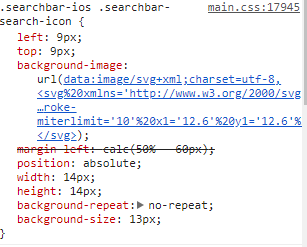
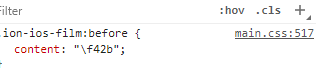
I'm having the same sort of issue as @mburger81 using Ionic v3.9.2. The ion-searchbar seems to be using the svg files, but when I manually added in an icon using ion-icon, it's using the fonts.
 kaiukdevelopment
on 30 May 2018
kaiukdevelopment
on 30 May 2018
@danielehrhardt try the suggestions here:
https://github.com/ionic-team/ionic/issues/14509
 MT--
on 8 Jun 2018
MT--
on 8 Jun 2018
My WordPress has this
wp_enqueue_style(
    'ionicons',
    '//unpkg.com/[email protected]/dist/css/ionicons.min.css',
    array(),
    CHILD_THEME_VERSION
);
Can I use Ionicons to replace text on menu items?
FourAwesome will just need to declare "CSS Class" fa fa-lg fa-home
How does Ionicons ?
Thanks
 sexilyspeaking
on 28 Nov 2018
sexilyspeaking
on 28 Nov 2018
Related issues
 chukwu
·
35Comments
chukwu
·
35Comments
 matheusdavidson
·
22Comments
matheusdavidson
·
22Comments
 cmtonkinson
·
6Comments
cmtonkinson
·
6Comments
 jlucfarias
·
14Comments
jlucfarias
·
14Comments
 Simon-Laux
·
10Comments
Simon-Laux
·
10Comments
Most helpful comment
Could you please add a documentation how to include this in a Angular 6 Ionic 4 Application with the angular.json File and a npm package?