Ionic-native: [blocked] Access to geolocation was blocked over insecure connection to ionic://localhost
I have developed a ionic app using geolocation. It is working well on android and chrome browser.
But ios and safari browser occur issue
[ ] bug report
[ ] feature request
[ ] support request => Please do not submit support requests here, use one of these channels: https://forum.ionicframework.com/ or https://ionicworldwide.herokuapp.com/
Current behavior:
I have installed cordova-plugin-geolocation and setup config for geolocation description.
App gives me location on ios chrome but not working geolocation on safari browser and ipa app on device
 cleverjack
All 10 comments
Exact same issue !
 skol-pro
on 28 Aug 2019
skol-pro
on 28 Aug 2019
Yes we have also the same issues any one got the solution for the same....
 pujarram
on 1 Oct 2019
pujarram
on 1 Oct 2019
Are you guys using capacitor? If not check link below.
I am facing this issue using the capacitor geolocation.
https://github.com/ionic-team/ionic-native/issues/780
 terranmarine
on 11 Nov 2019
terranmarine
on 11 Nov 2019
I have the same issue when running on device. Log output from my attempts to recreate:
> window.location = "/";
< "/"
[Error] ERROR – HttpErrorResponse {headers: HttpHeaders, status: 0, statusText: "Unknown Error", …}
HttpErrorResponse {headers: HttpHeaders, status: 0, statusText: "Unknown Error", url: "https://skatapp.ctcampbell.com/api/1.0/games/", ok: false, …}HttpErrorResponse
    defaultErrorLogger (vendor-es2015.js:43414)
    handleError (vendor-es2015.js:43466)
    next (vendor-es2015.js:74037)
    (anonymous function) (vendor-es2015.js:69613)
    __tryOrUnsub (vendor-es2015.js:118210)
    next (vendor-es2015.js:118149)
    _next (vendor-es2015.js:118099)
    next (vendor-es2015.js:118076)
    next (vendor-es2015.js:117862)
    emit (vendor-es2015.js:69575)
    run (polyfills-es2015.js:3130)
    onHandleError (vendor-es2015.js:73321)
    runTask (polyfills-es2015.js:3177)
    invokeTask (polyfills-es2015.js:3471)
    timer (polyfills-es2015.js:5656)
[Debug] Ionic Stop Scroll injected! (user-script:1, line 50)
[Log] Angular is running in the development mode. Call enableProdMode() to enable the production mode. (vendor-es2015.js, line 72478)
[Error] [blocked] Access to geolocation was blocked over insecure connection to ionic://localhost.

    (anonymous function) (vendor-es2015.js:101083)
    (anonymous function) (vendor-es2015.js:101041)
    ZoneAwarePromise (polyfills-es2015.js:3882)
    tryNativePromise (vendor-es2015.js:101040)
    wrapPromise (vendor-es2015.js:101066)
    updateNearbyCourses (common-es2015.js:821)
    searchLocal (tab1-tab1-module-es2015.js:130)
    ionViewDidEnter (tab1-tab1-module-es2015.js:117)
    onInvokeTask (vendor-es2015.js:73266)
    runTask (polyfills-es2015.js:3174)
    invokeTask (polyfills-es2015.js:3471)
    invokeTask (polyfills-es2015.js:4609)
    globalZoneAwareCallback (polyfills-es2015.js:4635)
    dispatchEvent
    lifecycle (common-es2015.js:626)
    fireDidEvents (common-es2015.js:617)
    (anonymous function) (common-es2015.js:570)
    asyncFunctionResume
    (anonymous function)
    promiseReactionJob
[Log] PositionError {code: 2, message: "Origin does not have permission to use Geolocation service", PERMISSION_DENIED: 1, POSITION_UNAVAILABLE: 2, TIMEOUT: 3} (common-es2015.js, line 825)
[Log] Ionic Native: deviceready event fired after 984 ms (cordova.js, line 1509)
[Log] OPEN database: _ionicstorage (cordova.js, line 1509)
[Log] new transaction is queued, waiting for open operation to finish (cordova.js, line 1509)
[Log] OPEN database: _ionicstorage - OK (cordova.js, line 1509)
[Log] DB opened: _ionicstorage (cordova.js, line 1509)
 ctcampbell
on 12 Nov 2019
ctcampbell
on 12 Nov 2019
I did have the same issue. My problem was to not have the platform loaded first. This resolved it for me.
platform.ready()
 Daou
on 20 Jan 2020
Daou
on 20 Jan 2020
EDIT: This reply is inaccurate. It seems I get proper location and still get this error message like the issue title states. My problem was actually with "Deviceorientation" for compass feature, and was unrelated to the error message. For more information see this issue, more explanation and links in the 3rd comment over there.
I have the same issue.
Cordova 9, wraping angular 7 with ionic-webview plugin on ios.
I'm getting:
[blocked] Access to geolocation was blocked over insecure connection to ionic://localhost.
Geolocation PositionError {code: 1, message: "Origin does not have permission to use Geolocation service"
I'm trying to get location and device orientation:
  private trackMe() {
    if (this.globals.iphone) {
        window.addEventListener('deviceorientation', (event) => {
          this.currentCompass$.next(Math.round(event['webkitCompassHeading']));
        });
      // }
    } else {
      window.addEventListener('deviceorientationabsolute', (event) => {
        this.currentCompass$.next(360 - Math.round(event['alpha']));
      }, true);
    }


    if (navigator.geolocation) {
      this.locationTimer = timer(0, 100).subscribe(tick => {
        navigator.geolocation.getCurrentPosition((position) => {
          this.currentLocation$.next(position.coords);
          this.isCurrentPosition$.next(true);
          this.sendLocationError = true;
        }, (err) => {
          this.isCurrentPosition$.next(false);
          this.sendError(err.message);
          console.log(err);
          this.errorMessage$ = err.message;
          console.log(this.errorMessage$);
        }, {
          enableHighAccuracy: true
        });
      });

    } else {
      alert('Geolocation is not supported by this browser.');
      this.sendError('navigator.geolocation = null ("Geolocation is not supported by this browser.")');
    }
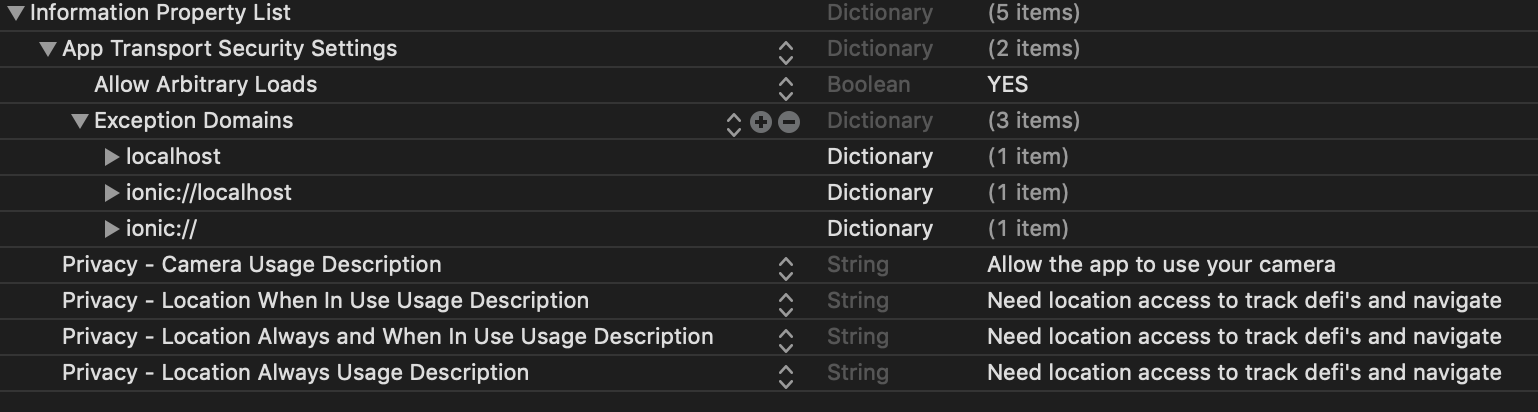
plist has:
Safari develop console:

 arielhasidim
on 6 May 2020
arielhasidim
on 6 May 2020
Has anyone found a solution for this problem? I face the same issue with iOS and ionic://localhost :(
 hamakiri
on 13 May 2020
hamakiri
on 13 May 2020
we have this problem with capacitor
 SheppardX
on 16 Jul 2020
SheppardX
on 16 Jul 2020
Any updates on this problem?
 stefiHB
on 2 Oct 2020
stefiHB
on 2 Oct 2020
As I mentioned above in my comment, I'm not sure my situation is the same.
But, this is the full solution for the problem I introduced:
https://stackoverflow.com/questions/61651936/access-to-geolocation-was-blocked-over-insecure-connection-to-ionic-localhost/64133763#64133763
arielhasidim
on 2 Oct 2020
Related issues
 kyleap
·
4Comments
kyleap
·
4Comments
 rajanshahsa
·
3Comments
rajanshahsa
·
3Comments
 icchio
·
3Comments
icchio
·
3Comments
 ihadeed
·
4Comments
ihadeed
·
4Comments
 jgw96
·
3Comments
jgw96
·
3Comments