Ionic-native: Issue with xxxOriginal with v5 upgrade
I'm submitting a ... (check one with "x")
[x] bug report
[ ] feature request
[ ] support request => Please do not submit support requests here, use one of these channels: https://forum.ionicframework.com/ or https://ionicworldwide.herokuapp.com/
Current behavior:
Using for example @ionic-native/geolocation: ^5.0.0-beta.9, names for classes have been changed to GeolocationOriginal.
When doing an ng serve I get this warning
WARNING in ./src/app/app.module.ts
52:40-59 "export 'GeolocationOriginal' was not found in '@ionic-native/geolocation'
This line breaks the compilation : export class SimpleGeolocationMock extends GeolocationOriginal
Uncaught TypeError: Object prototype may only be an Object or null: undefined
    at setPrototypeOf (<anonymous>)
    at push../src/mocks/geolocation/index.ts.__extends (main.ts:12)
    at index.ts:92
    at Object../src/mocks/geolocation/index.ts (index.ts:149)
    ...
I have the same issue with every other plugin.
Expected behavior:
Before upgrading to v5, everything was working fine. I was using Geolocation instead of GeolocationOriginal.
Steps to reproduce:
- Setup an application with Angular6 and Ionic4
- Install @ionic-native/core": "^5.0.0-beta.9" and "@ionic-native/geolocation": "^5.0.0-beta.9"
- Configure the App Module
providers: [
GeolocationOriginal
]
- Launch ng serve
**Related code:**
insert any relevant code here
**Other information:**
<!-- List any other information that is relevant to your issue. Stack traces, related issues, suggestions on how to fix, Stack Overflow links, forum links, etc. -->

**Ionic info:** (run `ionic info` from a terminal/cmd prompt and paste output below):
cli packages: (C:UsersOlivierAppDataRoamingnpmnode_modules)
@ionic/cli-utils : 1.19.2
ionic (Ionic CLI) : 3.20.0
System:
Node : v8.11.1
npm : 5.5.1
OS : Windows 10
Misc:
backend : pro
```
 olivier-po
All 5 comments
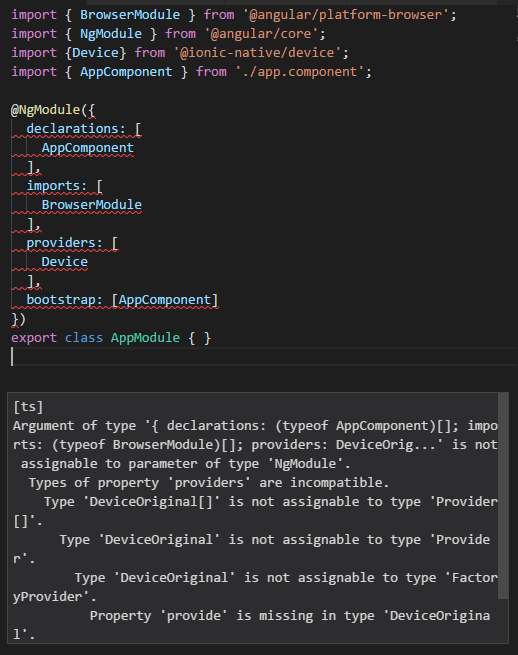
Kind of the same for me. After updating project to Angular 6 plugins don't work. I'm not able to add them to my modules providers array. App is complaining that '... Device is not a valid Provider ...'. I created a new project using Angular CLI 6.0.0, but I get the same errors there when trying to use/import the plugin.
 andelz
on 15 May 2018
andelz
on 15 May 2018
Hi,
I think this is normal as far as I can see. Here is splashScreen index
import { IonicNativePlugin, cordova } from '@ionic-native/core';
var SplashScreenOriginal = /** @class */ (function (_super) {
__extends(SplashScreenOriginal, _super);
function SplashScreenOriginal() {
return _super !== null && _super.apply(this, arguments) || this;
}
SplashScreenOriginal.prototype.show = function () { return cordova(this, "show", { "sync": true }, arguments); };
SplashScreenOriginal.prototype.hide = function () { return cordova(this, "hide", { "sync": true }, arguments); };
SplashScreenOriginal.pluginName = "SplashScreen";
SplashScreenOriginal.plugin = "cordova-plugin-splashscreen";
SplashScreenOriginal.pluginRef = "navigator.splashscreen";
SplashScreenOriginal.repo = "https://github.com/apache/cordova-plugin-splashscreen";
SplashScreenOriginal.platforms = ["Amazon Fire OS", "Android", "iOS", "Windows"];
return SplashScreenOriginal;
}(IonicNativePlugin));
var SplashScreen = new SplashScreenOriginal();
export { SplashScreen };
As you can see SplashScreenOriginal is not exported but SplashScreen instance is. This is because ionic is leaving angular so we don't need dependency injection anymore.
@Component({
//...
})
export class AppComponent {
constructor(platform: Platform, statusBar: StatusBar, splashScreen: SplashScreen) {
platform.ready()
.then(() => {
statusBar.styleDefault();
splashScreen.hide();
});
}
}
Becomes
import { SplashScreen } from '@ionic-native/splash-screen';
import { StatusBar } from '@ionic-native/status-bar';
@Component({
//...
})
export class AppComponent {
constructor(platform: Platform) {
platform.ready()
.then(() => {
StatusBar.styleDefault();
SplashScreen.hide();
});
}
}
 paulsouche
on 15 May 2018
paulsouche
on 15 May 2018
OK, so no need to add to modules providers anymore? Am I getting this right?
andelz
on 15 May 2018
Gave it a try and everything seems to work as expected (with 5.0.0-beta.10). @paulsouche Thanks for your hint.
andelz
on 16 May 2018
Hey everyone ..
To upgrade from v4 to v5, you need to add /ngx at the end of each package name. For example:
import { Camera } from '@ionic-native/camera';

// becomes this:
import { Camera } from '@ionic-native/camera/ngx';
If you import without ngx you will just get a static class that you can use right away without injecting:
import { Camera } from '@ionic-native/camera';

Camera.getPicture()
 ihadeed
on 17 May 2018
ihadeed
on 17 May 2018
Related issues
 FdezRomero
·
4Comments
FdezRomero
·
4Comments
 hobbydevs
·
3Comments
hobbydevs
·
3Comments
 JaneDawson
·
4Comments
JaneDawson
·
4Comments
 vaibsVB
·
4Comments
vaibsVB
·
4Comments
 sabariferin
·
4Comments
sabariferin
·
4Comments
Most helpful comment
Hey everyone ..
To upgrade from v4 to v5, you need to add
/ngxat the end of each package name. For example:If you import without
ngxyou will just get a static class that you can use right away without injecting: