Ionic-native: Native: tried calling plugins, but the plugin is not installed.
I'm submitting a ... (check one with "x")
[x ] bug report
[ ] feature request
Current behavior:
Native: tried calling plugins, but the plugin is not installed.
i get this error for cordova-plugin-google-analytics and cordova-plugin-apprate
any help please
cordova-plugin-apprate : v1.3.0
@ionic-native/app-rate : v4.3.1

cordova-plugin-google-analytics : v1.8.3
@ionic-native/google-analytics  : v4.3.1
cli packages: (/usr/lib/node_modules)

    @ionic/cli-utils  : 1.12.0
    ionic (Ionic CLI) : 3.12.0

global packages:

    cordova (Cordova CLI) : 7.0.1

local packages:

    @ionic/app-scripts : 3.0.0
    Cordova Platforms  : android 6.3.0
    Ionic Framework    : ionic-angular 3.7.1

System:

    Android SDK Tools : 25.2.3
    Node              : v7.8.0
    npm               : 2.15.12
    OS                : Linux 4.10

Misc:

    backend : pro
 m4riachi
All 39 comments
Same here with my own plugin
 millerf
on 18 Dec 2017
millerf
on 18 Dec 2017
Hi @ihadeed ,
I am grateful for your sacrifice. This library is awesome.
Is this normal ? Could you help us, please ?
My app is not working right on android 4.4 because plugins don't install.
Do you have any idea ?
package.json:
```
"dependencies": {
"@angular/common": "5.1.1",
"@angular/compiler": "5.1.1",
"@angular/compiler-cli": "5.1.1",
"@angular/core": "5.1.1",
"@angular/forms": "5.1.1",
"@angular/http": "5.1.1",
"@angular/platform-browser": "5.1.1",
"@angular/platform-browser-dynamic": "5.1.1",
"@ionic-native/android-permissions": "^4.5.2",
"@ionic-native/app-rate": "^4.5.2",
"@ionic-native/core": "4.5.2",
"@ionic-native/file": "^4.5.2",
"@ionic-native/file-transfer": "^4.5.2",
"@ionic-native/firebase": "^4.5.2",
"@ionic-native/local-notifications": "^4.5.2",
"@ionic-native/native-audio": "^4.1.0",
"@ionic-native/native-storage": "^4.5.2",
"@ionic-native/network": "^4.5.2",
"@ionic-native/splash-screen": "4.5.2",
"@ionic-native/status-bar": "4.5.2",
"@ionic/storage": "2.1.3",
"cordova-android": "7.0.0",
"cordova-plugin-android-permissions": "^1.0.0",
"cordova-plugin-app-event": "^1.2.1",
"cordova-plugin-apprate": "^1.3.0",
"cordova-plugin-badge": "^0.8.5",
"cordova-plugin-compat": "^1.2.0",
"cordova-plugin-console": "^1.1.0",
"cordova-plugin-device": "^1.1.7",
"cordova-plugin-dialogs": "^1.3.4",
"cordova-plugin-file": "^5.0.0",
"cordova-plugin-file-transfer": "^1.7.0",
"cordova-plugin-firebase": "^0.1.25",
"cordova-plugin-globalization": "^1.0.9",
"cordova-plugin-inappbrowser": "^1.7.2",
"cordova-plugin-local-notification": "^0.9.0-beta.1",
"cordova-plugin-nativeaudio": "^3.0.9",
"cordova-plugin-nativestorage": "^2.2.2",
"cordova-plugin-network-information": "^1.3.4",
"cordova-plugin-splashscreen": "^4.1.0",
"cordova-plugin-statusbar": "^2.4.0",
"cordova-plugin-whitelist": "^1.3.3",
"ionic-angular": "3.9.2",
"ionic-audio": "^3.2.0",
"ionic-plugin-keyboard": "^2.2.1",
"ionic2-super-tabs": "^4.1.4",
"ionicons": "3.0.0",
"rxjs": "5.5.5",
"sw-toolbox": "3.6.0",
"zone.js": "0.8.18"
},
"devDependencies": {
"@ionic/app-scripts": "3.1.5",
"ionic": "3.19.0",
"typescript": "2.6.2"
},
"description": "An Ionic project",
"cordova": {
"plugins": {
"cordova-plugin-console": {},
"cordova-plugin-device": {},
"cordova-plugin-splashscreen": {},
"cordova-plugin-statusbar": {},
"cordova-plugin-whitelist": {},
"ionic-plugin-keyboard": {},
"cordova-plugin-nativeaudio": {},
"cordova-plugin-network-information": {},
"cordova-plugin-file-transfer": {},
"cordova-plugin-file": {},
"cordova-plugin-android-permissions": {},
"cordova-plugin-firebase": {},
"cordova-plugin-apprate": {},
"cordova-plugin-nativestorage": {},
"cordova-plugin-local-notification": {}
},
"platforms": [
"android"
]
}
ionic info:
cli packages: (C:ionic_appstesbihatnode_modules)
@ionic/cli-utils  : 1.19.0
ionic (Ionic CLI) : 3.19.0
global packages:
cordova (Cordova CLI) : 7.1.0
local packages:
@ionic/app-scripts : 3.1.5
Cordova Platforms  : android 7.0.0
Ionic Framework    : ionic-angular 3.9.2
System:
Node : v8.9.3
npm  : 5.6.0
OS   : Windows 10
Environment Variables:
ANDROID_HOME : not set
Misc:
backend : legacy
```
tested android version: 4.4 (api level 19)
browser warning message: 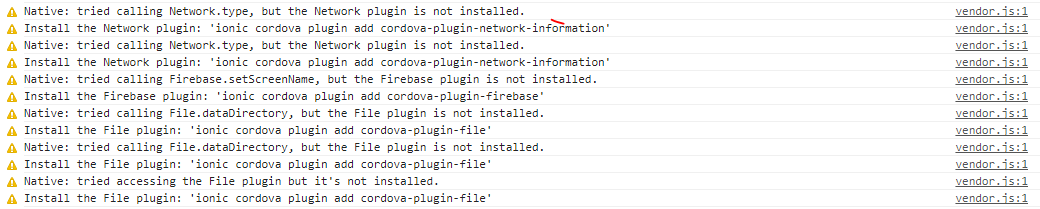
 YamanSehzade
on 21 Dec 2017
YamanSehzade
on 21 Dec 2017
You added the Ionic Native modules into your app.module.ts file and included them in the provider array?
 chrisgriffith
on 21 Dec 2017
chrisgriffith
on 21 Dec 2017
Thanks for fast reply @chrisgriffith.
Yes, I added.
app.module.ts:
import { LocalNotifications } from '@ionic-native/local-notifications';
import { SERVICES } from './../services/index';
import { BrowserModule } from '@angular/platform-browser';
import { ErrorHandler, NgModule, CUSTOM_ELEMENTS_SCHEMA } from '@angular/core';
import { IonicApp, IonicErrorHandler, IonicModule } from 'ionic-angular';
import { SplashScreen } from '@ionic-native/splash-screen';
import { StatusBar } from '@ionic-native/status-bar';
import { NativeStorage } from '@ionic-native/native-storage';
import { MyApp } from './app.component';
import { GlobalVariable } from "../data/globalvariable";
import { NativeAudio } from '@ionic-native/native-audio';
import { IonicAudioModule, defaultAudioProviderFactory } from 'ionic-audio';
import { File } from '@ionic-native/file';
import { FileTransfer } from '@ionic-native/file-transfer';
import { Network } from '@ionic-native/network';
import { Firebase } from '@ionic-native/firebase';
import { AndroidPermissions } from '@ionic-native/android-permissions';
import { AppRate } from '@ionic-native/app-rate';
import { SuperTabsModule } from 'ionic2-super-tabs';

@NgModule({
  declarations: [
    MyApp,
  ],
  imports: [
    BrowserModule,
    IonicModule.forRoot(MyApp),
    IonicAudioModule.forRoot(defaultAudioProviderFactory),
    SuperTabsModule.forRoot()
  ],
  bootstrap: [IonicApp],
  entryComponents: [
    MyApp,
  ],
  providers: [
    StatusBar,
    LocalNotifications,
    SplashScreen,
    GlobalVariable,
    ...SERVICES,
    NativeStorage,
    NativeAudio,
    Firebase,
    Network,
    AndroidPermissions,
    AppRate,
    File,
    FileTransfer,
    { provide: ErrorHandler, useClass: IonicErrorHandler }
  ],
  schemas: [CUSTOM_ELEMENTS_SCHEMA]
})
export class AppModule { }
it worked correctly before upgrading packages
old package.json :
dependencies": {
        "@angular/common": "4.1.3",
        "@angular/compiler": "4.1.3",
        "@angular/compiler-cli": "4.1.3",
        "@angular/core": "4.1.3",
        "@angular/forms": "4.1.3",
        "@angular/http": "4.1.3",
        "@angular/platform-browser": "4.1.3",
        "@angular/platform-browser-dynamic": "4.1.3",
        "@ionic-native/android-permissions": "^4.1.0",
        "@ionic-native/app-rate": "^4.1.0",
        "@ionic-native/core": "4.1.0",
        "@ionic-native/file": "^4.1.0",
        "@ionic-native/firebase": "^4.1.0",
        "@ionic-native/local-notifications": "^4.1.0",
        "@ionic-native/native-audio": "^4.1.0",
        "@ionic-native/native-storage": "^4.0.0",
        "@ionic-native/network": "^4.1.0",
        "@ionic-native/splash-screen": "4.1.0",
        "@ionic-native/status-bar": "4.1.0",
        "@ionic-native/transfer": "^3.12.1",
        "@ionic/storage": "2.0.1",
        "cordova-android": "^6.2.3",
        "cordova-plugin-android-permissions": "^1.0.0",
        "cordova-plugin-apprate": "^1.3.0",
        "cordova-plugin-console": "^1.0.5",
        "cordova-plugin-device": "^1.1.4",
        "cordova-plugin-dialogs": "^1.3.3",
        "cordova-plugin-file": "^4.0.0",
        "cordova-plugin-file-transfer": "^1.6.3",
        "cordova-plugin-firebase": "^0.1.21",
        "cordova-plugin-globalization": "^1.0.7",
        "cordova-plugin-inappbrowser": "^1.7.1",
        "cordova-plugin-nativeaudio": "^3.0.9",
        "cordova-plugin-nativestorage": "^2.2.2",
        "cordova-plugin-network-information": "^1.3.3",
        "cordova-plugin-splashscreen": "^4.0.3",
        "cordova-plugin-statusbar": "^2.2.2",
        "cordova-plugin-whitelist": "^1.3.1",
        "de.appplant.cordova.plugin.local-notification": "^0.8.5",
        "ionic-angular": "3.6.0",
        "ionic-audio": "^3.0.4",
        "ionic-plugin-keyboard": "^2.2.1",
        "ionicons": "3.0.0",
        "rxjs": "5.4.2",
        "sw-toolbox": "3.6.0",
        "zone.js": "0.8.16"
    },
    "devDependencies": {
        "@ionic/app-scripts": "2.1.3",
        "ionic": "3.10.2",
        "typescript": "2.4.2"
    },
    "description": "An Ionic project",
    "cordova": {
        "plugins": {
            "cordova-plugin-console": {},
            "cordova-plugin-device": {},
            "cordova-plugin-splashscreen": {},
            "cordova-plugin-statusbar": {},
            "cordova-plugin-whitelist": {},
            "ionic-plugin-keyboard": {},
            "cordova-plugin-nativeaudio": {},
            "cordova-plugin-network-information": {},
            "cordova-plugin-file-transfer": {},
            "cordova-plugin-file": {},
            "cordova-plugin-android-permissions": {},
            "cordova-plugin-firebase": {},
            "cordova-plugin-apprate": {},
            "cordova-plugin-nativestorage": {},
            "de.appplant.cordova.plugin.local-notification": {}
        },
        "platforms": [
            "android"
        ]
    }
same issue here. hope it gets solved soon
 iamisti
on 14 Jan 2018
iamisti
on 14 Jan 2018
Same here. Android 6.0.1
 FrankCharlz
on 15 Jan 2018
FrankCharlz
on 15 Jan 2018
any update on this. i Have been facing same issue.
 anujdixit84
on 23 Jan 2018
anujdixit84
on 23 Jan 2018
the issue is happening only when your are using
ionic serve command,
but when u plug in an android/ios and run the app natively (or in an emulator), then the bug dissapears.
try to run
ionic cordova run android
or
ionic cordova run ios
and it should work.
iamisti
on 23 Jan 2018
Ran it using ionic serve -c _(via the DevApp)_, and natively using ionic cordova run android/ionic cordova run ios. Plugin still not installed.
Tried switching the installation order of the platforms and plugins. Still didn't work. Same issue.
 christianwico
on 31 Jan 2018
christianwico
on 31 Jan 2018
any update so far?
I get same plugin not installed with sqliteporter plugin. I tried camera plugin and it works fine.
Somebody should help please.
 MakerzGroup
on 6 Feb 2018
MakerzGroup
on 6 Feb 2018
Having same trouble here with Flashlight plugin.
 nardocesar
on 10 Feb 2018
nardocesar
on 10 Feb 2018
Same issue : "Native: tried calling LocalNotifications.registerPermission, but the LocalNotifications plugin is not installed."
The strange thing is that sometimes notification is triggered but this warning appears anyway....
Please fix it soon,
Thanks
 DorianLovera
on 11 Feb 2018
DorianLovera
on 11 Feb 2018
Make sure you don't use -c or -l arguments for the ionic cordova run ios command and it should work
iamisti
on 13 Feb 2018
I did fix my problems with native plugins (Flashlight and Speech recognition) building my app.
Run ionic cordova platform add [platform] then ionic cordova build [platform] and run in your device.
I tested in my Android and all plugins that I'd been get this error works fine.
nardocesar
on 16 Feb 2018
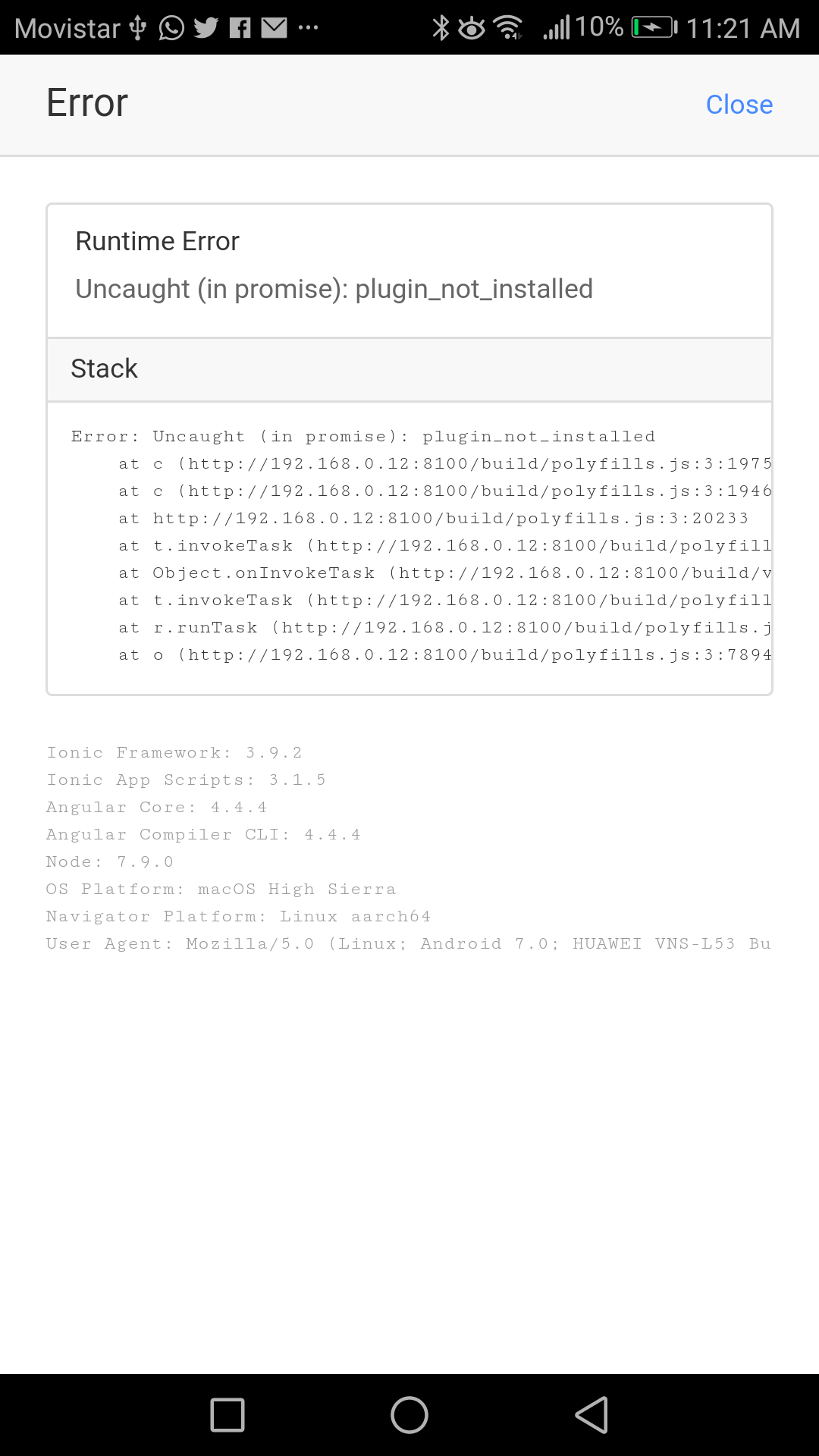
Same happens to me for FCM Plugin. @iamisti I ran devapp without -cargument but still I get the Plugin is not installed.
But, Last night I finally decided to give it a chance at onesignal plugin, so I started a fresh new blank project, followed a tutorial for onesignal and same thing happened. OneSignal Plugin is not installed and all bla bla bla same.
Two weeks ago FCM Plugin was working just fine. I'm completely lost here.
 evallgar
on 19 Mar 2018
evallgar
on 19 Mar 2018
Having the same problem with zeroconf using ionic serve -c and the DevApp.
 dlowrey
on 29 Mar 2018
dlowrey
on 29 Mar 2018
This is still happening with e.g. AppAvailability plugin, also when running ionic cordova run android.
ionic v.3.20.0 on Android 6.0
[11:48:29] console.warn: Native: tried calling AppAvailability.check, but the AppAvailability plugin is not installed.
[11:48:29] console.warn: Install the AppAvailability plugin: 'ionic cordova plugin add cordova-plugin-appavailability
 NorthFred
on 31 Mar 2018
NorthFred
on 31 Mar 2018
@dlowrey https://github.com/becvert/cordova-plugin-zeroconf doesn't have a browser version ,and you are serving the browser platform with ionic serve and DevApp. Consider using a provider factory pattern to avoid loading non-browser plugins in browser environments.
 emcniece
on 4 Apr 2018
emcniece
on 4 Apr 2018
Guys, I had this issue during a week and finally found the source. In the app.component.ts there was some functions (from some plugins) used outside the platform.ready() so I just moved these functions into the ready state and works like a charm. Hope that helps!
 JDonadio
on 4 Apr 2018
JDonadio
on 4 Apr 2018
Also having the same issue with NativePageTransitions
ionic version 3.20.0
cordova version 8.0.0
NativePageTransition version 0.6.5
What I have tried to fix the issue.
Uninstall
ionic cordova plugin rm com.telerik.plugins.nativepagetransitions
npm uninstall @ionic-native/native-page-transitions
Then install again with the instructions on the native page ionic website.
I also deleted the node_modules folder and then ran npm install.
Oddly enough, it was working when I initially started using it and then for some strange reason stopped.
If anyone has a fix/ionic team has a fix that would be greatly appriciated.
output: console.warn: Native: tried calling NativePageTransitions.fade, but the NativePageTransitions plugin is not installed.
 Jdrew001
on 19 Apr 2018
Jdrew001
on 19 Apr 2018
@Jdrew001 (and everyone else) this is a very common problem with apps that are not installed properly, when package versions are incorrect, or where users are building for target platforms that are not supported by the desired plugin.
Each commenters problem may be a bit different depending on the state of their local packages.
This might sound counterintuitive, but it would be a great help if folks could create new issues with a similar title as this but referencing the plugin they are having trouble with. In doing so, users are prompted to fill out vital information that makes it easier and faster for devs to identify potential problems and help users to find a resolution.
For example, @Jdrew001 I see that https://ionicframework.com/docs/native/native-page-transitions/ says that it only supports Android, iOS, and Windows Phone 8 platforms (specifically NOT desktop browsers), so my first question for you is this: How are you building your app when you get this error? Are you running ionic serve, are you emulating the app in a virtual machine, or are you running the app directly on a mobile device?
emcniece
on 19 Apr 2018
I am using ionic serve -c and running it through the DevApp
Which I have two other native plugins running and working
Jdrew001
on 19 Apr 2018
@Jdrew001 Excellent, thank you for sharing! This ionic serve is the source of your problem.
DevApp only makes the desktop (browser) version available on mobile devices - "native" Cordova plugins do not build in this arrangement. The other two plugins likely have browser compatibility or polyfills to prevent errors on this platform.
Out of curiosity, what are the other two native plugins that you are successfully running?
emcniece
on 19 Apr 2018
I actually solved my issue.
I misunderstood what I was doing!!
Thanks
Jdrew001
on 19 Apr 2018
@Jdrew001 glad to hear! Any chance you can share your solution here in case anyone else comes across this thread? Even if the solution is unrelated it might help other users while they search.
emcniece
on 19 Apr 2018
Sure,
I ran it on my phone.
I didn't understand that "serve" on DevApp was browser based. Bone headed mistake! Appreciate the patience!
Jdrew001
on 19 Apr 2018
Okey, so I tried to use ionic-native/firebase to build phone verification by calling firebase.getVerificationID() and got the same error msg "plugin_not_installed".
The funniest thing is that firebase.getToken() method which I call right after "getVerificationID()" returns me a normal value.
What kind of problems am I facing? any suggestions.
using real device via ionic cordova run android
 LozinskiyIlya
on 20 Apr 2018
LozinskiyIlya
on 20 Apr 2018
My problem is with the FILE CHOOSER PLUGIN. I've followed instructions and tutorials but the console keep saying that "file chooser plugin is not installed". BTW i also tried deploying the app as an APK to be sure but still not working..
below is my home.ts:
`import { FilePath } from '@ionic-native/file-path';
import { FileChooser } from '@ionic-native/file-chooser';
import { FileOpener } from '@ionic-native/file-opener';
import { Component } from '@angular/core';
import { NavController } from 'ionic-angular';
@Component({
selector: 'page-home',
templateUrl: 'home.html'
})
export class HomePage {
constructor(
private fileChooser: FileChooser,
private filePath: FilePath,
private fileOpener: FileOpener
) {
}
openFile(){
this.fileChooser.open().then(file=>{
this.filePath.resolveNativePath(file).then(resolvedFilePath=>{
this.fileOpener.open(resolvedFilePath, 'application/pdf').then(res=>{
alert('potang ina');
}).catch(err=> console.log(err.message));
}).catch(err=> console.log(err.message));
}).catch(err=> console.log(err.message));
}
}
this is my app.module.ts:
import { BrowserModule } from '@angular/platform-browser';
import { ErrorHandler, NgModule } from '@angular/core';
import { IonicApp, IonicErrorHandler, IonicModule } from 'ionic-angular';
import { SplashScreen } from '@ionic-native/splash-screen';
import { StatusBar } from '@ionic-native/status-bar';
import { FilePath } from '@ionic-native/file-path';
import { FileChooser } from '@ionic-native/file-chooser';
import { FileOpener } from '@ionic-native/file-opener';
import { MyApp } from './app.component';
import { HomePage } from '../pages/home/home';
@NgModule({
declarations: [
MyApp,
HomePage
],
imports: [
BrowserModule,
IonicModule.forRoot(MyApp)
],
bootstrap: [IonicApp],
entryComponents: [
MyApp,
HomePage
],
providers: [
StatusBar,
SplashScreen,
FileChooser,
FileOpener,
FilePath,
{provide: ErrorHandler, useClass: IonicErrorHandler}
]
})
export class AppModule {}
`
Expected output should be: Be able to browse and open a pdf file
 charlesCaballero
on 11 Jul 2018
charlesCaballero
on 11 Jul 2018
@charlesCaballero I created a working File Chooser demo for you: https://github.com/emcniece/ionic-filechooser-demo
Give this a test - it works for me on Android 8.0. Please ensure that you are actually running the .apk app on Android and not with ionic serve, Ionic DevApp or Ionic View.
If you continue to have problems, please open a new issue - it will help devs troubleshoot your code faster and more accurately.
emcniece
on 11 Jul 2018
the issue is happening only when your are using
ionic servecommand,but when u plug in an android/ios and run the app natively (or in an emulator), then the bug dissapears.
try to run
ionic cordova run android
or
ionic cordova run iosand it should work.
Is not working for me too, My phone is a Samsung S5 (sm-g900v) with android 6.0.1
 philip13
on 28 Nov 2018
philip13
on 28 Nov 2018
hi
i need urs help
if i install sim plugin and import in app.module.ts
and providers in app.module.ts i have a error
 Ashwininatarajan
on 29 Jan 2019
Ashwininatarajan
on 29 Jan 2019
I have the same problem with native-audio.
Any update for this issue or any help. I really appreciate it.
Here is my libs version
"dependencies": {
    "@angular/common": "^7.2.2",
    "@angular/core": "^7.2.2",
    "@angular/forms": "^7.2.2",
    "@angular/http": "^7.2.2",
    "@angular/platform-browser": "^7.2.2",
    "@angular/platform-browser-dynamic": "^7.2.2",
    "@angular/router": "^7.2.2",
    "@ionic-native/core": "^5.0.0",
    "@ionic-native/file": "^5.0.0",
    "@ionic-native/native-audio": "^5.0.0",
    "@ionic-native/splash-screen": "^5.0.0",
    "@ionic-native/status-bar": "^5.0.0",
    "@ionic/angular": "^4.0.0",
    "@ionic/storage": "^2.2.0",
    "cordova-android": "7.1.4",
    "cordova-plugin-device": "^2.0.2",
    "cordova-plugin-file": "6.0.1",
    "cordova-plugin-ionic-keyboard": "^2.1.3",
    "cordova-plugin-ionic-webview": "^3.1.1",
    "cordova-plugin-nativeaudio": "3.0.9",
    "cordova-plugin-splashscreen": "^5.0.2",
    "cordova-plugin-statusbar": "^2.4.2",
    "cordova-plugin-whitelist": "^1.3.3",
    "cordova-sqlite-storage": "3.0.0",
    "core-js": "^2.5.4",
    "ionic-angular": "^3.9.3",
    "rxjs": "~6.3.3",
    "zone.js": "~0.8.29"
  },
 nguyenhuuloc304
on 4 Feb 2019
nguyenhuuloc304
on 4 Feb 2019
@nguyenhuuloc304 did you try and remove the platform?
millerf
on 4 Feb 2019
Have you ever try to call plugin after the platform ready?
async checkVersion() {
    const ready = !!await this.platform.ready();
    if (ready) {
        // try to add your code here
    }
}
 serkon
on 4 Feb 2019
serkon
on 4 Feb 2019
Hi @millerf and @serkon
Thank you so much for your suggestion. But I decided to use HTML 5 audio element. I tested on Android device and it worked as my expectation. For this ionic-native audio, I will try your ways when I have free time.
nguyenhuuloc304
on 5 Feb 2019
Somehow this is STILL an issue, even 2 years later! I'm trying to use advanced-HTTP plugin, but it throws this error too. I'm running it directly on my android phone using ionic cordova run android but still no luck.
EDIT: Ok so after a fresh installation and hours of trial and error I've concluded that this is only a problem after reloading the app with chrome dev-tools or when using any live reload feature such as (but not limited to) ionic serve. The only way to test your app in a decent way is by rebuilding it every time. It's annoying to work like this, but it's better than nothing.
 sleeyax
on 7 Mar 2019
sleeyax
on 7 Mar 2019
@sleeyax ...confirming this is actually the case. ...wasted so much time debugging this :/ which there was a way to consistently use -l and have the plugins work properly.
 greaterking
on 3 Apr 2019
greaterking
on 3 Apr 2019
Hello! [IT WORKS FOR ME]
I had same problem running through Ionic v3, with an old Android project, but it needed new functionalities for implementations. I couldn't change plugin's versions because is an in-production app. Then, it was my solution to rebuild and test my app:
Delete following www and platforms folders
Run following commands:
ionic cordova add platform android
ionic cordova prepare androidTest your app in the emulator
ionic cordova run android --emulator
Also worked with--livereload
After those, my app worked with all plugins normally!
_It depends on your project, test it with ios too, because i can't._
My version scenario:
    @ionic/cli-utils  : 1.19.0
    ionic (Ionic CLI) : 3.19.0
    cordova (Cordova CLI) : 7.1.0
    @ionic/app-scripts : 3.2.0
    Cordova Platforms  : android 6.4.0
    Ionic Framework    : ionic-angular 3.9.2
    Android SDK Tools : 26.1.1
    Node              : v8.11.2
    npm               : 5.6.0
    OS                : Linux 4.15
I hope that solution can help everyone here.
PS: So, whether it works, please inform it to GitHub, and stamp as the solution. Thank you all!
 brunoleocoelho
on 30 Apr 2019
brunoleocoelho
on 30 Apr 2019
Related issues
 jgw96
·
50Comments
jgw96
·
50Comments
 Zerokk
·
26Comments
jgw96
·
26Comments
Zerokk
·
26Comments
jgw96
·
26Comments
 Remco75
·
26Comments
Remco75
·
26Comments
 macklus
·
28Comments
macklus
·
28Comments
Most helpful comment
Guys, I had this issue during a week and finally found the source. In the
app.component.tsthere was some functions (from some plugins) used outside theplatform.ready()so I just moved these functions into the ready state and works like a charm. Hope that helps!