Ionic-framework: bug: ios scrollbar appears in middle of the screen when using ion-menu
Bug Report
Ionic version:
[x] 4.x
[x] 5.x
Capacitor
[x] 2.4.x
Angular
9.1.x
Current behavior:
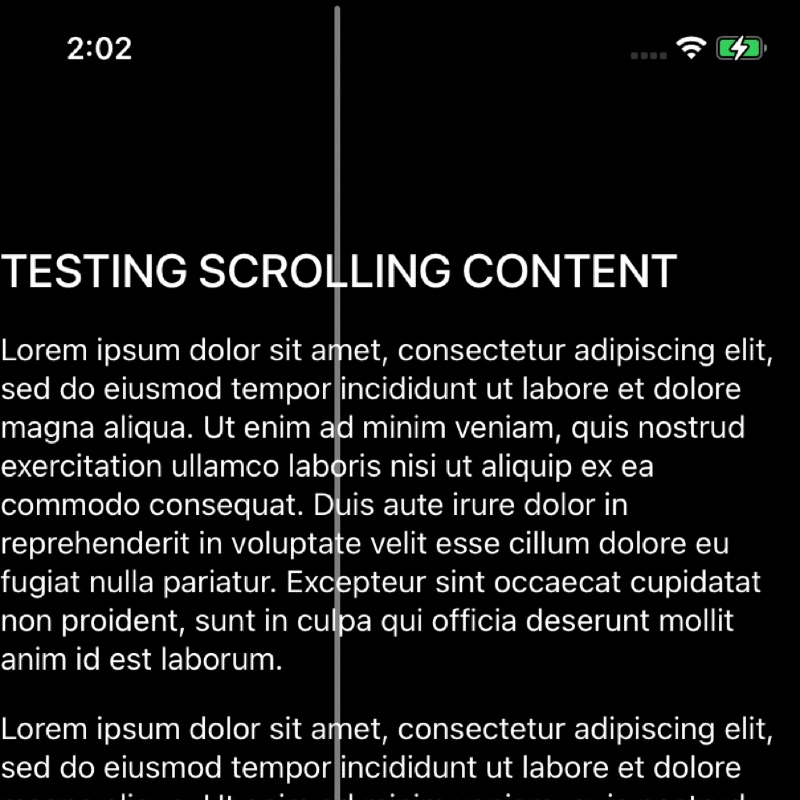
This is a very specific use case. On iOS devices...if the ion-menu type is push and if a page has an ion-content but no ion-header and you navigate away from it and then back to it...the vertical scrollbar displays in the middle of the page. I've noticed this only on iOS across many iOS devices and different apps I've built where a page doesn't have an ion-header/ion-toolbar. If I change the side menu type to reveal or overlay then the issue is resolved. Something about the push effect causes the scrollbar to persist in the middle of the screen when coming to the page after the side menu has been opened. Strangely...if I include an ion-header/toolbar then this scrollbar issue goes away.
Steps To Reproduce
With <ion-menu type="push">, create a page that has no ion-header and has content to scroll...then go to another page from the menu then go back to the original page. The push effect of the menu sets the scroll bar in the middle of the screen on iOS.
 askilondz
All 4 comments
Thanks for the issue! This issue has been labeled as needs reproduction. This label is added to issues that need a code reproduction.
Please provide a reproduction with the minimum amount of code required to reproduce the issue. Without a reliable code reproduction, it is unlikely we will be able to resolve the issue, leading to it being closed.
For a guide on how to create a good reproduction, see our Contributing Guide.
![ionitron-bot[bot] picture](https://avatars1.githubusercontent.com/in/8640?v=4&s=40) ionitron-bot[bot]
on 22 Oct 2020
ionitron-bot[bot]
on 22 Oct 2020
Hey there,
Can you please reproduce this in an Ionic starter app? Code snippets are not typically enough for us to reproduce the issue.
 liamdebeasi
on 22 Oct 2020
liamdebeasi
on 22 Oct 2020
Here is app project that reproduces the bug:
https://github.com/ClearDesignGroup/IOS-Scrollbar-Bug
askilondz
on 22 Oct 2020
Thanks! This appears to be a WebKit bug. I have filed an issue here: https://bugs.webkit.org/show_bug.cgi?id=218124.
A temporary workaround for now is to set transform: translate(0, 0) on ion-router-outlet (or whatever your main content is going to be). This does not completely fix the issue, but it at least forces the scrollbar to snap back into place when the animation is done.
liamdebeasi
on 23 Oct 2020
Related issues
 fdnhkj
·
3Comments
fdnhkj
·
3Comments
 BilelKrichen
·
3Comments
BilelKrichen
·
3Comments
 manucorporat
·
3Comments
manucorporat
·
3Comments
 aslamj
·
3Comments
aslamj
·
3Comments
 giammaleoni
·
3Comments
giammaleoni
·
3Comments
Most helpful comment
Thanks! This appears to be a WebKit bug. I have filed an issue here: https://bugs.webkit.org/show_bug.cgi?id=218124.
A temporary workaround for now is to set
transform: translate(0, 0)onion-router-outlet(or whatever your main content is going to be). This does not completely fix the issue, but it at least forces the scrollbar to snap back into place when the animation is done.