Ionic-framework: bug: ios native refresher refreshes too early when used in modal
Bug Report
Ionic version:
[ ] 4.x
[x] 5.x
Current behavior:
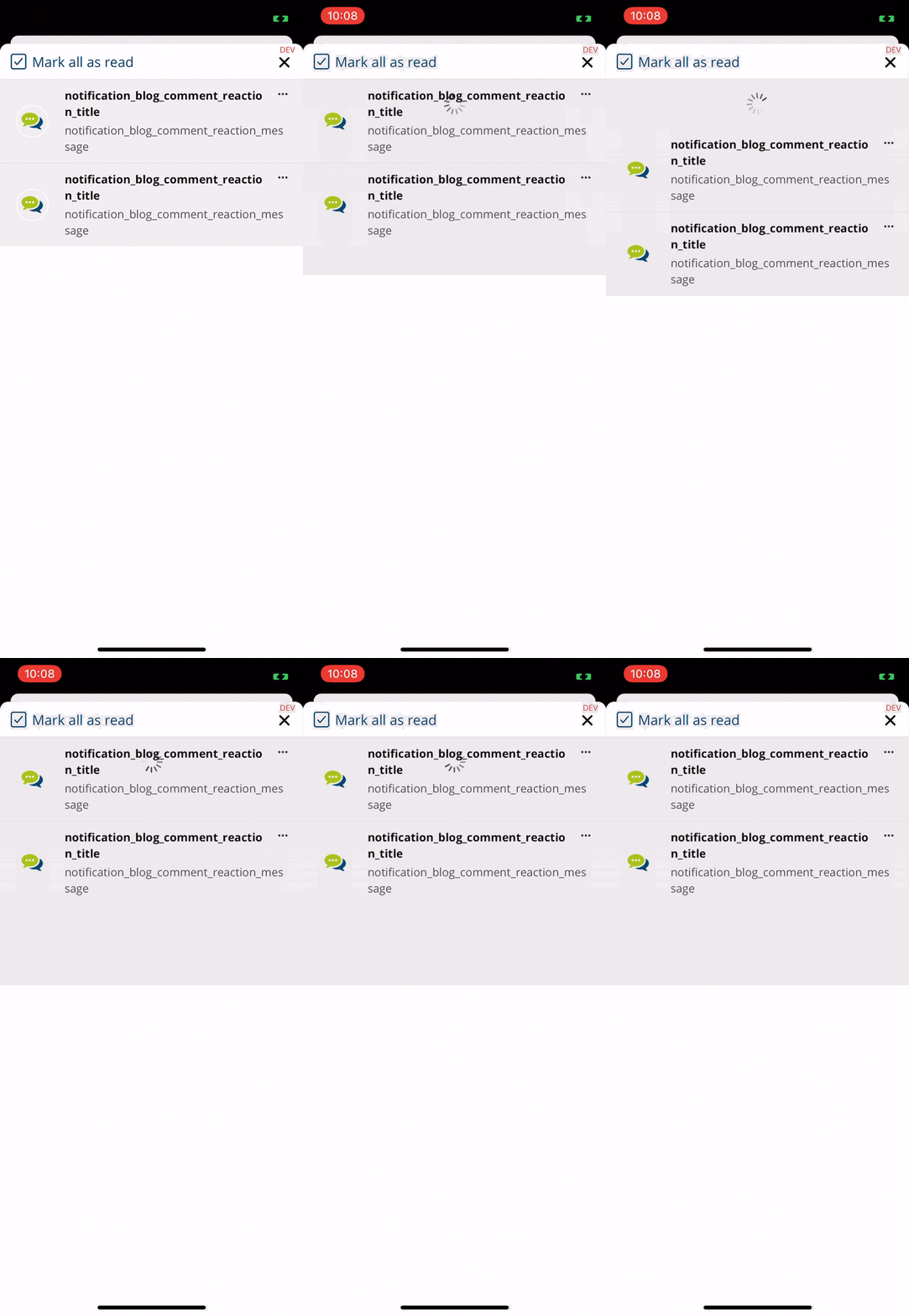
I use a Refresher within a Modal (iOS Card Style). It behaves not like as i expect, because it doesn't have the native look like the other refreshers. while i would expect the refresher to "show more" as more i pull down, it bugs, and start the refreshing very early.
Also in noticed that the spinner in my project is kind of behind the list (but visible) and only hides if i press or move anything.
Expected behavior:
The Refresher should work in a Mode where anywhere else.
Steps to reproduce:
I have created a small Repo: https://github.com/EinfachHans/ionic-refresher-bug
It contains the "main" bug, but i can't reproduce the other bug that the spinner is over the list, so i create a small video to help you. Maybe you have an idea or it's related to the same underlaying issue?
Ionic info:
Cordova:

   Cordova CLI       : 10.0.0
   Cordova Platforms : ios 6.1.1
   Cordova Plugins   : cordova-plugin-ionic-keyboard 2.2.0, cordova-plugin-ionic-webview 5.0.0, (and 24 other plugins)

Utility:

   cordova-res                          : 0.15.1
   native-run (update available: 1.2.1) : 1.0.0

System:

   Android SDK Tools : 25.2.3 (/Users/hanskrywalsky/Library/Android/sdk)
   ios-deploy        : 1.10.0
   ios-sim           : 8.0.2
   NodeJS            : v12.18.3 (/usr/local/bin/node)
   npm               : 6.14.8
   OS                : macOS Catalina
   Xcode             : Xcode 12.0.1 Build version 12A7300
 EinfachHans
All 18 comments
@liamdebeasi i would love to create a PR for this - can you quickly explain me how can i use my local ionic fork in an app and how to debug the ionic code (refresher code in this case)?
EinfachHans
on 23 Oct 2020
Thanks! We have a contributing guide here: https://github.com/ionic-team/ionic-framework/blob/master/.github/CONTRIBUTING.md#creating-a-pull-request. It explains how to get Ionic building locally.
The fix for this is very likely going to be in scrollListenerCallback: https://github.com/ionic-team/ionic-framework/blob/master/core/src/components/refresher/refresher.tsx#L173.
The math we do in https://github.com/ionic-team/ionic-framework/blob/master/core/src/components/refresher/refresher.tsx#L210-L213 is probably incorrect when used in a modal.
 liamdebeasi
on 23 Oct 2020
liamdebeasi
on 23 Oct 2020
Thx @liamdebeasi 😊 i already looked into it and noticed the place where it probably is wrong, but my problem is, that i don't know how to debug the ionic core component on a real device. In browser i can easily by running the core module but how to on real device? 🤔
EinfachHans
on 23 Oct 2020
If you run npm run start in the core directory, it will start up a live reload server. From there the easiest thing to do is to use https://ngrok.com/ to setup a tunnel to whatever port Ionic Core is running at (usually it is port 3333). Ngrok will give you a URL that you can paste into your device to visit it.
liamdebeasi
on 23 Oct 2020
@liamdebeasi thx!! That helps me very much 😃 will look into this next week! ❤️
EinfachHans
on 23 Oct 2020
@liamdebeasi - Thx again, with this help i was able to determine the underlaying bug. The scrollListenerCallback itself was correct, the error was the scrollEl's offsetHeight to be zero.
PR created: #22390
Would be great if you can include this in one of the upcoming bug-fixing releases 😊🎉
EinfachHans
on 25 Oct 2020
Thank you! I will take a look this week.
liamdebeasi
on 26 Oct 2020
liamdebeasi
on 2 Nov 2020
@liamdebeasi Seems like it is not resolved yet. After the change i did, it worked, but maybe it was "luck" as now it sometimes work and sometimes not. the offsetHeight of the contents scroll element is still zero sometimes.
Sadly i think i can't help you with this, as i'm not as deep inside as you are 😕 I thought componentOnReady makes sure the element is ready to go for such use-cases?
EinfachHans
on 6 Nov 2020
@liamdebeasi i searched in repo for similar cases and found that the <ion-infinite-scroll> does it similar and is also sometimes zero in a modal. I don't use it, but i think i breaks too, as is also uses the offsetHeight of the scroll Element of the content
EinfachHans
on 6 Nov 2020
tmp workaround can be to get the ScrollElement from Content again where the height finally is used, but i think it's better to understand why it happens like it does
EinfachHans
on 6 Nov 2020
Can you provide a GitHub repo that shows the bug still occurring? When I tested the fix, it was working fine.
liamdebeasi
on 6 Nov 2020
Yeah it was fine for me as well. I just created a Branch in my fork from your master. I just added a console.log and and a refresher in one of the modal's tests.
--> https://github.com/EinfachHans/ionic/tree/modal-refresher
Refresher added in Modal Test: http://localhost:3333/src/components/modal/test/spec (left corner button)
On open the ScrollEl's clientHeight is logged out. First time it works, after that it's zero all the time
EinfachHans
on 6 Nov 2020
What version of iOS are you testing on? The refresher is working fine for me every time on iOS 14.
liamdebeasi
on 6 Nov 2020
The client height is zero when i run ionic core in Safari Technology Preview (Release 115 (Safari 14.1, WebKit 15611.1.3.5)).
I also started ngrok to test on my device (iOS 14.2) and there it also fails sometimes with height of zero.
EinfachHans
on 6 Nov 2020
I added a PR that should fix the issue: https://github.com/ionic-team/ionic-framework/pull/22449
liamdebeasi
on 6 Nov 2020
yeah think this will work 🤔 still strange that it currently works sometimes and sometimes not
EinfachHans
on 6 Nov 2020
Thanks for the issue! This issue is being locked to prevent comments that are not relevant to the original issue. If this is still an issue with the latest version of Ionic, please create a new issue and ensure the template is fully filled out.
![ionitron-bot[bot] picture](https://avatars1.githubusercontent.com/in/8640?v=4&s=40) ionitron-bot[bot]
on 6 Dec 2020
ionitron-bot[bot]
on 6 Dec 2020
Related issues
 danbucholtz
·
3Comments
danbucholtz
·
3Comments
 GeorgeAnanthSoosai
·
3Comments
GeorgeAnanthSoosai
·
3Comments
 RobFerguson
·
3Comments
RobFerguson
·
3Comments
 brandyscarney
·
3Comments
brandyscarney
·
3Comments
 aslamj
·
3Comments
aslamj
·
3Comments