Ionic-framework: bug: safari 14 on macOS, clicking ion-item causes safari to crash
Bug Report
Ionic version:
[ ] 4.x
[x] 5.x
Current behavior:
Using Ionic with Angular, in Safari for macOS 11 Bug Sur Beta 5 and iOS 14 Beta 5, if you click/tap an <ion-item /> row in the list with a click handler, it causes Safari to reload the page because an error occurred.
Clicking/Tapping an <ion-label /> with a click handler works as expected.
Expected behavior:
I would expect the same behaviour clicking/tapping the <ion-item /> as with the <ion-label />
Steps to reproduce:
Create a new Ionic project
ionic start safariBugApp tabs --capacitor
Open tab1 page, and put the below related code into the html and component files.
Run the app
ionic serve
Click/Tap on the list item row - Safari reloads with error message at the top
Click/Tap the label - an alert appears saying 'Hello there.
Related code:
Angular page/view:
<ion-header [translucent]="true">
  <ion-toolbar>
    <ion-title>
      Bug Demo - Safari on iOS 14 Beta 5/macOS Big Sur Beta 5
    </ion-title>
  </ion-toolbar>
</ion-header>

<ion-content>
  <ion-list>
    <!-- This causes Safari to reload because of a problem -->
    <ion-item button detail="false" (click)="sayHello()">
      <ion-icon slot="start" name="download-outline"></ion-icon>
      <ion-label>Click to cause page reload</ion-label>
    </ion-item>
  </ion-list>

  <!-- This works as expected -->
  <ion-label (click)="sayHello()">Click here say hello</ion-label>
</ion-content>
Associated Angular component:
import { Component } from '@angular/core';

@Component({
  selector: 'app-tab1',
  templateUrl: 'tab1.page.html',
  styleUrls: ['tab1.page.scss']
})
export class Tab1Page {
  constructor() {}

  sayHello(): void {
    window.alert('Hello there - I\'m working!');
  }
}
Other information:
Ionic info:
Ionic:

   Ionic CLI                     : 6.11.0 (/usr/local/lib/node_modules/@ionic/cli)
   Ionic Framework               : @ionic/angular 5.3.1
   @angular-devkit/build-angular : 0.1000.6
   @angular-devkit/schematics    : 10.0.6
   @angular/cli                  : 10.0.6
   @ionic/angular-toolkit        : 2.3.1

Capacitor:

   Capacitor CLI   : 2.4.0
   @capacitor/core : 2.4.0

Utility:

   cordova-res : not installed
   native-run  : not installed

System:

   NodeJS : v14.8.0 (/usr/local/Cellar/node/14.8.0/bin/node)
   npm    : 6.14.7
   OS     : macOS Big Sur
 adamayoung
All 7 comments
I think this already has been reported as part of this issue: https://github.com/ionic-team/ionic-framework/issues/21613#issuecomment-675687568
 oddcb
on 20 Aug 2020
oddcb
on 20 Aug 2020
Thanks for the issue! This is a WebKit bug that has already been fixed. Closing.
 liamdebeasi
on 21 Aug 2020
liamdebeasi
on 21 Aug 2020
Workaround
add <div tabindex="0"></div> inside the <ion-item>...</ion-item> Element.
If there is a focusable element inside the <ion-item>...</ion-item>, the bug will disappear.
 makeiteazy
on 25 Aug 2020
makeiteazy
on 25 Aug 2020
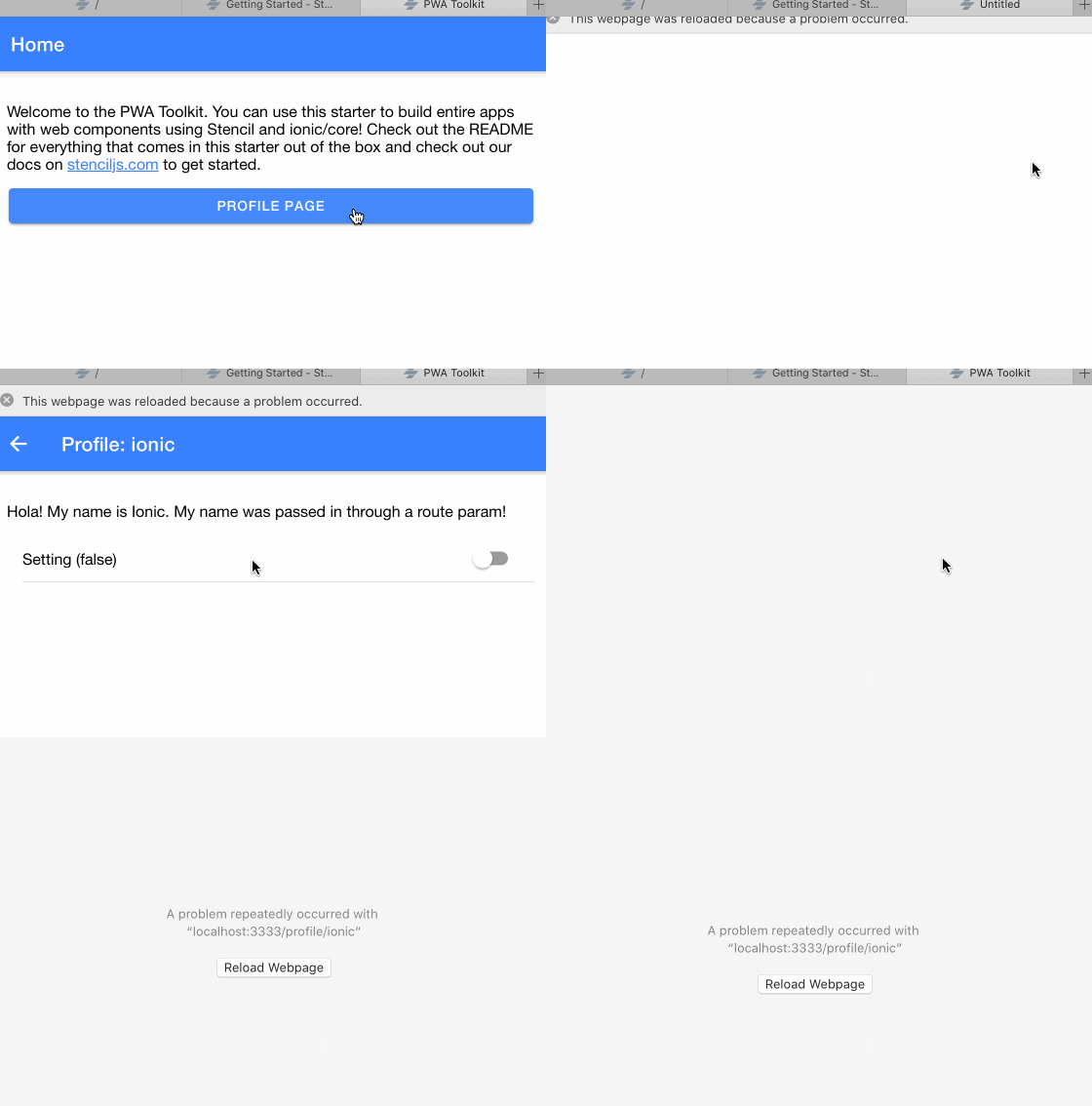
This bug is back with lasted update of Safari Version 14.0 (15610.1.28.1.9, 15610)
 modemlooper
on 17 Sep 2020
modemlooper
on 17 Sep 2020
@makeiteazy 's workaround works for Safari Version 14.0 (15610.1.28.1.9, 15610) on macOS.
 MrRogerHuang
on 17 Sep 2020
MrRogerHuang
on 17 Sep 2020
Hey there,
I wanted to follow up on this issue and provide some info for anyone else who may run into this. Please see below:
What happened?
There was a regression in Safari/iOS betas where web components with delegatesFocus: true caused the browser to crash if there were no focusable child elements. The underlying issue was that WebKit was not checking if the focusable element existed prior to forwarding focus. This affects the ion-item component as delegatesFocus: true is used.
The issue was resolved and code to fix the issue was merged; however, the fix has not shipped in Safari for macOS. As a result, this issue will still appear when Safari 14 for macOS is released. This fix has shipped in iOS 14, so devices running that version of iOS are not affected.
When will the fix be released?
The Ionic Framework team has verified that the issue is resolved in the latest Safari Technology Preview, indicating that this fix should ship in an upcoming update to Safari (i.e. Safari 14.0.1 or whatever the version ends up being). We will follow up on this thread when the fix has been released.
Is there a workaround?
The current workaround is to add a <div tabindex="0"></div> inside of ion-item as suggested in https://github.com/ionic-team/ionic-framework/issues/21939#issuecomment-679936379.
I am going to re-open this issue for now, and will close it once the fix has been released in a Safari 14 update. Please do not create new issues asking for status updates or reporting the same issue again as they will be closed. We are waiting on Apple to release this fix, so we will provide more information as we have it. Thank you!
liamdebeasi
on 17 Sep 2020
Hi everyone,
I have verified that this issue is resolved in the version of Safari that ships with macOS Big Sur. Developers on earlier versions of macOS that support Safari 14 should make sure that they are running the latest version of Safari by checking the "Software Update" pane in System Preferences.
For reference, here is the version + build that I have verified this fix in:
Version 14.0.1 (16610.2.11.51.8)
I am going to close this issue. For any additional bugs or feature requests, please open a new issue. Thank you!
liamdebeasi
on 23 Nov 2020
Related issues
 MrBokeh
·
3Comments
MrBokeh
·
3Comments
 brandyscarney
·
3Comments
brandyscarney
·
3Comments
 RobFerguson
·
3Comments
brandyscarney
·
3Comments
RobFerguson
·
3Comments
brandyscarney
·
3Comments
 danbucholtz
·
3Comments
danbucholtz
·
3Comments
Most helpful comment
I think this already has been reported as part of this issue: https://github.com/ionic-team/ionic-framework/issues/21613#issuecomment-675687568
See also: https://bugs.webkit.org/show_bug.cgi?id=215622