Ionic-framework: bug: scroll assist not positioning correctly
Bug Report
Ionic version:
[x] 5.x (especially 5.2.3)
Current behavior:
While scroll-assist was recently improved to position inputs more precise it also introduces a problem when the keyboard height is corrected shortly after the first "keyboardWillShow" event.
In my case I tap into a normal input field => ion-content scrolls to the correct position respecting keyboard height.
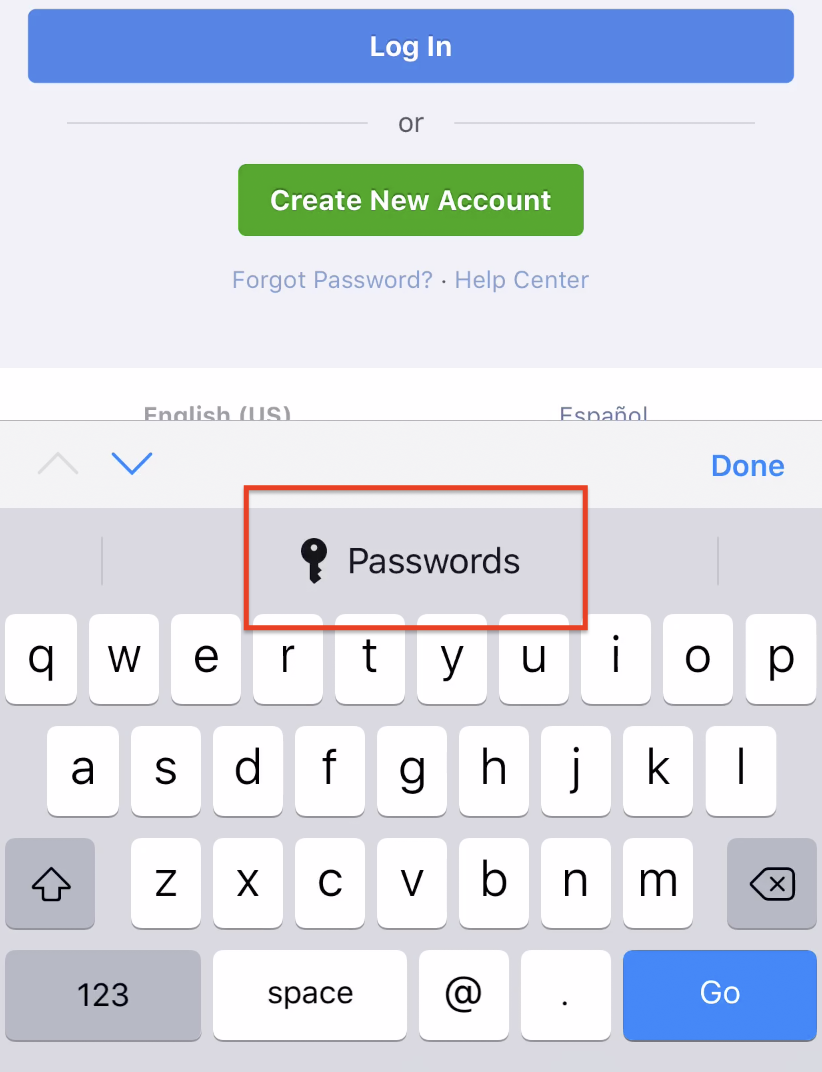
Then I tap on a password field => ion-content scrolls to the correct position first, but 30ms later iOS detects that it could offer me to choose a saved password and adds a password bar above the keyboard that now covers the input field.
Expected behavior:
I would expext the scroll-assist to wait for around 100ms if a second "keyboardWillShow" event will correct the keyboard height because of a input suggestion bar.

Alternatively the input field could be positioned 50px to the top which would cover most cases and make the next field that needs to be filled out visible as well.
Steps to reproduce:

(Note: the black area below "Password" actually covering the complete password input including the caret is the password keyboard with suggestion bar which is excluded from screen recording by iOS)
 7freaks-otte
All 8 comments
Thanks for the issue! This issue has been labeled as needs reproduction. This label is added to issues that need a code reproduction.
Please provide a reproduction with the minimum amount of code required to reproduce the issue. Without a reliable code reproduction, it is unlikely we will be able to resolve the issue, leading to it being closed.
For a guide on how to create a good reproduction, see our Contributing Guide.
![ionitron-bot[bot] picture](https://avatars1.githubusercontent.com/in/8640?v=4&s=40) ionitron-bot[bot]
on 7 Jul 2020
ionitron-bot[bot]
on 7 Jul 2020
There's no need for code. Any form with a normal ion-input and one with type="password" will do as long as you test it on an iOS device in a Capacitor container.
<p>enough</p><p>space</p><p>to</p><p>move</p><p>inputs</p><p>below</p><p>keyboard</p>

<ion-list>
    <ion-item>
        <ion-label position="stacked">Email</ion-label>
        <ion-input type="email"></ion-input>
    </ion-item>
    <ion-item>
        <ion-label position="stacked">Password</ion-label>
        <ion-input type="password"></ion-input>
    </ion-item>
</ion-list>
- Tapping in the email input will scroll to the right position.
- Tapping in the password input will not scroll enough as the first
keyboardWillShowwill give a keyboard height of 291px, then iOS decides to show you a bar to select saved passwords and triggers a secondkeyboardWillShowevent with a keyboard height of 336px.
These extra 45px added milliseconds later as the password suggestion bar is added, are enough to cover the input field after it was scrolled respecting the first 291px.
Please just have a look at the screenshots provided above (unfortunately iOS does not record the password keyboard probably because of privacy concerns and you can only see the black area. The blinking caret in the password field is actually hidden by the keyboard)
7freaks-otte
on 7 Jul 2020
@liamdebeasi Remember when you added the "keyboardWillShow" and "resize" listeners with a 300ms fallback to scroll-assist.ts detaching the listeners after whatever happens first?
iOS adding the password suggestion bar results in a second "keyboardWillShow" event with a different keyboard height but scroll-assist's jsSetFocus will never know and scrollContent is not called again to update the scroll position.
7freaks-otte
on 7 Jul 2020
We need a repo we can clone to reproduce the issue. Code snippets are typically not enough to reproduce the issue.
 liamdebeasi
on 7 Jul 2020
liamdebeasi
on 7 Jul 2020
What about the conference app? 😉
ionic start conference conference --type=angular --capacitor
cd conference
Update ionic and add capacitor (as the --capacitor flag does not seem to work with the conference app)
npm install @ionic/[email protected] @capacitor/cli @capacitor/core
Make sure that there is enough space above the login form and build the app
echo ".login-logo { min-height: 400px \!important; }" >> src/global.scss
ionic build
Init capacitor, sync and open Xcode
npx cap init
npx cap add ios
npx cap open ios
Open the conference app on an iOS device
- Navigate to Account/Login in the left menu
- Tap the "Username" input field => scrolling works
- Close the keyboard by tapping anywhere else
- Tap the "Password" input field => scrolling does not work
You will be experiencing 1 of 2 possible effects:
- Either the content will not scroll at all because of the capacitor keyboard resize method and not enough space below the password field so the content just cannot scroll before the webview is resized
- Or, which is my initial problem, the content will scroll the password field just above the keyboard, but will then cover the password input with the "select saved password proposal bar" which is added to the keyboard milliseconds after its first "keyboardWillShow" event. But the second "keyboardWillShow" event with the corrected keyboard height is ignored by scroll-assist
7freaks-otte
on 8 Jul 2020
Thanks. It looks like the webview is only resized after the "Passwords" bar appears, so Ionic Framework should wait for that as well. I will make a fix.
liamdebeasi
on 8 Jul 2020
Thanks for the issue. This has been resolved via https://github.com/ionic-team/ionic-framework/pull/21703, and a fix will be available in an upcoming release of Ionic Framework.
liamdebeasi
on 10 Jul 2020
Thanks for the issue! This issue is being locked to prevent comments that are not relevant to the original issue. If this is still an issue with the latest version of Ionic, please create a new issue and ensure the template is fully filled out.
ionitron-bot[bot]
on 9 Aug 2020
Related issues
 brandyscarney
·
3Comments
brandyscarney
·
3Comments
 gio82
·
3Comments
gio82
·
3Comments
 masimplo
·
3Comments
masimplo
·
3Comments
 fdnhkj
·
3Comments
fdnhkj
·
3Comments
 BilelKrichen
·
3Comments
BilelKrichen
·
3Comments
Most helpful comment
Thanks. It looks like the webview is only resized after the "Passwords" bar appears, so Ionic Framework should wait for that as well. I will make a fix.