Ionic-framework: bug: modal renders wrong first time loaded if <ion-range> is used in translucent footer toolbar
Bug Report
Ionic version:
[ ] 4.x
[x] 5.x
Current behavior:
If you have a modal with a fullscreen ion-content and translucent ion-header and ion-footer with a toolbar containing an ion-range (or an ion-radio-group, same behavior), the ion-content will not be rendered fullscreen the first time you open the modal. After the first time it will work if you open it again. It's hard to explain, better check the example out I made, it's a very eye-catching bug...
Expected behavior:
The ion-content is always fullscreen, not only from the second time opening it on.
Steps to reproduce:
New Ionic Angular app with Ionic 5.2.2 and Angular 9.1.9. Bug occurs in Android App, iOS App or with ionic serve.
Related code:
Simple new Ionic project with a modal with the bug
Other information:
This worked with Ionic 4 and stopped working after migrating to Ionic 5. I already opened a topic in the Ionic Forum with more information about hoe I found the bug and where it's occuring in my real project.
Ionic info:
Ionic:

   Ionic CLI                     : 6.10.1
   Ionic Framework               : @ionic/angular 5.2.2
   @angular-devkit/build-angular : 0.901.9
   @angular-devkit/schematics    : 9.1.9
   @angular/cli                  : 9.1.9
   @ionic/angular-toolkit        : 2.2.0

Utility:

   cordova-res : not installed
   native-run  : 1.0.0

System:

   NodeJS : v12.16.3
   npm    : 6.14.4
   OS     : Windows 10
 NiklasSchwab
All 7 comments
Thanks for the issue. Can you double check your project? I get a blank screen when opening the modal.
 liamdebeasi
on 25 Jun 2020
liamdebeasi
on 25 Jun 2020
Thanks for the reply. Should be fixed now.
NiklasSchwab
on 25 Jun 2020
Took a look @liamdebeasi
It seems that when the modal is first opened, the padding offsets are not applied on first show. Meaning we get a solid background.
Looking at the dom, the --offset-top and --offset-bottom vars are set to 0 on first show.

Then on subsequent shows, they are set correctly.

 mhartington
on 25 Jun 2020
mhartington
on 25 Jun 2020
I have confirmed this as a bug. When ion-content sets its offsets, it relies on offsetHeight. If a parent element has display: none, the offset values will be 0 (similar to how offsetParent will be null). When the modal is used for the first time, there is a race condition where the offsets are set before display: none is removed from ion-modal.
liamdebeasi
on 25 Jun 2020
Hi
Not sure if I should create an issue for my case or just mention it here...
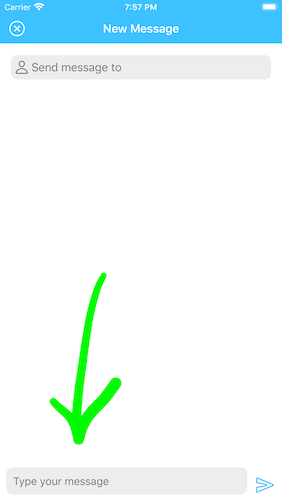
I'm encountering similar issue but with an ion-textarea not dispaying properly first time
First time opening modal
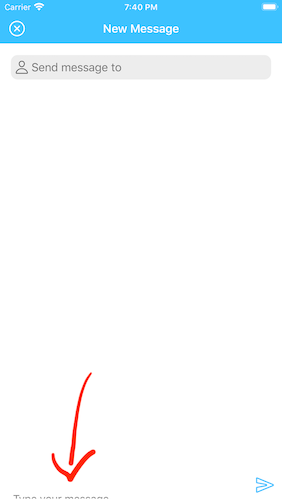
The weird part is the button displays with no issue
After closing and reopening
 jongbonga
on 2 Jul 2020
jongbonga
on 2 Jul 2020
Hi
Not sure if I should create an issue for my case or just mention it here...
I'm encountering similar issue but with an
ion-textareanot dispaying properly first time
I guess it's the same bug. I got it with \ If you remove them (so just a blank header/footer or almost blank with some icons), everything is working as intended.
NiklasSchwab
on 3 Jul 2020
I've got a workaround until this is fixed:
- Get the height of the \
- Set the
--offset-topand--offset-bottomof the \ - Set the
So the TS Code could look like this:
const headerHeight = document.getElementById('canvasHeader').offsetHeight;
const footerHeight = document.getElementById('canvasFooter').offsetHeight;
const canvasContentElement = document.getElementById('canvasContent');
canvasContentElement.style.setProperty('--offset-top', headerHeight + "px");
canvasContentElement.style.setProperty('--offset-bottom', footerHeight + "px");
It might not be a great way to do this, but it gets the job done...
NiklasSchwab
on 3 Jul 2020
Related issues
 danbucholtz
·
3Comments
danbucholtz
·
3Comments
 vswarte
·
3Comments
vswarte
·
3Comments
 brandyscarney
·
3Comments
brandyscarney
·
3Comments
 alan-agius4
·
3Comments
alan-agius4
·
3Comments
 Macstyg
·
3Comments
Macstyg
·
3Comments
Most helpful comment
I have confirmed this as a bug. When
ion-contentsets its offsets, it relies onoffsetHeight. If a parent element hasdisplay: none, the offset values will be0(similar to howoffsetParentwill benull). When the modal is used for the first time, there is a race condition where the offsets are set beforedisplay: noneis removed fromion-modal.