Ionic-framework: bug(5.2.0): must not manipulate the layer below ion-alert modal.
Bug Report
Ionic version:
[ ] 4.x
[x] 5.2.0
Current behavior:
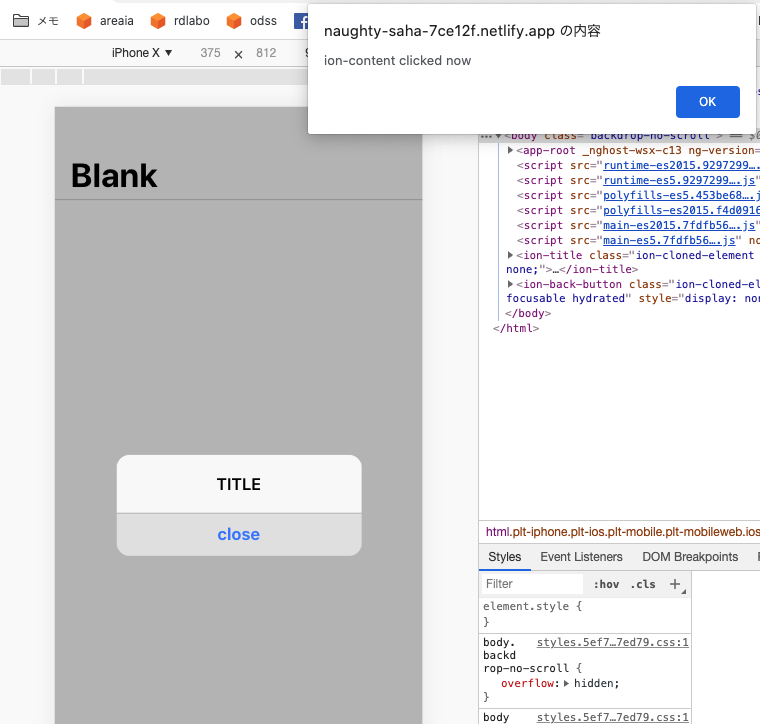
AlertController.create() on iOS can manipulate the layer below the alert modal.
Expected behavior:
must not control the layer below the alert modal.
Steps to reproduce:
Related code:
A sample application: https://naughty-saha-7ce12f.netlify.app/
↑Please emulate ios.
This source code: https://github.com/rdlabo/ion-alert-pointer/blob/master/src/app/home/home.page.ts
I didn't do anything special.
Other information:
This caused:
- https://github.com/ionic-team/ionic/pull/21060
- https://github.com/ionic-team/ionic/blob/master/core/src/components/alert/alert.ios.scss#L22-L24
Ionic info:
Ionic:

   Ionic CLI                     : 6.9.1 (/Users/sakakibara/dev/ionic-cli/packages/@ionic/cli)
   Ionic Framework               : @ionic/angular 5.2.0
   @angular-devkit/build-angular : 0.901.8
   @angular-devkit/schematics    : 9.1.8
   @angular/cli                  : 9.1.8
   @ionic/angular-toolkit        : 2.2.0

Utility:

   cordova-res (update available: 0.14.0) : 0.11.0
   native-run                             : not installed

System:

   NodeJS : v12.16.2 (/usr/local/bin/node)
   npm    : 6.14.4
   OS     : macOS Catalina
 rdlabo
All 6 comments
We can avoid this.
.alert-button .alert-button-inner {
  pointer-events: auto !important;
}
Thanks for the issue. Can you please clarify what the bug is that you are seeing?
 liamdebeasi
on 11 Jun 2020
liamdebeasi
on 11 Jun 2020
@liamdebeasi Thanks for reply.
Please access https://naughty-saha-7ce12f.netlify.app in browser emulated to ios device.
- ion-content has click event
alert('ion-content clicked now'). - ion-button has click event for launch ion-alert.
- Please click center-button, and click
closein ion-alert.
We expect close ion-alert only. but click event effect ion-content.
rdlabo
on 11 Jun 2020
Thanks! I was able to reproduce this behavior. It looks like this is only happening when running in iOS mode on Google Chrome. I was unable to reproduce this behavior in Safari.
liamdebeasi
on 11 Jun 2020
Closing as a duplicate of https://github.com/ionic-team/ionic/issues/21503.
liamdebeasi
on 11 Jun 2020
Thanks for the issue! This issue is being locked to prevent comments that are not relevant to the original issue. If this is still an issue with the latest version of Ionic, please create a new issue and ensure the template is fully filled out.
![ionitron-bot[bot] picture](https://avatars1.githubusercontent.com/in/8640?v=4&s=40) ionitron-bot[bot]
on 11 Jul 2020
ionitron-bot[bot]
on 11 Jul 2020
Related issues
 Macstyg
·
3Comments
Macstyg
·
3Comments
 masimplo
·
3Comments
masimplo
·
3Comments
 aslamj
·
3Comments
aslamj
·
3Comments
 alan-agius4
·
3Comments
alan-agius4
·
3Comments
 Nick-The-Uncharted
·
3Comments
Nick-The-Uncharted
·
3Comments
Most helpful comment
We can avoid this.