Ionic-framework: bug: scroll assist is not working on PWA with latest version of Ionic 5.1.1
Bug Report
Ionic version:
5.1.1
Current behavior:
I have a form with a list of inputs (create account form). When tapping through the inputs, the keyboard overlays and hides the input. I believe I first noticed this behavior since the introduction of Ionic 5.0.6 and e24060e.
My prod app is still running 5.0.5, and the scroll assist works great.
I updated to 5.1.1 to test it again, thinking that 7166a29 would have addressed it, but it's still not behaving properly for me.
Expected behavior:
When tapping through a list of inputs and the keyboard displays, the focused input should also remain visible.
Related code:
I'm using Ionic Angular 5.1.1, running as a PWA on iOS safari.
Here's an example of what the structure of my template looks like:
<form>
 <ion-item>
  <ion-label position="stacked">Example</ion-label>
  <ion-input type="text"></ion-input>
 </ion-item>

 <ion-item>
  <ion-label position="stacked">Example</ion-label>
  <ion-input type="text"></ion-input>
 </ion-item>

 <ion-item>
  <ion-label position="stacked">Example</ion-label>
  <ion-input type="text"></ion-input>
 </ion-item>

 <ion-item>
  <ion-label position="stacked">Example</ion-label>
  <ion-input type="text"></ion-input>
 </ion-item>

 <ion-item>
  <ion-label position="stacked">Example</ion-label>
  <ion-input type="text"></ion-input>
 </ion-item>

 <ion-item>
  <ion-label position="stacked">Example</ion-label>
  <ion-input type="text"></ion-input>
 </ion-item>

 <ion-item>
  <ion-label position="stacked">Example</ion-label>
  <ion-input type="text"></ion-input>
 </ion-item>

 <ion-item>
  <ion-label position="stacked">Example</ion-label>
  <ion-input type="text"></ion-input>
 </ion-item>

 <ion-item>
  <ion-label position="stacked">Example</ion-label>
  <ion-input type="text"></ion-input>
 </ion-item>

 <ion-button shape="round" expand="full">Create Account</ion-button>
</form>
Other information:
Notice that I'm not currently wrapping the ion-items in an ion-list, I'm not sure if that would have any impact.
Ionic info:
Ionic CLI : 5.2.3 (/usr/local/lib/node_modules/ionic)
Ionic Framework : @ionic/angular 5.1.1
@angular-devkit/build-angular : 0.900.7
@angular-devkit/schematics : 9.0.7
@angular/cli : 9.0.7
@ionic/angular-toolkit : 2.2.0

Capacitor:

Capacitor CLI : 1.5.1
@capacitor/core : 1.1.1

Cordova:

Cordova CLI : 8.1.2 ([email protected])
Cordova Platforms : none
Cordova Plugins : no whitelisted plugins (0 plugins total)

Utility:

cordova-res : not installed
native-run : not installed

System:

NodeJS : v10.16.3 (/usr/local/Cellar/node/9.6.1/bin/node)
npm : 6.9.0
OS : macOS Mojave
 joeszewski
All 14 comments
Thanks for the issue. What was the last version this was working on? I am trying this on Ionic Framework 5.0.5, and it is not working there either.
For Capacitor/Cordova apps scroll assist relies on the content being resized in order to scroll. This does not happen on PWAs, so it makes sense why it would not be working there. However, we have a --keyboard-offset variable that is supposed to be applied to the content to artificially add padding on the bottom so the content can scroll. That does not look like it is being added any more.
 liamdebeasi
on 20 May 2020
liamdebeasi
on 20 May 2020
@liamdebeasi strange...the app I have deployed to prod is using Ionic 5.0.5, and the scroll assist is working as expected. All other code/packages are the same.
joeszewski
on 20 May 2020
What version of iOS/device are you testing this on?
liamdebeasi
on 20 May 2020
iPhone 11 Pro running iOS 13.4.1
joeszewski
on 20 May 2020
Strange, I'm testing on an iPhone 11 running iOS 13.4.1. I'll keep investigating - thanks!
liamdebeasi
on 20 May 2020
Hi @liamdebeasi, after updating v5.1.1 I'm having the same problem, I would even say that scroll assist works randomly, is there any condition/Html attribute for having it work? 🤔 thanks!
 rricamar
on 2 Jun 2020
rricamar
on 2 Jun 2020
Here is a .zip with an example:
My ionic info:
Ionic:

   Ionic CLI                     : 5.4.16
   Ionic Framework               : @ionic/angular 5.1.1
   @angular-devkit/build-angular : 0.901.7
   @angular-devkit/schematics    : 9.1.7
   @angular/cli                  : 9.1.7
   @ionic/angular-toolkit        : 2.2.0

Cordova:

   Cordova CLI       : 9.0.0 ([email protected])
   Cordova Platforms : ios 5.1.1
   Cordova Plugins   : cordova-plugin-ionic-keyboard 2.2.0, cordova-plugin-ionic-webview 5.0.0, (and 24 other plugins)

Utility:

   cordova-res : not installed
   native-run  : 1.0.0

System:

   ios-deploy : 1.10.0
   ios-sim    : 8.0.2
   NodeJS     : v12.16.1 (/Users/rricamar/.nvm/versions/node/v12.16.1/bin/node)
   npm        : 6.14.4
   OS         : macOS Catalina
   Xcode      : Xcode 11.5 Build version 11E608c
I tried also v5.0.5 and it doesn't work. The input's Html is:
<ion-input
    type="password"
    formControlName="passwordConfirmation"
    (keydown.enter)="sendPassword()"
></ion-input>
To have scroll-assist working, do we need something more?
Thank you in advance 👍
rricamar
on 2 Jun 2020
One last thing that I've forgotten to say: This is happening to me on my Native App (Cordova), I know that this issue is for PWA but I considered convenient putting this info here 😅 👍
rricamar
on 2 Jun 2020
@liamdebeasi @rricamar FYI that updating to v5.2.2 has resolved the issue for me.
joeszewski
on 22 Jun 2020
Awesome! Glad to hear this is resolved for you. I will close this, but if you run into any other bugs feel free to open a new issue.
liamdebeasi
on 23 Jun 2020
@liamdebeasi @rricamar FYI that updating to
v5.2.2has resolved the issue for me.
Same here! 👏
rricamar
on 23 Jun 2020
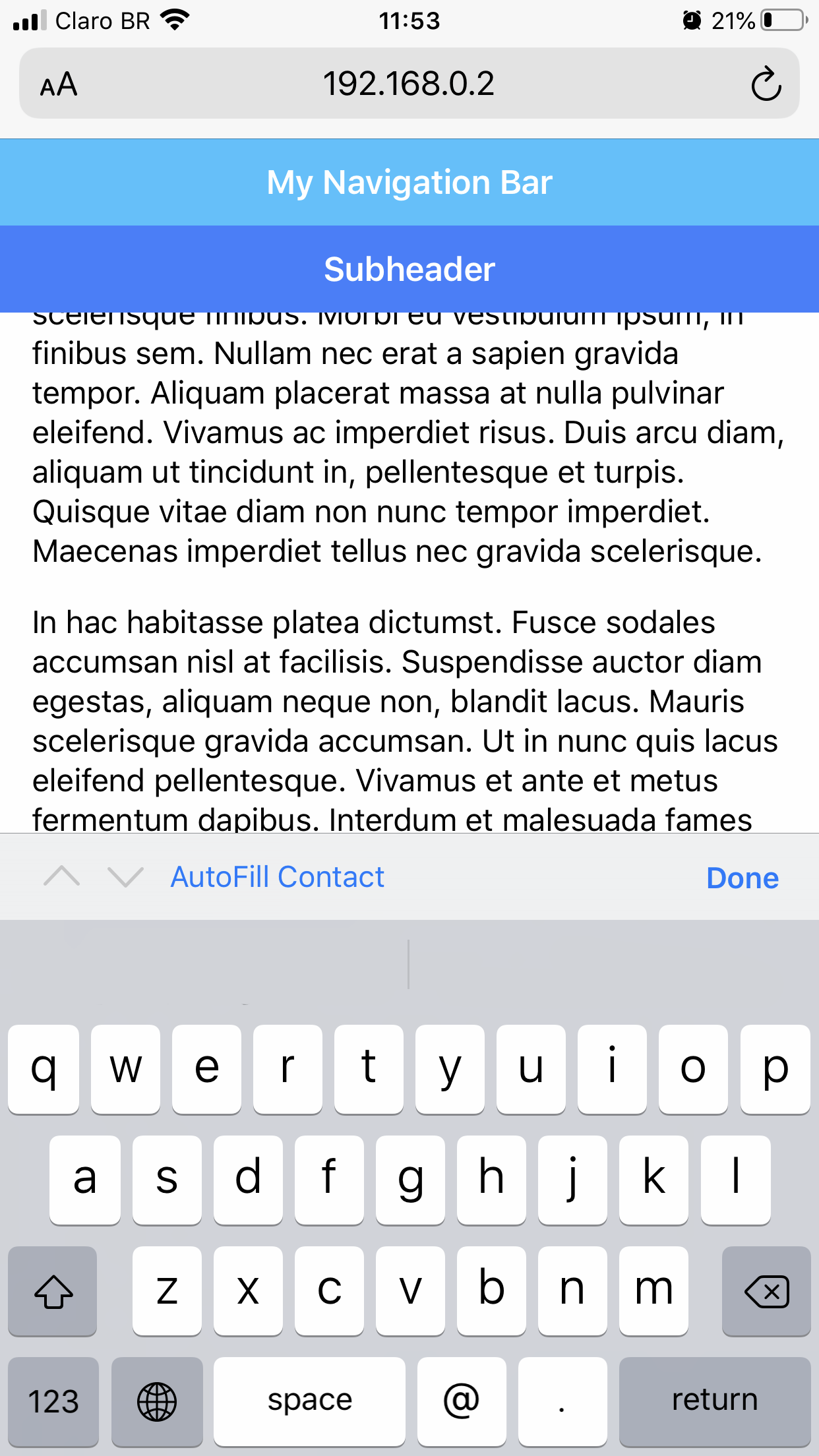
hi guys, I am facing the same issue both dev and prod versions. I've just updated ionic to the latest, created a brand new project, added a bunch of inputs to the home page and tested on my iPhone 7 plus iOS 13.3 running the dev server.
this is happening only on iPhone, I also tested on a Samsung A10 with Android 10 and it works ok!
Any help will be very much appreciated!
here's my ionic info
   Ionic CLI                     : 6.10.1 (/usr/local/lib/node_modules/@ionic/cli)
   Ionic Framework               : @ionic/angular 5.2.3
   @angular-devkit/build-angular : 0.901.10
   @angular-devkit/schematics    : 9.1.10
   @angular/cli                  : 9.1.10
   @ionic/angular-toolkit        : 2.2.0

Utility:

   cordova-res (update available: 0.15.1) : 0.8.1
   native-run (update available: 1.0.0)   : 0.2.8

System:

   NodeJS : v12.14.0 (/usr/local/Cellar/node@12/12.14.0/bin/node)
   npm    : 6.13.4
   OS     : macOS Catalina
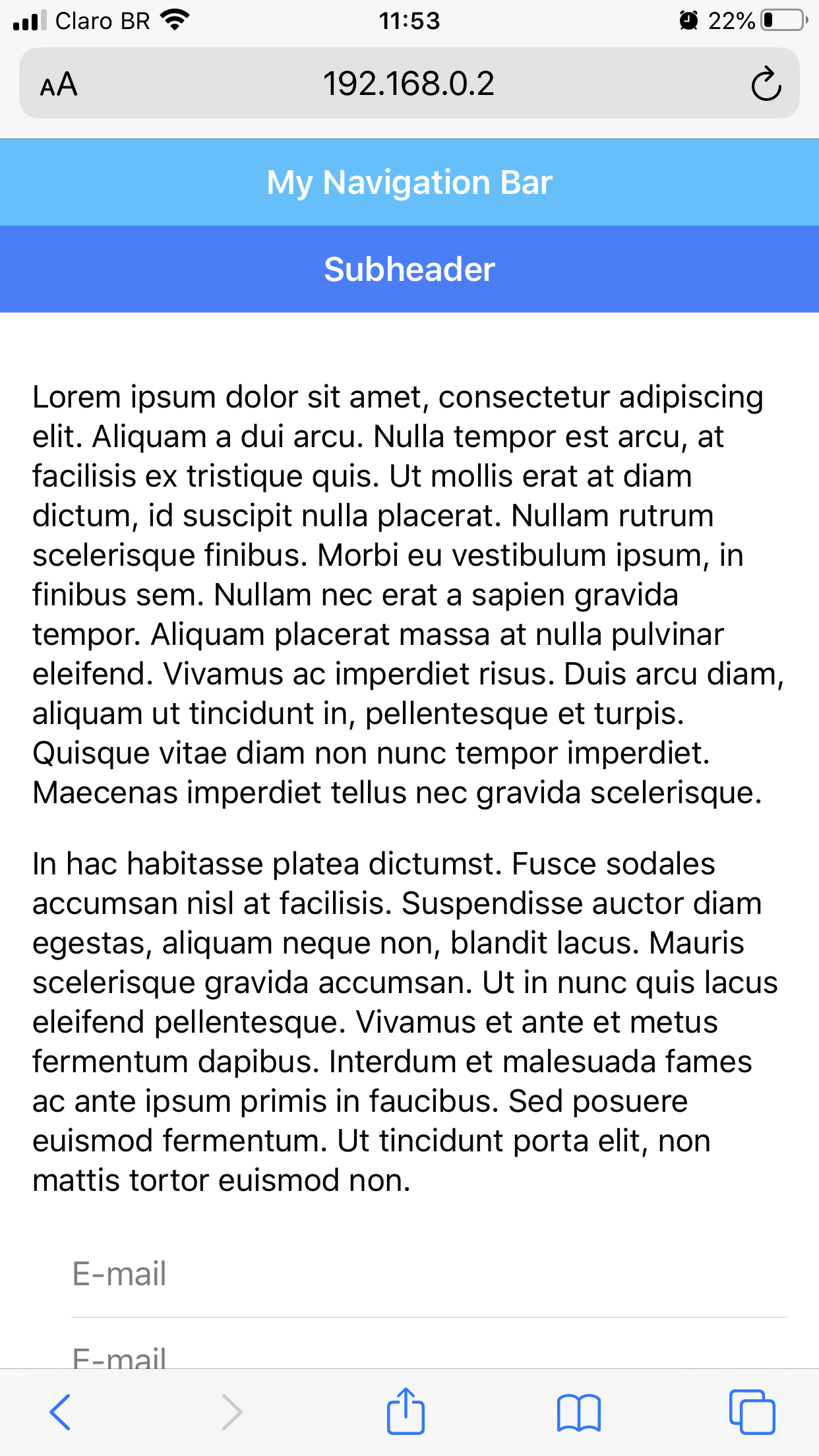
and here's my home page nothing fancy just a bunch of dummy texts and inputs
<ion-header class="ion-no-border">
  <ion-toolbar color="secondary">
    <ion-title>My Navigation Bar</ion-title>
  </ion-toolbar>

  <ion-toolbar color="primary">
    <ion-title>Subheader</ion-title>
  </ion-toolbar>
</ion-header>

<ion-content class="ion-padding">

  <p>Lorem ipsum dolor sit amet, consectetur adipiscing elit. Aliquam a dui arcu. Nulla tempor est arcu, at
    facilisis ex tristique quis. Ut mollis erat at diam dictum, id suscipit nulla placerat. Nullam rutrum
    scelerisque finibus. Morbi eu vestibulum ipsum, in finibus sem. Nullam nec erat a sapien gravida tempor.
    Aliquam placerat massa at nulla pulvinar eleifend. Vivamus ac imperdiet risus. Duis arcu diam, aliquam ut
    tincidunt in, pellentesque et turpis. Quisque vitae diam non nunc tempor imperdiet. Maecenas imperdiet
    tellus nec gravida scelerisque.</p>

  <p>In hac habitasse platea dictumst. Fusce sodales accumsan nisl at facilisis. Suspendisse auctor diam
    egestas, aliquam neque non, blandit lacus. Mauris scelerisque gravida accumsan. Ut in nunc quis lacus
    eleifend pellentesque. Vivamus et ante et metus fermentum dapibus. Interdum et malesuada fames ac ante
    ipsum primis in faucibus. Sed posuere euismod fermentum. Ut tincidunt porta elit, non mattis tortor
    euismod non.</p>

  <form>
    <ion-item>
      <ion-input placeholder="E-mail"
        type="email"></ion-input>
    </ion-item>
    <ion-item>
      <ion-input placeholder="E-mail"
        type="email"></ion-input>
    </ion-item>
    <ion-item>
      <ion-input placeholder="E-mail"
        type="email"></ion-input>
    </ion-item>
    <ion-item>
      <ion-input placeholder="E-mail"
        type="email"></ion-input>
    </ion-item>
  </form>

</ion-content>
Here the images of before and after tapping the input
 tattivitorino
on 4 Jul 2020
tattivitorino
on 4 Jul 2020
Thanks for the issue! This issue is being locked to prevent comments that are not relevant to the original issue. If this is still an issue with the latest version of Ionic, please create a new issue and ensure the template is fully filled out.
![ionitron-bot[bot] picture](https://avatars1.githubusercontent.com/in/8640?v=4&s=40) ionitron-bot[bot]
on 3 Aug 2020
ionitron-bot[bot]
on 3 Aug 2020
Related issues
 RobFerguson
·
3Comments
RobFerguson
·
3Comments
 giammaleoni
·
3Comments
giammaleoni
·
3Comments
 Nick-The-Uncharted
·
3Comments
Nick-The-Uncharted
·
3Comments
 fdnhkj
·
3Comments
fdnhkj
·
3Comments
 GeorgeAnanthSoosai
·
3Comments
GeorgeAnanthSoosai
·
3Comments
Most helpful comment
@liamdebeasi @rricamar FYI that updating to
v5.2.2has resolved the issue for me.