Ionic-framework: bug: IonSelect is not showing the options when clicked (React)
Bug Report
Ionic version:
@ionic/react 5.1.1,
Current behavior:
When clicking on the <IonSelect> element, the options do not get displayed.
Expected behavior:
When clicking on the <IonSelect> element, the options are displayed.
Steps to reproduce: / Related code:
I've tried copy-pasted the code directly from the documentation and still run into this issue.
<IonList>
  <IonItem>
    <IonLabel>Hemisphere</IonLabel>
    <IonSelect
      value={hemisphere}
      interface="popover"
      onIonChange={(e) => {
        SettingsStorage.setHemisphere(e.detail.value!)
        setHemisphere(e.detail.value!)
      }}
    >
      <IonSelectOption value="N">Northern</IonSelectOption>
      <IonSelectOption value="S">Southern</IonSelectOption>
    </IonSelect>
  </IonItem>
</IonList>
Other information:
It appears that when I do the following, I am able to get the options to display:
- Right click on the
<IonSelect>in the browser. - Inspect element
- A
<button>gets highlighted in the devtools. I delete this - I click the
<IonSelect>in the browser again - Options displayed!
Ionic info:
Ionic:
   Ionic CLI       : 6.9.1 (/Users/grardb/.config/yarn/global/node_modules/@ionic/cli)
   Ionic Framework : @ionic/react 5.1.1

Capacitor:
   Capacitor CLI   : 2.1.0
   @capacitor/core : 2.1.0

Utility:
   cordova-res : not installed
   native-run  : not installed

System:
   NodeJS : v11.14.0 (/Users/grardb/.nvm/versions/node/v11.14.0/bin/node)
   npm    : 6.7.0
   OS     : macOS High Sierra
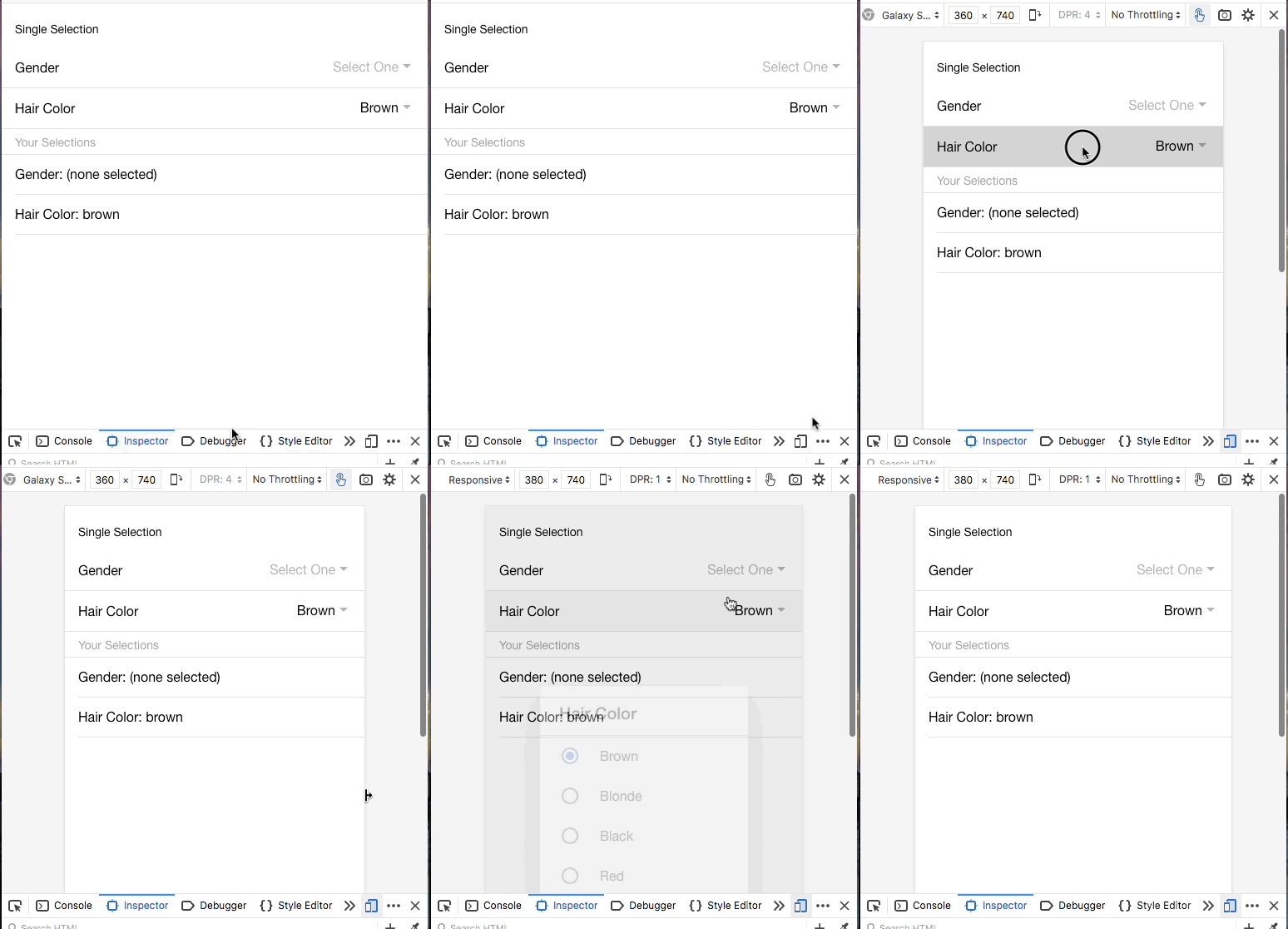
A gif of what's happening:

 GRardB
All 7 comments
Thanks for the issue! This issue has been labeled as needs reproduction. This label is added to issues that need a code reproduction.
Please provide a reproduction with the minimum amount of code required to reproduce the issue. Without a reliable code reproduction, it is unlikely we will be able to resolve the issue, leading to it being closed.
For a guide on how to create a good reproduction, see our Contributing Guide.
![ionitron-bot[bot] picture](https://avatars1.githubusercontent.com/in/8640?v=4&s=40) ionitron-bot[bot]
on 19 May 2020
ionitron-bot[bot]
on 19 May 2020
Thanks for the issue. Can you provide a full reproduction of the issue? I am unable to reproduce the issue using the code snippet provided.
 liamdebeasi
on 19 May 2020
liamdebeasi
on 19 May 2020
Hrm, so I think I've "figured it out" (not really, though). I can reproduce it using the code snippet above in a fresh Ionic project (blank template), but there appears to be a caveat: I need to be in Firefox, and I need to switch from the default browsing experience to the mobile-sized/responsive screen using the devtools. This bug doesn't seem to happen when doing the same in Chrome, however.
The bug doesn't seem to occur if I do a normal resize of the Firefox window, so I assume there's no resize event messing things up or something.
Furthermore, it seems that when changing the size of the responsive screen, I'm then able to open the menu.
At this point, I'm not sure if this is a cross-compatibility issue with Ionic or a Firefox bug. My hunch is that it has something to do with the shadow DOM, but I don't know much about that stuff, tbh.
GRardB
on 20 May 2020
It looks like this is an issue with the touch simulation in Firefox. I was able to reproduce it using those steps but only if the "Touch Simulation" button is enabled.
liamdebeasi
on 20 May 2020
Ah you know what this is actually a duplicate of an older bug: https://github.com/ionic-team/ionic/issues/20179. This ended up being a bug in Firefox with Touch Simulation, and not a bug in Ionic Framework.
The workaround for now is to not use Touch Simulation when developing in Firefox. We will report this to the Firefox dev team. Thanks!
liamdebeasi
on 20 May 2020
Hey there, I filed a bug with the Firefox team: https://bugzilla.mozilla.org/show_bug.cgi?id=1640189. Looks like this has been fixed in Firefox 78, so a fix should be available whenever that ships.
liamdebeasi
on 28 May 2020
Thanks for the issue! This issue is being locked to prevent comments that are not relevant to the original issue. If this is still an issue with the latest version of Ionic, please create a new issue and ensure the template is fully filled out.
ionitron-bot[bot]
on 27 Jun 2020
Related issues
 gio82
·
3Comments
gio82
·
3Comments
 manucorporat
·
3Comments
manucorporat
·
3Comments
 Nick-The-Uncharted
·
3Comments
Nick-The-Uncharted
·
3Comments
 MrBokeh
·
3Comments
MrBokeh
·
3Comments
 brandyscarney
·
3Comments
brandyscarney
·
3Comments
Most helpful comment
Hey there, I filed a bug with the Firefox team: https://bugzilla.mozilla.org/show_bug.cgi?id=1640189. Looks like this has been fixed in Firefox 78, so a fix should be available whenever that ships.