Ionic-framework: bug: Autogrow property in IonTextArea doesnt look good
Bug Report
Ionic version:
[x] 5.1
Current behavior:
When I initialize the value of a text area the label doesnt look good
Expected behavior:
Need to auto expand if I set property autogrod = true
Steps to reproduce:
Set a value to textArea component
Related code:
<IonItem>
            <IonLabel position="stacked">Beneficios</IonLabel>
            <IonTextarea
              className="inputs"
              placeholder={benefits}
              autoGrow={true}
              maxlength={400}
              value={benefits}
              rows={6} cols={20}
              onIonChange={e => setBenefits(e.detail.value!)}>
            </IonTextarea>
 </IonItem>
Other information:

Ionic info:
Ionic:

   Ionic CLI       : 6.8.0 (/Users/timugo/.nvm/versions/node/v12.16.0/lib/node_modules/@ionic/cli)
   Ionic Framework : @ionic/react 5.1.0

Capacitor:

   Capacitor CLI   : 2.1.0
   @capacitor/core : 2.1.0

Utility:

   cordova-res : not installed
   native-run  : not installed

System:

   NodeJS : v12.16.0 (/Users/timugo/.nvm/versions/node/v12.16.0/bin/node)
   npm    : 6.14.4
   OS     : macOS Mojave
 andirsun
All 20 comments
Thanks for the issue! This issue has been labeled as needs reproduction. This label is added to issues that need a code reproduction.
Please provide a reproduction with the minimum amount of code required to reproduce the issue. Without a reliable code reproduction, it is unlikely we will be able to resolve the issue, leading to it being closed.
For a guide on how to create a good reproduction, see our Contributing Guide.
![ionitron-bot[bot] picture](https://avatars1.githubusercontent.com/in/8640?v=4&s=40) ionitron-bot[bot]
on 8 May 2020
ionitron-bot[bot]
on 8 May 2020
@liamdebeasi
- Clone https://github.com/andirsun/bugTextArea
- npm install - ionic serve
- see the IonTextArea cant see correctly
andirsun
on 8 May 2020
I was able to reproduce it in a Codepen randomly - if you keep refreshing eventually you'll see it: https://codepen.io/brandyscarney/pen/JjYabVa
 brandyscarney
on 14 May 2020
brandyscarney
on 14 May 2020
I was able to reproduce it in a Codepen _randomly_ - if you keep refreshing eventually you'll see it: https://codepen.io/brandyscarney/pen/JjYabVa
Yes, in the web browser the autogrow propertie works fine, but in phone view the input doesnt recognize the size of the preloaded text.
andirsun
on 14 May 2020
Still appears. Any Updates to this?
 EinfachHans
on 17 Jul 2020
EinfachHans
on 17 Jul 2020
Still appears. Any Updates to this?
No yet :(
andirsun
on 17 Jul 2020
I am facing the same issue, I am using ionic 6.10.2 with react. To get around this issue i had to set autoGrow=true on focus of the element
 man1989
on 8 Aug 2020
man1989
on 8 Aug 2020
I have this issue on 5.4.16 with angular
 below43
on 25 Sep 2020
below43
on 25 Sep 2020
Does someone have a Workaround? This still appears in latest version....
EinfachHans
on 9 Oct 2020
Does someone have a Workaround? This still appears in latest version....
No interests in solve this bug I think.
andirsun
on 13 Oct 2020
Does someone have a Workaround? This still appears in latest version....
It's ugly but this solution is working for me for the time being... (I've disabled autoGrow attribute for the time being)
<ion-textarea [rows]="this.autoGrow?12:2" (click)="this.autoGrow=true" etc... >
below43
on 14 Oct 2020
@liamdebeasi @brandyscarney i debugged a bit:
nativeInput.scrollHeight is 0 if this bug happens. For me it happens in a Modal, seems to be the problem here in this Issue too if i look at the attached image. Maybe this is related to #22449 - there a property also could be zero (if the containing element is hidden). I think this cause problems in some more components if used in a modal or other can-be-hidden-elements 🤔
EinfachHans
on 9 Nov 2020
In ngOnInit if I do the following, it will show properly. This is a horrible hack, but it may help some folks:
@Input()
textEntry: { content: string }

ngOnInit() {
  this.formGroup = new FormGroup({
    content: new FormControl('',
      {
        validators: [
          Validators.required
        ]
      }
    )
  });

  // HACK: set values later, seems to trigger whatever ionic is waiting for
  setTimeout(() => {
    this.applyValues();
  }, 300);
}

applyValues() {
  this.formGroup.patchValue({ content: this.textEntry.content });
}
 barrcodes
on 12 Nov 2020
barrcodes
on 12 Nov 2020
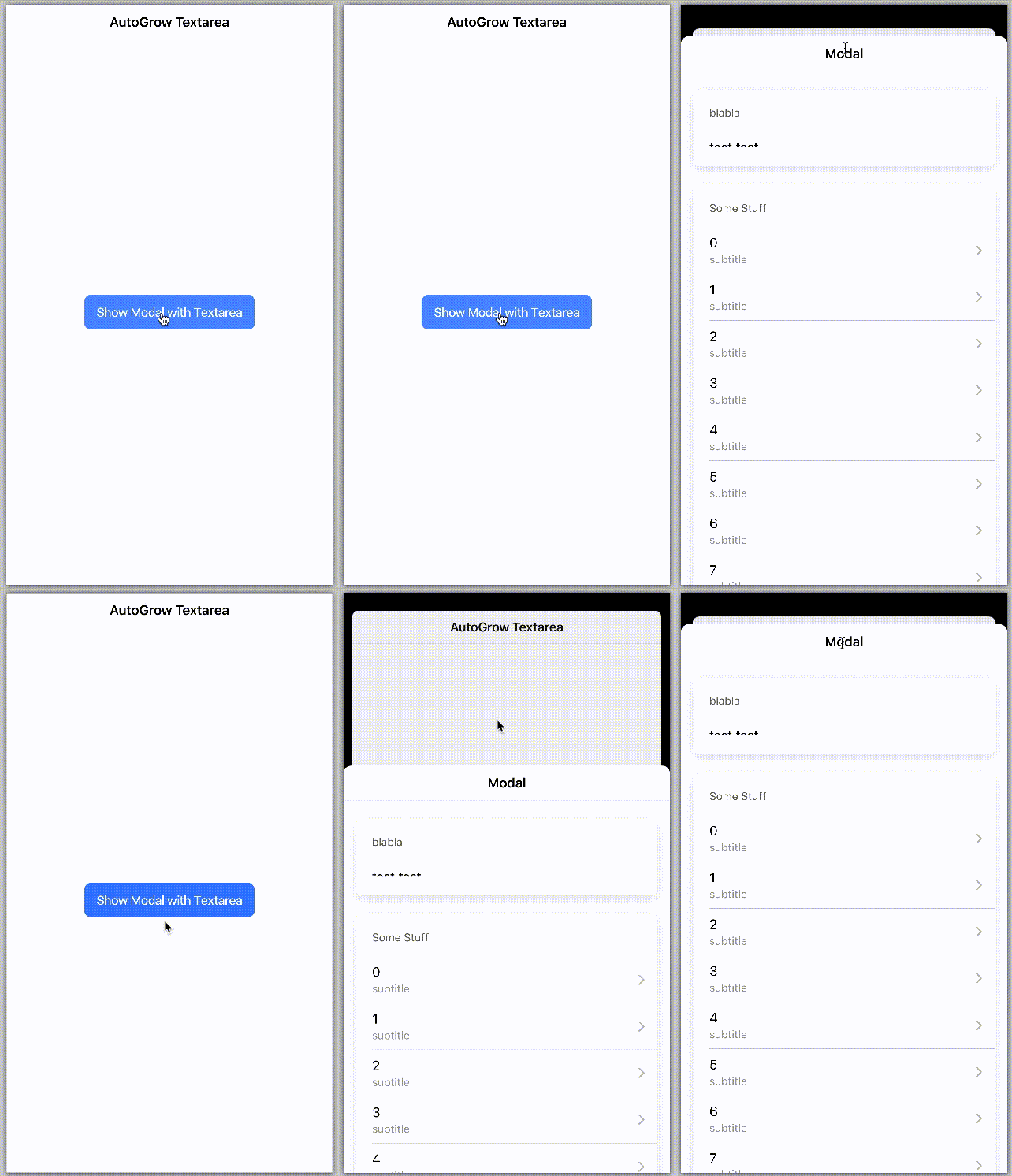
Seems like something has changed here, as this now happens every time for me in our app. I was able to create a repo where it also happens every time, so it should be easier to reproduce it now. Please investigate into this as it now happens always. @liamdebeasi @brandyscarney
Maybe my comment two above this one helps you.
Repo where it happens every time: https://github.com/EinfachHans/ionic-textarea-autogrow
Screen Recording:
EinfachHans
on 24 Nov 2020
Working Workaround
Until this is fixed, you can use this as a good Workaround:
define in global.scss:
.some-class {
  // see: https://github.com/ionic-team/ionic-framework/issues/21242
  textarea {
    min-height: 66px;
  }
}
Of course you can adjust the value, 66px fits perfect for my case 😊 Then you need to add this class to every textarea 😕
EinfachHans
on 25 Nov 2020
@EinfachHans for my issue #22584 this does not work...
 ivanov84
on 4 Dec 2020
ivanov84
on 4 Dec 2020
Working Workaround
Until this is fixed, you can use this as a good Workaround:
define in global.scss:
.some-class {
  // see: https://github.com/ionic-team/ionic-framework/issues/21242
  textarea {
    min-height: 66px;
  }
}
Of course you can adjust the value, 66px fits perfect for my case 😊 Then you need to add this class to every textarea 😕
This is good idea. may be able to simple:
ion-textarea[ng-reflect-auto-grow=true] {
  textarea {
    min-height: 66px;
  }
}
 rdlabo
on 7 Dec 2020
rdlabo
on 7 Dec 2020
@rdlabo this will not work in production, as the ng reflect attributes aren't available then
EinfachHans
on 7 Dec 2020
@EinfachHans Oh, thanks tell me. Today, I changed these:
<ng-container *ngIf="isReady">
   <ion-textarea [(ngModel)]="..." [autoGrow]="true">
</ng-container>
ionViewDidEnter {
  this.ready = true;
}
This work well. thanks.
rdlabo
on 7 Dec 2020
@EinfachHans @rdlabo could you help to find work around for my case #22584:
<ion-item>
  <ion-label position="stacked" color="primary">kuku kuku ku ku kuku kuku</ion-label>
  <ion-textarea autoGrow="true" rows="3" [placeholder]="textPlaceholder"></ion-textarea>
</ion-item>
Related issues
 Nick-The-Uncharted
·
3Comments
Nick-The-Uncharted
·
3Comments
 manucorporat
·
3Comments
manucorporat
·
3Comments
 Macstyg
·
3Comments
Macstyg
·
3Comments
 aslamj
·
3Comments
aslamj
·
3Comments
 alexbainbridge
·
3Comments
alexbainbridge
·
3Comments