Ionic-framework: bug: swipe to go back is not passive, causing safari to throttle click events
Bug Report
Ionic version:
[x] 5.x
Current behavior:
Clicking multiple UI components in relativly short time results in click events being lost.
"Fast" users have to double-click/tap almost every button/checkbox/ui element.
Since I am clicking too fast here, only every 2nd checkbox is marked as checked, even though you see that all of them were clicked.

Expected behavior:
Clicks events should not be lost.
Steps to reproduce:
E.g. create a ion-list with multiple checkboxes in it and check all of them without waiting too long between clicks.
https://github.com/capc0/ion-ios-clicks-not-recognized
Other information:
I guess this has nothing to do with the components (not specific to e.g. ion-checkbox), since it happens in the entire app (e.g. also in alert controllers with button clicks).
Seems to be only on iOS. Currently running on iOS 13.4, but that does not seem to matter. An old app of mine running on iOS 13.4 with ionic 4 does not have this issue (but it uses UIWebView instead of WKWebView, dont know if that does matter).
Related issues:
https://github.com/ionic-team/ionic/issues/19299
https://github.com/ionic-team/ionic/issues/19608
https://github.com/ionic-team/ionic/issues/19564
Ionic info:
Ionic:

   Ionic CLI                     : 6.2.1 (/usr/local/lib/node_modules/@ionic/cli)
   Ionic Framework               : @ionic/angular 5.0.7
   @angular-devkit/build-angular : 0.803.26
   @angular-devkit/schematics    : 8.3.26
   @angular/cli                  : 8.3.26
   @ionic/angular-toolkit        : 2.2.0

Cordova:

   Cordova CLI       : 9.0.0 ([email protected])
   Cordova Platforms : ios 5.1.1
   Cordova Plugins   : cordova-plugin-ionic-keyboard 2.2.0, cordova-plugin-ionic-webview 4.1.3, (and 4 other plugins)

Utility:

   cordova-res                          : 0.11.0
   native-run (update available: 1.0.0) : 0.2.9

System:

   ios-deploy : 1.9.4
   ios-sim    : 8.0.2
   NodeJS     : v10.16.3 (/usr/local/bin/node)
   npm        : 6.14.2
   OS         : macOS Catalina
   Xcode      : Xcode 11.4 Build version 11E146
 capc0
capc0
All 18 comments
This issues seems to also apply to button click event. If you press the button fast (like 5 clicks in 1 second), it will skip some of the event.
Same thing goes to tabs button. If you do a fast switch between tabs, the seconds tabs button won't get clicked.
This is most likely WebKit related and the issues was there since iOS 13.0. Here are the history of fixes by iOS version based on my learning:
iOS 13.0 -> Found issues on button and tabs button
iOS 13.1 -> Seems fixed on tabs button, but not the standard button
iOS 13.2.2 -> Fixed on both button and tabs button (as what was stated in #19299 and #19608)
iOS 13.4 -> Issues comes back again on button and tabs button
 yokeharn
on 8 Apr 2020
yokeharn
on 8 Apr 2020
issue is still present on iOS 13.4.1
capc0
on 8 Apr 2020
So it looks like this is a behavior in iOS Safari. In Ionic Angular apps, we have a swipe to go back gesture listening on ion-router-outlet. That gesture adds a touchstart listener to detect the beginning of the gesture. The presence of touchstart adds some sort of delay/timeout that is causing the issue described here.
~Using the Pointer Events API (I.e. pointerdown instead of touchstart) seems to solve this problem, so we should upgrade our gesture utility to use pointer events where supported.~
edit: looks like there was a change in iOS 13 where we need to specify certain listeners as passive otherwise Safari adds some throttling behavior. I changed the swipe to go back gesture to be passive instead of adding pointer events.
 liamdebeasi
on 14 Apr 2020
liamdebeasi
on 14 Apr 2020
Can everyone try the following dev build and let me know if it resolves the issue?
npm i @ionic/[email protected]
liamdebeasi
on 14 Apr 2020
First thing I will try tomorrow morning, will give you feedback asap.
capc0
on 14 Apr 2020
I hid my original comment as it is outdated. For those testing when they get the chance, use this dev build instead:
npm i @ionic/[email protected]
liamdebeasi
on 14 Apr 2020
I just tested with the dev build and it seems work on my end, both on my device (13.4.1) and simulators (13.4)
yokeharn
on 15 Apr 2020
The click behaviour on list items definetly got better with that version. However in my production app the dev version unfortunatly did not work. Still trying to figure out why the list component does work with the example repo but not in my production app.
Nevertheless I guess there has to be an additional cause.
I can still reproduce this issue with other ionic components e.g. ion-select.
added the code to https://github.com/capc0/ion-ios-clicks-not-recognized
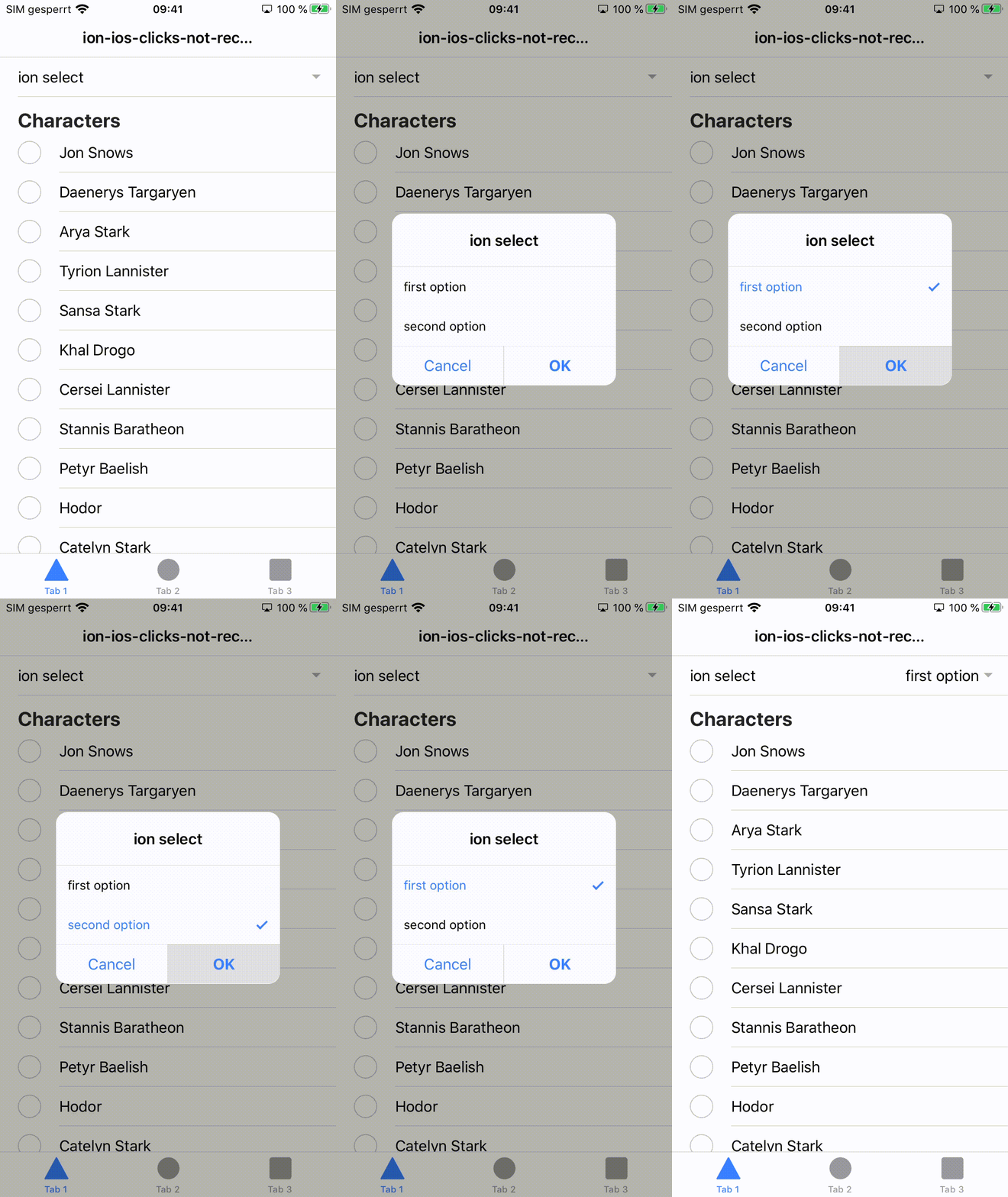
the click on "ok" does not work when pressed shortly after selecting an item.
capc0
on 15 Apr 2020
Yeah I noticed that it does not work on popups (modal, select, etc). There must be additional event listeners somewhere that are not passive. I'll take another look and will provide another dev build. Thanks for checking!
liamdebeasi
on 15 Apr 2020
ok that makes sense. In my production app I have the list also inside a modal, so thats why the previous dev build did not help there.
capc0
on 15 Apr 2020
Can you try the following dev build and let me know if it resolve the issue in popup components?
npm i @ionic/[email protected]
liamdebeasi
on 15 Apr 2020
That version resolves the issue.
Thanks!
capc0
on 16 Apr 2020
Will this fix please be included in the next release?
capc0
on 20 Apr 2020
@liamdebeasi sorry to bother you, but can this be within the 5.1.0 milestone? We are basically postponing updates until it is fixed :/
capc0
on 23 Apr 2020
Thanks for the issue. This has been resolved via https://github.com/ionic-team/ionic/pull/21038, and a fix will be available in an upcoming release of Ionic Framework.
liamdebeasi
on 30 Apr 2020
FYI: The click throttleing still seems to happen sometimes in alert dialogs. I am not yet able to reproduce this consistently. Can this also be due to other plugins creating click listeners that are not passive? If I manage to reproduce it in a standalone ionic project, should I open a new issue or comment here? Any other ideas much appreciated.
capc0
on 6 May 2020
@capc0 If you can reproduce the issue in a standalone Ionic project without 3rd party plugins, feel free to open a new issue. (also include a link to a repo so I can verify it 😊)
liamdebeasi
on 6 May 2020
Thanks for the issue! This issue is being locked to prevent comments that are not relevant to the original issue. If this is still an issue with the latest version of Ionic, please create a new issue and ensure the template is fully filled out.
![ionitron-bot[bot] picture](https://avatars1.githubusercontent.com/in/8640?v=4&s=40) ionitron-bot[bot]
on 5 Jun 2020
ionitron-bot[bot]
on 5 Jun 2020
Related issues
 GeorgeAnanthSoosai
·
3Comments
GeorgeAnanthSoosai
·
3Comments
 aslamj
·
3Comments
aslamj
·
3Comments
 brandyscarney
·
3Comments
brandyscarney
·
3Comments
 danbucholtz
·
3Comments
danbucholtz
·
3Comments
 gio82
·
3Comments
gio82
·
3Comments