Ionic-framework: bug: using collapse="condense" on IonHeader from "Collapsible Large Titles" guide causes overlaps
Bug Report
Ionic version:
[x] 4.x
Current behavior:
IonButtons & IonTitle are overlaped

Expected behavior:
There shouldn't be an overlap here. It seems that second IonButtons should be collapsed as they have collapse set to true.
Steps to reproduce:
Related code:
<IonPage>
  <IonHeader>
    <IonToolbar>
      <IonButtons collapse={true}>
        <IonButton>Click Me</IonButton>
      </IonButtons>
      <IonTitle>Home</IonTitle>
    </IonToolbar>
  </IonHeader>
  <IonContent>
    <IonHeader collapse="condense">
      <IonToolbar>
        <IonButtons collapse={true}>
          <IonButton>Click Me</IonButton>
        </IonButtons>
        <IonTitle size="large">Home</IonTitle>
      </IonToolbar>
      <IonToolbar>
        <IonSearchbar/>
      </IonToolbar>
    </IonHeader>
    {...}
</IonPage>
Other information:
I've took the Collapsiblle Large Titles small example from the original guide: https://ionicframework.com/docs/api/title#collapsible-large-titles
Ionic info:
Ionic:

   Ionic CLI       : 5.4.11 (/Users/ak/.nvm/versions/node/v10.16.3/lib/node_modules/ionic)
   Ionic Framework : @ionic/react 4.11.8

Utility:

   cordova-res : not installed
   native-run  : not installed

System:

   NodeJS : v10.16.3 (/Users/ak/.nvm/versions/node/v10.16.3/bin/node)
   npm    : 6.9.0
   OS     : macOS Catalina
 alekseykarpenko
All 6 comments
Thanks for the issue. This looks like a bug in the documentation example. As per the iOS spec, when using large titles all buttons should be aligned to the right. In this case, you would want to add slot="end" to IonButtons.
I will make sure that the documentation reflects this.
 liamdebeasi
on 17 Jan 2020
liamdebeasi
on 17 Jan 2020
Thanks! I have updated the documentation with this note.
liamdebeasi
on 17 Jan 2020
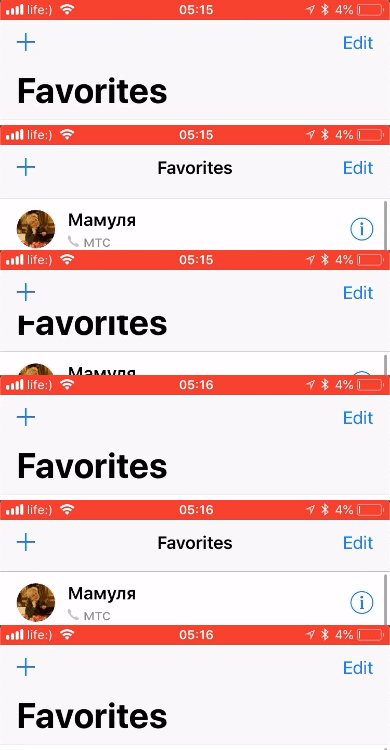
@liamdebeasi Looks like this approach is different from a native behavior. Checked on my iPhone: native Contacts app have action icons on both sides. This limitation should be critical for some specific screens (e.g. with Back navigation). Should I create a separate feature request to support fully native behavior?
alekseykarpenko
on 19 Jan 2020
The behavior you are describing is still possible. What I was referring to in my previous comment is having a button to the left of the "Favorites" text, which is not something that happens in the native iOS spec. The image you have posted shows a "+" button above the "Favorites" text.
To get the behavior you are describing, you would do something like:
<ion-header>
  <ion-toolbar>
    <ion-buttons slot="start">
      <ion-button slot="icon-only">
        <ion-icon name="add"></ion-icon>
      </ion-button>
    </ion-buttons>

    <ion-title>Favorites</ion-title>

    <ion-buttons slot="end">
      <ion-button>Edit</ion-button>
    </ion-buttons>
  </ion-toolbar>
</ion-header>

<ion-content>
  <ion-header collapse="condense">
    <ion-toolbar>
      <ion-title size="large">Favorites</ion-title>
    </ion-toolbar>
  </ion-header>
</ion-content>
@liamdebeasi ahh, okay, I got it, I should use upper header for those icons. Thx for explaining this.
alekseykarpenko
on 24 Jan 2020
Thanks for the issue! This issue is being locked to prevent comments that are not relevant to the original issue. If this is still an issue with the latest version of Ionic, please create a new issue and ensure the template is fully filled out.
![ionitron-bot[bot] picture](https://avatars1.githubusercontent.com/in/8640?v=4&s=40) ionitron-bot[bot]
on 23 Feb 2020
ionitron-bot[bot]
on 23 Feb 2020
Related issues
 BilelKrichen
·
3Comments
BilelKrichen
·
3Comments
 RobFerguson
·
3Comments
RobFerguson
·
3Comments
 GeorgeAnanthSoosai
·
3Comments
GeorgeAnanthSoosai
·
3Comments
 SebastianGiro
·
3Comments
SebastianGiro
·
3Comments
 manucorporat
·
3Comments
manucorporat
·
3Comments