Ionic-framework: bug: Usage of "contain: layout" causes layout inconsistencies between browsers due to lack of support
Bug Report
Ionic version:
[x] 4.x
Current behavior:
position: fixed does not behave correctly due to usage of a new CSS feature (contain: layout) which is not supported in all major browsers. Especially this is a problem due to the difference between Android and iOS.
Expected behavior:
Layout should behave the same across all major browsers.
Steps to reproduce:
Add an element to your app with position: fixed; bottom: 0 and see how it goes to different places in different browsers.
Related code:
Open this demo in e.g. Chrome and Safari/Firefox to see the difference: https://stackblitz.com/edit/ionic-v4-angular-tabs-xnkb9s?file=src/app/app.component.ts
It is this red square that is positioned incorrectly due to the lack of support in browsers like FF and Safari:
<div style="position: fixed; bottom: 0; background-color: red; width: 100px; height: 100px;"></div>
Other information:
Can I Use table for the feature looks like this
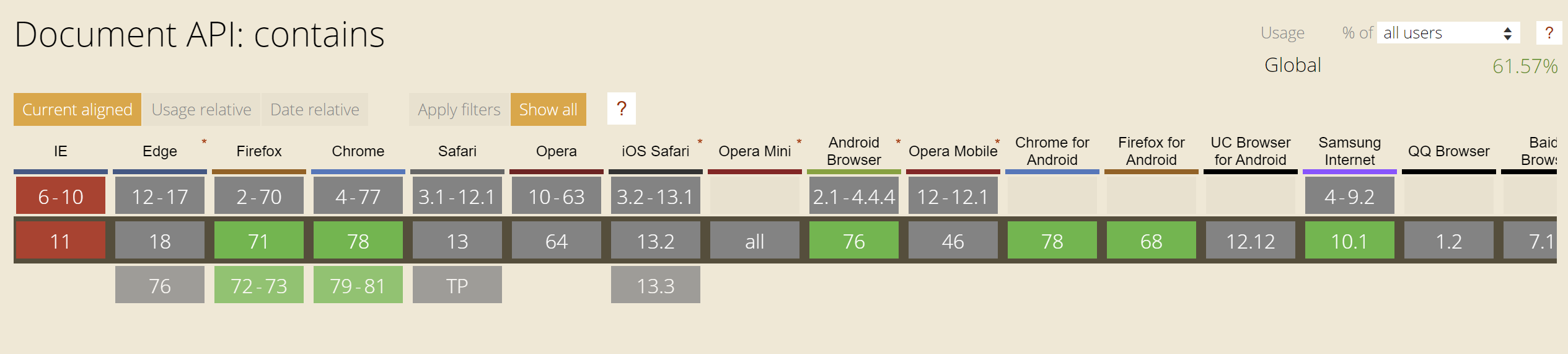
Firefox is green but it does not still work the same way.
Ionic info:
Problem with at least the latest Ionic Angular. StackBlitz example seems to use 4.8.1.
 RoopeHakulinen
All 4 comments
If anyone else struggles with the same issue, for me the temporary solution was to disable the contain: layout by overriding it for all relevant elements. In my case this was achieved as follows:
ion-tabs, .tabs-inner, ion-router-outlet, .ion-page {
contain: size style !important;
}
It is worth highlighting that this only works for my case as I happen to have just those Ionic elements in the stack. In some other case there might be other elements to be included in the rule for it to completely remove the layout.
RoopeHakulinen
on 15 Dec 2019
@RoopeHakulinen Hello, Im not sure I'm following/understanding the issue here.
You're example is very specific, is there problem specifically with Ionic's components? If so, can you isolate that instead of a red rectangle?
 mhartington
on 16 Dec 2019
mhartington
on 16 Dec 2019
@mhartington Thanks for your answer!
I guess whether this is an issue or not depends on the goal of Ionic. I might be totally off the track here but I've kind of assumed that one of the goals is to be compatible with major browsers and especially the two main mobile platforms (Android & iOS). If so, using a feature which is not supported by other browsers than Chrome doesn't seem like something that should be done when it causes layout issues between the supported browsers/platforms?
My example is just a minimal example of what kind of issue the usage of contain: layout causes. Took me quite a few hours of exploration to find out why stuff is not positioned correctly on iOS but is on Android. As shown in the StackBlitz project provided the usage of contain: layout causes even such a simple CSS as position: fixed; bottom: 0 to behave differently in different browsers.
I hope that clarifies the problem at least a bit.
RoopeHakulinen
on 16 Dec 2019
A possible solution is to use the slot="fixed" property in combination with the CSS bottom: 0;, and not use position: fixed; at all.
The button in the example below will stay at the bottom of the ion-contentcontainer no matter the length of the content.
<ion-content>
    <div>...some content...</div>
    <ion-button slot="fixed" style="bottom: 0;">Click me<ion-button>
</ion-content>
 Ionaru
on 20 May 2020
Ionaru
on 20 May 2020
Related issues
 alan-agius4
·
3Comments
alan-agius4
·
3Comments
 fdnhkj
·
3Comments
fdnhkj
·
3Comments
 brandyscarney
·
3Comments
brandyscarney
·
3Comments
 SebastianGiro
·
3Comments
SebastianGiro
·
3Comments
 RobFerguson
·
3Comments
RobFerguson
·
3Comments
Most helpful comment
A possible solution is to use the
slot="fixed"property in combination with the CSSbottom: 0;, and not useposition: fixed;at all.The button in the example below will stay at the bottom of the
ion-contentcontainer no matter the length of the content.