Ionic-framework: bug: iPadOS 13.2 rendering issues with absolute elements after overlay transition
This is a strange issue happening on iPads with iOS 13 / iPadOS on Ionic 4.7, 4.11.5, and 5.0.0-beta.
Current behavior:
With a set of absolute divs overlaid on top of a canvas, when a popover or alert is presented, then the absolute divs are being immediately hidden behind the canvas, even though the divs have a much higher z-index value (e.g. 1000 - 1001) than the underlying canvas (100).
Expected behavior:
The absolute divs should remain over top of the canvas even after the popover.present() function is called. From testing, the disappearing happens only when the popover is actually presented, not during popover creation. It happens with both iOS and MD modes when calling the popover.
This isn't an issue at all on iPhone or Android, only on iPad with iOS 13, which has a new desktop browsing engine. It also doesn't happen on Ionic 4.4 with NG 7. It happens both in native version and web-based PWA through Safari.
This is part of a complex project with document annotation features... I've spent about 10 hours troubleshooting it and I'm having trouble recreating this issue in a standalone repo.
I'm wondering if something changed in the overlay transition function (utils/overlay?) that might be causing this unusual behavior. Appreciate any suggestions for troubleshooting or a workaround. Thanks
Before Popover
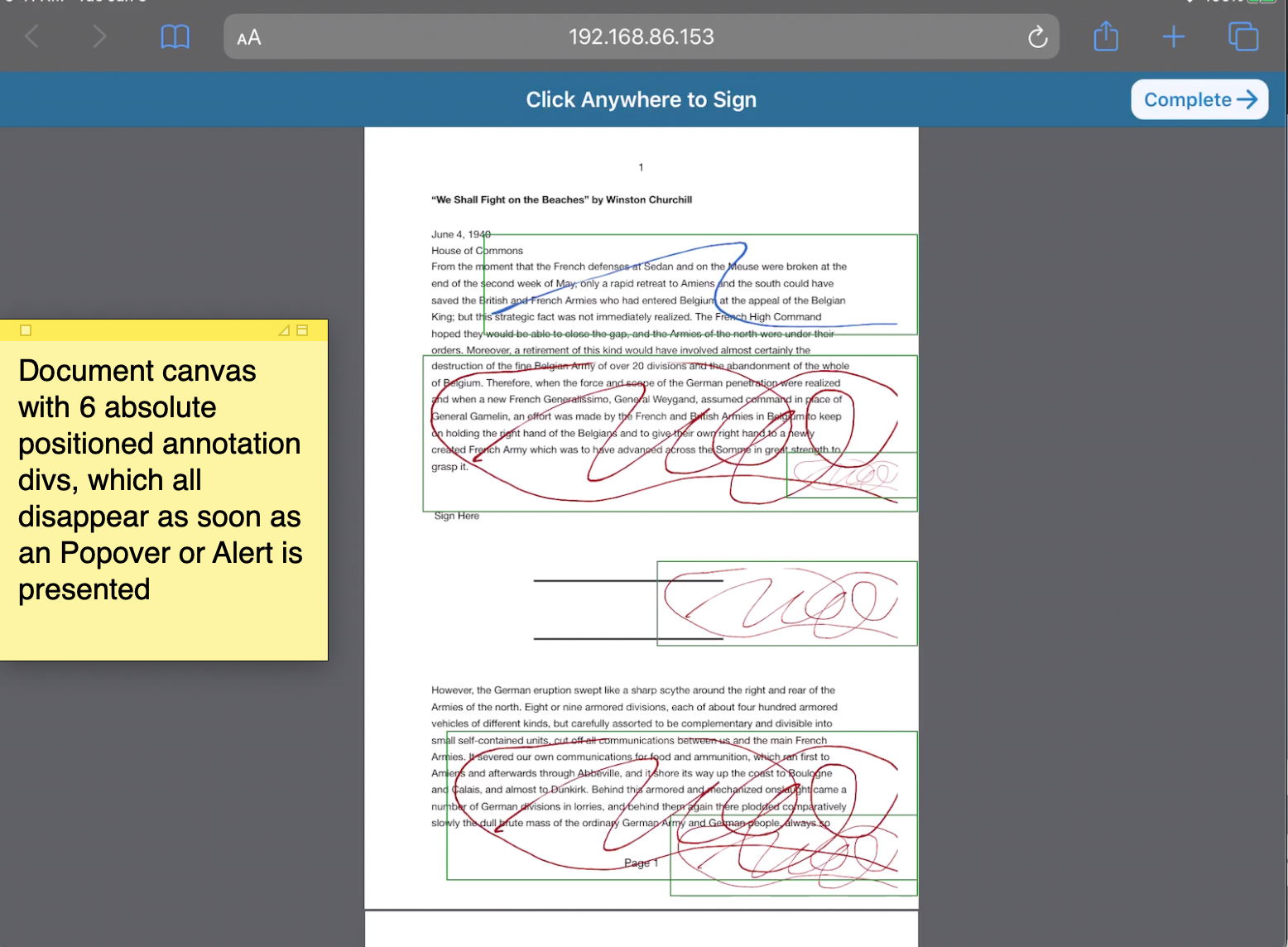
On popover.present() or alert controller

 thmclellan
All 7 comments
Thanks for the issue. I haven't seen any reported issues like this on iPadOS, so if you could create a standalone reproduction that would be great. Is this only happening on iPadOS 13.2, or have you seen this happening on older versions/newer betas?
 liamdebeasi
on 21 Nov 2019
liamdebeasi
on 21 Nov 2019
Thanks @liamdebeasi, it's happening on all versions of iOS/iPadOS 13.X since they rolled out the new safari desktop engine. I've tried chasing it down with WebKit but the root cause seems to be something happening when overlays are presented, and only started after switching from Ionic 4.4 / NG7 to Ionic 4.7 / NG8.
I'm having trouble re-creating the issue in a standalone repo... for now we may have to downgrade to Ionic 4.4 / NG7. One option to help with troubleshooting - if you have an iPad and want a test link to troubleshoot with Safari Dev tools, I could send you a link to our test server.
Do you know if there have been any significant changes on popover utils that might impact absolute positioned div's? I also wondered if this is likely due to NG8 ViewChild changes, I might try Ionic 4.11.5 on NG7.
Maybe our best bet is to stay at Ionic 4.4 until a future iPadOS update fixes the browser issue. Appreciate any advice. Thanks
thmclellan
on 21 Nov 2019
A test link would be great. You can either post it here, or if it needs to be shared privately email it to liam [at] ionic.io.
liamdebeasi
on 21 Nov 2019
@liamdebeasi I've sent over a test link by email (subject line: Test Link for Issue 19961). Let me know if there's anything else I can provide. Thanks
thmclellan
on 23 Nov 2019
Thanks for the test link. After signing the document and reloading the page I was able to periodically get the existing signatures to not show up. Here are the steps I followed:
- Open test link.
- Click "View & Sign".
- Add a few signatures to the page.
- Reload.
Sometimes the signatures would show up, sometimes they wouldn't. When the signatures did not show up, I inspected the DOM and it looks like the jet-doc-input components that are responsible for showing the signature were not even added to the DOM yet.
Having to tap the page in order to get these components added to the DOM probably means something isn't quite right with how you are handling change detection in your Angular app (I've run into this situation a few times before).
Is this the issue I should be looking for, or something else?
liamdebeasi
on 27 Nov 2019
Thanks @liamdebeasi for taking the time to dig into this. Sorry for the delay in following up. After a lot of troubleshooting I found a workaround and will be closing the issue.
The root cause seemed to be how iPad iOS 13 was handling z-index values of DOM elements after presenting iOS-styled overlays like modal and popover. Here are the details in case it helps others:
- We had a series of DOM elements (as you can see in earlier screenshots) that were absolute positioned with a high z-index value (e.g. 1000) over top of a canvas and other div's that were positioned at a lower z-index value (100).
- When presenting an iOS-styled overlay (e.g. modal or popover), in Ionic 4.1.0 through to 4.11.7, with both NG7 and NG8, then the iPadOS / iOS 13.2 and 13.3 Safari would cause the child z-index elements to get hidden, even though they had a higher z-index value.
- This also happened when calling toast, though only when the toast was dismissed.
- Strangely, this issue only happened when running in iOS mode. The same code running on iPad OS when in MD mode worked fine - the z-index values were respected.
- The solution that worked was to:
a) remove the z-index value (altogether) from the top-level div / canvas, so that only the child jet-doc-input components would have a z-index value, and
b) specify that the top-level div/canvas (below ion-content) has the following (this was necessary to get the top level div / canvas area to scroll on iPad without requiring z-index):
  –webkit-overflow-scrolling: touch;
  -webkit-transform: translate3d(0,0,0);
c) and also add this to the child component (jet-doc-input) with z-index:
-webkit-transform: translate3d(0,0,0);
Now it's working again in iPad and the document scrolls. Apparently the translate3d call may trigger GPU-handling of some of those z-index components that otherwise don't get handled properly.
It's still a mystery why the Ionic overlay present function (for iOS only, MD worked fine) was causing the z-index elements to disappear behind their correct layer. Hopefully Apple will fix this in a future version of iOS.
For anyone else with this issue, these two articles were helpful:
https://css-tricks.com/forums/topic/safari-for-ios-z-index-ordering-bug-while-scrolling-a-page-with-a-fixed-element/
https://weblog.west-wind.com/posts/2015/jun/05/ipad-scroll-issues-with-fixed-content
Thanks again for the help with troubleshooting!
thmclellan
on 20 Dec 2019
Thanks for the issue! This issue is being locked to prevent comments that are not relevant to the original issue. If this is still an issue with the latest version of Ionic, please create a new issue and ensure the template is fully filled out.
![ionitron-bot[bot] picture](https://avatars1.githubusercontent.com/in/8640?v=4&s=40) ionitron-bot[bot]
on 19 Jan 2020
ionitron-bot[bot]
on 19 Jan 2020
Related issues
 vswarte
·
3Comments
vswarte
·
3Comments
 brandyscarney
·
3Comments
brandyscarney
·
3Comments
brandyscarney
·
3Comments
brandyscarney
·
3Comments
 SebastianGiro
·
3Comments
SebastianGiro
·
3Comments
 fdnhkj
·
3Comments
fdnhkj
·
3Comments