Ionic-framework: bug: Can't modify spacing of ion-item
Bug Report
Ionic version:
[x] 4.7.
Current behavior:
I am simply trying to reduce the spacing of the items in this ion-list:

Spent far too many hours reading tutorials on shadow dom and trying various variables. Nothing has worked (although i am able to make it bigger).
Google has returned numerous posts with people complaining about the same issue; with no solutions. After this much time i have to assume this is a bug.
And if not a bug.. certainly far too difficult to make this simple modification.
I can likely accomplish what i am trying to do by not using an ion-list and just using std html components; but it is so close and easy to get this close - it seems hard to believe it can't be tweaked a few pixels.
Expected behavior:
the same list with slightly smaller spacing
Steps to reproduce:
Related code:
```
{{name}}
      <ion-item color="secondary" class="ion-no-padding" *ngIf="school">
        <ion-label style="font-size: 14px" text-wrap innerHTML={{school}}></ion-label>
        <ion-icon size="small" name="school" slot="start"></ion-icon>
      </ion-item>
      <ion-item color="secondary" class="ion-no-padding"*ngIf="year">
        <ion-label style="font-size: 14px" >{{year}}</ion-label>
        <ion-icon size="small" name="calendar" slot="start"></ion-icon>
      </ion-item>

    </ion-list>
**Ionic info:**
<!-- (run `ionic info` from a terminal/cmd prompt and paste output below): -->
Ionic:
Ionic CLI : 5.2.5 (C:\Users\Peter\AppData\Roaming\npmnode_modules\ionic)
Ionic Framework : @ionic/angular 4.7.4
@angular-devkit/build-angular : 0.13.9
@angular-devkit/schematics : 7.3.9
@angular/cli : 7.3.9
@ionic/angular-toolkit : 1.5.1
Capacitor:
Capacitor CLI : 1.0.0-beta.24
@capacitor/core : 1.0.0-beta.24
Cordova:
Cordova CLI : 9.0.0 ([email protected])
Cordova Platforms : android 8.0.0
Cordova Plugins : cordova-plugin-ionic-keyboard 2.1.3, cordova-plugin-ionic-webview 4.0.1, (and 8 other plugins)
Utility:
cordova-res : 0.3.0
native-run : 0.2.8
System:
Android SDK Tools : 26.1.1 (C:android-sdk)
NodeJS : v10.13.0 (D:\Program Filesnodejsnode.exe)
npm : 6.11.3
OS : Windows 7
```
 liquidcms
All 11 comments
You probably have a few options here.
You might want to remove the _min-height_ on the ion-items by setting the css variable: ion-item { --min-height: 0; }.
But it might also just be enough to manually pull up the lower item with a negative top margin, eg. give the lower item a class “year” and pull it up via: ion-item.year { margin-top: -5px; }.
Then theres also margins on the ion-labels, which you can also remove: ion-label {margin: 0; }.
 sean118
on 20 Oct 2019
sean118
on 20 Oct 2019
Thanks for the issue. These components are designed to match the iOS/MD spec by default so it's likely you will need to customize some of the margin/padding yourself. You should be able to adjust the margins on ion-label and possibly the padding on ion-icon.
Can you try that and let me know if it resolves your issue?
 liamdebeasi
on 21 Oct 2019
liamdebeasi
on 21 Oct 2019
ion-label {margin: 0; } - no impact
ion-item {
margin-top: -5px; - no impact
min-height: 0; - no impact
}
but yes, ion-item {--min-height: 0;} has a small impact in that it changes the overall line height from 48 to 45px

liquidcms
on 21 Oct 2019
I made a CodePen to show what I mean: https://codepen.io/liamdebeasi/pen/gOOgbyO
The top list has the customizations, the bottom list does not.
liamdebeasi
on 21 Oct 2019
with your code cut/paste.. same result:
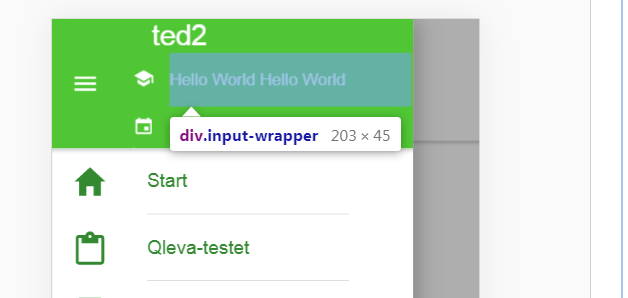
to be clear:
- pasted your entire css into global.scss
- took your top ion-list and replaced mine with it (left in the H1 ion-item)
You can see outer wrapping here: https://codepen.io/peter-lindstrom/pen/mddRVjg
liquidcms
on 21 Oct 2019
Can you provide a full repo with the code required to reproduce this issue?
liamdebeasi
on 21 Oct 2019
i'll put one together.
liquidcms
on 21 Oct 2019
Each element has its own styling. Item has two main elements that have padding left/right by default: ion-item and the inner item div. Those can be styled using the following custom properties:
--padding-top, --padding-end, --padding-bottom, --padding-start
--inner-padding-top, --inner-padding-end, --inner-padding-bottom, --inner-padding-start
In addition to the padding the item sets a min-height. The following CSS should remove all existing padding/min-height:
ion-item {
  --padding-start: 0;
  --padding-end: 0;

  --inner-padding-start: 0;
  --inner-padding-end: 0;

  --min-height: 0;
}
Inside of the item each component will be styled differently in order to match the spec. Since you are using an ion-icon it has margin-top/margin-bottom on it, and the ion-label does as well. The following will remove all margin from those elements:
ion-item ion-label,
ion-item ion-icon {
  margin: 0;
}
Here's an example Codepen: https://codepen.io/brandyscarney/pen/rNNjewr?editors=0110
 brandyscarney
on 21 Oct 2019
brandyscarney
on 21 Oct 2019
Hi Brandy, thanks as always.. that does the (painful) trick. Your suggestion reduces overall line height to 33px (from 48) - which is the size of the icon.

i'll need to tweak a little to center icon with text and prevent text from getting clipped - but this has fixed my issue.
Thank you and sorry for reporting this as a bug.
And thanks Liam for looking at this. I had most of a demo repo put together when Brandy posted.
liquidcms
on 21 Oct 2019
@liquidcms Glad that works! Item is a complex component because of all of the different scenarios it handles out of the box: avatars, thumbnails, icons, buttons, notes, inputs with floating/stacked/fixed labels, different width divider lines, multiple line items. These are all styled very specifically to match the spec for each device, for example, Material Design: https://material.io/components/lists/.
In most cases, if you need to fully customize an item and don't want it to look like native or handle the above scenarios, you should be able to use a combination of our grid or divs and CSS to accomplish what you need. Here's an example using our grid and removing all of the default padding: https://codepen.io/brandyscarney/pen/rNNjewr?editors=1100
Hope this helps! 🙂
brandyscarney
on 21 Oct 2019
Thanks for the issue! This issue is being locked to prevent comments that are not relevant to the original issue. If this is still an issue with the latest version of Ionic, please create a new issue and ensure the template is fully filled out.
![ionitron-bot[bot] picture](https://avatars1.githubusercontent.com/in/8640?v=4&s=40) ionitron-bot[bot]
on 20 Nov 2019
ionitron-bot[bot]
on 20 Nov 2019
Related issues
brandyscarney
·
3Comments
 GeorgeAnanthSoosai
·
3Comments
GeorgeAnanthSoosai
·
3Comments
 giammaleoni
·
3Comments
giammaleoni
·
3Comments
 manucorporat
·
3Comments
manucorporat
·
3Comments
 fdnhkj
·
3Comments
fdnhkj
·
3Comments