Ionic-framework: bug: Buttons no longer align with ion-searchbar
Bug Report
Ionic version:
[x] 4.10.0
Current behavior:
Add an ion-buttons next to an ion-searchbar component within a toolbar. On iOS they no longer align in v4.10.0. Unless there is a different way to align buttons next to a ion-searchbar that I am unaware of I believe this is a bug?
Expected behavior:
I'd expect buttons within ion-buttons to align with the searchbar on iOS.

Steps to reproduce:
Related code:
<ion-header>
  <ion-toolbar>
    <ion-searchbar></ion-searchbar>
    <ion-buttons slot="end">
      <ion-button (click)="goBack()">
        Cancel
      </ion-button>
    </ion-buttons>
  </ion-toolbar>
</ion-header>
Other information:
I believe this is due to the addition of https://github.com/ionic-team/ionic/commit/e27962dcaf98bfb1f4c026df5a8c525ee3773261#diff-d7830cbb2e9f6ba7efe16e29aaac9c6b specifically the padding-top: 1px !important;.
 rossholdway
All 23 comments
Thanks for the issue! Are you using a custom cancel button?
 brandyscarney
on 30 Sep 2019
brandyscarney
on 30 Sep 2019
Hi @brandyscarney
Yes, I am using a custom button because I need it to call a function on tap. I believe the button that’s provided by the ion-searchbar doesn’t allow me to do this.
rossholdway
on 30 Sep 2019
@rossholdway Anything in particular you're trying to do? You should be able to listen to the ionCancel event and change the visibility of it that way. Here's a sample Codepen: https://codepen.io/brandyscarney/pen/PoYrJNK?editors=1111
We can fix the alignment of buttons next to the toolbar but they will but up higher by the searchbar since this is updated to match the iOS spec.
brandyscarney
on 30 Sep 2019
Hi @brandyscarney,
I have the same issue
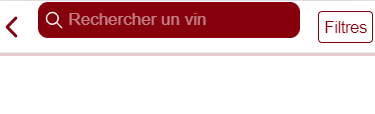
Related Code:
<ion-header>
    <ion-toolbar>
        <ion-buttons slot="start">
            <ion-back-button text=""></ion-back-button>
          </ion-buttons>
        <ion-searchbar #autofocus debounce="500" color="primary" placeholder="Rechercher un vin" (ionChange)="search($event)"></ion-searchbar>
        <ion-buttons slot="end">
            <ion-button (click)="showFilterChoice()" color="primary" fill="outline">Filtres</ion-button>
          </ion-buttons>
      </ion-toolbar>
  </ion-header>
 Anthony2539
on 1 Oct 2019
Anthony2539
on 1 Oct 2019
Same issue here.
By debugging I realize that the padding-top of ion-searchbar was removed, it is probably related to the issue.
 mateusduraes
on 1 Oct 2019
mateusduraes
on 1 Oct 2019
@brandyscarney Amazing. Thanks for the codepen. Didn't realise there was an ionCancel event available for the built in ion-searchbar button. Eveything aligns for me now.
<ion-header>
  <ion-toolbar>
    <ion-searchbar show-cancel-button="always" (ionCancel)="goBack()"></ion-searchbar>
  </ion-toolbar>
</ion-header>
I guess it might be worth looking into a CSS fix for custom buttons e.g. in Anthony2539's example above he has two buttons to align in the toolbar (back and filters).
rossholdway
on 1 Oct 2019
Thanks for the feedback! So like I said, we can update the buttons so that they are aligned with the searchbar but this will put them closer to the top. This is due to the iOS spec which normally does not include buttons by a searchbar. Here's a picture of the spec to see where the numbers come from:

And here are some examples of the searchbar in a toolbar by itself:


I'll look into a fix for the buttons. 🙂
brandyscarney
on 2 Oct 2019
As a workaround until the fix is in you can target them with this CSS:
ion-buttons {
  align-self: start;
}
This should mostly center them, still making sure it works properly. 🙂
brandyscarney
on 2 Oct 2019
This has been fixed in master, we're planning a 4.10.1 release with this in it on Friday. In the meantime, please use this dev build if you need it sooner: 4.11.0-dev.201910021623.cdfd82a
Thanks everyone!
brandyscarney
on 2 Oct 2019
still occur on 4.11.0-dev.201910081329.02c1724
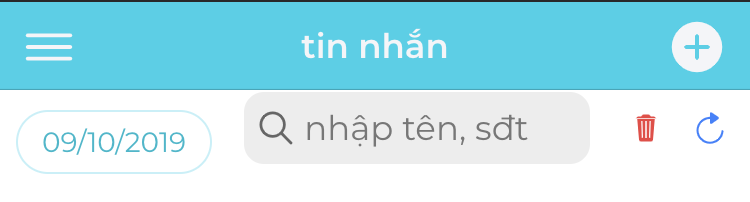
 thiennm2905
on 9 Oct 2019
thiennm2905
on 9 Oct 2019
Please use the exact dev build I posted, other dev builds weren't made with the same branch.
brandyscarney
on 9 Oct 2019
Actually, it was published with 4.10.1: https://ionicframework.com/docs/release-notes#4.10.1
brandyscarney
on 9 Oct 2019
I just use version 4.10.2 before try to use dev version, and I dont know why you fixed height and padding with important :(
thiennm2905
on 9 Oct 2019
searchbar align with cancel button, but not with others items inside ion-toolbar
thiennm2905
on 9 Oct 2019
a simple code, please check it
<ion-header>
  <ion-toolbar>
    <ion-chip [outline]="true" color="app" slot="start" (click)="picker.open()">
      <ion-datetime #picker [(ngModel)]="pickedDate" (ngModelChange)="pickDate()"
                    displayFormat="DD-MM-YYYY" pickerFormat="DD-MM-YYYY"
                    cancelText="thoát" doneText="chọn"
                    style="display: none;"></ion-datetime>
      {{pickedDate | date:'dd/MM/yyyy'}}
    </ion-chip>
    <ion-searchbar placeholder="nhập tên, sđt" [(ngModel)]="keyword" (ngModelChange)="search()"></ion-searchbar>
    <ion-buttons slot="end">
      <ion-button (click)="clearData()" size="small">
        <ion-icon color="danger" slot="icon-only" size="small" name="trash"></ion-icon>
      </ion-button>
      <ion-button (click)="updateData()" size="small">
        <ion-icon slot="icon-only" name="refresh" size="small"></ion-icon>
      </ion-button>
    </ion-buttons>
  </ion-toolbar>
</ion-header>
thiennm2905
on 9 Oct 2019
The searchbar has to have !important on it because it's a scoped component, so that's the way to make it override its default styles. This was done to match the iOS spec, see my comment here: https://github.com/ionic-team/ionic/issues/19502#issuecomment-537522707
We always align our components to match native. iOS doesn't actually have the concept of chips, but I can add some styles to align it but it will be on the top.
brandyscarney
on 9 Oct 2019
I know your mind but I think height and padding-bottom should not have important, it's make me impossible to custom my style ^^!
thanks for your helps
thiennm2905
on 9 Oct 2019
Okay I found a way to move the CSS so that !important wouldn't be needed and adjusted the styles for chip. I'm working on a dev build, ran into some issues.
brandyscarney
on 9 Oct 2019
Can you try this dev build please: 4.11.0-dev.201910082331.57ee7eb
brandyscarney
on 9 Oct 2019
I'm really grateful for your helps ^_^
thiennm2905
on 9 Oct 2019
sample code
<ion-header>
  <ion-toolbar>
    <ion-chip [outline]="true" color="app" slot="start" (click)="picker.open()">
      <ion-datetime #picker [(ngModel)]="pickedDate" (ngModelChange)="pickDate()"
                    displayFormat="DD-MM-YYYY" pickerFormat="DD-MM-YYYY"
                    cancelText="thoát" doneText="chọn"
                    style="display: none;"></ion-datetime>
      {{pickedDate | date:'dd/MM/yyyy'}}
    </ion-chip>
    <ion-searchbar placeholder="nhập tên, sđt" [(ngModel)]="keyword" (ngModelChange)="search()" showCancelButton="always"></ion-searchbar>
    <ion-buttons slot="end">
      <ion-button (click)="clearData()" size="small">
        <ion-icon color="danger" slot="icon-only" size="small" name="trash"></ion-icon>
      </ion-button>
      <ion-button (click)="updateData()" size="small">
        <ion-icon slot="icon-only" name="refresh" size="small"></ion-icon>
      </ion-button>
    </ion-buttons>
  </ion-toolbar>
</ion-header>
<ion-toolbar>
  <ion-chip [outline]="true" color="app" slot="start" (click)="picker.open()">
    <ion-datetime #picker [(ngModel)]="pickedDate" (ngModelChange)="pickDate()"
                  displayFormat="DD-MM-YYYY" pickerFormat="DD-MM-YYYY"
                  cancelText="thoát" doneText="chọn"
                  style="display: none;"></ion-datetime>
    {{pickedDate | date:'dd/MM/yyyy'}}
  </ion-chip>
  <ion-searchbar placeholder="nhập tên, sđt" [(ngModel)]="keyword" (ngModelChange)="search()"></ion-searchbar>
  <ion-buttons slot="end">
    <ion-button (click)="clearData()" size="small">
      <ion-icon color="danger" slot="icon-only" size="small" name="trash"></ion-icon>
    </ion-button>
    <ion-button (click)="updateData()" size="small">
      <ion-icon slot="icon-only" name="refresh" size="small"></ion-icon>
    </ion-button>
  </ion-buttons>
</ion-toolbar>
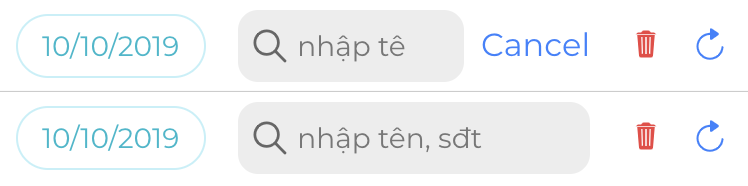
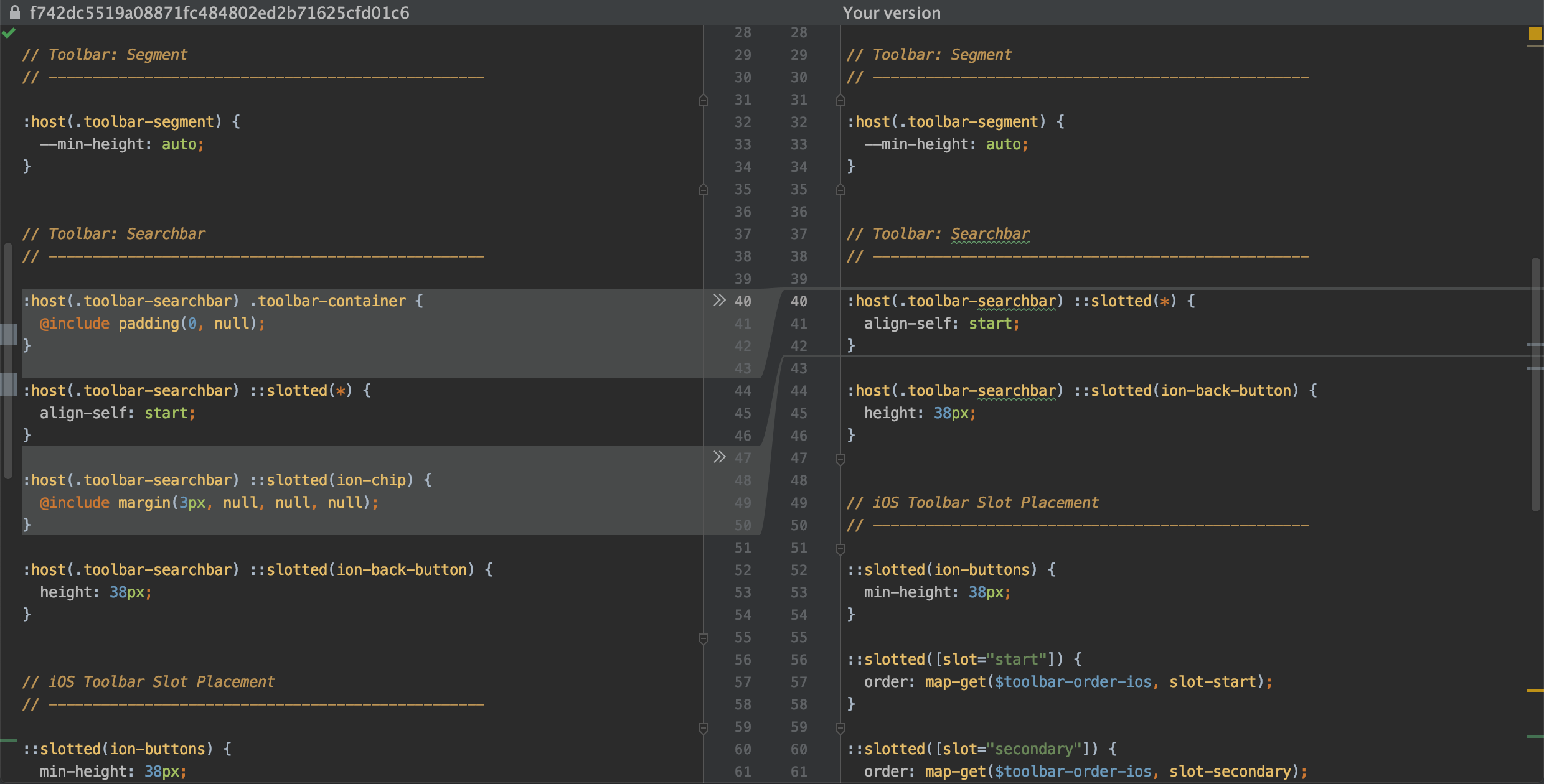

@brandyscarney
thiennm2905
on 10 Oct 2019
The alignment of the search bar is still not optimal.

Example: https://codepen.io/robingenz/pen/XWWdrRX
Will this be fixed?
 robingenz
on 14 Oct 2019
robingenz
on 14 Oct 2019
Please create a new issue if you are still running into a bug. The original issue has been resolved so I am going to lock this.
As I mentioned above the padding on the searchbar matches the iOS spec and is correct. It will not be changed. Please use custom padding in your app if you want it to look different.
brandyscarney
on 14 Oct 2019
Related issues
 masimplo
·
3Comments
masimplo
·
3Comments
 gio82
·
3Comments
gio82
·
3Comments
 giammaleoni
·
3Comments
giammaleoni
·
3Comments
 MrBokeh
·
3Comments
brandyscarney
·
3Comments
MrBokeh
·
3Comments
brandyscarney
·
3Comments
Most helpful comment
Thanks for the feedback! So like I said, we can update the buttons so that they are aligned with the searchbar but this will put them closer to the top. This is due to the iOS spec which normally does not include buttons by a searchbar. Here's a picture of the spec to see where the numbers come from:
And here are some examples of the searchbar in a toolbar by itself:
I'll look into a fix for the buttons. 🙂