Ionic-framework: bug: Virtual Scroll - Scrolling + switching tab
Bug Report
Ionic version:
[x] 4.x
Current behavior:
Changing tab while the virtual scroll is still scrolling will hide all the items when we go back to the previous tab. Watch this to better understand the bug:
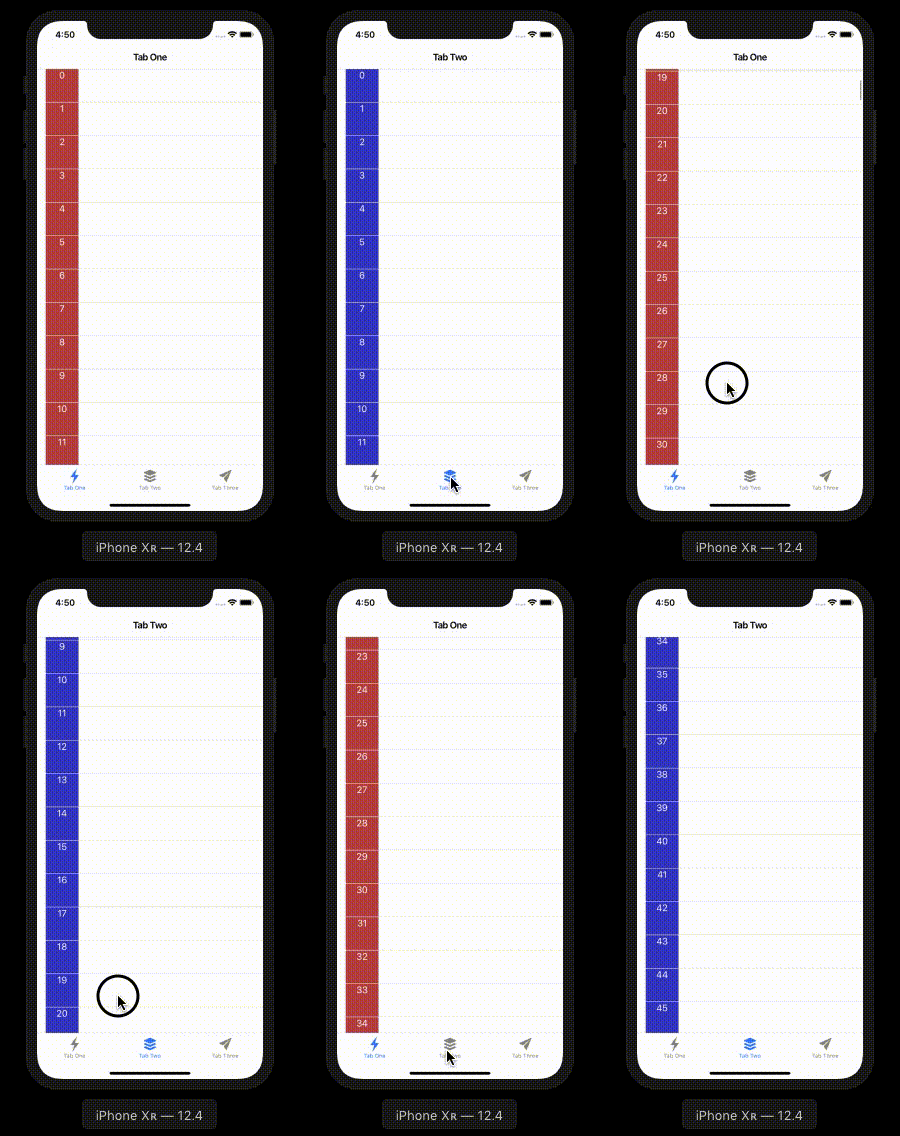
This seems to be the same issue as https://github.com/ionic-team/ionic/issues/13392 but on ionic 4
Expected behavior:
Should not hide items
Steps to reproduce:
clone this https://github.com/JumBay/ionic-virtualscroll-issue or
Create a brand new project with tabs options, edit tab1.page.ts and tab2.page.ts with this code:
import { Component } from '@angular/core';

@Component({
  selector: 'app-tab1',
  template: `
  <ion-header>
  <ion-toolbar>
    <ion-title>
      Tab One
    </ion-title>
  </ion-toolbar>
</ion-header>

<ion-content>
  <ion-virtual-scroll [items]="items">
    <ion-item *virtualItem="let item">
      <div>{{item}}</div>
    </ion-item>
  </ion-virtual-scroll>
</ion-content>
  `,

  styles: [
    `div {
      background: rgb(189, 72, 72);
      width: 60px;
      height: 60px;
      text-align: center;
      color: white;
    }`
  ]
})
export class Tab1Page {

  items = [];

  constructor() {
    for (let i = 0; i < 1000; i++) {
      this.items.push(i);
    }
  }

}
Run the code on an iOS simulator/device
Ionic info:
```
Ionic:
Ionic CLI : 5.2.3 (/usr/local/lib/node_modules/ionic)
Ionic Framework : @ionic/angular 4.7.3
@angular-devkit/build-angular : 0.801.3
@angular-devkit/schematics : 8.1.3
@angular/cli : 8.1.3
@ionic/angular-toolkit : 2.0.0
Cordova:
Cordova CLI : 9.0.0 ([email protected])
Cordova Platforms : ios 5.0.1
Cordova Plugins : cordova-plugin-ionic-keyboard 2.1.3, cordova-plugin-ionic-webview 4.1.1, (and 4 other plugins)
Utility:
cordova-res : 0.6.0
native-run : 0.2.3 (update available: 0.2.8)
System:
ios-deploy : 1.9.4
ios-sim : 8.0.1
NodeJS : v10.16.0 (/usr/local/bin/node)
npm : 6.9.0
OS : macOS Mojave
Xcode : Xcode 10.3 Build version 10G8
 JumBay
All 3 comments
Actually, any route change will produce this bug with ion-virtual-scroll.
 frozer
on 15 Nov 2019
frozer
on 15 Nov 2019
Anybody got a workaround to that problem?
 marcelkipp
on 21 Oct 2020
marcelkipp
on 21 Oct 2020
I ended up by using angular-cdk's virtualscroll
JumBay
on 21 Oct 2020
Related issues
 danbucholtz
·
3Comments
danbucholtz
·
3Comments
 MrBokeh
·
3Comments
MrBokeh
·
3Comments
 Nick-The-Uncharted
·
3Comments
Nick-The-Uncharted
·
3Comments
 alexbainbridge
·
3Comments
alexbainbridge
·
3Comments
 brandyscarney
·
3Comments
brandyscarney
·
3Comments
Most helpful comment
I ended up by using angular-cdk's virtualscroll