Ionic-framework: bug: hardwareBackButton config option not working as expected
Bug Report
Ionic version:
[x] 4.x
Current behavior:
'hardwareBackButton' option described here is not working.
Expected behavior:
Android hardware back button must be disabled.
Related code:
@NgModule({
    declarations: [
        AppComponent,
    ],
    entryComponents: [],
    imports: [
        BrowserModule,
        IonicModule.forRoot({
            hardwareBackButton: false,
        }),
        AppRoutingModule,
    ],
    providers: [
        SplashScreen,
        StatusBar,
        {provide: RouteReuseStrategy, useClass: IonicRouteStrategy},
    ],
    bootstrap: [AppComponent],
})
Ionic info:
Ionic:

   ionic (Ionic CLI)             : 4.12.0 (/Users/ramon.carreras/.nvm/versions/node/v8.15.1/lib/node_modules/ionic)
   Ionic Framework               : @ionic/angular 4.4.0
   @angular-devkit/build-angular : 0.13.9
   @angular-devkit/schematics    : 7.3.9
   @angular/cli                  : 7.3.9
   @ionic/angular-toolkit        : 1.5.1

Cordova:

   cordova (Cordova CLI) : 8.1.2 ([email protected])
   Cordova Platforms     : android 7.1.4, ios 4.5.5
   Cordova Plugins       : cordova-plugin-ionic-keyboard 2.1.3, cordova-plugin-ionic-webview 4.0.1, (and 6 other plugins)

System:

   Android SDK Tools : 26.1.1 (/Users/ramon.carreras/Library/Android/sdk)
   ios-deploy        : 2.0.0
   NodeJS            : v8.15.1 (/Users/ramon.carreras/.nvm/versions/node/v8.15.1/bin/node)
   npm               : 6.9.0
   OS                : macOS Mojave
   Xcode             : Xcode 10.2.1 Build version 10E1001
 ramoncarreras
All 18 comments
any news of this issue?
 jbagaresgaray
on 24 May 2019
jbagaresgaray
on 24 May 2019
Any update/fix with this?
I need to use this function urgently.....
 fer-fullstackdev
on 18 Jun 2019
fer-fullstackdev
on 18 Jun 2019
Hey @jbagaresgaray
Were you able to solve this issue?
fer-fullstackdev
on 18 Jun 2019
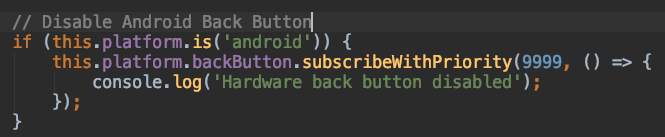
This is a temporary workaround:
ramoncarreras
on 19 Jun 2019
@ramoncarreras
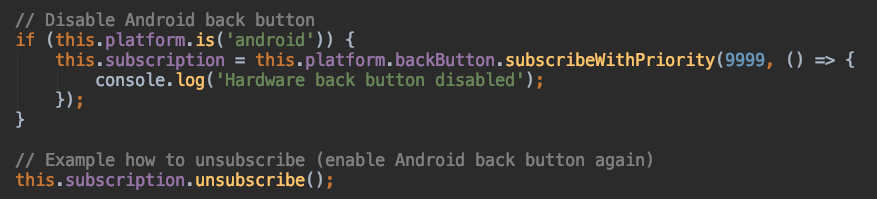
How to make it enabled again then?
I need to enable it on special page and disable on other page.
fer-fullstackdev
on 19 Jun 2019


ramoncarreras
on 19 Jun 2019
I tried the work around and its not working. Is this issue fixed?
 rrath-edr
on 25 Jul 2019
rrath-edr
on 25 Jul 2019
hello, i tried workaruound too and its not workings :(
 fernandomeridamatilla
on 5 Aug 2019
fernandomeridamatilla
on 5 Aug 2019
@fernandomeridamatilla @rrath-edr @fer-fullstackdev
An actual workaround that seems to work for me on @ionic/angular 4.6.2 is :
document.addEventListener("backbutton",function(e)  {
        console.log("disabled")
      }, false);
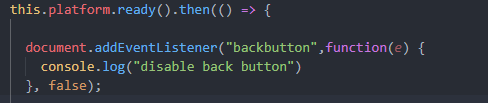
Code taken from cordova docs : here
Seems to work on any page other than my initial first page.
 jackbayliss
on 15 Aug 2019
jackbayliss
on 15 Aug 2019
any updates on this issue?
 loonix
on 6 Apr 2020
loonix
on 6 Apr 2020
This article explain the solution on Ionic 5 (and 4.6+ too I think).
https://www.damirscorner.com/blog/posts/20191122-CustomizingAndroidBackButtonInIonic4.html
 jackie-d
on 22 Apr 2020
jackie-d
on 22 Apr 2020
if (this.platform.is('android')) {
      this.platform.backButton.subscribeWithPriority(9999, () => {
        console.log('back priority');
      });
Tried this code, but unable to manage the android button at all, any idea what's wrong?
 dodomui
on 2 May 2020
dodomui
on 2 May 2020
if (this.platform.is('android')) { this.platform.backButton.subscribeWithPriority(9999, () => { console.log('back priority'); });Tried this code, but unable to manage the android button at all, any idea what's wrong?
- What issue are you experimenting? Do you get any error in console? Can you see the console info message?
jackie-d
on 4 May 2020
Hello
any news of this issue? still having the same problem
 GroupeBEL
on 23 Sep 2020
GroupeBEL
on 23 Sep 2020
Ionic 5 / angular 9 or 10
this solution worked for me
    document.addEventListener("backbutton",function(e) {
      // Do nothing
    }, false);
Thanks for the issue. The problem here is that hardwareBackButton: false only disables the event listeners in Ionic Framework. The webview's default hardware back button behavior is to navigate back, which these event listeners block. By setting this config option, you are allowing the webview's default hardware back button behavior to happen again.
The documentation is not very clear on this, so I need to check with the team to see if this is the expected behavior.
 liamdebeasi
on 19 Nov 2020
liamdebeasi
on 19 Nov 2020
Can you try the following dev build and let me know if it resolves the issue?
Angular
npm install @ionic/[email protected]
React
npm install @ionic/[email protected] @ionic/[email protected]
Vue
npm install @ionic/[email protected] @ionic/[email protected]
Stencil/Vanilla JavaScript
npm install @ionic/[email protected]
Thanks for the issue. This has been resolved via https://github.com/ionic-team/ionic-framework/pull/22555, and a fix will be available in an upcoming release of Ionic Framework.
liamdebeasi
on 2 Dec 2020
Related issues
 BilelKrichen
·
3Comments
BilelKrichen
·
3Comments
 gio82
·
3Comments
gio82
·
3Comments
 alexbainbridge
·
3Comments
alexbainbridge
·
3Comments
 masimplo
·
3Comments
masimplo
·
3Comments
 brandyscarney
·
3Comments
brandyscarney
·
3Comments
Most helpful comment
Can you try the following dev build and let me know if it resolves the issue?
Angular
React
Vue
Stencil/Vanilla JavaScript