Ionic-framework: bug: browser autofill background color overlaps label in md mode
Bug Report
Ionic version:
[x] 4.x
Current behavior:
Starting from 4.3.0, autofilled inputs overlap their floating labels in MD mode.
Expected behavior:
As for non-autofilled inputs, floating labels must stay entirely visible.
Steps to reproduce:
An ion-item containing a floating ion-label and an ion-input that is auto-fillable and auto-filled.
Related code:
N/A
Other information:
Ionic Screenshots
_MD_

_iOS_

MD implementation Screenshots
_Chrome_
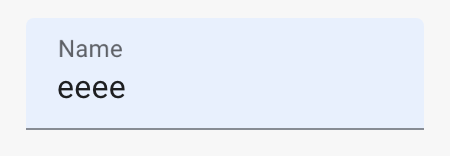
_Safari_

Ionic info:
Ionic:

   ionic (Ionic CLI)             : 4.12.0 (~/.nvm/versions/node/v10.12.0/lib/node_modules/ionic)
   Ionic Framework               : @ionic/angular 4.3.0
   @angular-devkit/build-angular : 0.13.8
   @angular-devkit/schematics    : 7.3.8
   @angular/cli                  : 7.3.8
   @ionic/angular-toolkit        : 1.5.1

System:

   NodeJS : v10.12.0 (~/.nvm/versions/node/v10.12.0/bin/node)
   npm    : 6.4.1
   OS     : macOS Mojave
 abennouna
All 4 comments
I have this issue with an ion-label and ion-input with the label set to stacked that is not auto-filled.
 EricKit
on 10 May 2019
EricKit
on 10 May 2019
Yes this issue also appears on position="stacked". It seems the style
.native-input.sc-ion-input-md:-webkit-autofill {
background-color: transparent;
}
gets overridden. Could we get a fix asap for this?

This is on 4.9.0
 mebibou
on 16 Sep 2019
mebibou
on 16 Sep 2019
Until Ionic sort this (if they can; it's deeply-rooted and seems to be browser-specific), a hack is to use a combination of height and box-shadow. Height prevents it covering the label, and a box-shadow to change the color.
So an example using code from @mebibou:
.native-input.sc-ion-input-md:-webkit-autofill {
    height: 0px;
    box-shadow: 0 0 0 10px #ebe6ff inset;
}
or something more general, as per these answers:
input:-webkit-autofill {
    height: 0px;
    -webkit-box-shadow:0 0 0 10px white inset;
    -webkit-text-fill-color: black;
    font-weight: 500px;
}

input:-webkit-autofill:focus {
    height: 0px;
    -webkit-box-shadow: 0 0 0 10px white inset;
    -webkit-text-fill-color: black;
    font-weight: 500px;
}
Just change the color of the box-shadow property to anything you want, and ensure you add the inset value. You can also do other stuff like change the font-family, add a transform, and even do some animation.
Of course the box-shadow doesn't get rid of the default browser css, it just sits on top.
 jaipresto
on 2 Oct 2019
jaipresto
on 2 Oct 2019
I have had this for a long time but finally found the time to contribute just to find this issue ;-)

ionic@4 not 5 yet.
 bitflower
on 31 Mar 2020
bitflower
on 31 Mar 2020
Related issues
 fdnhkj
·
3Comments
fdnhkj
·
3Comments
 alexbainbridge
·
3Comments
alexbainbridge
·
3Comments
 vswarte
·
3Comments
vswarte
·
3Comments
 alan-agius4
·
3Comments
alan-agius4
·
3Comments
 danbucholtz
·
3Comments
danbucholtz
·
3Comments
Most helpful comment
Until Ionic sort this (if they can; it's deeply-rooted and seems to be browser-specific), a hack is to use a combination of
heightandbox-shadow. Height prevents it covering the label, and a box-shadow to change the color.So an example using code from @mebibou:
or something more general, as per these answers:
Just change the color of the box-shadow property to anything you want, and ensure you add the
insetvalue. You can also do other stuff like change the font-family, add a transform, and even do some animation.Of course the box-shadow doesn't get rid of the default browser css, it just sits on top.