Ionic-framework: bug: ion livecycles are not called as expected on nested ion-router-outlet, also caching algorithm has strange behavior
Bug Report
Ionic version:
[x] 4.2
Current behavior:
If you have nested ion-router-outlet ionView* live cycles are not called as expected for nested pages, there are several issues on it. We tried to figure out all of them, and we created a plain github repository for you to simulate all them.
What to know is we have a main router which keeps login and main page, and the main pages keeps the dashboard page with :id parameter s like this
       login
--->
       main    ----> dashboard/:id
1)
if you enter first time using login button to/main/dashboard/1 page Nested DashboardPage live cycles are called before the MainPage live cycles for entering.

We think the right behavior should be LoginPage#willLeave -> MainPage#willEnter -> DashboardPage#willEnter -> DashboardPage#didEnter -> MainPage#didEnter -> LoginPage#didLeave
2)
now if you switch to dashboard/2 we have this log
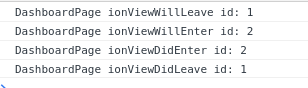
which is the right one, But what we can see from html, there is a strange behavior how does the ReuseStratgey work. the first /dashboard/1 page is always cached, other pages not. Why not? There is a difference on caching pages with and without parameters. But the livecycles are called in the right order.
3)
if you know clicks on logout you are redirect to login page and have this log
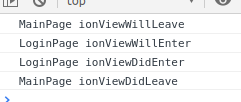
As you can see DashboardPage livecycles are never called! Only that for MainPage and LoginPage. But DashboardPage#ionWillLeave and DashboardPage#ionDidLeaveshould be called in the right order
4)
now on login page click again Login and you are redirected again to /main/dashboard/1

And as you can see from log, NOW when the dashboard page is already cached the livecycles are called as expected, not as on use case 1) where page was not cached.
Steps to reproduce:
We have created a project to simulate the issues
https://github.com/mburger81/ionic4-nested-router
Ionic info:
Ionic:
   ionic (Ionic CLI)             : 4.12.0 (/usr/lib/node_modules/ionic)
   Ionic Framework               : @ionic/angular 4.2.0
   @angular-devkit/build-angular : 0.13.8
   @angular-devkit/schematics    : 7.2.4
   @angular/cli                  : 7.3.8
   @ionic/angular-toolkit        : 1.4.1

System:
   NodeJS : v10.15.3 (/usr/bin/node)
   npm    : 6.9.0
   OS     : Linux 4.15
 mburger81
All 17 comments
Linking similar issue: https://github.com/ionic-team/ionic/issues/17373
 liamdebeasi
on 8 Apr 2019
liamdebeasi
on 8 Apr 2019
Hi there,
Thanks for the issue! I've reproduced the issue, and we will investigate.
Thanks for using Ionic!
liamdebeasi
on 8 Apr 2019
Any news on that ?
I tried to avoid nested rooter but with ion-tabs your are forced to because of the tabprefix. I can't release my app before this is fixed.
 roxteddy
on 26 Jun 2019
roxteddy
on 26 Jun 2019
same issue in ionic 5.2.3
 nickpetrov
on 30 Jul 2019
nickpetrov
on 30 Jul 2019
Is there any update on this issue?
 elfraiman
on 26 Nov 2019
elfraiman
on 26 Nov 2019
The workaround which I have used is the following:
all pages are created under /tabs (or any main route)
and I externally hide the tabs bar wherever required from the DOM. (wrote a service for doing this and called it wherever needed)
 showTabsBar() {
    let tabBarElement = document.querySelectorAll("ion-tab-bar");
    if (tabBarElement != null) {
      Object.keys(tabBarElement).map((key) => {
        tabBarElement[key].style.display = '';
      });
    }
  }

  hideTabsBar() {
    let tabBarElement = document.querySelectorAll("ion-tab-bar");
    if (tabBarElement != null) {
      Object.keys(tabBarElement).map((key) => {
        tabBarElement[key].style.display = 'none';
      });
    }
  }
 shekhars271991
on 26 Nov 2019
shekhars271991
on 26 Nov 2019
@liamdebeasi is this issue going to be addressed soon? I'm noticing that the ionViewDidEnter is not firing when navigating back to a page in my tabs view.
 SimonBrazell
on 28 Jan 2020
SimonBrazell
on 28 Jan 2020
@liamdebeasi is this issue going to be addressed soon? I'm noticing that the
ionViewDidEnteris not firing when navigating back to a page in my tabs view.
I'm waiting for the bug fix from the ionic team too, but in the meantime you can do a quick fix by adding a "ghost" tab. The idea is that you add the ghost tab to your tabs-routing.module, but leave it out of your TabsPage component. Then whenever you navigate away from the TabsPage component, first navigate to that ghost tab so as to avoid the lifecycle callbacks from bugging on your current tab.
For example
  logOut() {
    return this.authService.logOut().pipe(
      switchMap(() => this.router.navigate(['tabs/ghost'])),
      switchMap(() => this.router.navigate(['logged-out'])),
    );
  }
My routing structure would be something like:
- logged-out
- tabs
- tab1
- tab2
- tab3
- ghost
 jairemix
on 28 Jan 2020
jairemix
on 28 Jan 2020
Any news on this issue?
 Ajax-ua
on 12 Mar 2020
Ajax-ua
on 12 Mar 2020
Just downloaded the conference example and placed this into SpeakerListModule:
  constructor() {
    console.log("INITIATED");
  }
  ionViewDidLoad(){
    console.log("LOADED");
  }
Run it and go to the List page. No logs! Also note, that it gets initiated twice...
 muuvmuuv
on 17 Mar 2020
muuvmuuv
on 17 Mar 2020
Same here, using nested ion-router-outlet, we did find a temporary workaround using the AcitvatedRoute.url observable, it will trigger once every time the component's route get activated and can be registered in the ngOnInit.
 antoinecfmws
on 2 Apr 2020
antoinecfmws
on 2 Apr 2020
workaround of @antoinecfmws work for me !
Hope to see this bug fix soon !
 yoann217
on 23 Jul 2020
yoann217
on 23 Jul 2020
This can potentially produce memory leaks in your application if you are using hot observables in your pages.
This is still happening in 5.3.0
 dalepo
on 7 Aug 2020
dalepo
on 7 Aug 2020
I finnally manage to solve the problem by don't using the component Lazy Loading.
I have now ionViewWillEnter and ionViewWillLeave events corretly working in multiple components in nested ion-router-outlet.
yoann217
on 15 Aug 2020
@yoann217 How to stop using the Lazy Loading, and how do I find out if I'm using it in my project?
P.S. Sorry for the n00b question but I am very much new to this platform and facing similar issue.
 hemangshah
on 17 Sep 2020
hemangshah
on 17 Sep 2020
@yoann217 How to stop using the Lazy Loading, and how do I find out if I'm using it in my project?
P.S. Sorry for the n00b question but I am very much new to this platform and facing similar issue.
Lazy loading is when you're using JS dynamic import() keyword to load your components or modules.
So in Angular
routes = [
   {  path: 'sample', loadChildren: () => import('./path/to/module.ts').then(m => m.SampleModule }
]
In React
import React, { lazy } from 'react';
const LazyLoadedComponent = lazy(() => import('./Component'));
any workaround worked for me... can we have a fix soon please.
 tlosbar
on 21 Oct 2020
tlosbar
on 21 Oct 2020
Related issues
 alan-agius4
·
3Comments
alan-agius4
·
3Comments
 aslamj
·
3Comments
aslamj
·
3Comments
 brandyscarney
·
3Comments
brandyscarney
·
3Comments
 giammaleoni
·
3Comments
giammaleoni
·
3Comments
 manucorporat
·
3Comments
manucorporat
·
3Comments
Most helpful comment
This can potentially produce memory leaks in your application if you are using hot observables in your pages.
This is still happening in 5.3.0