Ionic-framework: ion-refresher causes inner-scroll to form a stacking context
Bug Report
Ionic version:
[x] 4.x
Current behavior:
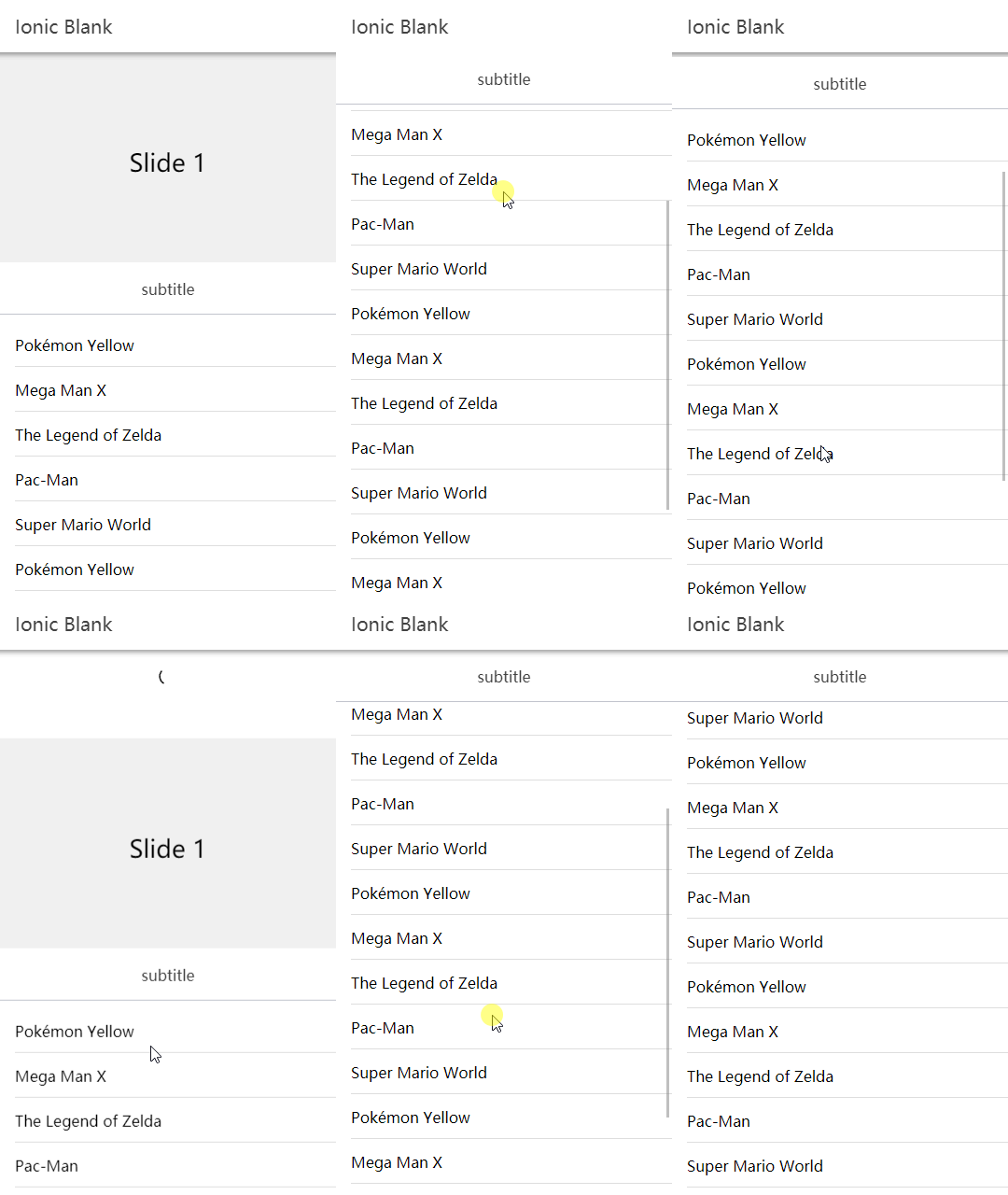
When I trigger a pulldown refresh, ionic adds 'transform' to '.inner-scroll', which is correct. But when I finish the pull-down refresh, 'transform' is not removed, which leads to the formation of stacking content.
Expected behavior:
No stacking context.
Remove 'transform' at the end.
Steps to reproduce:
default

pulling

end

Related code:
<ion-content>
  <ion-refresher slot="fixed">
    <ion-refresher-content></ion-refresher-content>
  </ion-refresher>
</ion-content>
Other information:
Ionic info:
Ionic:

   ionic (Ionic CLI)             : 4.12.0
   Ionic Framework               : @ionic/angular 4.2.0
   @angular-devkit/build-angular : 0.13.6
   @angular-devkit/schematics    : 7.2.4
   @angular/cli                  : 7.3.6
   @ionic/angular-toolkit        : 1.4.1

System:

   NodeJS : v10.13.0
   npm    : 6.4.1
   OS     : Windows 10
 ETXIN
ETXIN
All 11 comments
Hi there,
Thanks for the issue! Are you able to provide an example of the "stacking content" you described?
Thanks!
 liamdebeasi
on 4 Apr 2019
liamdebeasi
on 4 Apr 2019
@liamdebeasi Thanks for your response.
As long as the "transform: translateZ(0px)" is removed after the pulldown, it can be restored. #stacking-content
Expected:
style.transform = ((y > 0) ? `translateY(${y}px) translateZ(0px)` : null);
ETXIN
on 5 Apr 2019
Hi there,
Thanks for the follow up. What you described makes sense. Is having the translate remain causing any issues with the framework, or is it more of a "best practice" to remove it?
Thanks!
liamdebeasi
on 10 Apr 2019
However, by default, 'translateZ(0px)' does not exist, so it should be removed when the pulldown is triggered.
I'm not sure if 'stacking content' will cause more problems, but it won't be a problem if you don't create it, right?
ETXIN
on 11 Apr 2019
Hi there,
I'm having a similar issue with the refresher. I have a DOM element that is positioned fixed at the bottom of my ion-content.
The problem is that the left-over translateZ causes this fixed position element to no longer be positioned correctly. (some quirk of CSS, I don't fully get why...)
If I remove the translateZ then it positions correctly again.
This could the what the EXTIN is describing as "stacking content", not 100% sure.
Anyway, I agree, it would be better to remove translateZ once the refresher is finished. If it's not there before the refresh starts, why keep it around when it's done? Seems inconsistent to me and is causing these display issues.
cheers
-adam
 asgeo1
on 17 Apr 2019
asgeo1
on 17 Apr 2019
Hi there,
Thanks for the follow up. What you described makes sense. Is having the
translateremain causing any issues with the framework, or is it more of a "best practice" to remove it?Thanks!
I am having the same issue. I have a fixed box at the bottom of the ion-content, but after refreshing (using ion-refresher), the box is not fixed any more.
Removing the transform: translateZ(0px); fixes it.
The solution I have tested is
style.transform = ((y > 0) ? `translateY(${y}px) translateZ(0px)` : 'unset');
 jmoren
on 25 Jul 2019
jmoren
on 25 Jul 2019
I'm also having the issue with transform: translateZ(0). Please remove it if there's no reason for it.
 mohsini172
on 12 Nov 2019
mohsini172
on 12 Nov 2019
Any update on this? We are still seeing this. We've implemented a work around for now but it makes the page jump as we have to wait for the refresher to finish before we remove the transform property.
 logitimate
on 22 Jan 2020
logitimate
on 22 Jan 2020
Up! Having problems with fixed elements, because of the 'translateZ(0px)'. It is such an easy fix. Why hasn't it been fixed for a year?
 elvisgraho
on 26 Feb 2020
elvisgraho
on 26 Feb 2020
Thanks for the issue. This has been resolved via https://github.com/ionic-team/ionic/pull/20621 and will be available in an upcoming release of Ionic Framework.
liamdebeasi
on 26 Feb 2020
Thanks for the issue! This issue is being locked to prevent comments that are not relevant to the original issue. If this is still an issue with the latest version of Ionic, please create a new issue and ensure the template is fully filled out.
![ionitron-bot[bot] picture](https://avatars1.githubusercontent.com/in/8640?v=4&s=40) ionitron-bot[bot]
on 27 Mar 2020
ionitron-bot[bot]
on 27 Mar 2020
Related issues
 gio82
·
3Comments
gio82
·
3Comments
 daveshirman
·
3Comments
daveshirman
·
3Comments
 brandyscarney
·
3Comments
brandyscarney
·
3Comments
 alexbainbridge
·
3Comments
alexbainbridge
·
3Comments
 giammaleoni
·
3Comments
giammaleoni
·
3Comments
Most helpful comment
@liamdebeasi Thanks for your response.
As long as the "transform: translateZ(0px)" is removed after the pulldown, it can be restored. #stacking-content
Current:
https://github.com/ionic-team/ionic/blob/48814ab134cfc5d8c54895e3a648d5dc8ef8ec28/core/src/components/refresher/refresher.tsx#L341
Expected: