Ionic-framework: safe-area-inset is not respected for Android and only works on iOS
Bug Report
Ionic version:
[x] 4.x
Current behavior:
The safe-area-inset-top is not respected on android devices so even with a notch at the top, there is no padding added.
Expected behavior:
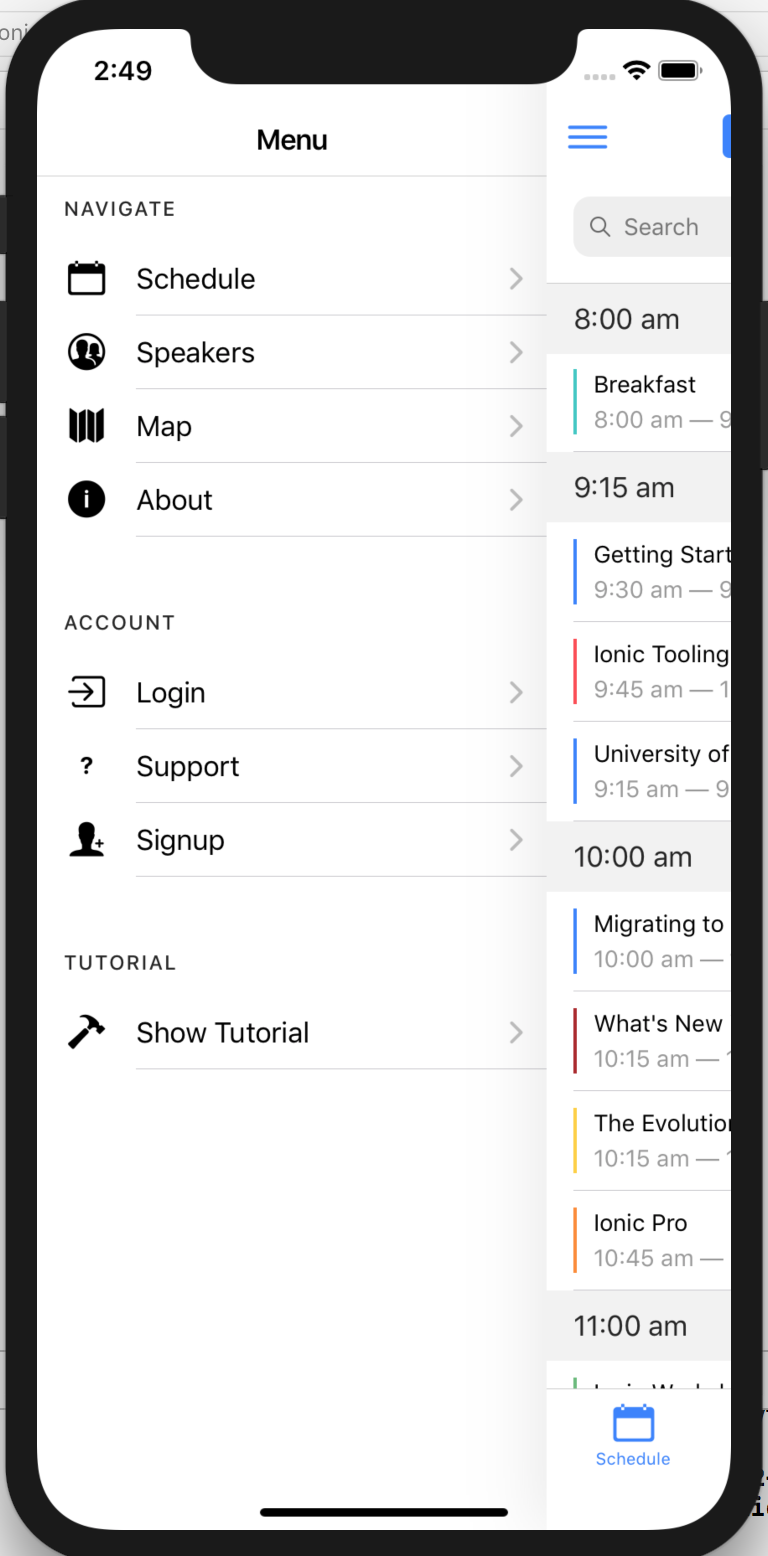
The safe-area should be respected similar to what's happening on iOS
Steps to reproduce:
Open the ionic conference app with a notched android phone, or on an android emulator running Android P or above so that a notch can be added programmatically to test. Then add this.statusBar.overlaysWebView(true); in the initializeApp() function located in app.components.ts before running the app.


But this is handled fine on iOS:
Other information:
This issue was brought up in the cordova-plugin-statusbar repository https://github.com/apache/cordova-plugin-statusbar/issues/112 but is still open at the time of writing.
Currently, I have a solution here -> https://github.com/apache/cordova-plugin-statusbar/pull/134 (see feature/addGetStatusBarHeightMethod) which will introduce to a way to obtain the height of the status bar through a service call. However, it would be ideal if the safe-area-inset can be enhanced to also work for Android devices
 XxAdi101xX
All 12 comments
I'm having the same issue and temporarily resolved it with:
- installing cordova-plugin-android-notch (github repo)
- setting the missing '--ion-safe-area-top' css var for android via
declare var window: any;

if (window.AndroidNotch) {
        const style = document.documentElement.style;

        window.AndroidNotch.getInsetTop(px => {
          style.setProperty('--ion-safe-area-top', px + 'px');
        }, (err) => console.error('Failed to get insets top:', err));
}
in the initializeApp() in app.component.ts inside a platform.ready()
 eyeswideopen
on 14 May 2019
eyeswideopen
on 14 May 2019
Is any thing else update? safe-area-inset just only work in iOS, and notch in android still problem.
 tlatforlz
on 26 May 2019
tlatforlz
on 26 May 2019
Anyone find the solution? please share the solution in ionic 4 , notch display is not working
 aayush-ios
on 28 Jun 2019
aayush-ios
on 28 Jun 2019
Looking also a solution to set safe-area-inset, cordova-plugin-android-notch is not fully doing the job, global css variable is not easy to maintain specificaly for android notch.
 Aarbel
on 28 Aug 2019
Aarbel
on 28 Aug 2019
Yeah, the solution is to switch to React Native. I'm sick of Ionic problems. I've been strugglin with it for too long.
 pitis
on 23 May 2020
pitis
on 23 May 2020
@pitis react native is unfortunately not ideal either.
Aarbel
on 25 May 2020
@Aarbel that's also true, but I can show you a very big list of Ionic bugs I've found, that I'm sure if I started with RN i wouldn't have encountered, like this SafeAreaView problem, like the focusing on input in Modal making a glitch in the view. None have been addressed.
Why isn't there something like SafeAreaView in Ionic? I've been struggling for a month now to get the paddings right in a project.
pitis
on 25 May 2020
@pitis
I used RN ,because of I'm sick of RN problems. I changed to ionic 😄
 coloz
on 25 May 2020
coloz
on 25 May 2020
Thanks for the issue. I am going to close this as this is not a bug in Ionic Framework.
Ionic Framework is functioning as intended with regards to utilizing the safe-area-inset variables. However, the Chromium webview found on Android is not properly setting the safe-area-inset values. As a result, all of the values are initialized to 0px. This results in the behavior you are experiencing.
There is nothing we can fix right now, as the bug is in the webview not Ionic Framework. I have reported this bug to the Chromium team: https://bugs.chromium.org/p/chromium/issues/detail?id=1094366.
As a temporary workaround, I recommend one of the following routes:
Do not use
overlaysWebView(true)for now. (Not ideal, I realize.)Try using the plugin suggested in https://github.com/ionic-team/ionic/issues/17927#issuecomment-492198561. It sounds like this is not a perfect solution, but for simple use cases this may get the job done. You could use this to set the
--ion-safe-area-topCSS Variable. Please note that this should be done at runtime.
Thank you!
 liamdebeasi
on 12 Jun 2020
liamdebeasi
on 12 Jun 2020
Hi, I don't get why you closed this, I am bumping on that problem too. The solution given in https://github.com/ionic-team/ionic/issues/17927#issuecomment-492198561 doesn't work for me.
 mightysloth
on 19 Jun 2020
mightysloth
on 19 Jun 2020
I closed this issue because the problem comes from the Android WebView code, not Ionic Framework. As a result, there is nothing for us to "fix" since it is not our bug.
Regarding the workaround, I recommend creating a post on our forums: http://forum.ionicframework.com/. There are a lot of friendly people there who would be happy to help you out!
liamdebeasi
on 19 Jun 2020
Thanks for the issue! This issue is being locked to prevent comments that are not relevant to the original issue. If this is still an issue with the latest version of Ionic, please create a new issue and ensure the template is fully filled out.
![ionitron-bot[bot] picture](https://avatars1.githubusercontent.com/in/8640?v=4&s=40) ionitron-bot[bot]
on 19 Jul 2020
ionitron-bot[bot]
on 19 Jul 2020
Related issues
 masimplo
·
3Comments
masimplo
·
3Comments
 GeorgeAnanthSoosai
·
3Comments
GeorgeAnanthSoosai
·
3Comments
 BilelKrichen
·
3Comments
BilelKrichen
·
3Comments
 daveshirman
·
3Comments
daveshirman
·
3Comments
 brandyscarney
·
3Comments
brandyscarney
·
3Comments
Most helpful comment
I'm having the same issue and temporarily resolved it with:
in the
initializeApp()in app.component.ts inside aplatform.ready()