Ionic-framework: ionic4 flickering and performance issue on *ngIf
Bug Report
Ionic version:
[x] 4.x
Current behavior:
On ionic4 we see many times performance issues and flickering on adding and removing ionic components from dom.
If we have for example something like that
           <div *ngIf="this.loginSerivce.step === 2">YES</div>
            <ion-chip *ngIf="this.loginSerivce.step === 2" (click)="backToChooseGW()">
                <ion-icon name="arrow-back"></ion-icon>
                <ion-label>{{ selectedGW?.description }}, {{ selectedGW?.serialNumber }}</ion-label>
            </ion-chip>
as you can see there are a div (only for test) and an ion-chip which should render at the same time. If we do exactly the same thing on ionic3 and performe a performance registration with chrome we can see both elements are rendered in exactly the same frame, if we do this in ionic4 we can see some flickering for the ioni-chip and on the performance test the div element is rendered much faster then the ion-chip element.
So if you have many elements on the screen and update a list or others there are a lot of flickering, on ionic3 all this things looks much much much smoother
Same problem with a ion-list with 2 elements, if we update the element it looks really bad, absolutly no problem and very smooth on ionic3
Ionic info:
Ionic:
   ionic (Ionic CLI)             : 4.10.3 (/usr/lib/node_modules/ionic)
   Ionic Framework               : @ionic/angular 4.1.1
   @angular-devkit/build-angular : 0.13.5
   @angular-devkit/schematics    : 7.2.4
   @angular/cli                  : 7.3.5
   @ionic/angular-toolkit        : 1.4.0

Cordova:
   cordova (Cordova CLI) : 8.1.2 ([email protected])
   Cordova Platforms     : not available
   Cordova Plugins       : not available

System:
   Android SDK Tools : 26.1.1 (/home/...../software/android/sdk)
   NodeJS            : v10.15.2 (/usr/bin/node)
   npm               : 6.8.0
   OS                : Linux 4.15
 mburger81
All 6 comments
Hi there,
Thanks for opening an issue with us! Would you be able to provide a repository with the code required to reproduce this issue?
Thanks!
 liamdebeasi
on 11 Mar 2019
liamdebeasi
on 11 Mar 2019
Hi,
I created a github repository with a minimal blank starter page and the ion-list in the home page component
https://github.com/mburger81/ionic4-flicker
This is what you'll see
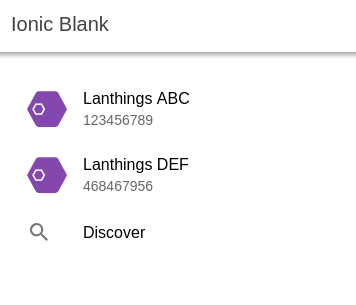
If you now click several times on the Discover on-item button the gws property is set to the same data then before but as you can see there is a flickering in the list.
I figured out today the flickering is ONLY happening if we have the button property in the ion-item for the ngFor list.
<ion-item *ngFor="let gw of gws" button>
if we remove the button property no flickering anymore
This is one of the "performance" flickering issues we found, let us check previously this one, the other one is much more complicated to provide a github repo
thx
mburger81
on 11 Mar 2019
Hello,
I'm facing the same flickering with *ngif, It noticeable on old devices (tested on Samsung s5 and iPhone 6 plus) but not noticeable with browser/emulator/simulator.
I think this closed issue is similar https://github.com/ionic-team/ionic/issues/15953
 mohaelzain
on 12 Mar 2019
mohaelzain
on 12 Mar 2019
We have the problem on DEV with latest chrome, so the problem should not be only on slow old devices.
mburger81
on 12 Mar 2019
@mburger81 checked the repo and adding a trackBy in ngFor seems to fix your problem, i think it happens because angular is recreating the ion-item every time.
//view
    <ion-item *ngFor="let gw of gws; trackBy: trackByFn" button>
        <ion-avatar slot="start">
            <img src="assets/img/lanthings-hdpi-icon.png">
        </ion-avatar>
        <ion-label>
            <h2>{{ gw.description }}</h2>
            <p>{{ gw.serialNumber }}</p>
        </ion-label>
    </ion-item>

//controller
  trackByFn(index: number, item: any): number {
    return item.serialNumber;
  }
 alainbelez
on 3 Apr 2019
alainbelez
on 3 Apr 2019
Thanks for the issue! This issue is being closed due to inactivity. If this is still an issue with the latest version of Ionic, please create a new issue and ensure the template is fully filled out.
Thank you for using Ionic!
![ionitron-bot[bot] picture](https://avatars1.githubusercontent.com/in/8640?v=4&s=40) ionitron-bot[bot]
on 2 Apr 2020
ionitron-bot[bot]
on 2 Apr 2020
Related issues
 vswarte
·
3Comments
vswarte
·
3Comments
 masimplo
·
3Comments
masimplo
·
3Comments
 SebastianGiro
·
3Comments
SebastianGiro
·
3Comments
 Macstyg
·
3Comments
Macstyg
·
3Comments
 brandyscarney
·
3Comments
brandyscarney
·
3Comments
Most helpful comment
@mburger81 checked the repo and adding a trackBy in ngFor seems to fix your problem, i think it happens because angular is recreating the ion-item every time.