Ionic-framework: [Ionic v4] CSS issues on Chrome 53 (crosswalk)
Bug Report
Ionic version:
[x] 4.x
Current behavior:
ion-checkbox and ion-spinner styles are broken on Chrome 53.0.2.2785.143 (the version which is shipped with crosswalk). Most probably also other Chrome Versions are affected.

Expected behavior:
Correct styles on Chrome 53.
Steps to reproduce:
(check example repo)
- Add an ion-checkbox or ion-spinner to a blank ionic v4 project
- Add cordova + crosswalk
- Run on Android device
Related code:
https://github.com/DavidStrausz/ionic-v4-css-bugs
Other information:
- Related: #17501
- The problem with the checkbox seems to be the
containproperty being set tostrict, changing it tononefixes the issue: https://github.com/ionic-team/ionic/blob/master/core/src/components/checkbox/checkbox.scss#L58
Ionic info:
Ionic:
   ionic (Ionic CLI): 4.10.3
   Ionic Framework: @ionic/angular 4.0.1
   @angular-devkit/build-angular: 0.12.4
   @angular-devkit/schematics: 7.2.4
   @angular/cli: 7.2.4
   @ionic/angular-toolkit: 1.4.0
Cordova:
   cordova (Cordova CLI): 8.1.2 ([email protected])
   Cordova Platforms: android 6.5.0-dev
   Cordova Plugins: no whitelisted plugins (6 plugins total)
System:
   Android SDK Tools : 26.1.1
   NodeJS: v9.4.0
   npm: 5.8.0
   OS: Windows 10
 DavidStrausz
All 13 comments
Hi there,
Thanks for opening an issue with us! Crosswalk has been discontinued since 2017. Could you try building your app without Crosswalk and see if you can reproduce this issue?
Thanks!
 liamdebeasi
on 18 Feb 2019
liamdebeasi
on 18 Feb 2019
Hi, I'm aware, we still need support for Android 4.1 - 4.4 for our customer base.
When disabling Crosswalk it works fine, but this should just work fine as Android 4.4, which initially shipped with Chrome 30, is listed as minimum requirement for Ionic 4.
Also in the related issue someone mentioned the spinner animation does also not work on Chrome 61 which indicates there is something wrong. And finally CSS containment should be supported since Chrome version 52 which also tells me there is something wrong as other components which use CSS containment just work fine.
At least the checkbox bug should be easy to fix by changing CSS containment to none (default behaviour), although I don't know if you guys had a reason for setting it to strict.
Edit:
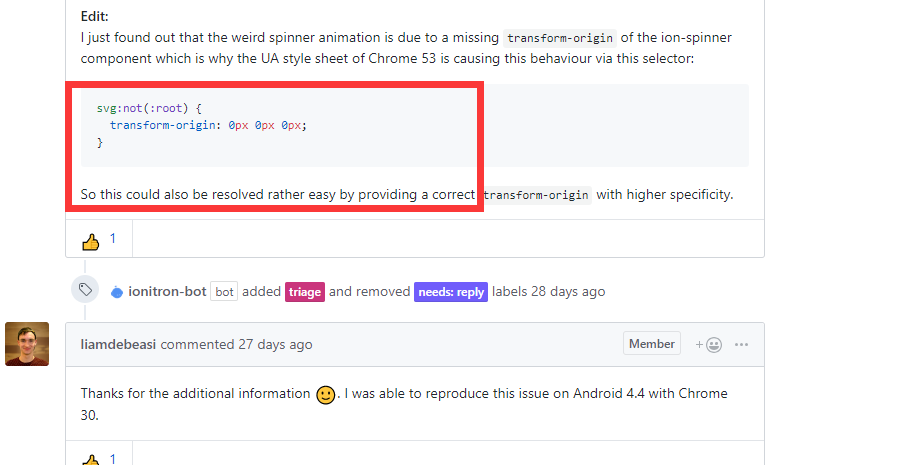
I just found out that the weird spinner animation is due to a missing transform-origin of the ion-spinner component which is why the UA style sheet of Chrome 53 is causing this behaviour via this selector:
svg:not(:root) {
  transform-origin: 0px 0px 0px;
}
So this could also be resolved rather easy by providing a correct transform-origin with higher specificity.
DavidStrausz
on 18 Feb 2019
Thanks for the additional information 🙂. I was able to reproduce this issue on Android 4.4 with Chrome 30.
liamdebeasi
on 19 Feb 2019
Just ran into the same issue with the base Android 8.1 release https://github.com/ionic-team/ionic/issues/17501#issuecomment-466439204
 wcmhc
on 22 Feb 2019
wcmhc
on 22 Feb 2019
svg:not(:root) {
transform-origin: 0px 0px 0px;
}
the code not work
 Desever
on 18 Mar 2019
Desever
on 18 Mar 2019
Hi @Desever,
If you are running into a problem with an Ionic component, please open a new issue. Thanks!
liamdebeasi
on 18 Mar 2019
Desever
on 18 Mar 2019
Hi @Desever,
I misunderstood your comment as having to do with another issue. I've closed the issue you made and we can continue discussion here. Sorry for the confusion!
liamdebeasi
on 18 Mar 2019
@Desever,
As I understand, you are running into the same issue. Can you post the output of ionic info as well as your user agent string when testing on a device? You can find this by logging window.navigator.userAgent.
Thanks!
liamdebeasi
on 18 Mar 2019
I think,the svg not add transform-origin: center;
Desever
on 18 Mar 2019
I add style(transform-origin: center;) to global.scss,but this not work
Desever
on 18 Mar 2019
please tell me,the style write where
Desever
on 18 Mar 2019
Thanks for the issue! This issue is being locked to prevent comments that are not relevant to the original issue. If this is still an issue with the latest version of Ionic, please create a new issue and ensure the template is fully filled out.
![ionitron-bot[bot] picture](https://avatars1.githubusercontent.com/in/8640?v=4&s=40) ionitron-bot[bot]
on 26 Apr 2019
ionitron-bot[bot]
on 26 Apr 2019
Related issues
 danbucholtz
·
3Comments
danbucholtz
·
3Comments
 vswarte
·
3Comments
vswarte
·
3Comments
 gio82
·
3Comments
gio82
·
3Comments
 MrBokeh
·
3Comments
MrBokeh
·
3Comments
 alan-agius4
·
3Comments
alan-agius4
·
3Comments