Ionic-framework: IonIcons 404 Error after upgrade
Bug Report
Ionic version:
[x] 4.9
Current behavior:
After running npm ionic i -g --save on a project the ionicons can not be found (404)
Expected behavior:
In Ionic version 4.8.0 icons would show up.
Steps to reproduce:
After running npm ionic i -g --save on a project the ionicons can not be found (404)
"ionic": "^4.9.0",
"ionicons": "^4.5.5",
Related code:
<ion-icon name="medal"></ion-icon>
Other information:
Ionic info:
Ionic:
ionic (Ionic CLI) : 4.9.0
Ionic Framework : @ionic/angular 4.0.0
@angular-devkit/build-angular : 0.12.2
@angular-devkit/schematics : 7.1.4
@angular/cli : 7.1.4
@ionic/angular-toolkit : 1.2.2
System:
NodeJS : v8.12.0 (C:\Program Files\nodejs\node.exe)
npm : 6.4.1
OS : Windows 10

 hvlg-blaire
All 10 comments
Thanks for the issue! Did you happen to update @ionic/angular at the same time or only the Ionic CLI?
 brandyscarney
on 23 Jan 2019
brandyscarney
on 23 Jan 2019
Just the Ionic CLI. I went back and ran npm i -g @ionic/angular but still no luck
hvlg-blaire
on 23 Jan 2019
I am having this issue on OSX as well. I updated both today. I tried reverted to ionic 4.8.0 but the problem has persists. I also downgraded @ionic/angular back to 4.0.0.rc.3 but still no luck.
I am going to check my Angular version as well. That also got updated recently.
 zdennis
on 23 Jan 2019
zdennis
on 23 Jan 2019
You have to update the angular.json to copy the icons into the final www:
https://github.com/ionic-team/ionic/blob/master/CHANGELOG.md#breaking-changes-2
 manucorporat
on 23 Jan 2019
manucorporat
on 23 Jan 2019
I am also experiencing similar issue.
This is working
<ion-icon name="checkmark-circle"></ion-icon>
This is not
<ion-icon name="checkmark-circle-outline"></ion-icon>
here is my Ionic Info
Ionic:

   ionic (Ionic CLI)             : 4.9.0 (/usr/local/lib/node_modules/ionic)
   Ionic Framework               : @ionic/angular 4.0.0
   @angular-devkit/build-angular : 0.12.3
   @angular-devkit/schematics    : 7.2.3
   @angular/cli                  : 7.2.3
   @ionic/angular-toolkit        : 1.2.2

System:

   NodeJS : v10.14.2 (/usr/local/bin/node)
   npm    : 6.5.0
   OS     : macOS Mojave
PS.
I also updated my angular.json file as suggested in release note of 4.0.0-rc.1 (BREAKING CHANGE)
 Yogeshk25
on 23 Jan 2019
Yogeshk25
on 23 Jan 2019
Thanks @manucorporat! That resolved the issue for me. You get all of the internet points today. 🎉
zdennis
on 23 Jan 2019
@hvlg-blaire I think there is some confusion here. The ionic package is the Ionic CLI, which is installed globally using:
npm i -g ionic
The @ionic/angular package is the Ionic Framework with the Angular bindings and should be installed from within the project (not globally):
npm install @ionic/angular@latest
The latest version of the CLI is 4.9.0 and the Framework is @ionic/angular 4.0.0.
As Manu stated, there was a breaking change requiring the ionicons to be included in the angular.json file. It is included in our starters: https://github.com/ionic-team/starters/blob/master/angular/base/angular.json
I'm not seeing the original issue in a freshly created Ionic 4 project. If you're still seeing it with the above added - could you please provide steps to reproduce and/or a project that reproduces it. Thanks!
brandyscarney
on 23 Jan 2019
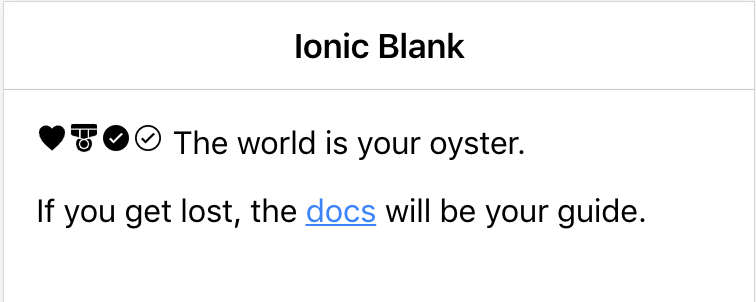
The above is a new Ionic 4 blank project that includes these icons:
<ion-icon name="heart"></ion-icon>
<ion-icon name="medal"></ion-icon>
<ion-icon name="checkmark-circle"></ion-icon>
<ion-icon name="checkmark-circle-outline"></ion-icon>
Thank you @brandyscarney and @manucorporat. I added the breaking change and cleared cache and all is working again.
hvlg-blaire
on 23 Jan 2019
Thanks for the issue! This issue is being locked to prevent comments that are not relevant to the original issue. If this is still an issue with the latest version of Ionic, please create a new issue and ensure the template is fully filled out.
![ionitron-bot[bot] picture](https://avatars1.githubusercontent.com/in/8640?v=4&s=40) ionitron-bot[bot]
on 22 Feb 2019
ionitron-bot[bot]
on 22 Feb 2019
Related issues
 giammaleoni
·
3Comments
giammaleoni
·
3Comments
 gio82
·
3Comments
gio82
·
3Comments
 GeorgeAnanthSoosai
·
3Comments
GeorgeAnanthSoosai
·
3Comments
 masimplo
·
3Comments
brandyscarney
·
3Comments
masimplo
·
3Comments
brandyscarney
·
3Comments
Most helpful comment
You have to update the angular.json to copy the icons into the final www:
https://github.com/ionic-team/ionic/blob/master/CHANGELOG.md#breaking-changes-2