Ionic-framework: [4.0.0-beta.19][iOS] Keyboard overlays ion-input but not input elements
Hi everyone,
I got a problem with previous Ionic releases but that's still present in the beta.19. I use Ionic inside my Capacitor project and get my keyboard overlaying focused elements that are at the bottom of my page. I get different cases:
- if I use a ion-input inside a ion-content, the keyboard will overlay
- if I use a ion-input WITHOUT ion-content, the webview scrolls to the focused ion-input so that it is visible
- if I use a input inside a ion-content, the web view scrolls to the focused ion-input so that it is visible
I'm a bit lost about how to manage that :/ does anyone have already experienced that on iOS?
Thank you,
 sneko
sneko
All 33 comments
Are you using an ion-footer on that page? Could you copy in the HTML? Can't say I have experienced this problem
 tomfebry
on 18 Dec 2018
tomfebry
on 18 Dec 2018
I'm just using a basic:
    ion-content
      br
      br
      br
      br
      br
      br
      br
      br
      br
      br
      br
      br
      br
      br
      br
      br
      br
      br
      br
      br
      br
      br


      span aaaaa
      ion-input(type="text" placeholder="here")
      br
      br
      br
      br
      br

      span bbbbb
Note that I think in the first case I described, the webview is probably not pushing the content with the right padding so that's why it's still hidden.
That's funny because sometimes I get the problem of the wrong offset to click on elements (https://github.com/ionic-team/capacitor/issues/814). That means that I need to click around 200px above the input to click it and make it focused, and by doing so the content is pushed up and the keyboard is not overlaying the input.
So strange... I'm not able to determine the origin of the problem :( I hope someone could help on it
sneko
on 18 Dec 2018
This could be fixed #17043 . Could you please check after rc.2 release if this problem still occurs?
 paulstelzer
on 13 Jan 2019
paulstelzer
on 13 Jan 2019
@paulstelzer I will, thank you
sneko
on 13 Jan 2019
I still have the same issue on rc.2
 EricKit
on 19 Jan 2019
EricKit
on 19 Jan 2019
@EricKit Did you have test it with normal input? Did it workt there? This is important because otherwise we cannot say if this is Ionic or the cordova keyboard plugin
paulstelzer
on 19 Jan 2019
@paulstelzer Here is the code I'm using:
<ion-header>
  <ion-toolbar color="primary">
    <ion-buttons slot="start"> <ion-back-button defaultHref="/tabs/account/"></ion-back-button> </ion-buttons>
    <ion-title><img src="assets/wp-toolbar.png"/></ion-title>
  </ion-toolbar>
</ion-header>

<ion-content padding>
  <ion-card>
    <ion-card-header> New Password </ion-card-header>
    <ion-card-content> Change the password for {{ username }}. </ion-card-content>
  </ion-card>
  <form [formGroup]="changePasswordForm" (ngSubmit)="changePassword()">
    <ion-item no-padding margin>
      <ion-label position="stacked">Current Password</ion-label>
      <ion-input
        formControlName="oldPassword"
        type="password"
        (keyup.enter)="changePasswordForm.valid && changePassword()"
      ></ion-input>
    </ion-item>
    <ion-item no-padding margin>
      <ion-label position="stacked">New Password</ion-label>
      <ion-input
        formControlName="password"
        type="password"
        (keyup.enter)="changePasswordForm.valid && changePassword()"
      ></ion-input>
    </ion-item>
    <ion-item no-padding margin>
      <ion-label position="stacked">Confirm New Password</ion-label>
      <ion-input
        formControlName="confirmPassword"
        type="password"
        (keyup.enter)="changePasswordForm.valid && changePassword()"
      ></ion-input>
    </ion-item>
    <ion-button type="submit" [disabled]="!changePasswordForm.valid" margin>Reset</ion-button>
  </form>
</ion-content>
Here is a screenshot with that code:

Here is simply removing ion-content (It's cropped below the top of the keyboard). It pushes the content up correctly and the right amount:

Here is changing ion-input to input, I took two, one before the keyboard and one after (it pushes it up further):

and after
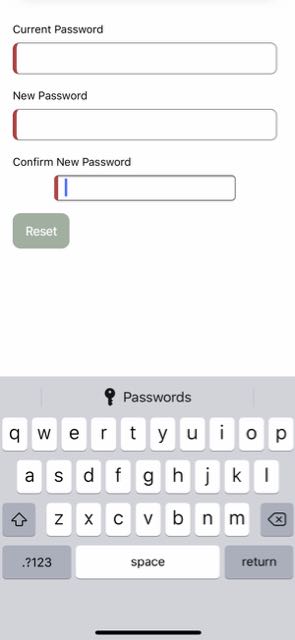
Of note, the keyboard on iOS does some other strange things on this page (it'll freeze all touch input until I reselect the text input that caused it). I'm attempting to make it reproducible then I'll post a new report.
EricKit
on 19 Jan 2019
@EricKit I could not see if something is wrong. for me everything looks good - keyboard not hides the input :)
paulstelzer
on 19 Jan 2019
@paulstelzer The input is hidden in the first screen shot (Focus is in the one below the keyboard). When clicking on it, it does not move up at all. If I remove ion-content or change ion-input to input, it moves up (differently in each case).
EricKit
on 19 Jan 2019
Do you use a new iPhone? because there is so much space on the bottom (the gray at the bottom). If this would be smaller everything would be okay.
But the question at all is: Is it Ionic or is it cordova keyboard plugin that the input will be hidden by the keyboard. @jcesarmobile do you have an idea?
paulstelzer
on 19 Jan 2019
@paulstelzer Yes it's one with a notch (XS). I've attempted adding multiple inputs below the 3rd one to click on something at the very bottom of the page (so the size of the screen or keyboard would not be a factor). Same result. It does not attempt to move up at all when the focus is placed on the input.
I can try to make a video if you think it'd help
Edit: Not sure if this helps, but bringing up the keyboard, putting the app in the background (going home), then bringing the app back to the foreground offsets the input up when it comes back.
EricKit
on 19 Jan 2019
I tested with Android, no problems. I am sure the problem will be the cordova keyboard plugin because I don't think @ionic/core has css styles for keyboard. And with latest change ion-input and the underlying input don't use shadow dom anymore
paulstelzer
on 19 Jan 2019
If this helps since you are discussing Cordova Keyboard Plugin. I'm using Capacitor and Ionic Native. When I sync I only use 3 Cordova plugins.
  Found 3 Cordova plugins for ios
    ComSarriaromanPhotoviewer (1.2.0)
    CordovaSqliteStorage (2.6.0)
    Cordova.plugins.diagnostic (4.0.10)
Here is my info:
Ionic:

   ionic (Ionic CLI)             : 4.8.0 (/usr/local/lib/node_modules/ionic)
   Ionic Framework               : @ionic/angular 4.0.0-rc.2
   @angular-devkit/build-angular : 0.12.2
   @angular-devkit/schematics    : 7.2.2
   @angular/cli                  : 7.2.2
   @ionic/angular-toolkit        : 1.2.2

Capacitor:

   capacitor (Capacitor CLI) : 1.0.0-beta.13
   @capacitor/core           : 1.0.0-beta.13

Cordova:

   cordova (Cordova CLI) : 8.1.2 ([email protected])
   Cordova Platforms     : none
   Cordova Plugins       : no whitelisted plugins (1 plugins total)

System:

   ios-deploy : 2.0.0
   ios-sim    : 7.0.0
   NodeJS     : v11.6.0 (/usr/local/bin/node)
   npm        : 6.5.0-next.0
   OS         : macOS Mojave
   Xcode      : Xcode 10.1 Build version 10B61
@paulstelzer I thought it was independent of Capacitor since it happened to the original post with Cordova, me with Capacitor. Now I have verified it's the same with Safari on an iPhone. If I post my site and remove ion-content or change ion-input to input, it moves for the keyboard. Otherwise it does not. This is with Safari on an iPhone not through an app. Apologies if it's Capacitor and unrelated, will raise the issue there if so.
EricKit
on 19 Jan 2019
@EricKit I have checked in my app (native ios, native android - both created with cordova - and pwa in safari browser) and input will not be hidden by keyboard. (using rc2 like you, so input has NO shadow dom)
So it can be two reasons: it's an issue with cordova keyboard / capacitor or happens random (means sometimes it works, sometimes not - what would be your statement that it happens in plain safari). So it's hard to find this issue - mh
To summarize: We are aware of this issue but it's hard to reproduce if it works sometimes, sometimes not. But as I said, we are aware of it. So I reopen it :)
paulstelzer
on 19 Jan 2019
@paulstelzer thanks for the update and information. Here is how I can reproduce it if it helps, hopefully it's the same for everyone:
npm install -g ionic@latest
ionic start updateApp blank --type=angular
cd updateApp
ionic cap add ios
Modify home.page.html to read:
<ion-header>
  <ion-toolbar> <ion-title> Ionic Blank </ion-title> </ion-toolbar>
</ion-header>

<ion-content padding>
  <br /><br /><br /><br /><br /><br /><br /><br />
  <br /><br /><br /><br /><br /><br /><br /><br />
  <br /><br /><br /><br /><br /><br /><br />
  <form>
    <ion-item><ion-input type="text"></ion-input></ion-item>
    <input />
  </form>
</ion-content>
ionic build && ionic cap sync
Run on an iPhone from Xcode and click on each input. One will raise the input into view, one will not. It works in the simulator or on an iPhone. Also try going from one input and back to the other for another issue.
EricKit
on 19 Jan 2019
Same for me, the rc.2 update did not solve the issue I described (looks the same than the @EricKit 's one)
sneko
on 19 Jan 2019
Here is some more data. When the normal input is clicked a style is set on ion-content which is --keyboard-offset: 290px;
When I click on ion-input, it is 0px. So I attempted to follow the code in Ionic in the Safari debugger on the phone. The ion-input is all properly running in input-shims.ts and scroll-assist.ts to include when I click on it, the clone is made, then it attempts to scroll with scrollByPoint. When it attempts to scroll, no scroll occurs. I took a screen shot of the local environment at that time.
I'm digging into this so much because it's stopping me from deploying to iOS. This form issue seems to be a big deal if the above processes I gave is reproducible as it's using the way the documenting says to start an app for new Ionic users.

EricKit
on 22 Jan 2019
I just wonder why it's working perfect on my iPad (iOS 12.1). The scrolling works without hiding an input. Maybe a browser issue in older versions?
If there is a notch, maybe the 290px keyboard offset are not enough? That would explain the picture of @EricKit
PS: And yes, the issue is related to @ionic/core - not cordova or the keyboard plugin - my fault :)
paulstelzer
on 22 Jan 2019
@paulstelzer I'm also experiencing this issue on my iPhone with iOS 12.1.2
sneko
on 22 Jan 2019
@sneko - yes, but what a device - with or without a notch?
paulstelzer
on 22 Jan 2019
@paulstelzer no notch, I have the iPhone 6
sneko
on 22 Jan 2019
I invited @manucorporat to this issue, he knows more about the code :)
I think it's related with -> https://github.com/ionic-team/ionic/blob/master/core/src/utils/input-shims/input-shims.ts
paulstelzer
on 22 Jan 2019
@paulstelzer thanks for your time looking at it. When the issue occurs, the input is properly registered in input-shims and enableScrollAssist is called. In scroll-assist.ts it properly registers touchstart and touchend on the ion-input. When I select the input, they both run.
touchend recognizes there is no focus and that the touch event has not moved >4, so it properly executes jsSetFocus. In there it recognizes it needs to scroll the input and the view by 347px. I'm wondering if that's where it is broken. From my screenshot above, scrollByPoint is called and executes (scope variables look right)... but it doesn't scroll. I tried to find any documentation on that method, but found little. I don't think scrollByPoint is working on iOS with overflow.. but I could be completely wrong.
It's not the notch or the size I think because it doesn't try to scroll at all. However, it does create overflow around the number of pixels the normal input scrolls up (I can manually scroll it up after clicking on the ion-input and swiping up with the keyboard present). I'm doing this on the example I created above (Only changes are to package.json to to rc2 and Angular dependencies).
Edit: This does happen on iPad Pro Xcode simulator. I put the example on GitHub: https://github.com/EricKit/scroll-issue.git
More Edits: In the example on GitHub, I think this is related, if you click on the normal input, it appears everything works fine. The input and ion-input all scroll up. But when they scroll back down you can't click on the ion-input. If you look at it in Safari Inspector, the ion-item and the ion-input are still in the scrolled up position (hidden) until you click on the hidden items, though they show in the scrolled down position (not clickable).
EricKit
on 22 Jan 2019
@manucorporat don't you think this issue could be related to the merged PR https://github.com/ionic-team/capacitor/pull/1119 ?
The PR solves Keyboard issue on native Capacitor projects, but since me and @EricKit also have this issue in browsers, maybe it was more relative to Ionic no?
Thanks,
sneko
on 23 Jan 2019
Upgrading to Ionic 4.0 official release and Capacitor Beta 17 fixed my issue. There is a black background behind the keyboard now when it's going up, but at least it moves the text up.
This fixed the black background in the capacitor json file. It's all good to go now.
"Keyboard": {
"resize": "ionic"
}
EricKit
on 26 Jan 2019
@EricKit oh I never saw new Capacitor versions since they were not tagged as "latest release":
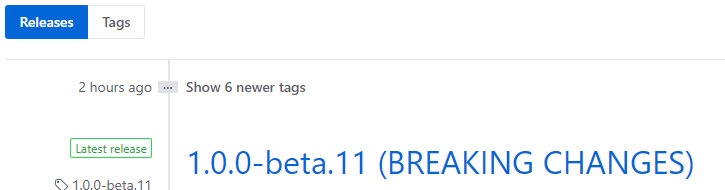
I will try to upgrade tonight, thanks for the information Eric 👍
sneko
on 26 Jan 2019
Just to confirm that the Capacitor beta.17 helped with https://github.com/ionic-team/capacitor/pull/1119 to start solving this issue on native projects.
But inside the mobile browser on iOS, the issue persists even with Ionic 4.0 😢
sneko
on 27 Jan 2019
@sneko that is the case. I didn't test the browser assuming it was fixed until your comment. Still an issue.
EricKit
on 28 Jan 2019
We still have the issue running iOS emulator, with ionic 4.0.1 and capacitor beta.17.
No input focused:

Ion-input focused:

Regular focused:

My markup is just:
<ion-content>
  <form>
    <ion-input placeholder="This is an ion-input" type="text"></ion-input>
    <input type="text" placeholder="This is a regular input">
  </form>
</ion-content>
And added 500px padding to the form element
Edit: got a bit unsure if my case is exactly the same issue now. Just found this closed issue which might be related https://github.com/ionic-team/ionic/issues/16000
 jesperbjerke
on 12 Feb 2019
jesperbjerke
on 12 Feb 2019
Seems, when I focus on ion-text the internal text element is not getting focused but it looks fine in ion-textarea.
 gnanasuriyan
on 3 Apr 2019
gnanasuriyan
on 3 Apr 2019
This is how I resolved this issue.
- I have added ionic keyboard plugin
- In config.xml i have set KeyboardResizeMode as ionic
<preference name="KeyboardResizeMode" value="ionic" />
That solved all the issues expect textarea. So I hacked like this
`
initializeApp() {
this.platform.ready().then(() => {
this.statusBar.styleDefault();
this.splashScreen.hide();
if (this.platform.is('ios')) {
window.addEventListener('keyboardDidShow', () => {
setTimeout(() => {
const activeEle: any = document.activeElement;
if (activeEle.type === 'textarea') {
activeEle.scrollIntoView();
}
}, 200);
});
}
this.keyboard.hideFormAccessoryBar(false);
});
}
`
Please share any better solution for this issue.
gnanasuriyan
on 16 Apr 2019
Thanks for the issue! This issue is being closed due to inactivity. If this is still an issue with the latest version of Ionic, please create a new issue and ensure the template is fully filled out.
Thank you for using Ionic!
![ionitron-bot[bot] picture](https://avatars1.githubusercontent.com/in/8640?v=4&s=40) ionitron-bot[bot]
on 15 Apr 2020
ionitron-bot[bot]
on 15 Apr 2020
Related issues
 BilelKrichen
·
3Comments
BilelKrichen
·
3Comments
 alan-agius4
·
3Comments
alan-agius4
·
3Comments
 GeorgeAnanthSoosai
·
3Comments
GeorgeAnanthSoosai
·
3Comments
 vswarte
·
3Comments
vswarte
·
3Comments
 brandyscarney
·
3Comments
brandyscarney
·
3Comments