Ionic-framework: Integration of ion-tab in @ionic/angular to display custom content without using routes
Feature Request
Ionic version:
[x] 4.0.0
Describe the Feature Request
Please include reinclude ion-tab removed in 4.0.0 beta 18 in order to use with useRouter="false"
Describe Preferred Solution
ion-tab to display the content when useRouter="false" for example:
<ion-tab tab="test" active="true">
    <ion-nav id="test"></ion-nav>
</ion-tab>
Describe Alternatives
I do not have alternatives
Related Code
  <ion-tab-button tab="test">
    <ion-icon name="add"></ion-icon>
    <ion-label</ion-label>
  </ion-tab-button>

<ion-tab tab="test" active="true">
    <ion-nav id="test"></ion-nav>
</ion-tab>
 goelectricstations
All 17 comments
@paulstelzer I hope now is correct.
goelectricstations
on 18 Dec 2018
Perfect :) But i cannot promise you if and when this will be integrated. Just edited your title. Alternative could be to use segment and segment buttons
 paulstelzer
on 18 Dec 2018
paulstelzer
on 18 Dec 2018
You can use ion-tab-bar as a standalone component, you don't need tabs in order to implement your own "tabs" solution, that does not use routing!!
 manucorporat
on 18 Dec 2018
manucorporat
on 18 Dec 2018
We will extend the docs to explain how this is possible!
manucorporat
on 18 Dec 2018
@manucorporat I tried but does not work
<ion-tab-bar tab="test" active="true">
    <ion-nav id="test"></ion-nav>
</ion-tab-bar>
ERROR Error: Uncaught (in promise): Error: Cannot match any routes. URL Segment: test
goelectricstations
on 18 Dec 2018
@manucorporat the latest docs is still wrong I would like to see the changes thanks so mutch
goelectricstations
on 20 Dec 2018
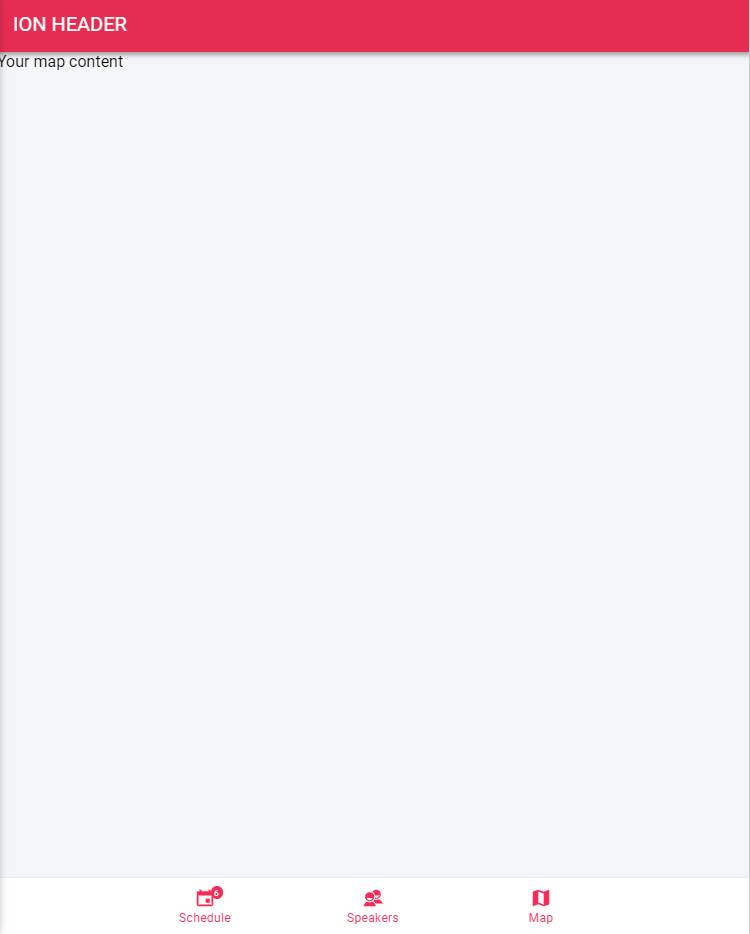
I talked with @manucorporat about this and the solution is very simple. Just use the ion-tab-bar.
PS: At the moment you have to wrap it with your own class because ion-tab-bar is not showing correctly if used standalone
You see that your use case is not so trivial, but we cannot add every use case inside it. So at the moment you have to use the following workaround.
HTML:
  <div class="my-tabs">
    <div class="my-tabs-inner">
      <ng-container *ngIf="tab === 'calendar'">
        Your calendar content
      </ng-container>

      <ng-container *ngIf="tab === 'speakers'">
        Your speakers content
      </ng-container>

      <ng-container *ngIf="tab === 'map'">
        Your map content
      </ng-container>
    </div>

    <ion-tab-bar slot="bottom">
      <ion-tab-button (click)="show('calendar')">
        <ion-icon name="calendar"></ion-icon>
        <ion-label>Schedule</ion-label>
        <ion-badge>6</ion-badge>
      </ion-tab-button>

      <ion-tab-button (click)="show('speakers')">
        <ion-icon name="contacts"></ion-icon>
        <ion-label>Speakers</ion-label>
      </ion-tab-button>

      <ion-tab-button (click)="show('map')">
        <ion-icon name="map"></ion-icon>
        <ion-label>Map</ion-label>
      </ion-tab-button>
    </ion-tab-bar>

  </div>
TS:
  tab = 'calendar';

  show(tab) {
    this.tab = tab;
  }
SCSS:
.my-tabs {
    display: flex;
    position: absolute;
    top: 0;
    left: 0;
    right: 0;
    bottom: 0;
    flex-direction: column;
    width: 100%;
    height: 100%;
    contain: layout size style;

    .my-tabs-inner {
        position: relative;
        flex: 1;
        contain: layout size style;
    }

    ion-tab-bar {
        width: 100%;
    }
}
paulstelzer
on 20 Dec 2018
@paulstelzer thank you so mutch, This should be a typical use case for me and should be possible because i set useRouter="false" in order to call tab content without router. I was able to make it works without work around from ionic 3.x.x to ionic 4.0.0 beta 17, after beta 18 no anymore.
However I used your code but I get the error below in the console, how is possible that you do not get this error?
Missing "tab" property in ion-tab-button
I am using the latest version 4.0.0-rc.0
goelectricstations
on 20 Dec 2018
@paulstelzer in my case the docs confuse me, I use angular but I will like to use:
  <ion-tab tab="home">Home Content</ion-tab>
  <ion-tab tab="settings">Settings Content</ion-tab>
WIth that was so easy before 4.0.0 beta 18
goelectricstations
on 21 Dec 2018
@paulstelzer any news?
goelectricstations
on 29 Dec 2018
I presented you a working solution -> https://github.com/ionic-team/ionic/issues/16796#issuecomment-449085001
A fix can be made to ion-tab-bar to reduce the css boilerplate. And related to tabs see this comment https://github.com/ionic-team/ionic/issues/16267#issuecomment-450417435
Another solution would be using the segment buttons
paulstelzer
on 29 Dec 2018
@paulstelzer does not work because an error come up:
Missing "tab" property in ion-tab-button
goelectricstations
on 29 Dec 2018
That must be just a warning and the app should work without problems. This log will be removed soon
paulstelzer
on 29 Dec 2018
@paulstelzer No trown an error in the console
goelectricstations
on 29 Dec 2018
yes, it's a error log, but the app should work without any problems
PS: The PR is already on the way -> https://github.com/ionic-team/ionic/pull/16905 - So it will be fixed soon :)
PPS: I close this here as duplicate of #16845 ( I know yours is older, but the other issue is already part of the PR)
paulstelzer
on 29 Dec 2018
@paulstelzer I just want to say thank you for all including the example now is working perfect, v4 rc1
goelectricstations
on 11 Jan 2019
Thanks for the issue! This issue is being locked to prevent comments that are not relevant to the original issue. If this is still an issue with the latest version of Ionic, please create a new issue and ensure the template is fully filled out.
![ionitron-bot[bot] picture](https://avatars1.githubusercontent.com/in/8640?v=4&s=40) ionitron-bot[bot]
on 10 Feb 2019
ionitron-bot[bot]
on 10 Feb 2019
Related issues
 brandyscarney
·
3Comments
brandyscarney
·
3Comments
 BilelKrichen
·
3Comments
BilelKrichen
·
3Comments
 RobFerguson
·
3Comments
RobFerguson
·
3Comments
 gio82
·
3Comments
gio82
·
3Comments
 GeorgeAnanthSoosai
·
3Comments
GeorgeAnanthSoosai
·
3Comments