Ionic-framework: [4.0.0-beta.19] StaticInjectorError in NavParams
Bug Report
Ionic version:
[x] 4.0 BETA 19
Current behavior:
Get static injection error when trying to inject NavParams inside a component
Expected behavior:
No error in console
Steps to reproduce:
- start a new project using tab template.
- add the code below to tab2.page.ts
import { NavParams } from '@ionic/angular';
...
export class Tab2Page {
  constructor(navParams: NavParams) {}
}
- Check the console error
Other information:
Console Error:
core.js:12501 ERROR Error: Uncaught (in promise): Error: StaticInjectorError(AppModule)[Tab2Page -> NavParams]:
  StaticInjectorError(Platform: core)[Tab2Page -> NavParams]:
    NullInjectorError: No provider for NavParams!
Error: StaticInjectorError(AppModule)[Tab2Page -> NavParams]:
  StaticInjectorError(Platform: core)[Tab2Page -> NavParams]:
    NullInjectorError: No provider for NavParams!
    at NullInjector.push../node_modules/@angular/core/fesm5/core.js.NullInjector.get (core.js:717)
    at resolveToken (core.js:954)
    at tryResolveToken (core.js:898)
    at StaticInjector.push../node_modules/@angular/core/fesm5/core.js.StaticInjector.get (core.js:795)
    at resolveToken (core.js:954)
    at tryResolveToken (core.js:898)
    at StaticInjector.push../node_modules/@angular/core/fesm5/core.js.StaticInjector.get (core.js:795)
    at resolveNgModuleDep (core.js:17656)
    at NgModuleRef_.push../node_modules/@angular/core/fesm5/core.js.NgModuleRef_.get (core.js:18345)
    at resolveNgModuleDep (core.js:17656)
    at resolvePromise (zone.js:814)
    at resolvePromise (zone.js:771)
    at zone.js:873
    at ZoneDelegate.push../node_modules/zone.js/dist/zone.js.ZoneDelegate.invokeTask (zone.js:421)
    at Object.onInvokeTask (core.js:14051)
    at ZoneDelegate.push../node_modules/zone.js/dist/zone.js.ZoneDelegate.invokeTask (zone.js:420)
    at Zone.push../node_modules/zone.js/dist/zone.js.Zone.runTask (zone.js:188)
    at drainMicroTaskQueue (zone.js:595)
Ionic info:
Ionic:

   ionic (Ionic CLI)             : 4.5.0 (/Users/xxx/.nvm/versions/node/v10.14.1/lib/node_modules/ionic)
   Ionic Framework               : @ionic/angular 4.0.0-beta.19
   @angular-devkit/build-angular : 0.10.7
   @angular-devkit/schematics    : 7.0.7
   @angular/cli                  : 7.0.7
   @ionic/angular-toolkit        : 1.2.0

System:

   NodeJS : v10.14.1 (/Users/xxx/.nvm/versions/node/v10.14.1/bin/node)
   npm    : 6.5.0
   OS     : macOS Mojave
 MrSparklle
All 14 comments
The exact same problem here. My team is desperate for a solution.
We have dozens of components depending on such feature.
 nathanpronto
on 17 Dec 2018
nathanpronto
on 17 Dec 2018
I have same issue when lazy loading.
 ghost
on 18 Dec 2018
ghost
on 18 Dec 2018
I think NavParams is deprecated for @ionic/angular ( https://github.com/ionic-team/ionic/blob/master/angular/src/directives/navigation/nav-params.ts ). You can do everything with Angular itself and NavParams don't seem to be included as Provider in the IonicModule so this error occurs. But I think @manucorporat can tell more :)
 paulstelzer
on 18 Dec 2018
paulstelzer
on 18 Dec 2018
There should be an alternative before deprecates NavParams. How we can we control Ionic Modals without using NavParams? What can we do with componentProps?
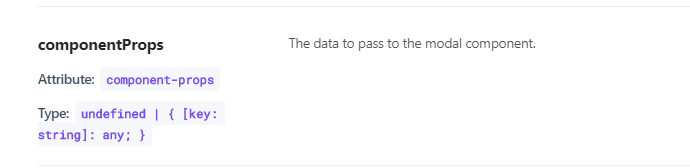
But NavParams still works with following way:
import { Component, OnInit, Inject } from '@angular/core';
import { ModalController, NavParams } from '@ionic/angular';
@Component({
selector: 'app-my-modal',
templateUrl: './my-modal.page.html',
styleUrls: ['./my-modal.page.scss'],
})
export class MyModalPage implements OnInit {
constructor(@Inject(NavParams) private navParams: NavParams) { }
ngOnInit() {
console.log(this.navParams.data);
}
}
 coturiv
on 18 Dec 2018
coturiv
on 18 Dec 2018
This is not needed for modals. Every property you set inside componentProps will be set to the property of the component.
If you have the following:
componentProps: {
  myId: 'something'
}
And this is your modal:
import { Component, OnInit, Inject } from '@angular/core';
import { ModalController} from '@ionic/angular';

@Component({
  selector: 'app-my-modal',
  templateUrl: './my-modal.page.html',
  styleUrls: ['./my-modal.page.scss'],
})
export class MyModalPage implements OnInit {

  myId: string;

  constructor() { }

  ngOnInit() {
    console.log(this.myId); // Output will be 'something'
  }
}
Talked with @manucorporat - NavParams is not depcrecated and docs will be updated
paulstelzer
on 18 Dec 2018
There is a great topic in Stackoverflow about how to receive modal parameters without NavParams:
https://stackoverflow.com/questions/51989882/ionic-4-how-do-i-receive-componentprops
MrSparklle
on 18 Dec 2018
In my project NavParams still works if you are loading a component/page via modalController.
e.g
const modal = await this.modalController.create({
component: TestComponent,
componentProps: { value: 123, othervalue: 234 }
});
It only doesn't work when you are navigating to a new page. In this instance I either save the object in a service and retrieve or use the angular route parameters to retrieve the object. For example my route URL would be:
/testcomponent/:value/:othervalue
I then navigate as:
this.navCtrl.navigateForward('/testcomponent/123/234')
And in my component I retrieve as follows:
import { ActivatedRoute } from '@angular/router';
constructor { private activatedRoute: ActivatedRoute}
ngOnInit() {
let value = Number(this.activatedRoute.snapshot.paramMap.get('value'));
let othervalue = Number(this.activatedRoute.snapshot.paramMap.get('othervalue'));
}
Note activatedRoute always retrieves as string so if it is boolean, object or number you have to convert.
If you want to send an object you must stringify it eg JSON.stringify(obj). And then parse it when retrieving it JSON.parse(obj)
Navparams was a lot simpler to deal and don't know why it was deprecated but the above works.
 bkarv
on 20 Dec 2018
bkarv
on 20 Dec 2018
@bkarv The last part you describe is normal Angular behavior ;) And as I said NavParams is not deprecated, i thought it was, but it's not ;)
paulstelzer
on 20 Dec 2018
You can use navParams on modalControllers but you can't use it on a page that is in view, you will get the static injection error. I just tried it then. (Also original question although it mentions components, the example provided is a page)
I think the issue is everyone is used to navigating pages like Ionic 3 and passing parameters as follows and expecting to retrieve the variables using NavParams.
this.navCtrl.push(TestComponent, { value: 123, othervalue: 234 });
In regards to my last, I take it back :) Thinking about it more, could the reason be navParams doesn't exist on pages is if you navigate directly via the URL there is no way to pass the params and retrieve the params via NavParams, which will create bugs in the code.
I could be wrong but just writing on my own experience.
bkarv
on 20 Dec 2018
@paulstelzer
Also thanks for this tip. I did not know componentProps worked this way, I had been using navParams to retrieve componentProps. Removes another line of code, wohoo!
This is not needed for modals. Every property you set inside componentProps will be set to the property of the component.
If you have the following:
componentProps: {
  myId: 'something'
}
And this is your modal:
import { Component, OnInit, Inject } from '@angular/core';
import { ModalController} from '@ionic/angular';

@Component({
  selector: 'app-my-modal',
  templateUrl: './my-modal.page.html',
  styleUrls: ['./my-modal.page.scss'],
})
export class MyModalPage implements OnInit {

  myId: string;

  constructor() { }

  ngOnInit() {
    console.log(this.myId); // Output will be 'something'
  }
}
bkarv
on 20 Dec 2018
@bkarv Some writes it with @Input() myId, but this is not needed. For me it's working without @Input
paulstelzer
on 20 Dec 2018
NavParams is only used when using ion-nav or pushing a page with to a modal, for params passing, use the angular router way!
 manucorporat
on 11 Jan 2019
manucorporat
on 11 Jan 2019
Thanks for the issue! This issue is being locked to prevent comments that are not relevant to the original issue. If this is still an issue with the latest version of Ionic, please create a new issue and ensure the template is fully filled out.
![ionitron-bot[bot] picture](https://avatars1.githubusercontent.com/in/8640?v=4&s=40) ionitron-bot[bot]
on 10 Feb 2019
ionitron-bot[bot]
on 10 Feb 2019
Related issues
 GeorgeAnanthSoosai
·
3Comments
GeorgeAnanthSoosai
·
3Comments
 BilelKrichen
·
3Comments
BilelKrichen
·
3Comments
 RobFerguson
·
3Comments
RobFerguson
·
3Comments
 alexbainbridge
·
3Comments
alexbainbridge
·
3Comments
 alan-agius4
·
3Comments
alan-agius4
·
3Comments
Most helpful comment
This is not needed for modals. Every property you set inside componentProps will be set to the property of the component.
If you have the following:
And this is your modal: