Ionic-framework: Ion-fab show behind the toolbar
Bug Report
[x] 4.0 BETA 19
Current behavior:
Afer Beta 18 the ion-fab is showed behind the toolbar.

Expected behavior:
The fab button should appear above the toolbar like previous versions.
Related code:
<ion-header no-border>
  <ion-toolbar color="primary">
    <ion-title> <img src="assets/imgs/dark.svg" height="46" /> </ion-title>
  </ion-toolbar>
</ion-header>

<ion-content>
   <ion-fab vertical="top" horizontal="end" edge slot="fixed">
    <ion-fab-button color="tertiary" (click)="navigateToEditProfile(profileId)">
      <ion-icon name="create"></ion-icon>
    </ion-fab-button>
  </ion-fab>

  <ion-list-header color="secondary" no-margin>
    <ion-label>
      <h1 text-uppercase>PERFIL</h1>
    </ion-label>
  </ion-list-header>

  <div>....</div>

</ion-content>
Ionic info:
Ionic:

   ionic (Ionic CLI)             : 4.5.0 (/Users/xxx/.nvm/versions/node/v10.14.1/lib/node_modules/ionic)
   Ionic Framework               : @ionic/angular 4.0.0-beta.19
   @angular-devkit/build-angular : 0.11.3
   @angular-devkit/schematics    : 7.1.3
   @angular/cli                  : 7.1.3
   @ionic/angular-toolkit        : 1.2.0

Cordova:

   cordova (Cordova CLI) : 8.1.2 ([email protected])
   Cordova Platforms     : none
   Cordova Plugins       : no whitelisted plugins (0 plugins total)

System:

   NodeJS : v10.14.1 (/Users/xxx/.nvm/versions/node/v10.14.1/bin/node)
   npm    : 6.5.0
   OS     : macOS Mojave
   Xcode  : Xcode 9.4 Build version 9F1027a
 MrSparklle
All 29 comments
You need to have slot="fixed" on the ion-fab if you'd like it to position it over the content & toolbar. Please see the usage here: https://beta.ionicframework.com/docs/api/fab. Thanks!
 brandyscarney
on 17 Dec 2018
brandyscarney
on 17 Dec 2018
@brandyscarney, please reopen:
I'm tried adding slot="fixed" but the problem keeps:
<ion-fab vertical="top" horizontal="end" slot="fixed" edge>
I notice the problem occurs when I use edge directive to make the button overlapping the head.
I also update the example provided in the first post.
MrSparklle
on 17 Dec 2018
@brandyscarney @MrSparklle is right. In the current state it's not working.
It's not header only, footer, too
beta.17 (ionic docs):

current master (http://localhost:3333/src/components/fab/test/preview):

 paulstelzer
on 17 Dec 2018
paulstelzer
on 17 Dec 2018
I'm not sure what's going on here. I am not seeing the same thing on the preview test (on master after running a fresh npm i):

I also can't reproduce it in a codepen using 4.0.0-beta.19: https://codepen.io/brandyscarney/pen/KbgKNw
I was only able to reproduce the problem when slot="fixed" was missing, but adding it fixed it.
Is there a specific browser this is happening on or is it on several?
brandyscarney
on 17 Dec 2018
@brandyscarney I tested your codepen. It has the same behaviour. It's behind the toolbar (using Chrome 71)
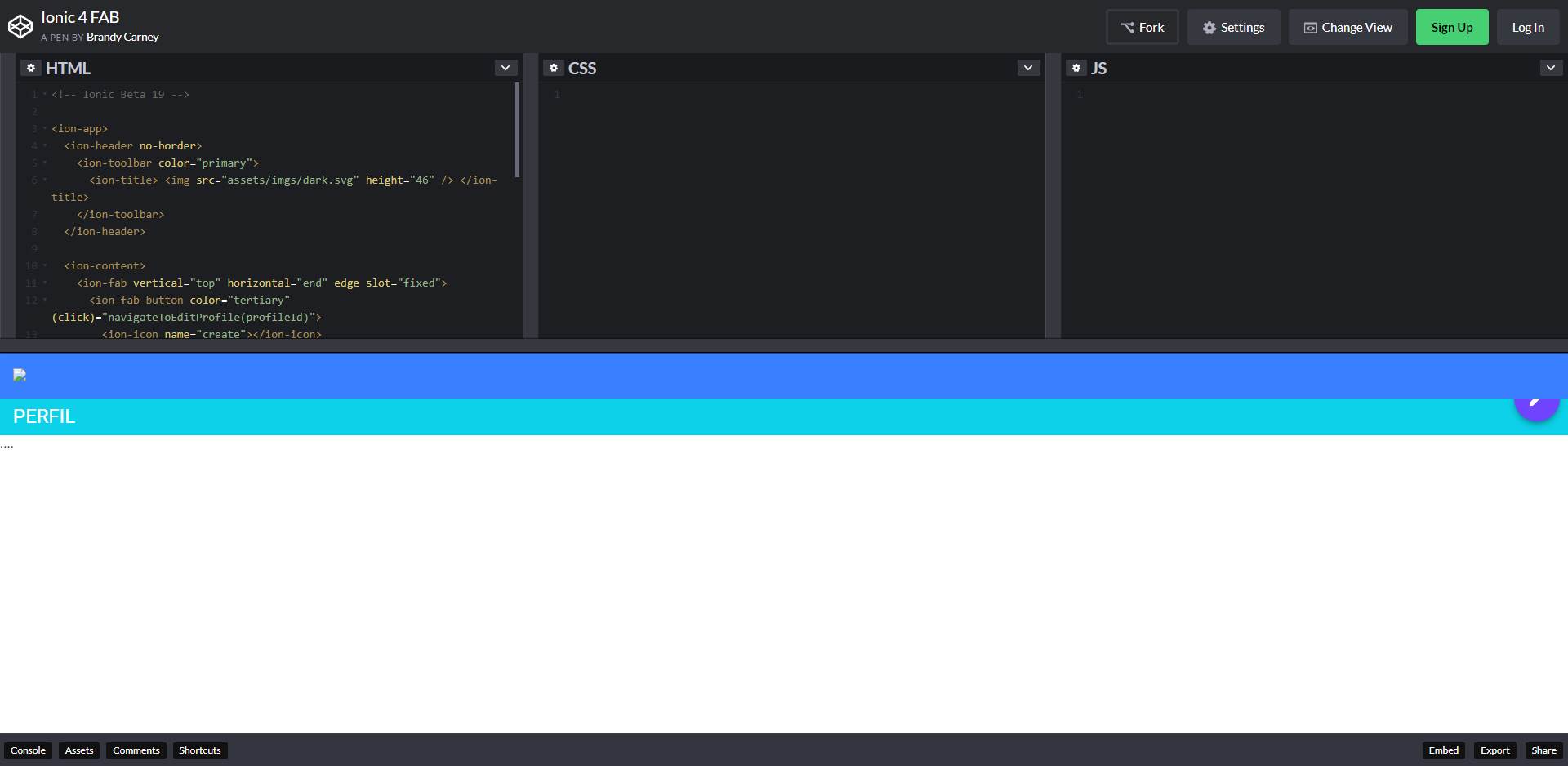
I downgraded to beta.17 / beta,16, but there it's still behind the toolbar. Maybe Chromium has a change?
paulstelzer
on 17 Dec 2018
@paulstelzer Thanks! Apparently I needed to relaunch Chrome to update it, so I can now reproduce it in latest Chrome. This helps narrow the problem down!

brandyscarney
on 17 Dec 2018
For more info, this is also appearing in Ionic 3.9.2. It is also seen in the Ionic Docs.
 brassier
on 18 Dec 2018
brassier
on 18 Dec 2018
Also note that this works fine in FireFox. Only seems to be a problem with Chrome 71.
I stink at CSS, but I attempted to break this down into a simpler example that shows something working in FireFox and not in Chrome, based on hunting and pecking the tons of styles going on in the Ionic app I have. A (semi-embarrassing) example is below. Again, this shows a fake FAB that appears normal in FireFox, which appears under a fake header in Chrome. It really seems like z-index is handled differently since the 999 z-index raises the FAB to the top in FF but not in Chrome.
https://js-bjvaxt.stackblitz.io/
Of course there are hacks we could do to make this work again. I'm just not convinced I have a "proper" fix in mind.
brassier
on 18 Dec 2018
A bit more info. In my testing it looks like the following style on ion-content may be the key trigger point that Chrome and FF are treating differently:
contain: layout size style;
Disabling that style on Chrome 71 makes the FAB on top again.
brassier
on 18 Dec 2018
@brassier Thank you for all of the debugging!
@manucorporat Do you have any ideas here?
brandyscarney
on 19 Dec 2018
rc0
I see the same here: https://github.com/peterennis/aetabs/blob/master/src/app/contact/contact.page.html#L38
The suggestion from @brassier works.

 peterennis
on 20 Dec 2018
peterennis
on 20 Dec 2018
This might also be related: https://stackoverflow.com/questions/53155252/css-property-contain-layout-makes-fixed-footer-not-work
Maybe it is just the layout element of contain.
 redwolf2
on 20 Dec 2018
redwolf2
on 20 Dec 2018
Any update on this? I would guess there are many Ionic apps out in the wild with wonky FAB buttons as it stands. Chrome obviously changed how they handle this contain: layout style. Which is correct?
- Chrome ~71
- Chrome <71 (and current FireFox / Safari)
brassier
on 24 Dec 2018
I checked what redwolf2 said and it's like that, just erasing the "layout" allows the fab to be shown on top again
 DarkAnivia
on 3 Jan 2019
DarkAnivia
on 3 Jan 2019
I created a Chromium bug report for this: https://bugs.chromium.org/p/chromium/issues/detail?id=918889
Since it still works the same in other browsers, I'd like to find out if this is a bug specifically with Chrome before making changes to our code, but worst case scenario we will remove the contain CSS if there is no response.
brandyscarney
on 3 Jan 2019
The bug report was closed as a WontFix with the message:
I believe the current behavior in Chromium is right.
Notice that if you enable "layout.css.contain.enabled" flag in Firefox, the behavior is the same there.
Safari doesn't implement css-contain yet, so it's not unexpected that the behavior is different in that case.The spec is very clear, if you use "contain: layout" (https://drafts.csswg.org/css-contain/#containment-layout):
"5. The element creates a stacking context."A possible solution could be setting for example "z-index: 20" on that element.
redwolf2
on 4 Jan 2019
@brandyscarney - Looks like this won't be fixed in Chrome, and will likely start failing in other browsers too. Any idea how Ionic would suggest a fix for this in 4.x and 3.x ionic?
brassier
on 7 Jan 2019
We'll be removing the contain CSS in both versions of Ionic and making sure there are no negative effects to the UI or performance.
brandyscarney
on 7 Jan 2019
Sorry for the inconvenience but is there an approximate time to market of this fix?
We are figuring whether or not is worthwhile to change the composition of our app in the meanwhile
DarkAnivia
on 9 Jan 2019
For v4 we plan to have it in for final, this issue is being tracked in the project board as top priority: https://github.com/ionic-team/ionic/projects/3 and the RC tracking issue: https://github.com/ionic-team/ionic/issues/16819.
v3 will likely take a bit longer to get a fix out as we will need to review our scripts to ensure nothing breaks.
In the meantime the following workaround should work for both versions:
ion-content {
  contain: size style;
}
Updated the earlier codepen to include this: https://codepen.io/brandyscarney/pen/KbgKNw
I'm not sure if there are any negative side effects from this as we have not started testing it yet. If anyone would like to throw that CSS in their app and report any bugs they see, that would be helpful. Thanks!
brandyscarney
on 9 Jan 2019
Thanks @brandyscarney . I added that suggested style adjustment to my app which is running 3.9.2. The app has about 25 pages, using a good chunk of the Ionic components. This change fixed the FAB display issue in Chrome (web) and Android (native). I ran some quick tests and didn't see any negative impacts in Web, or Native (Android/iOS).
Certainly not comprehensive, but looks good to me so far. If I understand this issue correctly, it seems like the contain: layout style, while it was in the Ionic code, likely was never actually used up to this point since Chrome seemed to just implement it. So removing that portion seems like it will just make apps run like they always used to, which seems like a safe bet.
brassier
on 9 Jan 2019
Chrome added it in 52, so while it may have not been working the same from a UI perspective it was still doing something. 🙂We will check it against all of our tests though.
https://developers.google.com/web/updates/2016/06/css-containment
https://www.chromestatus.com/features/6522186978295808
brandyscarney
on 9 Jan 2019
Thank you, we will try aswell
DarkAnivia
on 11 Jan 2019
It's fixed for Ionic 4, but Ionic 3 still has this problem.
redwolf2
on 12 Feb 2019
@redwolf2 The fix should've been in the 3.9.3 release, are you using this version? https://github.com/ionic-team/ionic-v3/releases/tag/v3.9.3
brandyscarney
on 12 Feb 2019
@brandyscarney Thx, I will check that out.
redwolf2
on 12 Feb 2019
Hi, my issue https://github.com/ionic-team/ionic/issues/17130 has been locked.
I still have this exact problem, nothing has been fixed.
 Frotty
on 1 Mar 2019
Frotty
on 1 Mar 2019
@Frotty Could you please open a new issue with your current Ionic version and steps to reproduce please? Thank you!
brandyscarney
on 1 Mar 2019
Thanks for the issue! This issue is being locked to prevent comments that are not relevant to the original issue. If this is still an issue with the latest version of Ionic, please create a new issue and ensure the template is fully filled out.
![ionitron-bot[bot] picture](https://avatars1.githubusercontent.com/in/8640?v=4&s=40) ionitron-bot[bot]
on 31 Mar 2019
ionitron-bot[bot]
on 31 Mar 2019
Related issues
 daveshirman
·
3Comments
daveshirman
·
3Comments
 vswarte
·
3Comments
vswarte
·
3Comments
 BilelKrichen
·
3Comments
BilelKrichen
·
3Comments
 fdnhkj
·
3Comments
fdnhkj
·
3Comments
 MrBokeh
·
3Comments
MrBokeh
·
3Comments
Most helpful comment
@paulstelzer Thanks! Apparently I needed to relaunch Chrome to update it, so I can now reproduce it in latest Chrome. This helps narrow the problem down!