Ionic-framework: [4.0.0-beta.15] ion-input, ion-searchbar, ion-textarea styling inconsistencies
Bug Report
Info
@ionic/core : 4.0.0-beta.15
Describe the Bug
<ion-input>, <ion-searchbar>, <ion-textarea> have a larger placeholder font-weight in edge.
Side-by-side image of Chrome, Edge, IE11:
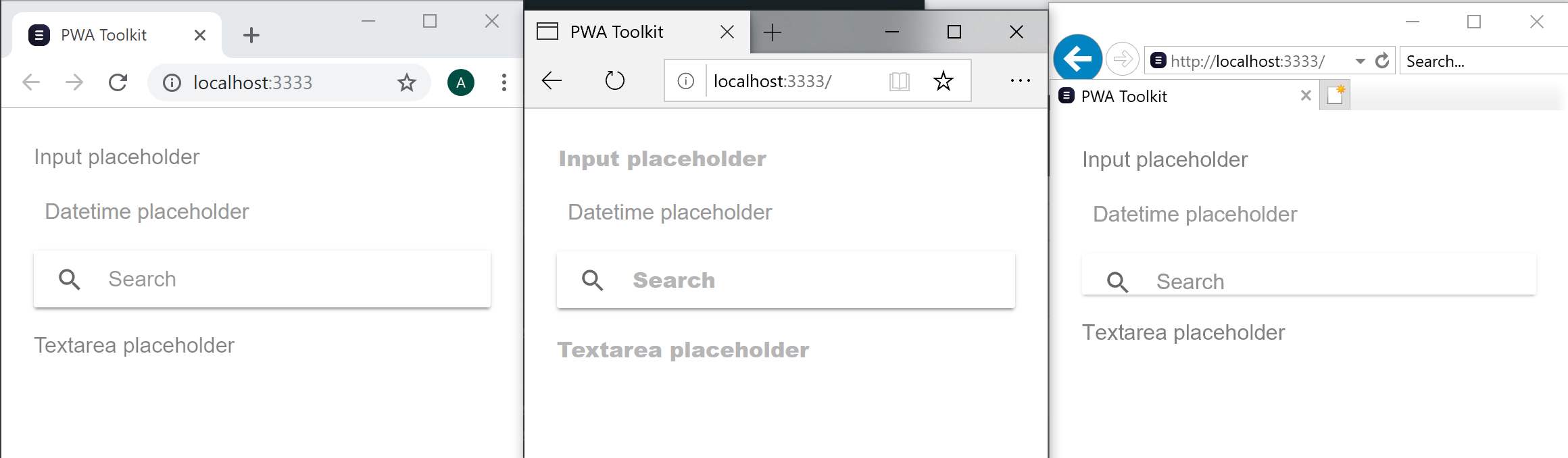
<ion-searchbar> has content clear button positioned incorrectly.

<ion-searchbar> has a smaller height and content clear button styling issues in IE11, and placeholder text is not visible when the input is focused but empty.

Related Code
import { Component } from '@stencil/core';

@Component({
  tag: 'app-root',
  styleUrl: 'app-root.css'
})
export class AppRoot {
  render() {
    return (
      <ion-app>
        <ion-content padding>
          <ion-input type="text" placeholder="Input placeholder" />
          <ion-searchbar />
          <ion-textarea placeholder="Textarea placeholder" />
        </ion-content>
      </ion-app>
    );
  }
}
Expected Behavior
<ion-input>, <ion-searchbar>, <ion-textarea> should look consistent across browsers.
 ajmchambers
All 9 comments
Seeing same with ion-toolbar.
From theme/variables.scss:
:root {
  --ion-color-primary: #455a64;
  --ion-color-primary-rgb: 69, 90, 100;
  --ion-color-primary-contrast: #fff;
  --ion-color-primary-contrast-rgb: 255, 255, 255;
  --ion-color-primary-shade: #718792;
  --ion-color-primary-tint: #1c313a;

  --ion-color-danger: #f04141;
  --ion-color-light: #ffffff;

  --ion-color-medium: #0b2db5;
  --ion-color-medium-rgb: 11, 45, 181;

  --ion-toolbar-md-background-color: #43697c;
  --ion-toolbar-background-color: #43697c;
  --ion-toolbar-md-text-color: #ffffff;
  --ion-toolbar-text-color: #ffffff;
ion-toolbar styling not coming through anymore.
 kinggolf
on 2 Nov 2018
kinggolf
on 2 Nov 2018
@kinggolf This is the result of https://github.com/ionic-team/ionic/commit/b2021fd, and is unrelated to the present issue. (I agree this should have been more explicitly mentioned in the release notes. The moral of the story is that you should scrutinize the change-log at each release... :p)
 ptitjes
on 2 Nov 2018
ptitjes
on 2 Nov 2018
@ptitjes thank you for pointing out https://github.com/ionic-team/ionic/commit/b2021fd.
BTW - I agree that I should have noticed this in the changelog. Cheers!
kinggolf
on 2 Nov 2018
Thanks for the issue! We will look into this.
Sorry that the breaking changes didn't make the changelog from https://github.com/ionic-team/ionic/commit/b2021fd! That was my fault - I formatted it wrong in the commit so it didn't make it into the changelog. 🙁 I updated the release tag here: https://github.com/ionic-team/ionic/releases/tag/v4.0.0-beta.15
Will merge this PR to update the changelog once the checks pass: https://github.com/ionic-team/ionic/pull/16201
 brandyscarney
on 2 Nov 2018
brandyscarney
on 2 Nov 2018
It's all good @brandyscarney. Docs look good, which is very cool! Thanks for great framework and all the super support. Take it easy. :)
kinggolf
on 3 Nov 2018
Thanks for your reponse. Is the issue solved or are there still any issues?
 paulstelzer
on 7 Dec 2018
paulstelzer
on 7 Dec 2018
I've noticed improvements in beta 17 but I'm still having a few issues in edge and ie11 which I'll try and get documented.
Anyway I'm going to close this issue and https://github.com/ionic-team/ionic/issues/15621. I'll do some fresh testing in beta 17 and create some new issue(s).
Cheers
ajmchambers
on 7 Dec 2018
Thank you! Yes, a summarized issue would be the best!
paulstelzer
on 7 Dec 2018
Thanks for the issue! This issue is being locked to prevent comments that are not relevant to the original issue. If this is still an issue with the latest version of Ionic, please create a new issue and ensure the template is fully filled out.
![ionitron-bot[bot] picture](https://avatars1.githubusercontent.com/in/8640?v=4&s=40) ionitron-bot[bot]
on 6 Jan 2019
ionitron-bot[bot]
on 6 Jan 2019
Related issues
brandyscarney
·
3Comments
 alan-agius4
·
3Comments
alan-agius4
·
3Comments
 manucorporat
·
3Comments
manucorporat
·
3Comments
 BilelKrichen
·
3Comments
BilelKrichen
·
3Comments
 masimplo
·
3Comments
masimplo
·
3Comments
Most helpful comment
Thanks for the issue! We will look into this.
Sorry that the breaking changes didn't make the changelog from https://github.com/ionic-team/ionic/commit/b2021fd! That was my fault - I formatted it wrong in the commit so it didn't make it into the changelog. 🙁 I updated the release tag here: https://github.com/ionic-team/ionic/releases/tag/v4.0.0-beta.15
Will merge this PR to update the changelog once the checks pass: https://github.com/ionic-team/ionic/pull/16201