Ionic-framework: Ionic 4 - Styles being injected only after first livereload
Bug Report
Ionic Info
Run ionic info from a terminal/cmd prompt and paste the output below.
Ionic:

   ionic (Ionic CLI)          : 4.0.3 (/home/linuxbrew/.linuxbrew/lib/node_modules/ionic)
   Ionic Framework            : @ionic/angular 4.0.0-beta.0
   @angular-devkit/core       : 0.7.2
   @angular-devkit/schematics : 0.7.2
   @angular/cli               : 6.1.2
   @ionic/ng-toolkit          : 1.0.2
   @ionic/schematics-angular  : 1.0.2

Cordova:

   cordova (Cordova CLI) : 8.0.0
   Cordova Platforms     : none

System:

   Android SDK Tools : 26.0.2
   NodeJS            : v10.5.0 (/home/linuxbrew/.linuxbrew/lib/node_modules/node/bin/node)
   npm               : 6.1.0
   OS                : Linux 3.16

Environment:

   ANDROID_HOME : /home/matheushf/Android/Sdk
Describe the Bug
When I first start my project with ionic serve --lab, it all starts normally, except that some styles are not injected, and the appearance is all broken, elements like ion-cards, ion-toolbar etc. But when you make any change to any file, the livereload brings the styles, and everything is back to normal.
The problem is making a build, you don't have livereload there.
Steps to Reproduce
Steps to reproduce the behavior:
- Start the project
- All broken
- Make a change
- All good
Related Code


Expected Behavior
All styles should appear on the first ionic serve, and ionic build
Additional Context
I noticed that [data-ion-card-md-host] doesn't gets styled on the first ionic serve, and that styles like <style data-style-tag="ion-card" data-style-mode="ion-card" data-style-scoped="true"> are only injected after the first livereload
 matheushf
All 27 comments
Same as his
ionic info
√ Gathering environment info - done!
Ionic:
ionic (Ionic CLI) : 4.0.6 (C:\Users\Lande\AppData\Roamingnpmnode_modules\ionic)
Ionic Framework : @ionic/angular 4.0.0-beta.1
@angular-devkit/core : 0.7.3
@angular-devkit/schematics : 0.7.3
@angular/cli : 6.1.3
@ionic/ng-toolkit : 1.0.6
@ionic/schematics-angular : 1.0.4
Cordova:
cordova (Cordova CLI) : 8.0.0
Cordova Platforms : not available
System:
NodeJS : v8.11.3 (C:\Program Filesnodejsnode.exe)
npm : 6.3.0
OS : Windows 10
Environment:
ANDROID_HOME : not set
 lander854
on 16 Aug 2018
lander854
on 16 Aug 2018
I also noticed that it only happens after I use navigation to another module/component, that is being loaded through lazy loading. Although it looks like problems with our own styles, it's ionic core styles that are not loaded properly.
So, I still don't know what to do.
matheushf
on 22 Aug 2018
It still wasn't solved.
I've tried putting this page from the screenshot in the first page that loads (app.component.html) and it loads perfect with all styles, but it doesn't load the styles when using it after two routing states (1 with href from ion-tabs and another from this.router.navigateByUrl.
matheushf
on 29 Aug 2018
I'm facing the same problem. @matheushf Did you fixed?
 luishmcmoreno
on 7 Sep 2018
luishmcmoreno
on 7 Sep 2018
Are you still seeing this in latest (4.0.0-beta.13)?
 brandyscarney
on 26 Oct 2018
brandyscarney
on 26 Oct 2018
Sorry, In my case, my problem was that I didn't put the ion-item content inside of an ion-label:
<ion-item>
    <ion-icon slot="start" icon="home"> </ion-icon>
    ION ITEM CONTENT
</ion-item>
The code above works very well when you enter at the page by url. But when you go navigating by the navPush, something wrong happens in the lazy loading and the styles is not injected. But, just the md styles. When you force iOS styles, the code above works ok.
But after some tests, I realized that the code below works very well in all cases:
<ion-item>
    <ion-icon slot="start" icon="home"> </ion-icon>
    <ion-label> ION ITEM CONTENT</ion-label>
</ion-item>
I don't know if its a bug or if it is really necessary to have the ion-label inside the ion-item. And it's happening on the beta.13 . But, everything is working fine with the ion-label. I also don't know if the bug reported by @matheushf is the same as mine.
By the way, congratulations for all ionic collaborators. I love this framework since the version 1 and the version 4 is really really awesome. I'm falling in love with Ionic Web Components and Stencil.
luishmcmoreno
on 26 Oct 2018
@luishmcmoreno Thank you for the quick reply! At this time it is required that the content in an ion-item is wrapped in an ion-label, but we will have to look into why that would be causing styles to only load on the livereload, as that seems wrong.
Thank you for the feedback! It's really nice to hear that you're loving it. 😄
brandyscarney
on 26 Oct 2018
Unfortunately mine is still happening, I've made an workaround re-styling (on scss) button inside ionic-toolbar so it could keep the normal style when building. But the card and some others still needs to livereload when developing.
matheushf
on 27 Oct 2018
I have the same Problem with the ion-button element:
html
<ion-button mode="ios" shape="round" expand="full" color="secondary" (click)="login(user)">Login</ion-button>
When I reload the page all css styles are attached, but when I navigate to the page with routing the Button has no styling at all. When I reload again it has styles again.
 roder125
on 28 Oct 2018
roder125
on 28 Oct 2018
Can you share with us all the html code from this page?
luishmcmoreno
on 28 Oct 2018
So this was just one little example. Hier is a better one.
When I click the logout button on the HomePage it should bring me to the login-register page.
But after the navigation all ion-button styles are gone.
Here is the cde for the Homepage:
html
<ion-header>
  <ion-toolbar>
    <ion-title>
      Hello {{id}}
    </ion-title>
  </ion-toolbar>
</ion-header>

<ion-content padding>
    <ion-button shape="round" (click)="logout()">Round Button</ion-button>
</ion-content>
TS
logout(){
    this.storageService.deleteFromStorage("user");
    this.storageService.deleteFromStorage("keepLoggedin");
    this.navCtrl.navigateRoot("/login-register");
  }
And here is the LoginRegisterPage
HMTL
<ion-content padding class="content" fullscreen>
  <button class="home-btn">
    <ion-icon style="color: white" name="home"></ion-icon>
  </button>
  <div class="button-outer-top">
    <button color="secondary" class="button-rounded">
      <img src="../../assets/imgs/logo.svg">
    </button>
  </div>
  <div class="signup-btn">
    <ion-button mode="ios" shape="round" expand="full" color="secondary" (click)="openPage('RegisterPage')">Signup</ion-button>
    <p>Via Facebook or E-Mail</p>
  </div>
  <div class="login-btn">
    <ion-button mode="ios" shape="round" expand="full" color="secondary" (click)="openPage('LoginPage')">Login</ion-button>
    <p>With an already existing account</p>
  </div>
</ion-content>
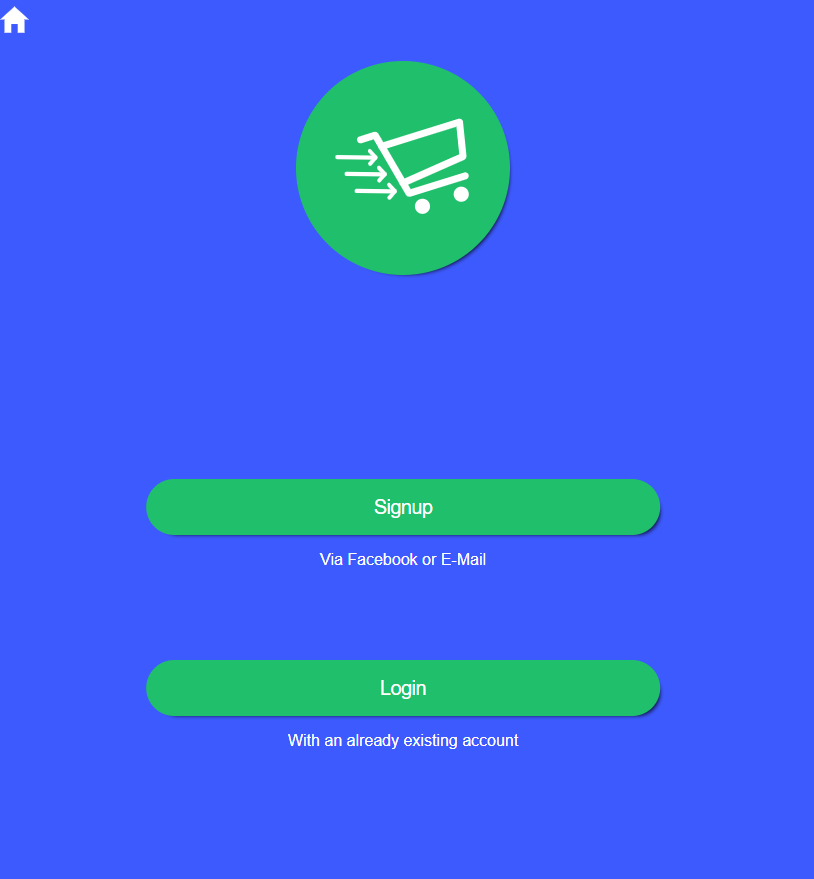
Here is the result:
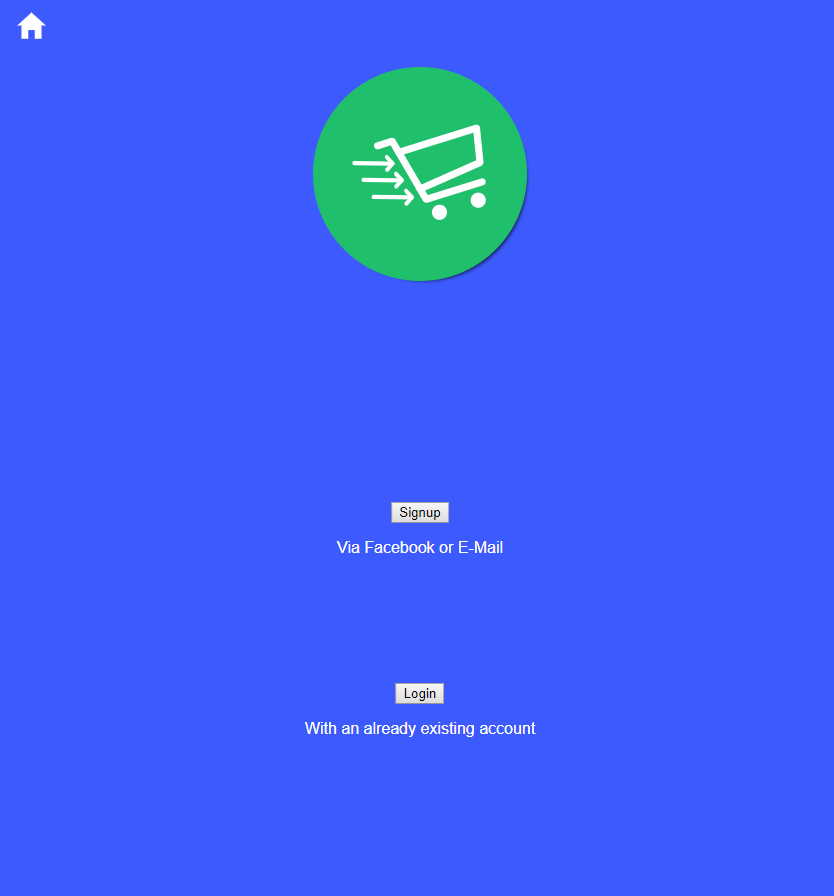
And this is how it should look. after I reload the page it looks like that
roder125
on 28 Oct 2018
Is this issue still exist in beta.17?
 paulstelzer
on 3 Dec 2018
paulstelzer
on 3 Dec 2018
I am experiencing a similar issue too. Before a life reload, when you navigate to a lazy loaded page using the navigate() or navigateByUrl() functions, buttons/title bar styles basically don't load..inputs seem unaffected for some reason. illustration below.

_image shows page after live reload and before life reload_
I'm growing attached to ionic 4 and I cannot fo back to three for obvious reasons. So if there is anyone with a working workaround or a solution..please help!
Gotta thank the Ionic team for the great work they are doing.
 Tchayo
on 5 Dec 2018
Tchayo
on 5 Dec 2018
Can you show us the HTML of the entire ion-header ?
luishmcmoreno
on 5 Dec 2018
there you go.
<ion-header>
  <ion-toolbar>
    <ion-title>dashboard</ion-title>
    <ion-buttons slot="end">
        <ion-button color="primary" routerLink="/resident_create">
          <ion-icon slot="icon-only" name="person-add"></ion-icon>
        </ion-button>
        <ion-button color="primary" (click)="logout()">
          <ion-icon slot="icon-only" name="log-out"></ion-icon>
        </ion-button>
      </ion-buttons>
  </ion-toolbar>
</ion-header>
and i forgot to mention that it does not only affect the header but also any other button in sight. Pretty much all buttons don't get styled.
Tchayo
on 5 Dec 2018
I was facing this exactly problem but it was related with some ion items without wrapping text inside ion-labels. I'm not seeing anything wrong in your ion-header.
luishmcmoreno
on 5 Dec 2018
wait you mean whenever you create an ion-item it must have an ion-label?!
Tchayo
on 5 Dec 2018
Wrong way:
<ion-item> Text </ion-item>
Right way:
<ion-item> <ion-label> Text </ion-label> </ion-item>
When I was doing it with the wrong way, all the buttons in the page was losing its style.
luishmcmoreno
on 5 Dec 2018
That's correct and a breaking change, please see this file -> https://github.com/ionic-team/ionic/blob/master/angular/BREAKING.md#item
There are all breaking changes.
paulstelzer
on 5 Dec 2018
I have been enlightened. Lemme try and make these changes and see if the error will persist.
Tchayo
on 5 Dec 2018
I have made all the necessary changes but the issue persists
Tchayo
on 5 Dec 2018
We haven't seen this behavior with the starters or the conference app. Is there a repo somewhere we can use to reproduce the issue?
 dwieeb
on 5 Dec 2018
dwieeb
on 5 Dec 2018
This same issue also/still happens when using mode="ios" in ion-button:
Button that breaks css style:
<ion-button mode="ios" shape="round" color="primary" expand="full" > Login </ion-button>
Button that works:
<ion-button shape="round" color="primary" expand="full" > Login </ion-button>
Maybe that could assist someone having the same issue.
Project info:
Ionic:

   ionic (Ionic CLI)             : 4.3.1 (/usr/local/lib/node_modules/ionic)
   Ionic Framework               : @ionic/angular 4.0.0-beta.7
   @angular-devkit/build-angular : 0.7.5
   @angular-devkit/schematics    : 0.7.5
   @angular/cli                  : 6.1.5
   @ionic/angular-toolkit        : not installed

Cordova:

   cordova (Cordova CLI) : 8.1.2 ([email protected])
   Cordova Platforms     : not available
   Cordova Plugins       : not available

System:

   Android SDK Tools : 26.1.1 (/home/carel/Android/Sdk)
   NodeJS            : v10.13.0 (/home/carel/n/bin/node)
   npm               : 6.4.1
   OS                : Linux 4.15
 CarelFdeWaal
on 10 Jan 2019
CarelFdeWaal
on 10 Jan 2019
@Carel-Ttrumpet Could you please update to rc.1 and check again?
paulstelzer
on 10 Jan 2019
I have the same issue, especially with ion-tab-button and color attribute in ion-icon
Project info:
Ionic:

   ionic (Ionic CLI)             : 4.8.0 (/Users/xx/.nvm/versions/node/v10.14.2/lib/node_modules/ionic)
   Ionic Framework               : @ionic/angular 4.0.0-rc.2
   @angular-devkit/build-angular : 0.12.2
   @angular-devkit/schematics    : 7.2.2
   @angular/cli                  : 7.2.2
   @ionic/angular-toolkit        : 1.2.2

Capacitor:

   capacitor (Capacitor CLI) : 1.0.0-beta.13
   @capacitor/core           : 1.0.0-beta.13

System:

   NodeJS : v10.14.2 (/Users/xx/.nvm/versions/node/v10.14.2/bin/node)
   npm    : 6.5.0
   OS     : macOS Mojave
 maeisdev
on 21 Jan 2019
maeisdev
on 21 Jan 2019
I close this issue here because it seems that different issues are here now. Everyone who has still a problem, please create a new issue and tell us how to replicate it and send a repo, too!
paulstelzer
on 21 Jan 2019
Thanks for the issue! This issue is being locked to prevent comments that are not relevant to the original issue. If this is still an issue with the latest version of Ionic, please create a new issue and ensure the template is fully filled out.
![ionitron-bot[bot] picture](https://avatars1.githubusercontent.com/in/8640?v=4&s=40) ionitron-bot[bot]
on 20 Feb 2019
ionitron-bot[bot]
on 20 Feb 2019
Related issues
 SebastianGiro
·
3Comments
SebastianGiro
·
3Comments
 fdnhkj
·
3Comments
fdnhkj
·
3Comments
 Nick-The-Uncharted
·
3Comments
Nick-The-Uncharted
·
3Comments
 Macstyg
·
3Comments
Macstyg
·
3Comments
 MrBokeh
·
3Comments
MrBokeh
·
3Comments
Most helpful comment
It still wasn't solved.
I've tried putting this page from the screenshot in the first page that loads (app.component.html) and it loads perfect with all styles, but it doesn't load the styles when using it after two routing states (1 with href from
ion-tabsand another fromthis.router.navigateByUrl.