Ionic-framework: [Ionic 4] Missing Methods on ion-content
Ionic 4
It seems that there are many missing methods on ion-content compared to previous versions - are these work in progress or has approach changed?
e.g
getContentDimensions() is missing.
Is there a new ionic 4 way of getting the dimensions?
 ganySA
All 34 comments
why do you need getContentDimensions()? in ionic 4 ion-content has been simplied and now the layout uses flex.
 manucorporat
on 12 Aug 2018
manucorporat
on 12 Aug 2018
@manucorporat I also need getContentDimensions() to tie the dimensions of a descendant fixed component. How should we proceed in Ionic 4 ?
 ptitjes
on 13 Aug 2018
ptitjes
on 13 Aug 2018
contentEl.offsetHeight
contentEl.offsetWidth
?
You can use slot="fixed" to place element that does not scroll with content
manucorporat
on 13 Aug 2018
@manucorporat But then how to access the native element of a ionic component ? (There is no Ion base class anymore...)
ptitjes
on 13 Aug 2018
@manucorporat Maybe I did not phrase my question correctly. So let me try again.
In v3, I was using content.getContentDimensions().contentHeight in order to compute the available height and tie some other elements on this height.
Now content.getScrollElement().clientHeight seems to be what I need but it does return undefined every time (and content.getScrollElement().scrollHeight returns NaN).
What am I supposed to use ? Thanks in advance for your help.
ptitjes
on 15 Aug 2018
Hi! I'm also having the same issue.
If I do a console.debug of content.getScrollElement() I get:
ZoneAwarePromise {__zone_symbol__state: null, __zone_symbol__value: Array(0)}
__zone_symbol__state: true
__zone_symbol__value: div.inner-scroll.scroll-y
__proto__: Object
If I use:
this.content.getScrollElement().then((element: HTMLElement) => {
  // element...
});
It "works", but until I run ionic serve again (and thus the compiler run, and throws an error since HTMLElement is not a promise).
Anyone knows how to access to the equivalent nativeElement ?
Thanks!
 enzonotario
on 19 Aug 2018
enzonotario
on 19 Aug 2018
Yep, observed the same as @enzonotario.
ptitjes
on 19 Aug 2018
@ptitjes I'm following this tutorial: https://www.joshmorony.com/creating-a-custom-scroll-vanish-directive-with-ionic-web-components/ and, with some modifications, it works:
home.page.html
<ion-content #scrollArea> </ion-content>
home.page.ts
import {Component, OnInit, ViewChild} from '@angular/core';
import {Content} from "@ionic/angular";

@Component({
  selector: 'app-home',
  templateUrl: './home.page.html',
  styleUrls: ['./home.page.scss'],
})
export class HomePage implements OnInit {
  @ViewChild('scrollArea') content: Content;

  constructor() { }

  ngOnInit() {
    console.debug('content', this.content);

    let mutationObserver = new MutationObserver(() => {
      let scrollElement = this.content.nativeElement.getScrollElement();

      console.debug('scrollElement', scrollElement);
    });

    mutationObserver.observe(this.content.nativeElement.shadowRoot, {
      childList: true
    });
  }
}
@ganySA in that way, you can use scrollElement.clientHeight and such attributes...
enzonotario
on 19 Aug 2018
@enzonotario Well using that, tsc says:
ERROR in src/app/toolkit/components/scroll-to-top.component.ts(76,43): error TS2339: Property 'nativeElement' does not exist on type 'Content'.
And my browser says:
ERROR TypeError: Cannot read property 'shadowRoot' of undefined
@manucorporat Any chance to have this issue and https://github.com/ionic-team/ionic/issues/15160 fixed for the next beta ?
ptitjes
on 19 Aug 2018
+1
Also this.content.ScrollToTop() method is not present in the latest Ionic 4, Not sure on how to make the page scrollToTop or scrollToBottom :(
 Chethannp
on 20 Aug 2018
Chethannp
on 20 Aug 2018
@Chethannp, yes it is present since beta.3. Note that it is spelled scrollToTop with a small 's'.
ptitjes
on 20 Aug 2018
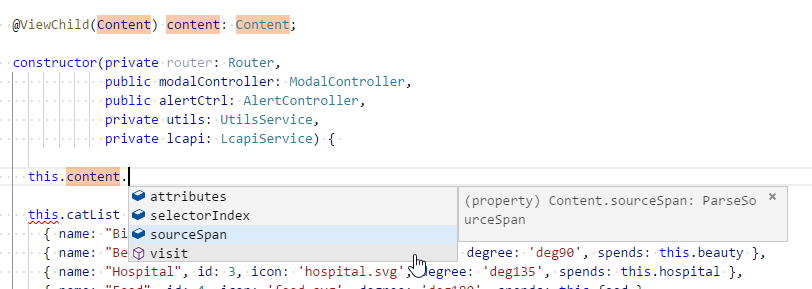
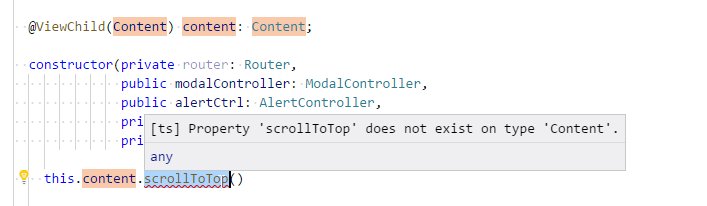
@ptitjes
I think mine is still in beta.2 how do I upgrade it as npm install -g ionic is not moving it to beta.3 :(
ionic (Ionic CLI) : 4.1.0 (C:\Users\Chethan\AppData\Roaming\npmnode_modules\ionic)
Ionic Framework : @ionic/angular 4.0.0-beta.2
@angular-devkit/core : 0.7.3
@angular-devkit/schematics : 0.7.3
@angular/cli : 6.1.3
@ionic/ng-toolkit : 1.0.6
@ionic/schematics-angular : 1.0.5
Chethannp
on 20 Aug 2018
@Chethannp, I did manually update the package.json file.
ptitjes
on 20 Aug 2018
@Chethannp also the viewchild might not be correct
@ViewChild(Content, { read: Content }) private content: Content;
 peterpeterparker
on 20 Aug 2018
peterpeterparker
on 20 Aug 2018
Issue 1:
Hey @peterpeterparker -
Its still the same, I am not getting any options relating to scroll.
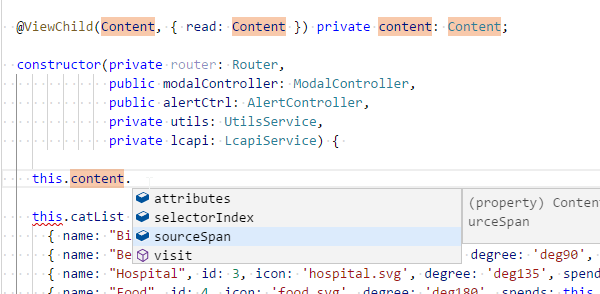
and I am getting the below error for including Content in the imports.
ERROR Error: Uncaught (in promise): Error: Cannot find module 'tslib'
Error: Cannot find module 'tslib'
Issue 2:
Also any idea on how to access ion-scroll via shadow Dom? My App has drag and drop elements. So when the user starts dragging an item I want to disable or hide the overflow on the scroll content, The earlier version (Ionic 3) I was just adding a dynamic class to ion-content and then write a CSS like
ion-content.no-scroll .scroll-content{overflow:hidden;} but with this latest approach scroll-content is not there and ion-scroll inside shadow DOM not sure on how to catch hold of this :(
Fyi:

Chethannp
on 20 Aug 2018
ion-scroll themselves don't exist anymore in beta.3 because they could be replaced with divs
peterpeterparker
on 20 Aug 2018
Oh then? sorry I mean inner-scroll which is inside shadow-root.
Chethannp
on 20 Aug 2018
- for scrollToTop the above solution should work
- for custom code, I guess update your custom code according the dom elements ;)
peterpeterparker
on 20 Aug 2018
@manucorporat, @enzonotario I did dig the code a little. The implementation of the Angular proxy for getScrollElement() does indeed return a promise for an HTMLElement. (See https://github.com/ionic-team/ionic/blob/master/angular/src/directives/proxies.ts#L17-L29)
I did a PR (#15250) to change the signature of the getScrollElement() method in the core web component so that it returns a Promise, as are all Stencil @Method-annotated component methods.
With that PR, you would have to do
let scrollElement = await this.content.getScrollElement();
or depending on you tastes
this.content.getScrollElement().then(scrollElement => {
  // ...
});
I tested it inside the ionic/angular/test/testapp, and it works very well.
ptitjes
on 21 Aug 2018
@ViewChild(Content, { read: Content }) private content: Content;

const scrollElement = await this.content.getScrollElement();
should work.
@ptitjes i don't understand what fixes that PR, can you try the code adobe without your fix? it should just work.
All methods in angular now return a promise.
manucorporat
on 22 Aug 2018
@manucorporat Absolutely, using await works. But as the signature in the interface doesn't return a Promise<HTMLElement> but a HTMLElement, a decent IDE (or ngc) will not accept that you use then() on it. And completion is not good either...
ptitjes
on 22 Aug 2018
@manucorporat To be more precise, the Content interface (from @ionic/angular) extends the StencilComponents.IonContent interface (from @ionic/core) which itself defines the getScrollElement() method as:
'getScrollElement': () => HTMLElement;
Finally, the backing implementation in content.tsx defines the method as:
@Method() getScrollElement(): HTMLElement { }
My pull request makes those definitions to return a Promise<HTMLElement> instead, which is what proxyMethod(...) (generated by Stencil) seems to expect.
ptitjes
on 23 Aug 2018
Until the API return type is fixed, here's what I did to work around the compile error: (this.content.getScrollElement() as any).then(el => this.scrollElement = el);
I'm using a view child for referencing this.content and then in my ngAfterViewInit() I am using this code to get a reference to the scroll element. This way I can use the scrollElement's scrollTop position in my scrollHandlers, I found no other way since the $event passed in the (ionScroll) handler does not have the scrollTop position anymore (its always set to 0 because the ion-content itself does not have a scrollTop, but instead the scroll element which is inside the shadow dom of ion-content is what has the scrollTop.
 daem0ndev
on 28 Aug 2018
daem0ndev
on 28 Aug 2018
@daem0ndev Both the signature of getScrollElement() and the event details' scrollTop/scrollLeft are fixed in beta.5.
ptitjes
on 28 Aug 2018
@ganySA, @manucorporat I think this issue can be closed.
ptitjes
on 28 Aug 2018
Can you confirm that this actually works now in beta11 ?
I can't get my content attribute
@ViewChild(Content, { read: Content }) private content: Content;
const scrollElement = await this.content.getScrollElement(); // this.content is undefined
 olivier-po
on 19 Sep 2018
olivier-po
on 19 Sep 2018
@olivier-po Your problem comes from your ViewChild() expression. It has to be defined in the component that contains the ion-content tag. Please read about ViewChild in the Angular documentation.
ptitjes
on 19 Sep 2018
@olivier-po { read: Content } used to be needed for a ViewChild for one or two early betas but since a couple of releases it shouldn't be use anymore, try
@ViewChild(Content) private content: Content;
@peterpeterparker Out of curiosity, can you please tell me why the { read: Content } was necessary and since what change in Ionic it is now useless ? I am under the impression, that it was working without it for me before...
ptitjes
on 19 Sep 2018
@ptitjes see following https://github.com/ionic-team/ionic/issues/15046
according the comments in that issue read was needed but after an update in Stencil which was then included in Ionic a month ago this isn't needed anymore
peterpeterparker
on 20 Sep 2018
@peterpeterparker Thanks !
ptitjes
on 20 Sep 2018
I'm going to close this as from the comments the original issue seems to be resolved, please let me know if this is incorrect. Thanks!
 brandyscarney
on 8 Nov 2018
brandyscarney
on 8 Nov 2018
Thanks for the issue! This issue is being locked to prevent comments that are not relevant to the original issue. If this is still an issue with the latest version of Ionic, please create a new issue and ensure the template is fully filled out.
![ionitron-bot[bot] picture](https://avatars1.githubusercontent.com/in/8640?v=4&s=40) ionitron-bot[bot]
on 8 Dec 2018
ionitron-bot[bot]
on 8 Dec 2018
Related issues
 RobFerguson
·
3Comments
RobFerguson
·
3Comments
 aslamj
·
3Comments
aslamj
·
3Comments
 alexbainbridge
·
3Comments
alexbainbridge
·
3Comments
 giammaleoni
·
3Comments
giammaleoni
·
3Comments
 daveshirman
·
3Comments
daveshirman
·
3Comments
Most helpful comment
@manucorporat To be more precise, the
Contentinterface (from@ionic/angular) extends theStencilComponents.IonContentinterface (from@ionic/core) which itself defines thegetScrollElement()method as:Finally, the backing implementation in
content.tsxdefines the method as:My pull request makes those definitions to return a
Promise<HTMLElement>instead, which is whatproxyMethod(...)(generated by Stencil) seems to expect.