Ionic-framework: Uncaught SyntaxError in vendor.js when running on Android
Bug Report
Ionic Info
Run ionic info from a terminal/cmd prompt and paste the output below.
Ionic:

   ionic (Ionic CLI)          : 4.0.3 (/usr/local/lib/node_modules/ionic)
   Ionic Framework            : @ionic/angular 4.0.0-beta.1
   @angular-devkit/core       : 0.7.2
   @angular-devkit/schematics : 0.7.2
   @angular/cli               : 6.1.2
   @ionic/ng-toolkit          : 1.0.2
   @ionic/schematics-angular  : 1.0.3

Cordova:

   cordova (Cordova CLI) : 8.0.0
   Cordova Platforms     : android 7.1.1, ios 4.5.5

System:

   Android SDK Tools : 26.1.1
   ios-deploy        : 2.0.0
   NodeJS            : v10.8.0 (/usr/local/Cellar/node/10.8.0/bin/node)
   npm               : 6.2.0
   OS                : macOS High Sierra
   Xcode             : Xcode 9.4.1 Build version 9F2000

Environment:

   ANDROID_HOME : /Users/heb/Library/Android/sdk
Describe the Bug
Even the simplest myApp Ionic4/Angular6 demo does not proceed past the loading index.html when running on Android (device or emulator). Browser and iOS are fine.
Steps to Reproduce
Steps to reproduce the behavior:
- Make sure an Android SDK is installed and in the PATH and env variables
- Create a test app, e.g. via
ionic start myApp tabs --type=angular - Start logcat e.g. from command line via
adb logcat - Add the Android platform via
ionic cordova platform add android - Run
ionic cordova emulate android - App starts but shows a blank white page (which is the index.html)
Related Log
During app start up in the emulator the logcat logs the following error which I think is the root cause for the app not continuing loading.
D/SystemWebChromeClient( 6353): http://localhost:8080/vendor.js: Line 71984 : Uncaught SyntaxError: Use of const in strict mode.
I/chromium( 6353): [INFO:CONSOLE(71984)] "Uncaught SyntaxError: Use of const in strict mode.", source: http://localhost:8080/vendor.js (71984)
D/CordovaWebViewImpl( 6353): onPageFinished(http://localhost:8080/)
Expected Behavior
App should finish starting up.
Additional Context
This error only happens on Android devices and the emulator, but not when starting the app on Android via the Ionic DevApp tool.
 hebra
hebra
All 31 comments
As an additional information: the first line where the const keyword occurs in the vendor.js from the android apk file seems to be some Ionic-specific initialization:
function setupConfig(config) {
    const win = window;
    const Ionic = win.Ionic;
    if (Ionic && Ionic.config && Ionic.config.constructor.name !== 'Object') {
        console.error('ionic config was already initialized');
        return;
    }
    win.Ionic = win.Ionic || {};
    win.Ionic.config = Object.assign({}, win.Ionic.config, config);
    return win.Ionic.config;
}
Updated to the latest Ionic 4 Beta 2 release this morning - problem still persists.
Created a new test project via ionic start i4a6-app tabs --type=angular and run it on the emulator (and a test Android device).
ionic info

Ionic:

   ionic (Ionic CLI)          : 4.0.5 (/usr/local/lib/node_modules/ionic)
   Ionic Framework            : @ionic/angular 4.0.0-beta.2
   @angular-devkit/core       : 0.7.2
   @angular-devkit/schematics : 0.7.2
   @angular/cli               : 6.1.2
   @ionic/ng-toolkit          : 1.0.5
   @ionic/schematics-angular  : 1.0.4

Cordova:

   cordova (Cordova CLI) : 8.0.0
   Cordova Platforms     : android 7.0.0

System:

   Android SDK Tools : 26.1.1
   ios-deploy        : 2.0.0
   NodeJS            : v10.8.0 (/usr/local/Cellar/node/10.8.0/bin/node)
   npm               : 6.3.0
   OS                : macOS High Sierra
   Xcode             : Xcode 9.4.1 Build version 9F2000

Environment:

   ANDROID_HOME : /Users/heb/Library/Android/sdk
One other thing I found is: when I rollback my project to Ionic 3 and Angular 5 the whole thing works w/o any issue even though the vendor.js also has plenty of 'use strict' and 'const' uses.
hebra
on 9 Aug 2018
For reference here are the project configuration files for the test project I created (the Android platform and node_modules folders have been removed to reduce file size).
i4a6-app.zip
hebra
on 9 Aug 2018
Same issue for me. I know this behaviour existed in the past as well with older Android Versions. We used to use Crosswalk in those projects, targeting Android 4.xx.
Right now, Android > 5.1 works for me. But lower doesnt
 timhill1989
on 9 Aug 2018
timhill1989
on 9 Aug 2018
@timhill1989 can you share your project files (config.xml, package.json etc.) of the project which works for you? Also which Android SDK version are you using?
hebra
on 9 Aug 2018
Let me know if you need other information.
Started from empty template, not much functionality added yet.
API 22 Emulator/Device throws error
Api 27 Emulator/Device works
Ionic:

   ionic (Ionic CLI)          : 4.0.3 (C:\Users\t.hill\AppData\Roaming\npm\node_modules\ionic)
   Ionic Framework            : @ionic/angular 4.0.0-beta.2
   @angular-devkit/core       : 0.7.0-rc.3
   @angular-devkit/schematics : 0.7.0-rc.3
   @angular/cli               : 6.0.8
   @ionic/ng-toolkit          : 1.0.2
   @ionic/schematics-angular  : 1.0.1

Cordova:

   cordova (Cordova CLI) : 8.0.0
   Cordova Platforms     : android 7.0.0

System:

   Android SDK Tools : 26.1.1
   NodeJS            : v9.8.0 (C:\Program Files\nodejs\node.exe)
   npm               : 6.2.0
   OS                : Windows 10
config.xml
<?xml version='1.0' encoding='utf-8'?>
<widget id="xxx" version="0.0.1" xmlns="http://www.w3.org/ns/widgets" xmlns:cdv="http://cordova.apache.org/ns/1.0">
    <name>xxx</name>
    <description>xxx</description>
    <author email="xxx" href="xxx">xxx</author>
    <content src="index.html" />
    <access origin="*" />
    <allow-intent href="http://*/*" />
    <allow-intent href="https://*/*" />
    <allow-intent href="tel:*" />
    <allow-intent href="sms:*" />
    <allow-intent href="mailto:*" />
    <allow-intent href="geo:*" />
    <preference name="ScrollEnabled" value="false" />
    <preference name="android-minSdkVersion" value="19" />
    <preference name="BackupWebStorage" value="none" />
    <preference name="SplashMaintainAspectRatio" value="true" />
    <preference name="FadeSplashScreenDuration" value="300" />
    <preference name="SplashShowOnlyFirstTime" value="true" />
    <preference name="SplashScreen" value="screen" />
    <preference name="SplashScreenDelay" value="3000" />
    <platform name="android">
        <allow-intent href="market:*" />
        <icon density="ldpi" src="resources/android/icon/drawable-ldpi-icon.png" />
        <icon density="mdpi" src="resources/android/icon/drawable-mdpi-icon.png" />
        <icon density="hdpi" src="resources/android/icon/drawable-hdpi-icon.png" />
        <icon density="xhdpi" src="resources/android/icon/drawable-xhdpi-icon.png" />
        <icon density="xxhdpi" src="resources/android/icon/drawable-xxhdpi-icon.png" />
        <icon density="xxxhdpi" src="resources/android/icon/drawable-xxxhdpi-icon.png" />
        <splash density="land-ldpi" src="resources/android/splash/drawable-land-ldpi-screen.png" />
        <splash density="land-mdpi" src="resources/android/splash/drawable-land-mdpi-screen.png" />
        <splash density="land-hdpi" src="resources/android/splash/drawable-land-hdpi-screen.png" />
        <splash density="land-xhdpi" src="resources/android/splash/drawable-land-xhdpi-screen.png" />
        <splash density="land-xxhdpi" src="resources/android/splash/drawable-land-xxhdpi-screen.png" />
        <splash density="land-xxxhdpi" src="resources/android/splash/drawable-land-xxxhdpi-screen.png" />
        <splash density="port-ldpi" src="resources/android/splash/drawable-port-ldpi-screen.png" />
        <splash density="port-mdpi" src="resources/android/splash/drawable-port-mdpi-screen.png" />
        <splash density="port-hdpi" src="resources/android/splash/drawable-port-hdpi-screen.png" />
        <splash density="port-xhdpi" src="resources/android/splash/drawable-port-xhdpi-screen.png" />
        <splash density="port-xxhdpi" src="resources/android/splash/drawable-port-xxhdpi-screen.png" />
        <splash density="port-xxxhdpi" src="resources/android/splash/drawable-port-xxxhdpi-screen.png" />
    </platform>
    <plugin name="cordova-plugin-whitelist" spec="1.3.3" />
    <plugin name="cordova-plugin-device" spec="2.0.2" />
    <plugin name="cordova-plugin-splashscreen" spec="5.0.2" />
    <plugin name="cordova-plugin-ionic-webview" spec="^2.0.0" />
    <plugin name="cordova-plugin-ionic-keyboard" spec="^2.0.5" />
    <plugin name="cordova-plugin-file" spec="^6.0.1" />
    <plugin name="cordova-plugin-android-permissions" spec="^1.0.0" />
    <engine name="android" spec="7.0.0" />
    <allow-navigation href="http://172.28.1.243:8100" />
</widget>
package.json
{
  "name": "xxx",
  "version": "0.0.1",
  "author": "T.Hill",
  "homepage": "xxx",
  "scripts": {
    "ng": "ng",
    "start": "ng serve",
    "build": "ng build",
    "test": "ng test",
    "lint": "ng lint",
    "e2e": "ng e2e"
  },
  "private": true,
  "dependencies": {
    "@angular/common": "6.0.9",
    "@angular/core": "6.0.9",
    "@angular/forms": "6.0.9",
    "@angular/http": "6.0.9",
    "@angular/platform-browser": "6.0.9",
    "@angular/platform-browser-dynamic": "6.0.9",
    "@angular/router": "6.0.9",
    "@ionic-native/android-permissions": "^5.0.0-beta.14",
    "@ionic-native/core": "5.0.0-beta.14",
    "@ionic-native/file": "5.0.0-beta.14",
    "@ionic-native/splash-screen": "5.0.0-beta.14",
    "@ionic-native/status-bar": "5.0.0-beta.14",
    "@ionic/angular": "4.0.0-beta.2",
    "@ionic/ng-toolkit": "1.0.2",
    "@ionic/schematics-angular": "1.0.1",
    "cordova-android": "7.0.0",
    "cordova-plugin-android-permissions": "^1.0.0",
    "cordova-plugin-device": "^2.0.2",
    "cordova-plugin-file": "^6.0.1",
    "cordova-plugin-ionic-keyboard": "^2.1.2",
    "cordova-plugin-ionic-webview": "^2.0.2",
    "cordova-plugin-splashscreen": "^5.0.2",
    "cordova-plugin-whitelist": "^1.3.3",
    "core-js": "^2.5.3",
    "rxjs": "6.2.2",
    "zone.js": "^0.8.26"
  },
  "devDependencies": {
    "@angular/cli": "6.0.8",
    "@angular/compiler": "6.0.9",
    "@angular/compiler-cli": "6.0.9",
    "@angular/language-service": "6.0.9",
    "@angular-devkit/architect": "0.7.0-rc.3",
    "@angular-devkit/build-angular": "0.7.0-rc.3",
    "@angular-devkit/core": "0.7.0-rc.3",
    "@angular-devkit/schematics": "0.7.0-rc.3",
    "@types/jasmine": "~2.8.6",
    "@types/jasminewd2": "~2.0.3",
    "@types/node": "~10.5.2",
    "codelyzer": "~4.4.2",
    "jasmine-core": "~2.99.1",
    "jasmine-spec-reporter": "~4.2.1",
    "karma": "~2.0.2",
    "karma-chrome-launcher": "~2.2.0",
    "karma-coverage-istanbul-reporter": "~2.0.0",
    "karma-jasmine": "~1.1.1",
    "karma-jasmine-html-reporter": "^0.2.2",
    "protractor": "~5.4.0",
    "ts-node": "~7.0.0",
    "tslint": "~5.11.0",
    "typescript": "~2.7.2"
  },
  "description": "xxx",
  "cordova": {
    "plugins": {
      "cordova-plugin-file": {},
      "cordova-plugin-whitelist": {},
      "cordova-plugin-device": {},
      "cordova-plugin-splashscreen": {},
      "cordova-plugin-ionic-webview": {},
      "cordova-plugin-ionic-keyboard": {},
      "cordova-plugin-android-permissions": {}
    },
    "platforms": [
      "android"
    ]
  }
}
Thanks @timhill1989 - I can confirm that it is actually working with Android 8.x but not any older version. Considering the current market share for Oreo of just 10% I see this as a blocker for Ionic 4 right now. At least 6 (23%) & 7 (34%) have to be supported as well, better include 5 (15%) as well.
hebra
on 9 Aug 2018
After some testing with different SDK versions and emulators I can confirm that the minimum version as of now has to be SDK 25 (Android 7.1.1 Nougat). Anything older, even Android 7.0 (SDK 24) will not work with the current Ionic 4 beta release.
hebra
on 10 Aug 2018
Just contributing. My tests with API 23, 24, 25, 26 and 27 using AVD (Android Studio) and Genymotion:
Nexus_5X_API_23_-_Marshmallow_6.0:
Doesn't work on AVD (Android Studio) and Genymotion. White screen!
Nexus_5X_API_24_-_Nougat_7.0:
Doesn't work on AVD (Android Studio) and Genymotion. White screen!
Nexus_5X_API_25_Nougat_7.1.1: Works in parts!
_On Genymotion:_ Doesn't work. White screen!
_On AVD (Android Studio):_
The new tag <ion-img> does not show the image, I had to go back to the old tag:
<!--<ion-img [src]="item.imagem" [routerLink]="'/detail/' + item.id"></ion-img>-->
<img [src]="item.imagem" [routerLink]="'/detail/' + item.id">
Nexus_5X_API_26_-_Oreo_8.0: It works!
Works on AVD (Android Studio) and Genymotion
Nexus_5X_API_27_-_8.1_-_Oreo:
_On Genymotion:_ Doesn't exist.
_On AVD (Android Studio):_ It works!
It's a huge range of devices out of target.
The difficulty is of the devices? Or Ionic engineering?
Can we expect improvements in version 4 to achieve at least API 23?
 CesarDevesa
on 14 Aug 2018
CesarDevesa
on 14 Aug 2018
About my system:

CesarDevesa
on 14 Aug 2018
I found the reason: the compiled code of @ionic/angular is not the es5 code.
It use the new async/await keyword in ES2017.
 snowyu
on 28 Aug 2018
snowyu
on 28 Aug 2018
The target is set to es2017 not es5. Why?
snowyu
on 28 Aug 2018
The switch to es2017 happened in this commit:
06ad60e
CesarDevesa
on 28 Aug 2018
Perfect @snowyu
In Genymotion I tested with API 23 (Marshmallow 6.0), I enabled the PlayStore and then I installed the Webview Android System, it works !!!
We should try to guide the user to install or update the Webview Android System. Add a function in index.html, if the application doesn't load?

CesarDevesa
on 29 Aug 2018
@CesarDevesa I download and install it from https://www.apkmirror.com/apk/google-inc/android-system-webview/ directly on Android 6. But it seems no useful(still use the old webview), maybe MUST HAVE GOOGLE PLAY.
The right way should transpile code to es5. I change the @ionic/core and @ionic/angular source target to es5 and add the es5 to lib in the tsconfig. Now the es5 code is in the dist folder of the core and angular package. But It is still output async in the project. Maybe is it a bug in angular-cli? I am not good at angular or typescript. Could @manucorporat check it?
snowyu
on 30 Aug 2018
I has used the babeljs to transpile the @ionic output code successfully. All errors have disappeared from the inspect console too. Only a hint left: The key "viewport-fit" is not recognized and ignored.. But it is still not work(a white blank window).
I have checked the elements of the html body. All are rendered. But no shadow DOM(maybe need polyfill CSS? next day to try postcss):
<body>
  <app-root ng-version="6.1.6"><ion-app class="ion-page"><ion-router-outlet><app-tabs _nghost-c0="" class="ion-page ion-page-invisible"><ion-tabs _ngcontent-c0=""><ion-tab _ngcontent-c0="" href="/tabs/(home:home)" icon="home" label="Home" ng-reflect-label="Home" ng-reflect-href="/tabs/(home:home)" ng-reflect-icon="home"><ion-router-outlet _ngcontent-c0="" name="home"><app-home _nghost-c1="" class="ion-page ion-page-invisible"><ion-header _ngcontent-c1=""><ion-toolbar _ngcontent-c1=""><ion-title _ngcontent-c1="">Home</ion-title></ion-toolbar></ion-header><ion-content _ngcontent-c1="" padding=""> The world is your oyster. <p _ngcontent-c1="">If you get lost, the <a _ngcontent-c1="" href="https://ionicframework.com/docs" rel="noopener" target="_blank">docs</a> will be your guide.</p></ion-content></app-home></ion-router-outlet></ion-tab><ion-tab _ngcontent-c0="" href="/tabs/(about:about)" icon="information-circle" label="About" ng-reflect-label="About" ng-reflect-href="/tabs/(about:about)" ng-reflect-icon="information-circle"><ion-router-outlet _ngcontent-c0="" name="about"></ion-router-outlet></ion-tab><ion-tab _ngcontent-c0="" href="/tabs/(contact:contact)" icon="contacts" label="Contact" ng-reflect-label="Contact" ng-reflect-href="/tabs/(contact:contact)" ng-reflect-icon="contacts"><ion-router-outlet _ngcontent-c0="" name="contact"></ion-router-outlet></ion-tab></ion-tabs></app-tabs></ion-router-outlet></ion-app></app-root>
</body>
The following is my way to transpile the code. Good luck!
The angular-cli does not expose the weback config. But I've found this tool angular-cli-webpack. It can modify @angular/cli project's webpack configuration without "ejecting". here are my ngw.config.ts:
import { inspect } from 'util';
import * as webpack from 'webpack';
import * as path from 'path';
import { Path } from '@angular-devkit/core';

import { NormalizedBrowserBuilderSchema } from '@angular-devkit/build-angular';

export type WebpackOptions<T = NormalizedBrowserBuilderSchema> = {
    root: Path,
    projectRoot: Path,
    options: T;
};

const command = process.argv[2].toLowerCase();

const babelLoader = {loader: 'babel-loader', options: {
  babelrc: false, // Default true. When false, no options from .babelrc files will be used
  presets: [
    ['@babel/preset-env', {
    "targets": { "chrome": "44" },
    "modules": false
    }]
  ],
  plugins: [
    [require("@babel/plugin-syntax-dynamic-import")],
    // [require('@babel/plugin-transform-runtime'), {
    //   "corejs": false,
    //   "helpers": true,
    //   "regenerator": true,
    //   "useESModules": false
    // }]
  ]
}};

function addLibPath(aDir, aParentDir = 'node_modules') {
  return path.join(__dirname, aParentDir, aDir);
}

function injectBabelJs(aRules) {
  aRules.push({
    include: [
      addLibPath('@ionic'),
    ],
    test: /\.js$/, loader: babelLoader
  });
}
export default function (config: webpack.Configuration, options: WebpackOptions) {
    if (command === 'test') {
      console.log('Test configuration is running');
    }
    injectBabelJs(config.module.rules);
    return config;
}
I can confirm the web component spec which stencil used can not be rendered on Android 8.0 below.
I've tried using this Web Component Polyfill.
Now the UI like this(the standard tabs starter), and can not switch tab:

snowyu
on 4 Sep 2018
the same SyntaxError due to use of const in strict mode occurs if deploying to IOS 9 (standard "tabs" starter project without any modification)
 hermitdemschoenenleben
on 16 Sep 2018
hermitdemschoenenleben
on 16 Sep 2018
Same error here. I tested the official myTab apps on android 5.0 and android 6.0 with default browser and it could not load the page.
 raymond-yan
on 19 Sep 2018
raymond-yan
on 19 Sep 2018
Even the tab app is not working on android 7.0 webview.
raymond-yan
on 20 Sep 2018
I have a same problem
 lemosen
on 25 Sep 2018
lemosen
on 25 Sep 2018
Same issue White Screen
Uncaught SyntaxError: Use of const in strict mode. vendor.js:97238
```$ ionic info
√ Gathering environment info - done!
Ionic:
ionic (Ionic CLI) : 4.1.2 (C:\Users\micha\AppData\Roaming\npm\node_m odules\ionic)
Ionic Framework : @ionic/angular 4.0.0-beta.7
@angular-devkit/core : 0.7.5
@angular-devkit/schematics : 0.7.5
@angular/cli : 6.1.5
@ionic/ng-toolkit : 1.0.8
@ionic/schematics-angular : 1.0.6
Cordova:
cordova (Cordova CLI) : 8.0.0
Cordova Platforms : android 7.0.0
Cordova Plugins : cordova-plugin-ionic-keyboard 2.1.3, cordova-plugin-i onic-webview 2.1.4, (and 5 other plugins)
System:
Android SDK Tools : 26.1.1 (E:\Android\sdk)
NodeJS : v8.11.3 (E:\Program Files\nodejs\node.exe)
npm : 5.6.0
OS : Windows 10
```
 mictay
on 29 Sep 2018
mictay
on 29 Sep 2018
tracking issue here, causing of transplie module PROPER PACKAGE FOR ANGULAR #15191
 hiepxanh
on 6 Nov 2018
hiepxanh
on 6 Nov 2018
Bump.. huge blocker for me. I would like to support Android 5.0 and UP.. This is just 'too' important to ignore... We are currently developing on Ionic 4 Beta 15 and wanted to release when Ionic 4 is officially out, Will it support Android 5?
 raphjutras
on 13 Nov 2018
raphjutras
on 13 Nov 2018
@raphjutras the only way I see right now for 5.0 is to use Ionic 3 and to not upgrade to 4.
hebra
on 14 Nov 2018
@hebra You think that when they will release "official" version of Ionic 4, they will not support Android 5!?
Or you mean 'right now' ..?
raphjutras
on 14 Nov 2018
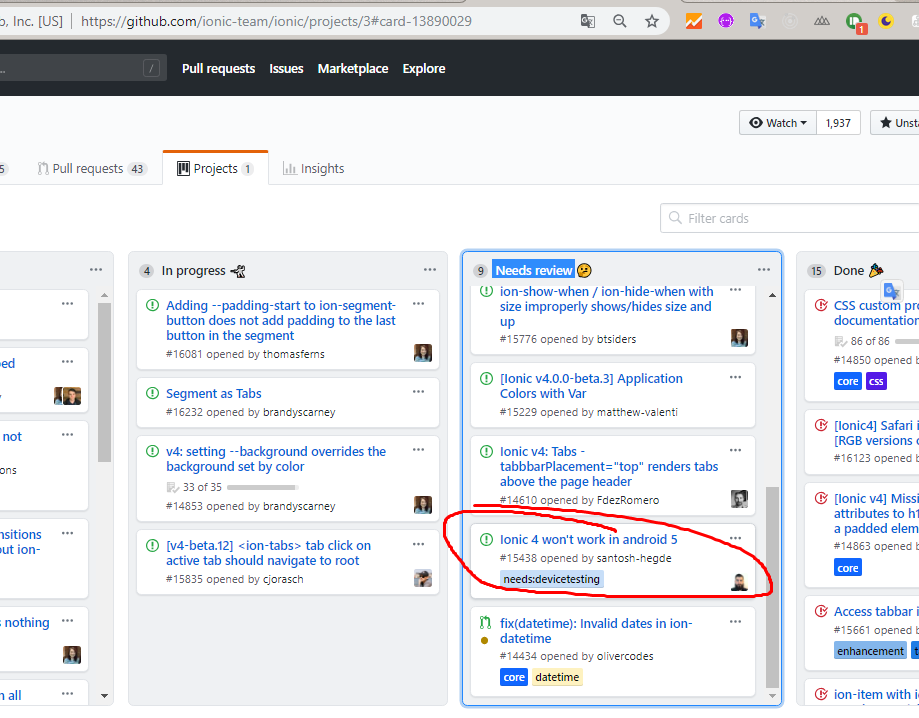
@raphjutras they will support but not now, they are working on it and will release with ionic 4 final. tracking at here IONIC 4 WON'T WORK IN ANDROID 5. It been move from in process to on desk
hiepxanh
on 14 Nov 2018
Ohhh, thank you :)
raphjutras
on 14 Nov 2018
Same issue with
`Ionic:
ionic (Ionic CLI) : 4.0.0 (C:\Users\exe\AppData\Roaming\nvm\v8.11.2\node_modules\ionic)
Ionic Framework : ionic-angular 3.9.2
@ionic/app-scripts : 3.2.0
Cordova:
cordova (Cordova CLI) : 8.1.2 ([email protected])
Cordova Platforms : android 7.1.2
System:
NodeJS : v8.11.3 (C:\Program Files\nodejs\node.exe)
npm : 5.6.0
OS : Windows 10`
Result:
White screen!
with ionic 3.9.2 when do 'ionic cordova run android' get white screen error and on console show Uncaught SyntaxError: Unexpected token function
any help is appreciate
the error in fact is this async await word!
async customfunction() {
<---code---->
}
 nextbyn
on 23 Nov 2018
nextbyn
on 23 Nov 2018
This issue has been automatically identified as an Ionic 3 issue. We recently moved Ionic 3 to its own repository. I am moving this issue to the repository for Ionic 3. Please track this issue over there.
If I've made a mistake, and if this issue is still relevant to Ionic 4, please let the Ionic Framework team know!
Thank you for using Ionic!
![ionitron-bot[bot] picture](https://avatars1.githubusercontent.com/in/8640?v=4&s=40) ionitron-bot[bot]
on 29 Nov 2018
ionitron-bot[bot]
on 29 Nov 2018
Issue moved to: https://github.com/ionic-team/ionic-v3/issues/658
ionitron-bot[bot]
on 29 Nov 2018
Related issues
 brandyscarney
·
3Comments
brandyscarney
·
3Comments
brandyscarney
·
3Comments
brandyscarney
·
3Comments
 Nick-The-Uncharted
·
3Comments
Nick-The-Uncharted
·
3Comments
 fdnhkj
·
3Comments
fdnhkj
·
3Comments
 MrBokeh
·
3Comments
MrBokeh
·
3Comments
Most helpful comment
I found the reason: the compiled code of
@ionic/angularis not thees5code.It use the new
async/awaitkeyword inES2017.