Ionic-framework: [Ionic 4 - beta1] ion-label and ion-input are presented in a strange way after upgrading from version 4.0.0-beta.0 to 4.0.0-beta.
Bug Report
Ionic Info
Run ionic info from a terminal/cmd prompt and paste the output below.
Ionic:
   ionic (Ionic CLI)          : 4.0.3 (C:\Users\...\AppData\Roaming\npm\node_modules\ionic)
   Ionic Framework            : @ionic/angular 4.0.0-beta.1
   @angular-devkit/core       : 0.7.0-rc.1
   @angular-devkit/schematics : 0.7.0-rc.1
   @angular/cli               : 6.0.8
   @ionic/ng-toolkit          : 1.0.0-rc.11
   @ionic/schematics-angular  : 1.0.0-rc.11

Capacitor:

   capacitor (Capacitor CLI) : 1.0.0-beta.3
   @capacitor/core           : 1.0.0-beta.3

System:

   NodeJS : v8.9.4 (C:\Program Files\nodejs\node.exe)
   npm    : 5.6.0
   OS     : Windows 10
Describe the Bug
After upgrading from version 4.0.0-beta.0 to 4.0.0-beta.1, ion-item components that have ion-label with ion-input are in the wrong view. Something in beta1 broke.
Steps to Reproduce
Steps to reproduce the behavior:
- create a new project with ionic-cli and upgrade ionic-angular 4.0.0-beta.1
- add on some page:
...
<ion-item style="border:1px solid gray">
    <ion-label position="floating">test</ion-label>
    <ion-input
            type="text"
            style="border:1px solid  lightskyblue"
    >
    </ion-input>
</ion-item>
...
obs: I added borders only for debugging
- see the error in the placement of the ion-label (placeholder) and the ion-input

Expected Behavior
that works just like the previous versions

Additional Context
these are my dependencies on package.json
...
"dependencies": {
"@angular/animations": "6.0.9",
"@angular/common": "6.0.9",
"@angular/core": "6.0.9",
"@angular/forms": "6.0.9",
"@angular/http": "6.0.9",
"@angular/platform-browser": "6.0.9",
"@angular/platform-browser-dynamic": "6.0.9",
"@angular/router": "6.0.9",
"@angular/service-worker": "6.0.9",
"@capacitor/core": "1.0.0-beta.3",
"@ionic-native/core": "5.0.0-beta.14",
"@ionic-native/screen-orientation": "5.0.0-beta.14",
"@ionic-native/splash-screen": "5.0.0-beta.14",
"@ionic-native/status-bar": "5.0.0-beta.14",
"@ionic/angular": "4.0.0-beta.1",
"@ionic/ng-toolkit": "1.0.0-rc.11",
"@ionic/schematics-angular": "1.0.0-rc.11",
"classlist.js": "^1.1.20150312",
"core-js": "^2.5.3",
"moment": "^2.22.1",
"rxjs": "6.2.1",
"zone.js": "^0.8.26"
},
"devDependencies": {
"@angular-devkit/architect": "0.7.0-rc.1",
"@angular-devkit/build-angular": "0.7.0-rc.1",
"@angular-devkit/core": "0.7.0-rc.1",
"@angular-devkit/schematics": "0.7.0-rc.1",
"@angular/cli": "6.0.8",
"@angular/compiler": "6.0.9",
"@angular/compiler-cli": "6.0.9",
"@angular/language-service": "6.0.9",
"@angular/pwa": "^0.6.8",
"@capacitor/android": "1.0.0-beta.3",
"@capacitor/cli": "1.0.0-beta.3",
"@ionic/lab": "1.0.0-rc.6",
"@types/jasmine": "~2.8.6",
"@types/jasminewd2": "~2.0.3",
"@types/moment": "^2.13.0",
"@types/moment-timezone": "^0.5.5",
"@types/node": "~10.5.2",
"codelyzer": "~4.4.2",
"jasmine-core": "~2.99.1",
"jasmine-spec-reporter": "~4.2.1",
"karma": "~2.0.2",
"karma-chrome-launcher": "~2.2.0",
"karma-coverage-istanbul-reporter": "~2.0.0",
"karma-jasmine": "~1.1.1",
"karma-jasmine-html-reporter": "^0.2.2",
"protractor": "~5.4.0",
"ts-node": "~7.0.0",
"tslint": "~5.11.0",
"typescript": "~2.7.2"
}
...
 rubaomin
All 9 comments
Same here. Seems to be related to position="floating"
ionic info
Ionic:

   ionic (Ionic CLI)          : 4.0.1 (/home/nightbringer/.nvm/versions/node/v8.11.3/lib/node_modules/ionic)
   Ionic Framework            : @ionic/angular 4.0.0-beta.1
   @angular-devkit/core       : 0.7.0-rc.3
   @angular-devkit/schematics : 0.7.0-rc.3
   @angular/cli               : 6.0.8
   @ionic/ng-toolkit          : 1.0.0
   @ionic/schematics-angular  : 1.0.0

Cordova:

   cordova (Cordova CLI) : 8.0.0
   Cordova Platforms     : none

System:

   Android SDK Tools : 26.1.1
   NodeJS            : v8.11.3 (/home/nightbringer/.nvm/versions/node/v8.11.3/bin/node)
   npm               : 5.6.0
   OS                : Linux 4.15

Environment:

   ANDROID_HOME : /home/nightbringer/Android/Sdk
 Nightbr
on 3 Aug 2018
Nightbr
on 3 Aug 2018
Same for me.
 nerdic-coder
on 3 Aug 2018
nerdic-coder
on 3 Aug 2018
it's not just floating. see:
beta0 (correct)
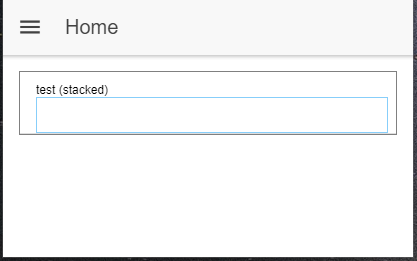
beta1 (Error - position="stacked")

... <ion-item style="border:1px solid gray">
        <ion-label position="stacked">test (stacked)</ion-label>
        <ion-input
                type="text"
                style="border:1px solid  lightskyblue"
        >
        </ion-input>
    </ion-item> ...
rubaomin
on 3 Aug 2018
Experiencing similar issue
 M00dl3
on 3 Aug 2018
M00dl3
on 3 Aug 2018
Same. It seems like it effects at least stacked and floating. Possibly others.
 SteveKennedy
on 4 Aug 2018
SteveKennedy
on 4 Aug 2018
Same.
 declanelcocks
on 6 Aug 2018
declanelcocks
on 6 Aug 2018
Thank you for the issue! We will look into this.
Note to team: I am able to reproduce this in the conference app using the core-update branch, but not in master of ionic/core. It seems the item is not getting the following classes:
item-label item-label-floating item-interactive item-input
and item-has-focus on input focus isn't being added.
 brandyscarney
on 6 Aug 2018
brandyscarney
on 6 Aug 2018
should be fixed in next beta, thanks to: https://github.com/ionic-team/stencil/pull/1000
 manucorporat
on 7 Aug 2018
manucorporat
on 7 Aug 2018
Thanks for the issue! This issue is being locked to prevent comments that are not relevant to the original issue. If this is still an issue with the latest version of Ionic, please create a new issue and ensure the template is fully filled out.
![ionitron-bot[bot] picture](https://avatars1.githubusercontent.com/in/8640?v=4&s=40) ionitron-bot[bot]
on 9 Sep 2018
ionitron-bot[bot]
on 9 Sep 2018
Related issues
 Macstyg
·
3Comments
Macstyg
·
3Comments
 vswarte
·
3Comments
vswarte
·
3Comments
 gio82
·
3Comments
brandyscarney
·
3Comments
gio82
·
3Comments
brandyscarney
·
3Comments
 alexbainbridge
·
3Comments
alexbainbridge
·
3Comments
Most helpful comment
Same here. Seems to be related to
position="floating"ionic info