Ionic-framework: [Ionic v4-beta.1] input stacked broken
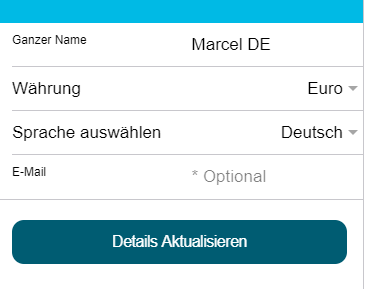
The element is not displayed correctly after upgrading from beta0 to beta1.
Bug Report
Ionic Info
Run ionic info from a terminal/cmd prompt and paste the output below.
Ionic:

   ionic (Ionic CLI)          : 4.0.2 (/usr/lib/node_modules/ionic)
   Ionic Framework            : @ionic/angular 4.0.0-beta.1
   @angular-devkit/core       : 0.7.0-rc.3
   @angular-devkit/schematics : 0.7.0-rc.3
   @angular/cli               : 6.0.8
   @ionic/ng-toolkit          : 1.0.0
   @ionic/schematics-angular  : 1.0.1

Cordova:

   cordova (Cordova CLI) : 8.0.0
   Cordova Platforms     : android 7.0.0, ios 4.5.4

System:

   NodeJS : v9.11.2 (/usr/bin/node)
   npm    : 6.2.0
   OS     : Linux 4.4

Environment:

   ANDROID_HOME : not set
Describe the Bug
Steps to Reproduce
Related Code
<ion-item style="border-top: none; ">
            <ion-label *ngIf="plt.is('android')" style="color: #999 !important;" position="stacked">{{'label_full_name' | translate}}</ion-label>
            <ion-label *ngIf="!plt.is('android')" position="stacked">{{'label_full_name' | translate}}</ion-label>
            <ion-input [(ngModel)]="accountDetails.full_name" type="text" clearInput></ion-input>
        </ion-item>
Expected Behavior
Additional Context
List any other information that is relevant to your issue. Stack traces, related issues, suggestions on how to fix, Stack Overflow links, forum links, screenshots, OS if applicable, etc.
 marcelgoya
All 3 comments
Can confirm (in beta.0 it worked fine)
 paulstelzer
on 2 Aug 2018
paulstelzer
on 2 Aug 2018
Thank you for the issue. I know this issue is older but I'm going to close it as a duplicate of #15005 since we have that one in the project board. 🙂
 brandyscarney
on 6 Aug 2018
brandyscarney
on 6 Aug 2018
Thanks for the issue! This issue is being locked to prevent comments that are not relevant to the original issue. If this is still an issue with the latest version of Ionic, please create a new issue and ensure the template is fully filled out.
![ionitron-bot[bot] picture](https://avatars1.githubusercontent.com/in/8640?v=4&s=40) ionitron-bot[bot]
on 5 Sep 2018
ionitron-bot[bot]
on 5 Sep 2018
Related issues
 GeorgeAnanthSoosai
·
3Comments
GeorgeAnanthSoosai
·
3Comments
 fdnhkj
·
3Comments
fdnhkj
·
3Comments
 Nick-The-Uncharted
·
3Comments
Nick-The-Uncharted
·
3Comments
 Macstyg
·
3Comments
Macstyg
·
3Comments
 MrBokeh
·
3Comments
MrBokeh
·
3Comments
Most helpful comment
Can confirm (in beta.0 it worked fine)