Ionic-framework: Navbar overlays statusbar
Ionic version: (check one with "x")
[ ] 2.x
[x] 3.x
[ ] 4.x
I'm submitting a ... (check one with "x")
[x] bug report
[ ] feature request
Current behavior:
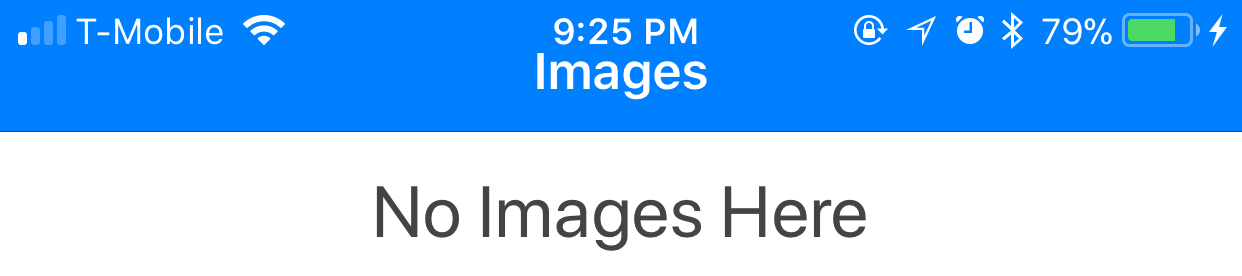
I upgraded to 3.7.1 from 3.6.0 and noticed that the toolbar on iOS now overlaps the statusbar. Image below:
Expected behavior:
The toolbar should not overlap the statusbar. Image below shows how it should be. (from before upgrading)

Steps to reproduce:
I upgraded from 3.6.0 to 3.7.1.
Ionic info:
cli packages: (/path/to/app/node_modules)

    @ionic/cli-utils  : 1.13.0
    ionic (Ionic CLI) : 3.13.0

global packages:

    cordova (Cordova CLI) : 7.0.1

local packages:

    @ionic/app-scripts : 3.0.0
    Cordova Platforms  : ios 4.4.0
    Ionic Framework    : ionic-angular 3.7.1

System:

    ios-deploy : 1.9.2
    Node       : v7.10.1
    npm        : 5.4.2
    OS         : macOS Sierra
    Xcode      : Xcode 9.0 Build version 9A235

Misc:

    backend : pro
 johnbwoodruff
All 18 comments
Hello! Thank you for opening an issue with us! Would you be able to provide a sample application via GitHub that demonstrates the issue you are having? Thanks for using Ionic!
 kensodemann
on 16 Oct 2017
kensodemann
on 16 Oct 2017
Hello! I have the same issue with the "tabs" starter project. To reproduce:
$ ionic start my-tabs tabs
$ cd ./my-tabs
$ ionic lab
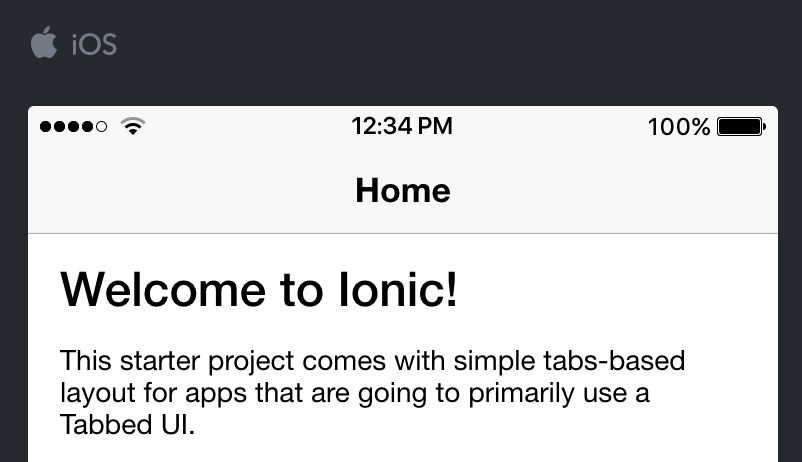
If I open the lab url with Safari (v11.0), I have the issue:

However, if I open the lab url with Chrome (v61.0.3163.100), no issues:
I tested with Ionic view and I have the issue on iPhone 7 IOS v11.0.3.
 levesquejf
on 17 Oct 2017
levesquejf
on 17 Oct 2017
@kensodemann I can confirm that this happens with a newly started project as demonstrated by @levesquejf. It does not happen on Chrome, only Safari.
johnbwoodruff
on 17 Oct 2017
Just wanted to chime in and confirm that we've noticed the same issues on 3.7.1 but only after updating to iOS 11. I assume that's relevant.
I have a hunch these are also related: #13152 #13160
 JamieWritesCode
on 17 Oct 2017
JamieWritesCode
on 17 Oct 2017
I experienced the exact same issue.
 ThomasKientz
on 17 Oct 2017
ThomasKientz
on 17 Oct 2017
I opened issue 24 and it looks like it is happening on ALL projects (existing and new) after upgrading to WKWEBVIEW and iOS 11. Screenshots below are from an iPhone 7 plus
Conference app
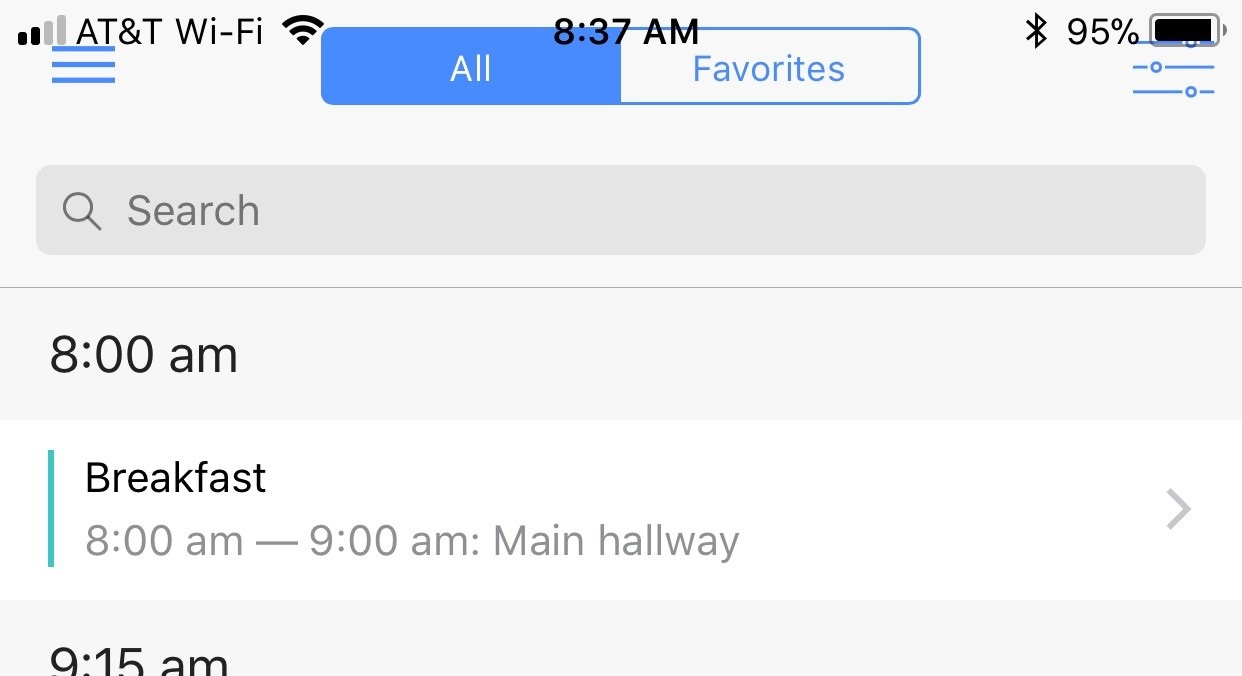
Tabs starter app

 gigocabrera
on 17 Oct 2017
gigocabrera
on 17 Oct 2017
Thank you for the issue report. So there are a few things happening here...
1) The statusbar padding being off in safari/ionic-lab but not in chrome.
The new releases of Ionic (3.7 and up) use the css constant/env features in iOS/Safari. This is how we can properly size the header on iOS 11 and iPhone X without any issues. Since this is supported in Safari, it just happens to work in lab, but is set to 0. Will have to fix this on the Lab side of things.
2) App deployed to Device/sim not sized correctly.
This Im not able to recreate myself actually. I have started a blank tabs app, upgraded to the latest nightly build of ionic-angular (which includes more ios11 list fixes) and deployed to iPhone-7-Plus and it works as expected. This includes the latest WKWebview as well.

If someone can provide a clear list of steps or starter project that can recreate this issue, that would be great.
 mhartington
on 17 Oct 2017
mhartington
on 17 Oct 2017
@mhartington you mentioned you upgraded to the latest nightly build. What do I need to do to upgrade to the latest nightly build? If that doesn't fix the issue I can give you access to my private repo where you should be able to recreate it
upgraded to the latest nightly build of ionic-angular (which includes more ios11 list fixes)
gigocabrera
on 17 Oct 2017
npm i ionic-angular@nightly @ionic/app-scripts@nightly
mhartington
on 17 Oct 2017
@mhartington I'm getting all kinds of errors after I upgraded to latest nightly. Let me give you access to my repo.
https://github.com/gigocabrera/LiveVault
gigocabrera
on 17 Oct 2017
Those are mostly lint errors.
I was able to run your app without any issues.
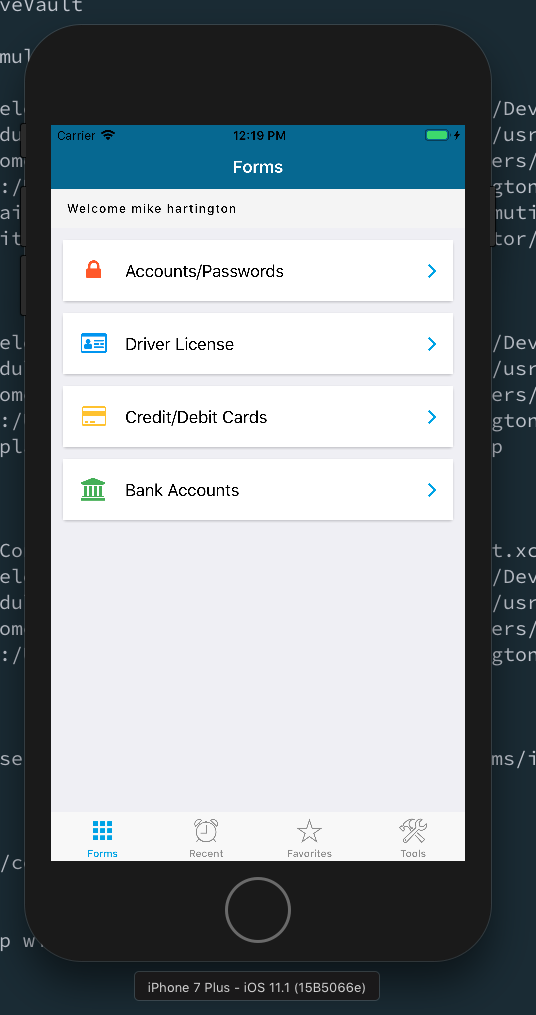
And everything worked as expected.
mhartington
on 17 Oct 2017
I have a public repo that has this issue: https://github.com/jbw91/toolbar-issue
Here's my environment info from running ionic info:
cli packages: (/Users/john/dev/ionic/toolbar-issue/node_modules)

    @ionic/cli-utils  : 1.13.0
    ionic (Ionic CLI) : 3.13.0

global packages:

    cordova (Cordova CLI) : 7.0.1

local packages:

    @ionic/app-scripts : 3.0.0
    Cordova Platforms  : ios 4.4.0
    Ionic Framework    : ionic-angular 3.7.1

System:

    ios-deploy : 1.9.2
    Node       : v7.10.1
    npm        : 5.4.2
    OS         : macOS Sierra
    Xcode      : Xcode 9.0.1 Build version 9A1004

Misc:

    backend : pro
Here is a screenshot from my iPhone 7 Plus device I ran it on using ionic cordova run ios --livereload

And here is a screenshot of me running it in an emulator after building the project with ionic cordova build ios

johnbwoodruff
on 17 Oct 2017
@jbw91 Your app was missing several important things.
1) Viewport fit: you're viewport meta tag is missing viewport-fit=cover
2) Statusbar plugin: You're using the older plugin which does not contain fix required
This is cover in the iOS 11 Checklist blog post
Updating those 2 things produces this.

mhartington
on 17 Oct 2017
Yep that was it. I was just following the Ionic CHANGELOG, didn't see the blog post. Good to know. Thanks.
johnbwoodruff
on 17 Oct 2017
@mhartington
- I was able to build my app with the latest
npm i ionic-angular@nightly @ionic/app-scripts@nightly - Reinstalled the Statusbar plugin to make sure I was not using the old one
- Deployed to device and still get the same issue
I know it worked for you but could it be something in my environment?
cli packages: (/usr/local/lib/node_modules)

    @ionic/cli-utils  : 1.13.1
    ionic (Ionic CLI) : 3.13.1

global packages:

    cordova (Cordova CLI) : 7.1.0

local packages:

    @ionic/app-scripts : 3.0.0-201710161925
    Cordova Platforms  : ios 4.5.2
    Ionic Framework    : ionic-angular 3.7.1-201710101557

System:

    ios-sim : 4.1.1
    Node    : v8.5.0
    npm     : 2.15.12
    OS      : OS X El Capitan
    Xcode   : Xcode 8.2.1 Build version 8C1002

Misc:

    backend : legacy
Awesome, closing then as this was the original issue/poster.
If anyone is have other issues, please open a new issue.
mhartington
on 17 Oct 2017
@gigocabrera Please use the statusbar from github/master.
Make sure you have everything in the ios 11 checklist blog post covered.
I'm not able to replicate it at all on my end.
mhartington
on 17 Oct 2017
Thanks for the issue! This issue is being locked to prevent comments that are not relevant to the original issue. If this is still an issue with the latest version of Ionic, please create a new issue and ensure the template is fully filled out.
![ionitron-bot[bot] picture](https://avatars1.githubusercontent.com/in/8640?v=4&s=40) ionitron-bot[bot]
on 1 Sep 2018
ionitron-bot[bot]
on 1 Sep 2018
Related issues
 GeorgeAnanthSoosai
·
3Comments
GeorgeAnanthSoosai
·
3Comments
 giammaleoni
·
3Comments
giammaleoni
·
3Comments
 alan-agius4
·
3Comments
alan-agius4
·
3Comments
 danbucholtz
·
3Comments
danbucholtz
·
3Comments
 Nick-The-Uncharted
·
3Comments
Nick-The-Uncharted
·
3Comments
Most helpful comment
Hello! I have the same issue with the "tabs" starter project. To reproduce:
$ ionic start my-tabs tabs$ cd ./my-tabs$ ionic labIf I open the lab url with Safari (v11.0), I have the issue:
However, if I open the lab url with Chrome (v61.0.3163.100), no issues:
I tested with Ionic view and I have the issue on iPhone 7 IOS v11.0.3.