Ionic-framework: ion-label floating cursor in very odd position
Ionic version: (check one with "x")
(For Ionic 1.x issues, please use https://github.com/ionic-team/ionic-v1)
[ ] 2.x
[x ] 3.x
[ ] 4.x
I'm submitting a ... (check one with "x")
[ x] bug report
[ ] feature request
Current behavior:
When using

Expected behavior:
Expect see cursor inline with inserted text.
Related code:
<ion-item>
  <ion-label floating>Username</ion-label>
  <ion-input type="text"></ion-input>
</ion-item>

<ion-item>
  <ion-label floating>Password</ion-label>
  <ion-input type="password"></ion-input>
</ion-item>
Ionic info:
cli packages: (/Users/pbrack/.nvm/versions/node/v8.5.0/lib/node_modules)

    @ionic/cli-utils  : 1.12.0
    ionic (Ionic CLI) : 3.12.0

global packages:

    cordova (Cordova CLI) : 7.0.1

local packages:

    @ionic/app-scripts : 2.1.4
    Cordova Platforms  : ios 4.4.0
    Ionic Framework    : ionic-angular 3.6.1

System:

    ios-deploy : 1.9.2
    ios-sim    : 5.0.8
    Node       : v8.5.0
    npm        : 5.3.0
    OS         : macOS Sierra
    Xcode      : Xcode 9.0 Build version 9A235

Misc:

    backend : legacy
 philipbrack
All 7 comments
github sample project uploaded. ionic cordova build ios and run on device will mainfest issue. FYI this is simply the blank starter project using the prescribed floating label example.
philipbrack
on 27 Sep 2017
+1. Issue seems to have popped up after upgrading to iOS 11.
 mino922
on 27 Sep 2017
mino922
on 27 Sep 2017
I cannot duplicate this with your sample project. I tried on an iPhone 7 running iOS 11 and on an iPhone 6 simulator also running iOS 11.
 kensodemann
on 27 Sep 2017
kensodemann
on 27 Sep 2017
You know what... In playing with my sample this afternoon, it appears to only happen sometimes when I click on the label itself. Never seems to happen if I click toward the right of the screen.
philipbrack
on 28 Sep 2017
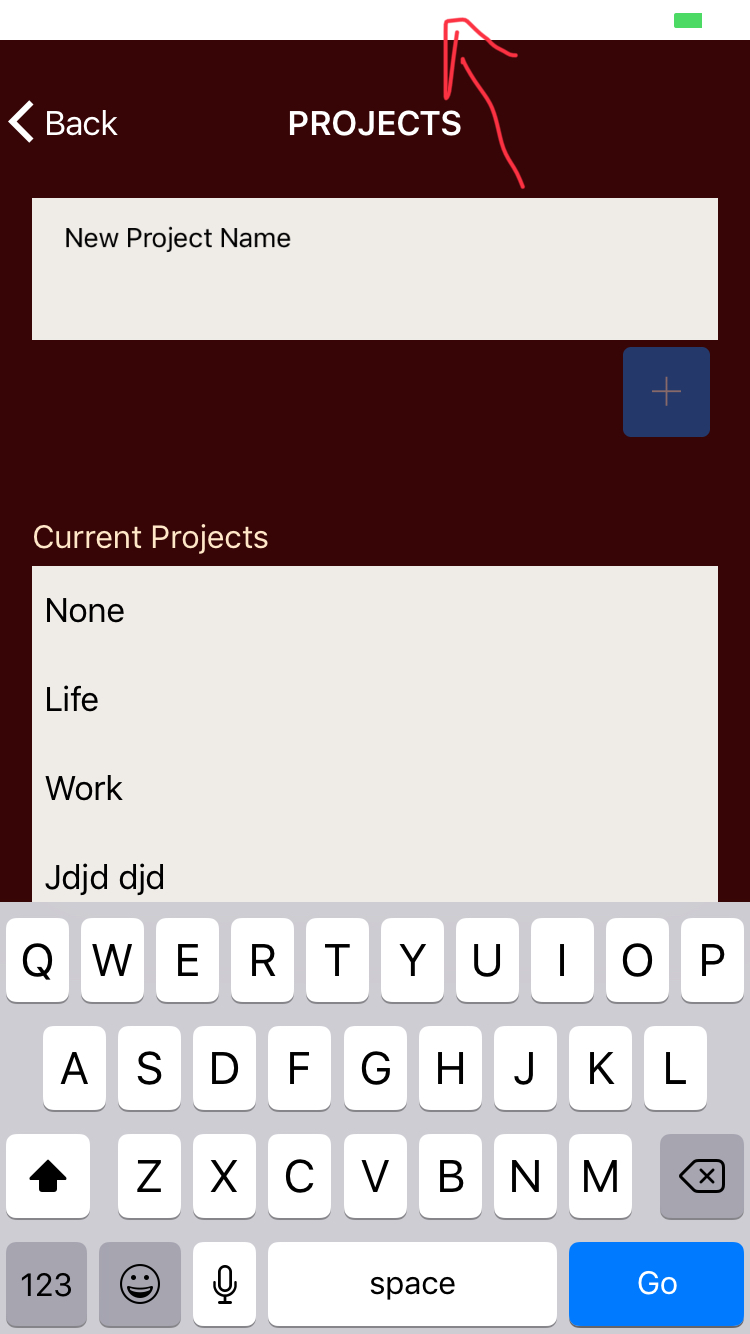
I took my app where I discovered this initially and remove the viewport-fit=cover in the meta tag for my index.html.
<meta name="viewport"
content="width=device-width, initial-scale=1.0, minimum-scale=1.0, maximum-scale=1.0, user-scalable=no">
After this change the cursor shows up in the correct place when I interact with the inputs and the keyboard.
However it did something weird to the status bar.
"dependencies": {
"@angular/common": "4.1.3",
"@angular/compiler": "4.1.3",
"@angular/compiler-cli": "4.1.3",
"@angular/core": "4.1.3",
"@angular/forms": "4.1.3",
"@angular/http": "4.1.3",
"@angular/platform-browser": "4.1.3",
"@angular/platform-browser-dynamic": "4.1.3",
"@ionic-native/core": "^4.3.0",
"@ionic-native/email-composer": "^4.3.0",
"@ionic-native/file": "^4.3.0",
"@ionic-native/globalization": "^4.3.0",
"@ionic-native/keyboard": "^4.3.0",
"@ionic-native/splash-screen": "^4.3.0",
"@ionic-native/status-bar": "^4.3.0",
"@ionic/storage": "2.0.1",
"angular2-moment": "^1.6.0",
"cordova-ios": "^4.5.1",
"cordova-plugin-compat": "^1.1.0",
"cordova-plugin-device": "^1.1.6",
"cordova-plugin-email-composer": "^0.8.10",
"cordova-plugin-file": "^4.3.3",
"cordova-plugin-globalization": "^1.0.7",
"cordova-plugin-nativestorage": "^2.2.2",
"cordova-plugin-splashscreen": "^4.0.3",
"cordova-plugin-statusbar": "git+https://github.com/apache/cordova-plugin-statusbar.git",
"cordova-plugin-whitelist": "^1.3.2",
"cordova-sqlite-storage": "^2.0.4",
"ionic-angular": "3.6.1-201709221952",
"ionic-plugin-keyboard": "^2.2.1",
"ionicons": "3.0.0",
"moment": "^2.18.1",
"rxjs": "5.4.0",
"sw-toolbox": "3.6.0",
"zone.js": "0.8.12"
},
I made sure to go through this checklist and also re-add the status bar and keyboard plugins.
philipbrack
on 28 Sep 2017
I fixed my issue. with the following-
ionic cordova plugin add cordova-plugin-ionic-webview --save
ionic cordova platform update ios
rm -rf ./plugins
ionic cordova prepare
ionic cordova build ios
for some reason before when I installed the cordova-plugin-ionic-webview it wasn't saved.
philipbrack
on 28 Sep 2017
Thanks for the issue! This issue is being locked to prevent comments that are not relevant to the original issue. If this is still an issue with the latest version of Ionic, please create a new issue and ensure the template is fully filled out.
![ionitron-bot[bot] picture](https://avatars1.githubusercontent.com/in/8640?v=4&s=40) ionitron-bot[bot]
on 2 Sep 2018
ionitron-bot[bot]
on 2 Sep 2018
Related issues
 danbucholtz
·
3Comments
danbucholtz
·
3Comments
 daveshirman
·
3Comments
daveshirman
·
3Comments
 vswarte
·
3Comments
vswarte
·
3Comments
 brandyscarney
·
3Comments
brandyscarney
·
3Comments
 fdnhkj
·
3Comments
fdnhkj
·
3Comments
Most helpful comment
I fixed my issue. with the following-
for some reason before when I installed the cordova-plugin-ionic-webview it wasn't saved.