Ionic-framework: iOS11 - Status Bar on the Bottom (WKWebview)
Resources:
Ionic version: (check one with "x")
[ ] 1.x (For Ionic 1.x issues, please use https://github.com/ionic-team/ionic-v1)
[ ] 2.x
[ X ] 3.x
I'm submitting a ... (check one with "x")
[ X ] bug report
[ ] feature request
[ ] support request => Please do not submit support requests here, use one of these channels: https://forum.ionicframework.com/ or http://ionicworldwide.herokuapp.com/
Current behavior:
Currently in iOS11 Beta 10 or 9, using WKWebview plugin via Ionic (https://github.com/ionic-team/cordova-plugin-wkwebview-engine - also tried the Cordova plugin), there is a white status bar at the bottom of the screen (similar to this issue): https://github.com/ionic-team/ionic/issues/12011
Per cordova's guidelines (https://issues.apache.org/jira/browse/CB-12886) the fit is to add viewport-fit=cover to your viewport, which does fix the problem on UIWebview, but not WKWebview.
This plugin (https://www.npmjs.com/package/cordova-plugin-ios11-inset-statusbar), fixes the issue here, but the scroll is all messed up in Ionic 3.x apps per this screenshot below - a quick scroll of the content area fixes it but all pages are not subject to this are about 10px off in terms of intiial loading.
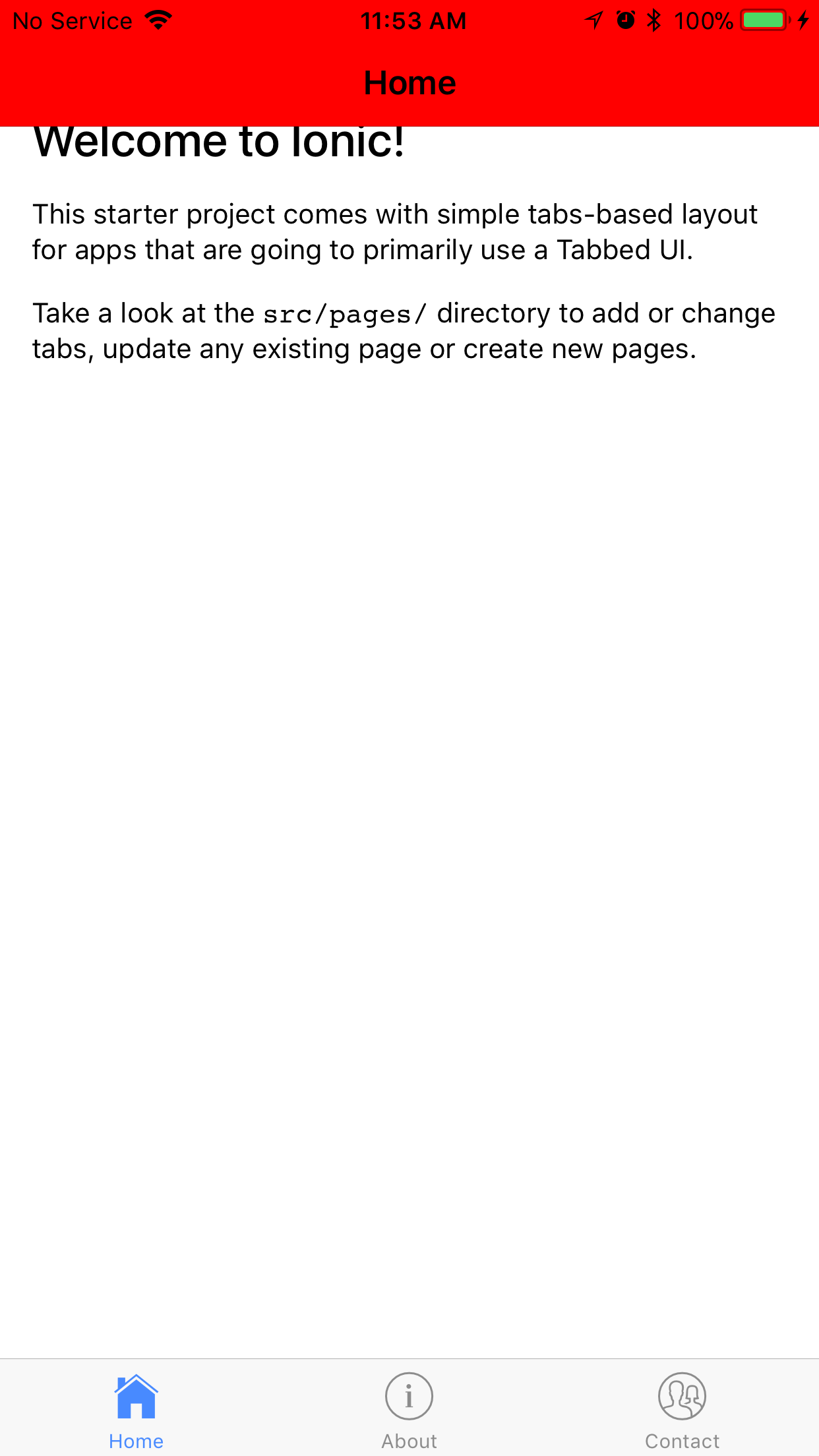
I'm not sure if this is a Cordova Issue or Ionic, but the second plugin cordova-plugin-ios11-inset-statusbar fixes the issue, but then Ionic's scroll placement is off - so I'm looking for guidance here. It doesn't appear that the inset status bar is the issue here.
Expected behavior:
The status bar at the bottom is completely removed with the use of a native plugin, or the scroll view in Ionic takes this in to account on iOS 11.
Steps to reproduce:
You can view the repo at https://github.com/gregavola/ionic-wkwebview-ios11-test to see the test.
Other information:
JIRA Ticket with Cordova: https://issues.apache.org/jira/browse/CB-12886
Similar Issue that was closed, but not fixed: https://github.com/ionic-team/ionic/issues/12011
Current Plugins installed:
cordova-plugin-console 1.0.5 "Console"
cordova-plugin-device 1.1.4 "Device"
cordova-plugin-disable-ios11-statusbar 1.0.0 "cordova-plugin-disable-ios11-statusbar"
cordova-plugin-splashscreen 4.0.3 "Splashscreen"
cordova-plugin-statusbar 2.2.2 "StatusBar"
cordova-plugin-whitelist 1.3.1 "Whitelist"
cordova-plugin-wkwebview-engine 1.1.4-dev "Cordova WKWebView Engine"
ionic-plugin-keyboard 2.2.1 "Keyboard"
Ionic info: (run ionic info from a terminal/cmd prompt and paste output below):
cli packages: (/Users/gregavola/.nvm/versions/node/v6.9.1/lib/node_modules)

    @ionic/cli-utils  : 1.9.2
    ionic (Ionic CLI) : 3.9.2

global packages:

    Cordova CLI : 7.0.1

local packages:

    @ionic/app-scripts : 2.1.4
    Cordova Platforms  : ios 4.4.0
    Ionic Framework    : ionic-angular 3.6.1

System:

    ios-deploy : 1.9.0
    ios-sim    : 5.0.12
    Node       : v6.9.1
    npm        : 3.10.8
    OS         : macOS Sierra
    Xcode      : Xcode 8.3.3 Build version 8E3004b
 gregavola
All 26 comments
This is really weird, because we do not have this bug using WKWebkit, as mentioned in #12011 .
Our app shows the correct layout, like in iOS 10, starting with iOS 11 beta 5.
We are not using viewport-fit=cover
Our setup is as follows:
Plugins:
cordova plugin add cordova-plugin-console
cordova plugin add cordova-plugin-device
cordova plugin add cordova-plugin-dialogs
cordova plugin add cordova-plugin-file
cordova plugin add cordova-plugin-file-transfer
cordova plugin add cordova-plugin-splashscreen
cordova plugin add cordova-plugin-statusbar
cordova plugin add cordova-plugin-whitelist
cordova plugin add ionic-plugin-keyboard
ionic cordova plugin add call-number
ionic cordova plugin add https://github.com/driftyco/cordova-plugin-wkwebview-engine.git --save
Ionic info
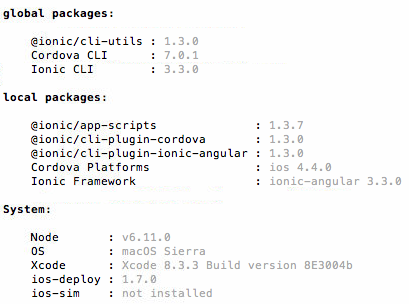
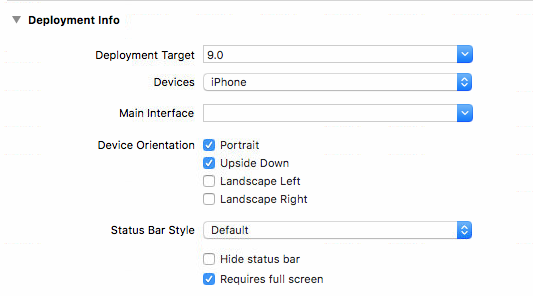
iOS Build Info
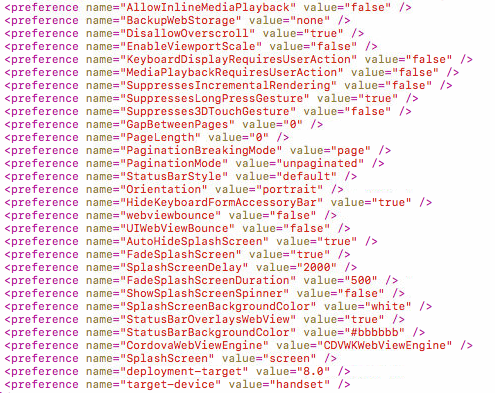
Relevant config.xml settings
 hofimax
on 9 Sep 2017
hofimax
on 9 Sep 2017
@hofimax Did you build with iOS 11, or just an app built with iOS10 running on an iOS 11 device?
gregavola
on 10 Sep 2017
We built using Xcode 8.3.3 with iOS 10 SDK for Deployment Target iOS 9
hofimax
on 10 Sep 2017
@hofimax Well that's the issue right there. You are building on iOS10, not iOS11 (Xcode 9 is required). If you download the beta for XCode (9), and then build your app with it, then you will find the same issue.
I should have made this clear, that this for apps being built with iOS11 on Xcode 9 (Beta).
gregavola
on 10 Sep 2017
After reading more into this it was discover that it's most likely the WKWebView plugin that is failing:
https://issues.apache.org/jira/browse/CB-12886?focusedCommentId=16160225&page=com.atlassian.jira.plugin.system.issuetabpanels:comment-tabpanel#comment-16160225
Both tests have been done with https://github.com/ionic-team/cordova-plugin-wkwebview-engine and https://github.com/apache/cordova-plugin-wkwebview-engine, and the issue remains. I'm hopefully that someone can fix this very soon, as this would be a major bug for all apps build with iOS 11.
gregavola
on 10 Sep 2017
(I think a good next step would be to put a plain Cordova reproduction project on Github so everybody there is talking about the same thing. If it works without Ionic, keep it out of the discussion there as well, as it only complicates things)
 janpio
on 10 Sep 2017
janpio
on 10 Sep 2017
I can confirm the same issue @gregavola.
 dalemugford
on 14 Sep 2017
dalemugford
on 14 Sep 2017
Where I see the most breaking change as a result of using cordova-plugin-ios11-inset-statusbar is in infinite scroll — it's automatically triggered with an ion view, and causes duplicate elements.
dalemugford
on 14 Sep 2017
@dalemugford any other breaking changes you see here?
gregavola
on 14 Sep 2017
Hey folks, we're looking into this and hoping to get a fix!
 mhartington
on 14 Sep 2017
mhartington
on 14 Sep 2017
@mhartington thanks Mike! @gregvola, haven’t tested everything app wise to know. I do notice that triggering native elements like the photo picker actually moves the whole content view up under the status at if it wasn’t there, but then creates the blank bottom at the bottom of the app.
Don’t know if it’s helpful, but this article provides some insight.
https://ayogo.com/blog/ios11-viewport/
Not sure if the ionic team wants to solve this natively, or in the framework with accommodation for iOS 11. I’m sure they’ll bag it ;)
dalemugford
on 15 Sep 2017
Here is an issue in Cordova land that does some investigation into iPhone X problems that are related to this here: https://issues.apache.org/jira/browse/CB-13273 But as Mike is on it, I assume this will soon come together into some fix in Cordova, Cordova plugin and/or Ionic.
janpio
on 15 Sep 2017
Thanks everyone, we're working to get this fixed ASAP, still trying to nail down exactly where the issue is
 mlynch
on 20 Sep 2017
mlynch
on 20 Sep 2017
@gregavola can you confirm the issue doesn't happen on UIWebView with the viewport fix, only WK?
mlynch
on 20 Sep 2017
@mlynch This is correct, not a problem on UIWebView, just the WKWebview Plugin from ionic, @mhartington may have fixed it here: https://github.com/mhartington/cordova-plugin-statusbar/tree/CB-12886cordova-plugin-statusbar, but I have not had the time to test it.
gregavola
on 20 Sep 2017
@gregavola thanks, also there's a fix coming tonight in the wkwebview plugin itself, give me ~10 minutes and I'll have something if you're up for testing
mlynch
on 20 Sep 2017
Amazing guys. I’m around to test as well @mlynch ;)
dalemugford
on 20 Sep 2017
@mlynch awesome! can test in the AM - thanks your help!
gregavola
on 20 Sep 2017
Thanks guys. Just pushed a fix to master (https://github.com/ionic-team/cordova-plugin-wkwebview-engine/commit/e4ec6db788f5a30c507a407340c724fe083f4f8f), if you can try the version in git that'd be awesome. It fixes your demo @gregavola with the red header, but I'm noticing a weird issue with the content area being scrolled up a few pixels until a (reflow?) happens which causes it to fix itself, hmmm
mlynch
on 20 Sep 2017
Closing in here, let's track any issues over at the wkwebview repo, as I'm pretty convinced this is fixed enough that if something is broken it warrants a new issue 😛
mlynch
on 20 Sep 2017
I do see the reflow issue with content as well— it might be limited to when fullscreen is present with ion-content
dalemugford
on 20 Sep 2017
@dalemugford can you add that here: https://github.com/ionic-team/cordova-plugin-wkwebview-engine/issues/180
mlynch
on 20 Sep 2017
@manucorporat fixed the scroll issue in the plugin just now, can you try 1.1.6?
mlynch
on 20 Sep 2017
Works well in my testing, awesome guys! 👏
dalemugford
on 21 Sep 2017
mark it
 CandySunPlus
on 12 Oct 2017
CandySunPlus
on 12 Oct 2017
Thanks for the issue! This issue is being locked to prevent comments that are not relevant to the original issue. If this is still an issue with the latest version of Ionic, please create a new issue and ensure the template is fully filled out.
![ionitron-bot[bot] picture](https://avatars1.githubusercontent.com/in/8640?v=4&s=40) ionitron-bot[bot]
on 2 Sep 2018
ionitron-bot[bot]
on 2 Sep 2018
Related issues
 RobFerguson
·
3Comments
RobFerguson
·
3Comments
 brandyscarney
·
3Comments
brandyscarney
·
3Comments
 danbucholtz
·
3Comments
danbucholtz
·
3Comments
 alan-agius4
·
3Comments
alan-agius4
·
3Comments
 alexbainbridge
·
3Comments
alexbainbridge
·
3Comments
Most helpful comment
Hey folks, we're looking into this and hoping to get a fix!